WineVDM ships v0.9.0 while master moved in September 2026
16-bit Windows (Windows 1.x, 2.x, 3.0, 3.1, etc.) on 64-bit Windows
At a glance
- What is it?
- A 16-bit Windows emulator ported to 64-bit Windows, built on a Wine based Win16 to Win32 relay layer, with its newest tag three years behind the last push to master.
- Who is it for?
- A 16-bit Windows application that has to run on a 64-bit machine has few alternatives, and WineVDM is candid about where its own edges are: no LDT modification, incomplete DOS emulation, and a configuration file for everything else. The gap worth checking first is versioning, because v0.9.0 from September 2023 is the newest tag while master has moved since, so anything built from source is newer than anything you can download.
- Can I use it commercially?
- Yes, with conditions. GPL-2.0 is a copyleft licence: if you distribute software that includes it, you must release that software's source code under the same licence. Running it internally without distributing it does not trigger that obligation.
- Is it still maintained?
- Yes. The repository last received commits 22 days ago.
- What is it written in?
- Mainly C, according to GitHub's language statistics.
Answers come from the project's GitHub data, last synced on November 15, 2026, and from our analysis. They are not legal advice.
Star history
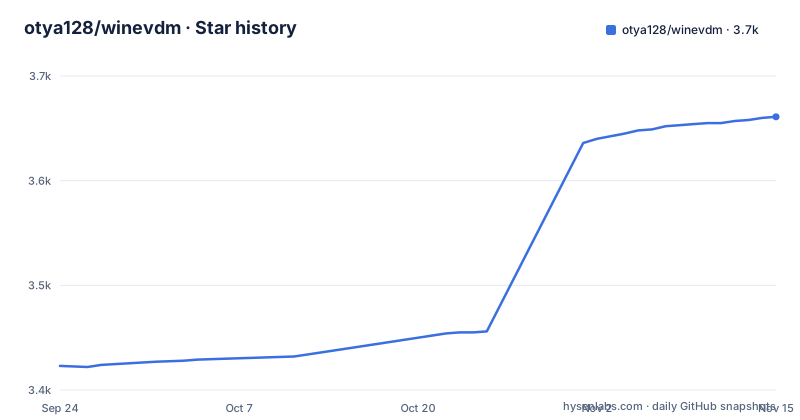
- otya128/winevdm3,661 ★ · +238
| Repository | 2026-09-24 | 2026-11-15 |
|---|---|---|
| otya128/winevdm | 3.4k | 3.7k |
238 Stars in the last 52 days, measured from the daily GitHub snapshot. Compare with other projects
Editorial analysis
The newest tag is v0.9.0 and master moved in September 2026
The last commit on master is dated 2026-09-22, and the newest tagged release is v0.9.0 from 2023-09-15. Between them sit v0.7.0 from 2019 and a release titled v0.8.0 whose own build is named v0.8.1, from 2021-11-13, so the release name and the artifact name already disagree once. Three years of master commits have produced no v1.0 and no v0.9.1. Anything newer than v0.9.0 is reached through the second link on the page, an AppVeyor project URL offered as the latest unstable version, which means the current state of the code is only distributed as a build artifact from continuous integration rather than as a release.
The CPU emulator is bounded by what the kernel refuses to do
The component list opens with a CPU Emulator and immediately attaches the reason it cannot go further: 64-bit Windows cannot modify LDT, because a call to `NtSetInformationProcess(,ProcessLdtInformation,,)` always returns an error. That single refusal is stated as a property of the host, not as a missing feature, and it shapes what the emulation layer can assume. A 16-bit program that expected to install its own descriptor table entry has no path to it on this host, so the port works around the restriction instead of emulating past it. It is a narrow, specific limitation, and it is the kind that would otherwise only show up as a crash.
A 16-bit installer is answered with a program that is not 16-bit
The install.inf section explains the mechanism in two sentences: when 64-bit Windows detects a 16-bit installer, it has a mechanism to start an alternative installer which is not 16-bit, and this program uses it. So the file is not a script that runs an installer, it is the thing Windows is redirected to when it sees one. There are two of them in the tree, `install.inf` and `installw.inf`, and two shortcuts, `install.lnk` and `install (no console).lnk`. One documented failure follows from the same mechanism: if the registry is initialized by Windows Update, the install procedure has to be performed again. Removal is a single file, uninstall.reg. Configuration lives in `otvdm.ini`.
Programs that save into the Windows directory get redirected
Some Win16 programs try to save their settings in `%WINDIR%\<filename>.ini`. In recent Windows it is not allowed to save to `%WINDIR%`, so the port redirects those writes. The README does not say where they land, how the mapping is decided, or whether the redirection covers the whole directory or only the file suffix pattern it names. What it does say is enough to explain an observation people make when running old software on a current machine: a program that appears to save its settings cannot, and the settings turn up somewhere else instead.
DOS emulation is incomplete and the page points at DOSBox instead
The program can also run DOS executables, described as DOS emulator-like, and the DOS version can be set with the `VDMDOSVER` environment variable. The very next line rules out treating that as a DOS emulator: DOS emulation is incomplete, and DOSBox or MS-DOS Player are what the page recommends. So there are two separate claims sitting next to each other, one that DOS binaries run and one that the feature is partial. The environment variable has no documented value list, which means the range of versions it accepts is something a reader has to work out from the guest program rather than from the docs.
One program answers to three executable names
The run instructions name `otvdm.exe` for drag and drop and `otvdmw.exe` for direct execution, while a separate section documents a third name for the command line.
winevdm.exe [--app-name app.exe] command line
winevdm.exe CALC.EXE
The tree carries the same split: an `otvdm/` source directory, `otvdm.sln`, and `otvdm.ini`. The optional `--app-name` argument is the only documented way to influence what the guest program thinks it is called. One runtime failure is written down with its fix: if you get an error that VCRUNTIME140.dll is missing, install Microsoft Visual C++ Redistributable for Visual Studio 2017 for 32-bit.
Relays come out of a spec table and one bullet repeats itself
Conversion between 16-bit and 32-bit is generated, not hand written. A relay table line names the Win16 name, the calling convention and the Win32 target.
53 pascal -ret16 DestroyWindow(word) DestroyWindow16What that line produces is a small wrapper.
BOOL16 WINAPI DestroyWindow16( HWND16 hwnd )
{
    return DestroyWindow( WIN_Handle32(hwnd) );
}
The generator is named convspec, and there is a `convspec/` directory for it. The component list that introduces this also contains the line `Fix compatibility problems, fix compatibility problems`, written twice in one bullet, alongside `16-bit <=> native HANDLE conversion` and DOS emulation for Win16.
Two build paths and only one of them is a script
The cmake path is five lines and needs no editing.
git clone https://github.com/otya128/winevdm.git
cd winevdm
mkdir build
cd build
cmake ..
make
The Visual Studio path is three steps and needs editing: install Visual Studio 2017, edit PropertySheet.props, compile. Both property sheets are in the tree, `PropertySheet.props` and `BuildToolProperty.props`, next to `CMakeLists.txt` and `appveyor.yml`, which is the continuous integration file behind the unstable download. A second README, READMEJP.md, sits beside the English one. Most of the tree is one directory per emulated subsystem: `commctrl/`, `gdi/`, `mmsystem/`, `krnl386/`, `lzexpand/`, `shell/`, `ole2/`, `nddeapi/`.
Editorial conclusion
A 16-bit Windows application that has to run on a 64-bit machine has few alternatives, and WineVDM is candid about where its own edges are: no LDT modification, incomplete DOS emulation, and a configuration file for everything else. The gap worth checking first is versioning, because v0.9.0 from September 2023 is the newest tag while master has moved since, so anything built from source is newer than anything you can download. One-off migrations of an old installer or a Win16 tool are exactly what this covers; anyone who wants a full DOS environment is pointed at DOSBox by the project itself.
Frequently asked questions
what is winevdm
An altered version of winevdm, which is a 16-bit Windows emulator, ported to run on 64-bit Windows. It covers 16-bit Windows releases from 1.x through 2.x, 3.0 and 3.1, converts Win16 calls to Win32 through a generated relay layer, and can also run DOS executables in an incomplete way. The code is C and the repository is under GPL-2.0.
is winevdm free
The repository carries a GPL-2.0 license with a LICENSE file at the top level, and the README states no separate commercial terms of its own. It is worth noting that the page offers a stable download from the releases list and a separate unstable build from an AppVeyor project URL, with no paid tier between them.
how to install winevdm
Download or compile it, then run the install shortcut or right-click install.inf and select Install, after which Win16 binaries can be executed directly. If the registry is initialized by Windows Update, the procedure has to be performed again. Removal is done by running uninstall.reg.
How to run winevdm?
Drag and drop the Win16 executable file onto otvdm.exe, or execute otvdmw.exe. A missing VCRUNTIME140.dll is answered by installing Microsoft Visual C++ Redistributable for Visual Studio 2017 for 32-bit. Command line use goes through winevdm.exe, with an optional --app-name argument.
winevdm vs dosbox
They cover different work. WineVDM runs 16-bit Windows binaries, converting Win16 to Win32, and its DOS emulation is described as incomplete. For DOS work the README itself recommends DOSBox or MS-DOS Player instead. The DOS version seen by a guest can be set with the VDMDOSVER environment variable.
winevdm vs otvdm
Inside this repository they are the same program under different names. The run instructions name otvdm.exe and otvdmw.exe, the command line section names winevdm.exe, and the tree holds an otvdm directory, otvdm.sln and otvdm.ini. Nothing in the README presents them as separate products.
Official sources
Where developers are discussing it
Posts on Hacker News, dev.to and Lobsters that link to this repository, found by our scan of those communities. 1 in the last 30 days; newest first.
- 16-bit Windows (Windows 1.x, 2.x, 3.0, 3.1, etc.) on 64-bit WindowsHacker News · Oct 27, 2026 · 147 points · 34 comments
Add this badge to your README
If you maintain this project, the badge below links readers to this analysis and shows its maintenance status from the daily GitHub snapshot. Paste the markdown into your README; add ?metric=license or ?metric=stars to the image URL for a different field.

[](https://hysenlabs.com/projects/otya128-winevdm)Star history chart for your README
[](https://hysenlabs.com/projects/otya128-winevdm)Was this useful?