Ouch publishes three different version numbers and verifies its own releases
Painless compression and decompression in the terminal
At a glance
- What is it?
- Ouch is a Rust compression tool with one subcommand per verb and format detection from the output filename. Its packaging is the interesting part: signatures on every release, a documented reproducible build recipe with one honest caveat, a licence-encumbered format you can opt out of, and a sandboxing crate pulled in only on Linux.
- Who is it for?
- Ouch is worth adopting if you want one archive tool that speaks fourteen formats instead of four, and the format-alias and chaining behaviour is the part that removes the usual per-format incantations. Three things to check first.
- Can I use it commercially?
- Check first. The repository uses a licence we do not classify automatically, so read its LICENSE file before any commercial use.
- Is it still maintained?
- Yes. The repository last received commits 4 days ago.
- What is it written in?
- Mainly Rust, according to GitHub's language statistics.
Answers come from the project's GitHub data, last synced on November 22, 2026, and from our analysis. They are not legal advice.
Star history
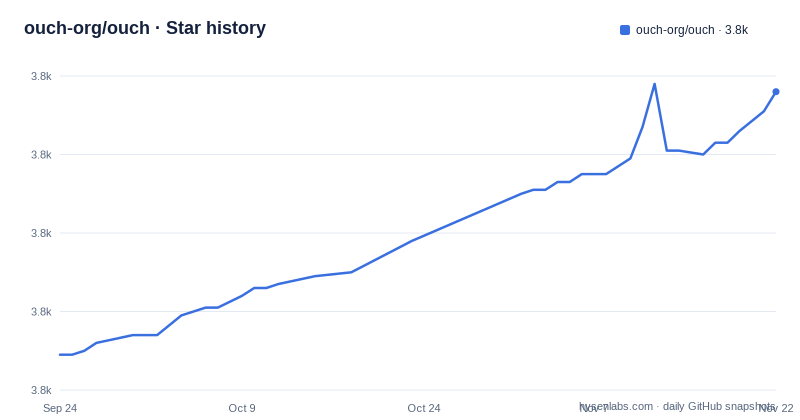
- ouch-org/ouch3,836 ★ · +67
| Repository | 2026-09-24 | 2026-11-22 |
|---|---|---|
| ouch-org/ouch | 3.8k | 3.8k |
67 Stars in the last 59 days, measured from the daily GitHub snapshot. Compare with other projects
Editorial analysis
Three version numbers, pointing at three different dates
The repository carries three versions of itself and they do not agree. The newest release tag is two patch releases ahead of the version in the package manifest on the branch. The benchmark section names a third number, several minor releases older than either, alongside the comparison tools it was measured against. That last one is not an oversight so much as an admission: benchmarks are expensive to re-run, and a page that keeps an old number next to a new tag is telling you the numbers describe a past release. The root also holds a changelog file whose name marks it as old, with no current changelog beside it, which compounds the point. If you are reproducing anything the README shows, check which version produced it before you trust the numbers.
Every release is signed, and the check is written out
The download section does not stop at a link. It says release binaries are signed with a transparency-log-based signing service using a particular tool, tells you to download the asset together with its bundle file, and then gives the verification command in full. The command names the tool, the subcommand, the asset, the bundle, a pattern restricting the certificate identity to URLs under this project's own repository, and the token issuer to the build service:
cosign verify-blob ouch-x86_64-unknown-linux-musl.tar.gz --bundle ouch-x86_64-unknown-linux-musl.tar.gz.sigstore.json --certificate-identity-regexp='^https://github.com/ouch-org/ouch/' --certificate-oidc-issuer=https://token.actions.githubusercontent.comThat last pair is what makes the check meaningful rather than decorative, because it refuses a signature issued for somebody else's repository even if the signature itself verifies. The example uses one specific Linux asset, which is the shape to expect: the same command with the asset name you actually downloaded.
Reproducible builds, with one caveat stated in the open
The section after the signature check claims release builds are reproducible and means it literally: given the source at a tagged commit, anyone can rebuild the same binary and compare it to what shipped. The recipe is four steps. Clone, check out the tag, export a source-date epoch taken from the commit's own timestamp, and set a remap-path compiler flag that rewrites the build directory in the binary to a dot. Then a locked release build for a target triple. The toolchain itself is pinned in a file at the root and installed automatically, and the lock file is committed, so both the compiler and the dependency graph are fixed. Then the caveat, which is the reason this section is worth reading: targets built through a container-based cross-compilation tool inherit that image's toolchain, which is not pinned by digest yet, so those targets reproduce only against the same image release. The README says so rather than letting you discover it.
RAR is the one format you can build out of
The format table has fourteen columns and three footnotes, and the footnotes carry the information. Two formats cannot be streamed in either direction because of limitations in the format itself, so a piped archive is not an option for them. Three more are supported with compression running in parallel, which is the footnote that explains a dependency in the manifest configured for parallel work. And one format is supported for decompression and listing only, because of its restrictive licence. That last row is the interesting one, because the tool does something about it: the readme says you can exclude the non-free code from your build by disabling a feature, and the manifest agrees, marking that dependency optional and pointing it at a renamed package. A compression tool that will not bundle one format by default, and says which one, is doing the right thing.
Format detection reads the output name, not the input
The compress subcommand takes input files first and the output file last, and it decides what to do by looking at the output file's extensions. That single rule explains the chaining support: asking for an output with two extensions compresses twice, and the readme shows both a two-format example and a longer chain that happens to include the same compressor twice, which the tool accepts. Aliases follow the same logic, with a list per container format, including the comic-book and publication extensions that share a container. And when a name carries no extension at all, the tool falls back to reading the file's signature and then asks for confirmation rather than guessing silently. That last behaviour is the difference between a tool you trust in a script and one you do not.
The no-dependencies claim is about the machine, not the graph
One feature bullet says no runtime dependencies, and the manifest lists more than two dozen direct ones, so the claim needs reading rather than repeating. What it means is that the binary is self-contained: the compression libraries are compiled into the executable, so installing it adds nothing to the machine and there is no shared library to keep in step. The rest of the feature list is short and specific. Two words on error messages, one on an accessibility mode with its own wiki page, shell completions and manual pages, and decompression from standard input, which is the capability that lets a pipeline stream an archive through the tool without ever naming a file. The command surface matches: three verbs, three one-letter aliases, and a help route that works either as a subcommand or as a flag.
Linux alone pulls in a filesystem sandboxing crate
Near the bottom of the manifest, under a target section scoped to Linux, there is a single dependency on a crate that implements an unprivileged Linux sandboxing mechanism. Nothing else in the file is conditional on the operating system, and no other format or feature behaves that way. A tool that extracts archives written by someone else is exactly the kind of program where restricting what its own file operations can reach is worth having, and doing it through an unprivileged kernel mechanism avoids needing elevated privileges. The README does not mention it in the feature list, which is a small gap: the feature most likely to matter to someone running the tool on a server is the one the documentation leaves out. It is also the kind of thing worth asking about directly in an issue, because whether the restriction applies to the extraction target, the source archive, or both is exactly the detail a reader cannot infer from a dependency line.
Editorial conclusion
Ouch is worth adopting if you want one archive tool that speaks fourteen formats instead of four, and the format-alias and chaining behaviour is the part that removes the usual per-format incantations. Three things to check first. The manifest version on the branch is behind the newest release tag, so pin a tag rather than a branch if you want reproducibility. The RAR dependency is optional for a licence reason, so decide deliberately whether your build includes it. And the reproducible build recipe covers native targets cleanly but not cross-compiled ones until the cross image is pinned by digest, which the README says itself.
Frequently asked questions
What does ouch do?
It is a terminal tool for compressing and decompressing files and directories, with three subcommands: decompress, compress and list, each with a one-letter alias. It also lists archive contents with an optional tree layout and uncompressed sizes.
How do I install ouch?
Six routes are documented: a system package on Arch, Homebrew on macOS, Scoop on Windows, the Rust package registry with cargo install, an APT archive for Debian, or a signed bundle from the releases page. The readme also notes that building from the registry on Ubuntu may need a compiler installed.
How do I chain compression formats with ouch?
Name them in the output file's extension, since that is what the tool reads to decide what to do. The readme shows a two-format example and a longer chain. If a filename has no extension, ouch infers the format from the file signature and asks you to confirm.
Can ouch create RAR archives?
No. Because of RAR's licence only decompression and listing are supported, and the readme says you can exclude the non-free code from your build by turning off the relevant feature, which the manifest makes possible by marking that dependency optional.
How do I verify an ouch release download?
Each release publishes a signature bundle next to the asset, and the readme gives the verification command with the certificate identity restricted to this project's own repository and the token issuer restricted to the build service, so a signature issued elsewhere is rejected.
Official sources
Add this badge to your README
If you maintain this project, the badge below links readers to this analysis and shows its maintenance status from the daily GitHub snapshot. Paste the markdown into your README; add ?metric=license or ?metric=stars to the image URL for a different field.

[](https://hysenlabs.com/projects/ouch-org-ouch)Star history chart for your README
[](https://hysenlabs.com/projects/ouch-org-ouch)Was this useful?