Overload's readme links point at develop, its default branch is main, and its floor is Windows 7
3D game engine with lua scripting
At a glance
- What is it?
- A C++20 game engine with Lua scripting, nine SDK libraries and two applications, built on BareGL, Bullet3, SoLoud, GLFW and ImGui. The dependency list names four libraries that no module claims, and the file ends on an empty Screenshots heading.
- Who is it for?
- Pick it if you want a small C++20 engine whose editor and runtime share one SDK, and if you are comfortable generating project files with premake before anything appears on screen. Budget for reading the wiki rather than the repository, because the sample projects, the tutorials and the scripting API all live there.
- Can I use it commercially?
- Yes. MIT is a permissive licence: you can use, modify and sell software built on it, as long as you keep its copyright and licence notices.
- Is it still maintained?
- Yes. The repository last received commits 42 days ago.
- What is it written in?
- Mainly C++, according to GitHub's language statistics.
Answers come from the project's GitHub data, last synced on November 15, 2026, and from our analysis. They are not legal advice.
Star history
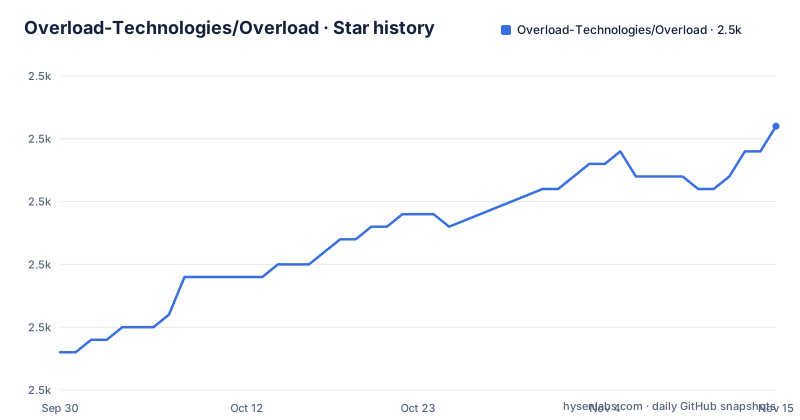
- Overload-Technologies/Overload2,506 ★ · +18
| Repository | 2026-09-30 | 2026-11-15 |
|---|---|---|
| Overload-Technologies/Overload | 2.5k | 2.5k |
18 Stars in the last 46 days, measured from the daily GitHub snapshot. Compare with other projects
Editorial analysis
Every file link in the readme points at develop while the default branch is main
The default branch of this repository is main. Not one of the links in the file points there. The contributing link goes to blob/develop/CONTRIBUTING.md, the module link goes to tree/develop/Sources/Overload, and the licence badge goes to blob/develop/LICENSE. The badge block above the heading is worse: it carries three separate links to the releases page, with no labels left to tell them apart, then the source tree, issues, pulls and that licence link. Meanwhile the root of the default branch holds LICENSE, CONTRIBUTING.md, Sources/, Tools/, Scripts/, Dependencies/, Resources/, premake5.lua, gen_proj.bat, gen_proj.sh and VERSION.txt. A link written against develop therefore resolves on a branch most clones will not be on.
The dependency list has nine entries and the module table accounts for five
The SDK table attributes one library to each module it can: SoLoud to OvAudio, Bullet3 to OvPhysics, BareGL to OvRendering, GLFW to OvWindowing and ImGui to OvUI. Four of the nine dependencies are claimed by nobody in that table. Sol3, the Lua binding, and Premake5, the project generator, are build time concerns that the module list does not try to cover. The other two are runtime libraries: Assimp as a 3D model loader and Tinyxml2 as an XML serializer, with no OvModel or OvXml module to hold them. OvTools is the module that mentions serialization and the file system, so they most likely sit there, but the table does not say so, and a reader wiring a new module has to find out by reading source. Four unattributed entries out of nine is also the kind of count that shifts whenever a dependency is added, since nothing in the architecture section has to change with it.
Project files are generated by premake and the solution is not committed
Both platforms go through a generator script before anything compiles. On Windows the sequence is a clone, a cd, then a generator call and the solution:
git clone https://github.com/Overload-Technologies/Overload
cd Overload
.\gen_proj.bat vs2022 # generate project files for Visual Studio 2022
.\Overload.sln # Open the solution in Visual Studio
There is no solution file in the tree, because the line above it creates one. The note under that block names the supported generator actions as vs2022 as the default, gmake and codelite, and points at premake's own documentation. The Linux path is the mirror image:
git clone https://github.com/Overload-Technologies/Overload
cd Overload
./gen_proj.sh gmake # generate project files for Makefile
make -j$(nproc) # build the project using all available CPU cores
Here the default action is gmake, and an important note adds that the editor needs zenity installed on Linux.
Windows 7 as a floor next to Visual Studio 2022 and C++20
The minimum requirements table gives 1GB of RAM, an x86_64 CPU, a graphics card supporting OpenGL 4.5, and Windows 7 and Linux as the operating systems. That floor sits oddly beside the rest of the file. The build path targets Visual Studio 2022, the pillars claim modern C++20 with the power and safety of current language features, and BareGL, which OvRendering is built around, is described as an OpenGL 4.5 wrapper, so the graphics requirement and the renderer line up even though the operating system row does not. The features list also names Windows game building as its only platform output, which leaves Linux as a place you can build the engine without a stated path to building a game from it, and the two requirements rows a developer actually hits first, the graphics card and the CPU, are the ones the architecture section backs up.
Three named features have no module of their own
The features list is short: Lua scripting, a game editor, a prefab system, physically based rendering, custom shader support, Windows game building, profiling tools, a material editor, spatial audio, rigidbody physics and skeletal animation, followed by a line promising more, and a sentence after it pointing at the issues and pull requests to learn what is coming next. The architecture section then names nine libraries and two applications. Match the two lists and three features have no counterpart in either. A material editor is not what OvEditor is described as doing, which is building your game. There is no prefab module among the nine. And OvDebug is described as logging and assertions, with nothing about profiling, even though profiling tools are on the feature list. Either those live inside other modules or the feature list runs ahead of the module names.
Six weeks between v1.7 and v1.8, then seven months to v1.9
Three releases are published: v1.7 on 2025-11-20, v1.8 on 2026-01-08 and v1.9 on 2026-08-25. The gap between the first two is about six weeks, and the gap between the last two is more than seven months, which is the kind of interval that says a release is cut when a milestone lands rather than on a cadence. Each release is titled with the engine name and the same number as the tag, Overload 1.9 for v1.9, with no other text. The version is also a file at the repository root, VERSION.txt, sitting next to premake5.lua and the two generator scripts, so the number exists both in a tag and in the tree. The default branch was last pushed 2026-09-20.
Six pillars, one of them that it should feel like a commercial engine
The pillars are six bullets. Ease of use, described as inspired by other commercial engines so that you feel right at home. Simplicity, minimalistic by design and avoiding unnecessary complexity. Pragmatic design, with features carefully considered and deeply integrated. Documentation, covering the scripting API and documented source code. Community driven. And modern C++20. Two of the six are about how the project presents itself rather than about anything the engine does, and one of them is a promise that the source is documented, which the module list neither confirms nor contradicts. The paragraph above them says the project started in 2019 as a graduation project by three named authors and has since become a community driven initiative supported by dozens of contributors, with an a in front of community driven where an is wanted. A code of conduct file sits at the repository root and a Discord invite sits in the badge block.
The file ends on an empty Screenshots heading and the samples live in the wiki
The last line of the readme is the Screenshots heading with nothing under it, after the minimum requirements table. Nothing above it links to an image either, so the section the table of contents advertises has no content in the file. The samples are elsewhere by design. The getting started section says that before running Overload you are recommended to download one of the sample projects, and those live on a wiki page rather than in the repository. The same wiki holds the tutorials and the scripting API, and the documentation section sends you there for all three. The repository itself carries code and resources, Sources/, Tools/, Scripts/, Dependencies/ and Resources/, but nothing you can launch to see the engine work.
Editorial conclusion
Pick it if you want a small C++20 engine whose editor and runtime share one SDK, and if you are comfortable generating project files with premake before anything appears on screen. Budget for reading the wiki rather than the repository, because the sample projects, the tutorials and the scripting API all live there. Check three things before committing: which branch your tooling will actually check out, whether the OpenGL 4.5 requirement fits your target machines, and where Assimp and Tinyxml2 sit, since the dependency list names them but no module does.
Frequently asked questions
What is Overload the game engine?
A free, open source 3D game engine written in C++ with Lua as its scripting language. It started in 2019 as a graduation project by Benjamin Viranin, Max Brun and Adrien Givry and is now community driven.
How do I build Overload on Linux?
Clone the repository, cd into Overload, run ./gen_proj.sh gmake to generate the makefiles, then run make -j$(nproc) to build on all available cores. The editor additionally needs zenity installed on Linux.
Which modules make up the Overload SDK?
Nine libraries: OvDebug, OvTools, OvMaths, OvAudio, OvPhysics, OvRendering, OvWindowing, OvUI and OvCore. Two applications sit on top of them, OvGame for a game built with Overload and OvEditor for building one.
What does Overload need to run?
1GB of RAM, an x86_64 CPU, a graphics card supporting OpenGL 4.5, and either Windows 7 or Linux.
Where are the Overload sample projects?
On a wiki page, not in the repository. The getting started section recommends downloading one before running the engine, and the wiki also carries the tutorials and the scripting API.
Which generator actions does Overload support?
gen_proj.bat takes vs2022 as its default action with gmake and codelite as the others, and gen_proj.sh defaults to gmake with codelite as the alternative. Both notes point at premake's documentation for the rest.
Official sources
Add this badge to your README
If you maintain this project, the badge below links readers to this analysis and shows its maintenance status from the daily GitHub snapshot. Paste the markdown into your README; add ?metric=license or ?metric=stars to the image URL for a different field.

[](https://hysenlabs.com/projects/overload-technologies-overload)Star history chart for your README
[](https://hysenlabs.com/projects/overload-technologies-overload)Was this useful?