OpenFlux picks its exit backend on the node, not on the client
Network stack research tool. TCP tunnel with pluggable transports.
At a glance
- What is it?
- A Go research tool that tunnels raw IP packets over a shared third party channel, with two exit backends, one of which needs root and a Linux kernel and the other of which needs nothing at all. The l3 mode has to teach the host kernel not to reset its own tunnel connections, and the compose file splits privileges deliberately between the two ends.
- Who is it for?
- OpenFlux is worth reading if you are studying how a packet tunnel behaves when one end needs kernel level forwarding and the other does not, because the two backends are a clean comparison of the cost of terminating TCP twice.
- Can I use it commercially?
- Yes, with conditions. GPL-3.0 is a copyleft licence: if you distribute software that includes it, you must release that software's source code under the same licence. Running it internally without distributing it does not trigger that obligation.
- Is it still maintained?
- Yes. The repository last received commits 20 days ago.
- What is it written in?
- Mainly Go, according to GitHub's language statistics.
Answers come from the project's GitHub data, last synced on November 19, 2026, and from our analysis. They are not legal advice.
Star history
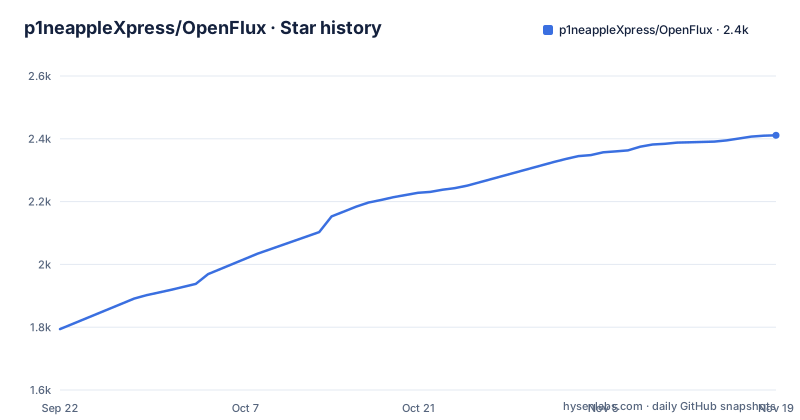
- p1neappleXpress/OpenFlux2,411 ★ · +617
| Repository | 2026-09-22 | 2026-11-19 |
|---|---|---|
| p1neappleXpress/OpenFlux | 1.8k | 2.4k |
617 Stars in the last 58 days, measured from the daily GitHub snapshot. Compare with other projects
Editorial analysis
The client terminates TCP, the exit node decides how to forward
The diagram in the readme puts the decision in one place.
Client (any):  macOS (utun) / Linux / Windows / iOS (packet tunnel) / Android
                    |
                    v
               Transport (Yandex.Docs / Volga / Board / MAX / Cups / Mail.ru / Direct)
                    |
                    v
               Exit node  -->  Internet
                 --mode l3   (raw SNAT/DNAT, Linux + root)
                 --mode l4   (gVisor proxy, any platform)
The client terminates TCP locally, using gVisor on Linux, the utun interface on macOS and the packet tunnel provider on iOS, and then puts raw IP packets into the transport. The exit backend is selected with the mode flag on the exit node, never on the client, so one client build works against either backend. That is the cleanest decision in the design: the platform constraints that force you into l4 live on the machine you control, not on the phone in your pocket, where the utun and packet tunnel interfaces are the only options available anyway.
l3 forwards raw packets and needs root; l4 terminates twice and needs nothing
Two backends, described with the trade-off stated rather than buried. The l3 backend opens raw sockets and does address translation with connection tracking, with no userspace TCP stack anywhere on the exit side, so TCP stays end to end between the client and the real server. It requires root or the raw socket capability and it is Linux only. The l4 backend terminates TCP and UDP inside a userspace gVisor stack and then re-dials the real server, which means TCP is terminated twice, once in the client and once on the exit node, and it requires nothing at all, so it runs on Linux, macOS and Windows. The older name for l4, the proxy alias, still works and is documented as deprecated. The readme is explicit about which to pick: l3 on a Linux host with root, l4 on a non root host, and on Windows the intended answer is l3 inside a lightweight virtual machine, because the native packet interception backend is not wired up yet and l4 is the working fallback until that ships.
The l3 kernel resets the tunnel, so a firewall rule is part of the setup
This is the part of l3 that is not obvious from the architecture diagram. In raw forwarding mode the exit node's own kernel sees return packets for connections it never opened, because those connections belong to the tunnel and not to any local process, so it answers them with a reset and tears the tunnel down. The fix is to drop those resets, and the readme offers two versions of it. The recommended one is scoped: assign a dedicated egress address, run the node with the local address flag, and drop resets only from that address.
sudo iptables -A OUTPUT -p tcp --tcp-flags RST RST -s <egress-ip> -j DROPThe alternative, which the readme labels a host wide fallback, drops every outbound reset on the machine, and it says in the same line why that is a bad trade: it makes closed ports look filtered to everything else on the host. The scoped rule is the difference between a tunnel and a subtle network change nobody asked for, and the truncated command following it suggests the fuller fallback list continues past the point the page is cut.
One image, two roles, and privileges that are deliberately lopsided
The build produces a single binary with CGO disabled and symbols stripped, dropped into an Alpine runtime that adds certificate authorities and iptables and nothing else, with an entrypoint that reads a role variable at startup to decide whether the container behaves as a client or as an exit node. The compose file documents why the two are not symmetrical.
  client:
    profiles: [client]
    # No auth on the SOCKS5 server — keep it bound to the host loopback only.
    ports:
      - "127.0.0.1:1080:1080"
The client is given no capabilities at all and is described as dialling out like a browser. Its SOCKS5 port has no authentication, so the protection is the bind address, and the comment says so in as many words. The exit node is the opposite: it is granted the raw socket capability and the network administration capability, and the comment explains that this is confined to the container's own network namespace so the reset rule can never reach the host. That asymmetry is the correct shape, and it depends entirely on you not changing that bind address.
Seven transports in the diagram, three in the environment file
The architecture diagram names seven transport channels, and the environment example documents three of them.
# Transport channel: yandex (legacy docs editor) | vyandex (new volga editor) | oneme (MAX)
TRANSPORT=yandex

# yandex / vyandex: public Yandex document URL shared by client and exit node.
DOC_URL=

# oneme: MAX Web token + the *other* side's user id (client dials the exit node's uid).
MAX_TOKEN=
MAX_UID=
So the remaining four, a board service, a cups service, the mail service contributed by an outside contributor and the direct path, are selectable in principle and undocumented in the file you are told to copy. The two documented families also work differently from each other, and the difference matters. The document based transports need one shared public URL that both ends know, which makes it a rendezvous by configuration. The messenger transport needs a token plus the other side's user identifier, with the client dialling the exit node, which makes it a rendezvous by identity. Two more settings are worth knowing: one to pin the egress address, usually left empty so the node detects it, and a debug switch that turns on packet level logging the page warns is noisy.
Three of the seven client rows are repositories you did not get from the author
The client table has seven rows and only four are built from this repository. macOS, Linux and Windows all say build from source, with platform notes: the macOS build gets a utun based tunnel client by default, the Windows build needs administrator rights for its tunnel mode, and the Windows exit node is limited to l4. The remaining four rows are a desktop application in its own repository with a node deployment wizard over SSH, an Android application in its own repository with a system wide VPN mode and captcha handling in a built in browser, an Android fork maintained by somebody else, and an iOS TestFlight build written by a different contributor. The credits are unusually specific about where the code came from: end to end encryption, the mail transport and session resilience are three numbered pull requests merged in from outside, and the shared multiplatform module the two first party apps use was written in a separate repository and moved across with the author's agreement. Any of it can drift from this repository at any time.
Two version lines and a Go directive pinned to a patch release
The tag list holds two separate tracks. The main binary is on its third version across three days, moving from 0.2.0 to 0.3.0, while a third tag is named for the node component and carries its own 1.1.0 version. So there is no single version number to pin for a deployment that runs both ends, which is worth settling before you write a compose file against either. The module manifest asks for a specific patch level of the language toolchain, 1.26.4, while the container build image tracks the 1.26 line without a patch, so a local build and a container build are not guaranteed to agree on the compiler. Two dependencies are pinned by commit rather than by release, the userspace network stack and the Windows packet interception library, and the latter's version string dates from 2020, which is consistent with the readme saying that backend is not wired up yet. The licence is GPL-3.0 and the disclaimer states the work is provided as is with no warranties and that the author does not encourage using it to bypass restrictions.
Subsystems live in single files at the repository root
The tree is organised as a set of directories for the real subsystems, transport handling, socks5, the stream proxy, network binding, deployment helpers, the mobile and desktop client pieces, and the provisioning scripts. Alongside those sit a row of single files at the top that each own a concern of their own: an authentication proxy, a benchmark harness, the configuration parser, a share command line, the node deployment wizard and its exit node counterpart, and the IPC handler that the graphical clients talk to. The platform specific pieces follow the same flat pattern, with separate tunnel files for macOS, Windows and everything else, and separate signal handling for Unix and Windows. Tests sit next to the files they cover rather than in one place, so the configuration parser, the IPC handler end to end, the wizard and the share command all have their own test file at the root, which makes the root directory double as the test index for the parts that are not in a directory.
Editorial conclusion
OpenFlux is worth reading if you are studying how a packet tunnel behaves when one end needs kernel level forwarding and the other does not, because the two backends are a clean comparison of the cost of terminating TCP twice. It is a research tool with an explicit non commercial disclaimer, and the transports it uses are third party consumer services, so the operational questions about whether a given channel is acceptable for a given use are yours to settle before anything else. Three technical cautions. The l3 mode needs a firewall rule that the documentation recommends scoping carefully, since the host wide alternative hides closed ports. The compose client has no authentication on its SOCKS5 port and relies entirely on the loopback bind. And the Windows path in the documentation depends on a virtual machine workaround because the native packet interception backend is not wired up yet.
Frequently asked questions
What is OpenFlux and how is it deployed?
It is a Go network stack research tool that tunnels IPv4 TCP and UDP as raw packets over a shared third party channel. The build produces one container image with two roles, client and exit node, selected at startup from a role variable, and the compose file starts only the end you need.
What is the difference between OpenFlux l3 and l4 mode?
l3 forwards raw packets with address translation and connection tracking using raw sockets, needs root or the raw socket capability, is Linux only, and leaves TCP end to end. l4 terminates TCP and UDP in a userspace gVisor stack and re-dials, needs no privileges, runs on Linux, macOS and Windows, and terminates TCP twice. The proxy alias is a deprecated name for l4.
Why does an OpenFlux l3 exit node need a firewall rule?
The exit node's kernel sees return packets for connections it never opened and answers them with resets, which tears the tunnel down. The recommended fix drops those resets only for a dedicated egress address passed to the local address flag. The host wide alternative drops every outbound reset and the readme notes it makes closed ports look filtered.
Which OpenFlux clients exist, and which ones live in other repositories?
macOS, Linux and Windows are built from source in this repository. The desktop app, the Android app, a third party Android fork and an iOS TestFlight beta are separate projects, with the credits naming outside contributors who merged encryption, a transport and session handling into this one.
What transports does OpenFlux use to carry traffic?
The client and exit node meet on a shared channel. The documented ones are the legacy and new document editor transports, which need a single public document URL both ends know, and the messenger transport, which needs a token plus the other side's user id because the client dials the exit node. Several further transports appear in the architecture diagram without being documented in the environment example.
Official sources
Add this badge to your README
If you maintain this project, the badge below links readers to this analysis and shows its maintenance status from the daily GitHub snapshot. Paste the markdown into your README; add ?metric=license or ?metric=stars to the image URL for a different field.

[](https://hysenlabs.com/projects/p1neapplexpress-openflux)Star history chart for your README
[](https://hysenlabs.com/projects/p1neapplexpress-openflux)Was this useful?