QCSuper: Capture Qualcomm Radio Frames as PCAP
QCSuper is a tool communicating with Qualcomm-based phones and modems, allowing to capture raw 2G/3G/4G radio frames, among other things.
At a glance
- What is it?
- QCSuper captures raw 2G, 3G, and 4G radio frames from Qualcomm-based devices, with limited 5G support, and sends them to Wireshark as PCAP data. It suits radio researchers and telecommunications engineers who need direct baseband capture rather than ordinary network-interface packet capture.
- Who is it for?
- Adopt QCSuper when direct access to a Qualcomm Diag device or a rooted Android phone is available and radio-frame capture is the objective. Do not choose it as a general packet sniffer or assume that every Qualcomm device and 5G configuration is supported.
- Can I use it commercially?
- Yes, with conditions. GPL-3.0 is a copyleft licence: if you distribute software that includes it, you must release that software's source code under the same licence. Running it internally without distributing it does not trigger that obligation.
- Is it still maintained?
- Yes. The repository last received commits 3 days ago.
- What is it written in?
- Mainly Python, according to GitHub's language statistics.
Answers come from the project's GitHub data, last synced on October 23, 2026, and from our analysis. They are not legal advice.
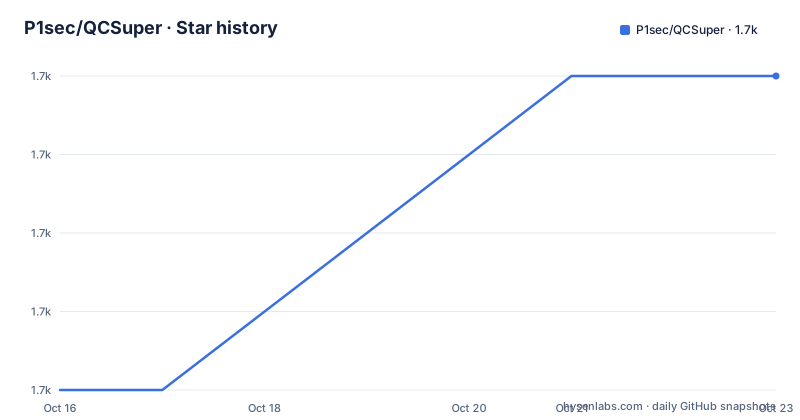
Star history
- P1sec/QCSuper1,668 ★ · +4
| Repository | 2026-10-16 | 2026-10-23 |
|---|---|---|
| P1sec/QCSuper | 1.7k | 1.7k |
4 Stars in the last 7 days, measured from the daily GitHub snapshot. Compare with other projects
Editorial analysis
Why QCSuper targets the baseband rather than Wi-Fi traffic
QCSuper addresses a specific gap left by conventional packet capture. Its purpose is to communicate directly with the baseband of a Qualcomm-based phone or modem and capture raw radio frames from 2G, 3G, and 4G systems. Certain models also support 5G, but that support should not be treated as universal. The resulting radio data can be exported as PCAP for analysis in Wireshark, giving researchers a view closer to the device's radio interface than a capture from an Ethernet or Wi-Fi interface would provide.
The intended users include developers, telecommunications-industry personnel, and security researchers, as reflected by the package classifiers and the repository's technical documentation. A rooted Android phone is one supported route into the capture process. A phone that already exposes a Diag service port, or a compatible mobile broadband dongle, is another. That device requirement is substantial. QCSuper is not merely a decoder that opens existing PCAP files, nor is it a general-purpose protocol analyzer that can inspect traffic without device access.
The hardware boundary matters. A phone's marketing model name does not prove that QCSuper can communicate with it. The README directs users to identify the processor and confirm that it is Qualcomm. The device must also provide a usable transport to the Diag service, either through ADB on a rooted phone or through a serial or USB connection to an exposed Diag port. This makes device verification part of adoption rather than an optional troubleshooting step.
The Diag-to-PCAP capture path in QCSuper
The core mechanism is the Qualcomm Diag protocol, also called QCDM or DM. QCSuper sends and receives diagnostic traffic through that protocol to communicate with the phone's baseband. The README describes two initial transports: `--adb` for a rooted Android device connected over USB, and `--usb-modem` for an exposed phone Diag port or mobile broadband dongle. The `auto` selection in the dongle command asks QCSuper to locate an eligible modem rather than requiring the reader to provide a fixed port in that example.
Once communication is available, the capture can be sent to Wireshark as it arrives. The `--wireshark-live` flag in the documented commands provides that live path. PCAP is also the project's stated output format, so Wireshark is not required for every form of capture storage, although the README emphasizes live viewing and Wireshark compatibility. Existing captures in another format are also mentioned as possible input, but the README does not define the accepted formats or a conversion command.
The boundary between acquisition and dissection is important. QCSuper's job begins with reaching Qualcomm Diag and obtaining radio frames. Wireshark handles the later packet inspection, including decoding supported 2G, 3G, and 4G frames. This division differs from tools that passively watch a conventional network interface. It also explains why permissions and exposed diagnostic services matter. If Android or the modem does not grant access to Diag, adding Wireshark to the workflow cannot repair that missing device connection.
Installing QCSuper on Linux and starting an ADB capture
The README identifies Ubuntu LTS 22.04+ as the main development environment, notes use on Windows 11, and recommends Linux for compatibility. On Linux, the shortest documented installation route uses `uv`. Install `uv` with one of the package-manager commands documented for the distribution:
sudo snap install --classic astral-uv # On Ubuntu
sudo dnf install -y uv # On Fedora
sudo pacman -S uv # On Archlinux, Manjaro
curl -LsSf https://astral.sh/uv/install.sh | sh # On Debian and others
After selecting the appropriate command for the system, install the latest stable QCSuper release:
uv tool install qcsuperRunning `qcsuper` starts the command-line program. If it needs root privileges to read a modem device and `sudo` cannot find the command in `$PATH`, the README gives this form:
sudo env "PATH=$PATH" qcsuperFor a first real capture, connect a rooted, Qualcomm-based Android phone over USB and ensure the documented ADB path is available. Start the live Wireshark workflow with:
qcsuper --adb --wireshark-liveThe expected result is a live radio capture in Wireshark if the device, driver, root access, Diag access, and protocol combination are compatible. A failed or empty capture does not by itself identify which layer failed, so device support and transport access need separate verification.
The README also provides a system-wide PyPI route. This includes installing `python3-pip` and Wireshark through the package manager before installing `qcsuper`:
sudo apt install python3-pip wireshark
sudo pip3 install --upgrade qcsuper --break-system-packages
The Python package metadata requires Python 3.7 or later and lists `crcmod`, `pycrate`, `pyserial`, and `pyusb` as runtime dependencies. Its `qcsuper` entry point maps to `qcsuper.main:main`, which is how the installed command is associated with the package's main function.
ADB, modem access, and Wireshark version constraints
QCSuper supports distinct device-access workflows because a rooted phone and an exposed USB modem do not present the same setup problem. With `--adb`, the phone must be rooted and connected through USB. With `--usb-modem auto`, the phone must have a manually exposed Diag port or the operator must be using a compatible dongle. The README warns that the procedure for exposing that port varies by modem and manufacturer, so the ADB command is not a universal substitute for modem access.
The documented dongle command is:
qcsuper --usb-modem auto --wireshark-liveOn Windows, the requirements are more manual. Google's ADB driver must work with the phone, and a pseudo-serial Diag connection may require `libusb-win32` filters. The README notes that mode switching can change the USB PID or VID, which may require recreating those filter associations. Device-specific USB drivers may also be necessary. The Windows instructions are truncated in the README, but the stated prerequisites remain specific: working `adb.exe shell`, the correct phone drivers, and any needed `libusb-win32` filters.
Wireshark version also limits decoding. The README supports 2G and 3G frames with Wireshark 2.x through 4.x. 4G frame handling requires at least Wireshark 2.5.x, while individual decrypted NAS messages from 4G frames require at least 2.6.x. 5G decoding was tested under Wireshark 3.6.x and later. Those are explicit compatibility boundaries, not guarantees for every device or capture.
For 5G, QCSuper can install a Wireshark Lua plug-in automatically. The README places it under `%APPDATA%\Wireshark\plugins` on Windows and `~/.local/lib/wireshark/plugins` on Linux and macOS. Installation can be disabled with the following environment variable:
DONT_INSTALL_WIRESHARK_PLUGIN=1That switch prevents automatic plug-in installation but does not turn unsupported Wireshark versions into compatible ones.
Where QCSuper differs from ordinary packet capture
The clearest alternative is Wireshark used only as a conventional packet analyzer. Wireshark can inspect captured packets across supported interfaces, while QCSuper's documented purpose is acquiring radio frames through Qualcomm Diag and exposing them to Wireshark. In the QCSuper workflow, Wireshark is the analysis destination rather than the source of device access.
A USB protocol analyzer is another relevant alternative, but the repository does not document one by name or establish its features. The direct comparison supported by the repository is therefore between passive network-interface capture and QCSuper's Qualcomm Diag acquisition path. QCSuper reaches the baseband radio data through a rooted Android phone or exposed Diag connection. Ordinary interface capture does not provide that project-specific mechanism.
QCSuper is the wrong tool when the goal is to capture ordinary IP packets from Wi-Fi or Ethernet without radio-frame analysis. It is also unsuitable where a non-Qualcomm baseband is fixed, USB access is controlled by the device, or no permission exists to access diagnostic services. The project is specialized, so its narrower acquisition model is a constraint rather than a defect. Its value lies in reaching a radio path that ordinary packet capture does not address.
For existing files, users should establish whether QCSuper can ingest the format before choosing it for offline conversion. The README mentions existing captures in another format, but it supplies no accepted-format list or command. Wireshark is the documented destination for inspection, with version constraints that vary by radio generation.
Release cadence, GPL-3.0 obligations, and upgrade work
The repository is not archived, and its last push was on 2026-10-12. Recent releases include version 2.1.3 on 2026-07-23 with a fix for 5G NR RRC dissection, version 2.1.1 on 2026-03-19 with PPA packaging, and version 2.1.0 on 2026-03-10. These records support current maintenance activity, although recent releases do not by themselves establish compatibility with every device.
The project is licensed under GPL-3.0. That identifier matters when distributing QCSuper or incorporating it into another distributed product, but this review does not provide legal advice. The repository includes a `LICENSE` file, and the Python metadata records the license reference. Organizations handling packaging, redistribution, or device tooling should review the actual license text for their use.
Upgrades can also affect analysis dependencies. Version 2.1.3 specifically changes 5G NR RRC dissection, while 2.1.1 changes PPA packaging. Users who preserve older captures should keep track of the QCSuper and Wireshark versions used to acquire and interpret them. The README's Wireshark requirements and the automatic Lua plug-in behavior provide concrete upgrade checks: confirm the selected Wireshark release is within the documented range, and decide whether automatic plug-in installation should be disabled.
Editorial conclusion
Adopt QCSuper when direct access to a Qualcomm Diag device or a rooted Android phone is available and radio-frame capture is the objective. Do not choose it as a general packet sniffer or assume that every Qualcomm device and 5G configuration is supported. Verify the device model, Qualcomm baseband, USB or ADB path, Wireshark version, and intended protocol first. For the documented phone workflow, compatibility begins with `qcsuper --adb --wireshark-live`.
Frequently asked questions
What devices can QCSuper capture radio frames from?
QCSuper targets Qualcomm-based phones and modems. The target must either be a rooted Android phone usable through ADB or a device that exposes a Diag service port over USB. The README says compatibility should be checked by confirming that the phone model has a Qualcomm processor.
How do I install and run QCSuper on Linux?
The README documents `uv tool install qcsuper`, followed by the `qcsuper` command. Linux is recommended for compatibility, and the project was lately developed on Ubuntu LTS 22.04+. A system-wide PyPI installation is also documented.
Does QCSuper need Wireshark to capture Qualcomm radio frames?
Wireshark is the documented analysis destination, and `--wireshark-live` starts live viewing. The project also generates PCAP files, but the README does not detail supported formats for existing captures in other formats.
Which Wireshark version is required for 5G decoding?
The README states that 5G decoding was tested with Wireshark 3.6.x and later. QCSuper can install a Lua plug-in automatically unless `DONT_INSTALL_WIRESHARK_PLUGIN=1` is set.
Official sources
Add this badge to your README
If you maintain this project, the badge below links readers to this analysis and shows its maintenance status from the daily GitHub snapshot. Paste the markdown into your README; add ?metric=license or ?metric=stars to the image URL for a different field.

[](https://hysenlabs.com/projects/p1sec-qcsuper)Star history chart for your README
[](https://hysenlabs.com/projects/p1sec-qcsuper)Was this useful?