Waydroid runs Android in six namespaces, and the image is still Android 13
Waydroid uses a container-based approach to boot a full Android system on a regular GNU/Linux system like Ubuntu.
At a glance
- What is it?
- Waydroid boots a full Android system inside a Linux container instead of a virtual machine, using user, pid, uts, net, mount and ipc namespaces. It is a Python script distribution with no build step and no install command in its README, and the shipped image is a customized LineageOS build on Android 13.
- Who is it for?
- Waydroid suits a Linux user who needs a specific Android app on a desktop that has no native build, and who is comfortable with a container-based setup. It does not suit a machine that must ship a phone-replacement stack today, because the image the README describes is Android 13.
- Can I use it commercially?
- Yes, with conditions. GPL-3.0 is a copyleft licence: if you distribute software that includes it, you must release that software's source code under the same licence. Running it internally without distributing it does not trigger that obligation.
- Is it still maintained?
- Yes. The repository last received commits 30 days ago.
- What is it written in?
- Mainly Python, according to GitHub's language statistics.
Answers come from the project's GitHub data, last synced on November 15, 2026, and from our analysis. They are not legal advice.
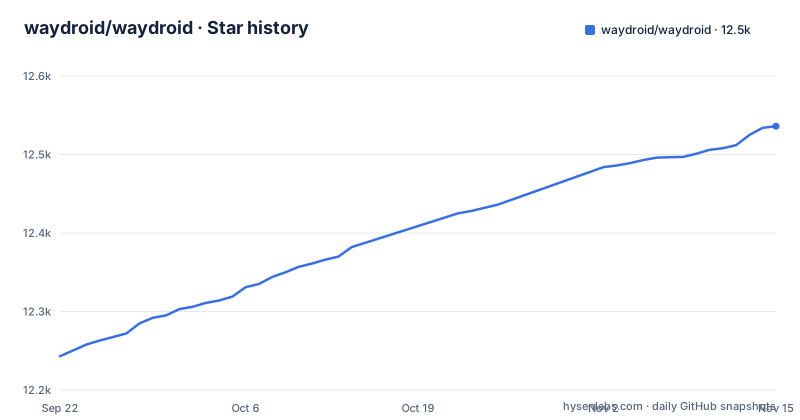
Star history
- waydroid/waydroid12,536 ★ · +293
| Repository | 2026-09-22 | 2026-11-15 |
|---|---|---|
| waydroid/waydroid | 12.2k | 12.5k |
293 Stars in the last 54 days, measured from the daily GitHub snapshot. Compare with other projects
Editorial analysis
Six namespaces, and no virtual machine between the app and the GPU
The mechanism is named in one sentence: Waydroid uses Linux namespaces, specifically user, pid, uts, net, mount and ipc, to run a full Android system in a container and hand Android applications to any GNU/Linux-based platform.
The README is direct about the consequence, saying the Android system inside the container has direct access to any needed hardware. That is the design and it is also the boundary. Isolation comes from process namespaces rather than from an emulated machine, so an Android process reaches the graphics stack the same way a native Linux program does. A reader deciding whether that is acceptable on a laptop has to weigh that sentence rather than assume the word container means a sandbox in the VirtualBox sense.
The README says Android 13, and the release line has moved past it
The runtime ships a minimal customized Android system image based on LineageOS, and the README states that the image is currently based on Android 13. That sentence is the only statement in the README about which Android version you get.
The tags tell a different story about cadence. Version 1.6.1 went out on 2025-12-29, 1.6.2 on 2026-02-22, and 1.6.3 on 2026-05-28, so the most recent release predates the last push on 2026-10-16 by roughly four and a half months. Someone searching for a newer Android version under Waydroid's name will not find it documented anywhere in this repository,. Package maintainers who tag 1.6.3 should check the image version themselves rather than trusting that sentence.
The build target prints a message and tells you to run make install
There is nothing to compile. The Makefile's build target does exactly this:
Nothing to build, run 'make install' to copy the files!The install target then copies data, tools and waydroid.py into $(PREFIX)/lib/waydroid, creates a relative symlink so that /usr/bin/waydroid points at the script, moves AppIcon.png into share/icons/hicolor/512x512/apps/waydroid.png, and moves the .desktop files from data into share/applications. Everything the user runs is a Python file copied into place.
That has a packaging consequence. pyproject.toml carries only tool configuration and no project table, so there is no library for pip to install. Distribution is the distribution's job, which is why a debian/ directory sits at the root of the tree. If you expected to add Waydroid to a requirements file, that is not how this is packaged.
systemd and D-Bus activation default to on while nftables defaults to off
Three build switches sit at the top of the Makefile, and their defaults differ in a way that matters:
USE_SYSTEMD ?= 1
USE_DBUS_ACTIVATION ?= 1
USE_NFTABLES ?= 0
systemd units and D-Bus activation are on unless you set them to 0, and nftables support is off unless you ask for it. The install target also creates directories under SYSCONFDIR, which is /etc rather than PREFIX (/usr): the AppArmor directory /etc/apparmor.d and the XDG menu directory /etc/xdg/menus/applications-merged. Those two paths are not redirected by PREFIX, so an install with a nonstandard prefix still touches /etc unless DESTDIR is set.
The install section is one link and no command
The README's Install section is a single sentence with a hyperlink to docs.waydro.id/usage/install-on-desktops. There is no command in it, no package name, and no version attached to the instructions it points at. Everything else in the README is the same shape: a link to docs.waydro.id for documentation, a link to the GitHub issue chooser for bugs, and the Matrix and Telegram rooms for contact.
That is worth saying plainly to a reader who arrived from a search result expecting a command to copy. Nothing in the repository pins what that install page will tell you on the day you read it. A person who wants a reproducible setup has to record what they followed themselves, because the project leaves that record to them.
Ruff is configured to ignore the two rules that catch redefined variables
pyproject.toml sets line-length 131 for autopep8, isort and ruff, then selects the E, W and F rule groups and ignores three entries. E501 is ignored with the comment that line length is not enforced for now. F401 carries the note that unused imports should be removed once the leftovers are gone. F811 carries the note that redefined variables should be refactored.
Both F rules are marked with TODO comments rather than as deliberate policy, so redefined names are not reported by ruff for now.
Three tags in five months, then four months of commits with no new tag
The repository is Python under GPL-3.0, with the licence text at the root and an SPDX identifier of GPL-3.0-or-later in pyproject.toml. Continuous integration is configured through .abstruse.yml, funding through FUNDING.yml, and distro packaging through debian/.
The version history is short enough to read at a glance: 1.6.1, then 1.6.2, then 1.6.3, each a few weeks or a few months apart, with the last push on 2026-10-16 arriving about four and a half months after the newest tag. If you pin 1.6.3 you are four months behind main, and if you track main you are running something no release has named. Decide which of those two you are before you write it into a setup script, because the project's own answer is not written down anywhere.
Editorial conclusion
Waydroid suits a Linux user who needs a specific Android app on a desktop that has no native build, and who is comfortable with a container-based setup. It does not suit a machine that must ship a phone-replacement stack today, because the image the README describes is Android 13. Before you install, check that your kernel and graphics driver support the user, pid, uts, net, mount and ipc namespaces, and read the install page at docs.waydro.id rather than expecting a command in the repository.
Frequently asked questions
Is Waydroid legal?
The project code is under GPL-3.0, with an SPDX identifier of GPL-3.0-or-later in pyproject.toml. The Android system image it ships is described as a minimal customized build based on LineageOS, and the README does not say anything about the licensing of apps you install into it.
What is Waydroid used for?
It provides Android applications on a GNU/Linux-based platform by running a full Android system in a container. The approach uses a container rather than an emulator, with Linux namespaces for user, pid, uts, net, mount and ipc.
Can I run all Android apps on Waydroid?
The README does not document which app sources are available. It describes the shipped image as a minimal customized Android system based on LineageOS, currently on Android 13, so treat app availability as something to verify on the documentation site rather than as a stated guarantee.
How safe is Waydroid?
Isolation comes from Linux namespaces rather than from an emulated machine, and the README states that the Android system inside the container has direct access to any needed hardware. The install target also writes an AppArmor profile directory under /etc/apparmor.d as part of a default install.
How do I install Waydroid on Ubuntu?
The README contains no install command. Its Install section is a link to docs.waydro.id/usage/install-on-desktops, and the project requires Linux namespaces for user, pid, uts, net, mount and ipc to be available on the host.
Official sources
Add this badge to your README
If you maintain this project, the badge below links readers to this analysis and shows its maintenance status from the daily GitHub snapshot. Paste the markdown into your README; add ?metric=license or ?metric=stars to the image URL for a different field.

[](https://hysenlabs.com/projects/waydroid-waydroid)Star history chart for your README
[](https://hysenlabs.com/projects/waydroid-waydroid)Was this useful?