Exporting IDA results as files instead of a live MCP session
Say goodbye to the complex, verbose, and laggy interaction mode of IDA Pro MCP
At a glance
- What is it?
- IDA-NO-MCP removes the MCP layer from reverse engineering: it writes decompiled C, disassembly, strings and call graphs to disk for Cursor or Claude Code to read, through a Python plugin for small targets and a Rust binary for large ones. The Rust build has to be compiled on the machine that already owns IDA Pro 9.x, and the committed manifest pins the idalib 0.9 line that the project's own version table pairs with a single IDA point build.
- Who is it for?
- Analysts who already keep a licensed IDA Pro 9.x on the machine doing the reversing are the intended audience, and the payoff is largest on big binaries, where token count and stall time are the real costs. Skip the Rust path if you only touch small files, because a native build buys nothing there.
- Can I use it commercially?
- Not without permission. GitHub finds no licence file in the repository, and without a licence all rights are reserved by default: you may read the code but not reuse it. Check the README, or ask the authors, before using it.
- Is it still maintained?
- Yes. The repository last received commits 89 days ago.
- What is it written in?
- Mainly Python, according to GitHub's language statistics.
Answers come from the project's GitHub data, last synced on October 23, 2026, and from our analysis. They are not legal advice.
Star history
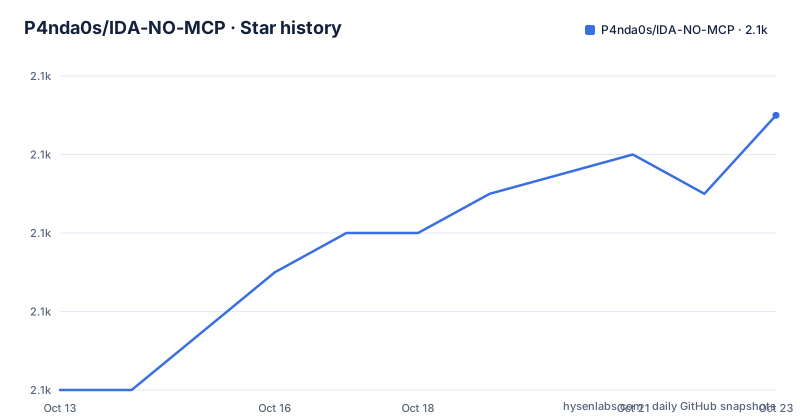
- P4nda0s/IDA-NO-MCP2,063 ★ · +7
| Repository | 2026-10-13 | 2026-10-23 |
|---|---|---|
| P4nda0s/IDA-NO-MCP | 2.1k | 2.1k |
7 Stars in the last 10 days, measured from the daily GitHub snapshot. Compare with other projects
Editorial analysis
Exporting decompiled code as files instead of an MCP session
IDA-NO-MCP targets one specific irritation: driving IDA Pro through an MCP server turns every question about a binary into a tool call, and each call returns a wall of text. This project removes the MCP layer entirely. An exporter walks the database and writes ordinary files to disk, among them `decompiled.c`, `function_index.txt`, `strings.txt`, `imports.txt`, `exports.txt` and a generated `AGENTS.md` that tells an AI editor how the directory is laid out. Cursor, Claude Code or any other editor then indexes those files the way it indexes a repository, which buys parallelism and the ability to read one slice of an enormous function instead of loading all of it. The stated reason is blunt: text, source code and shell are the native languages of an LLM, and a fixed tool schema adds nothing to a workflow no agent shares. That keeps the audience narrow, namely analysts who want a large binary sitting on disk as readable text while a separate tool does the reasoning.
Two builds that cannot be merged into a single plugin
The repository carries two exporters, described as complementary rather than as an old and a new version. `oldpython/INP.py` is a Python plugin that runs inside the IDA GUI, fired from `Edit` -> `Plugins` -> `Export for AI` or with `Ctrl-Shift-E`, aimed at mid-sized files and at dumping whatever progress exists at the moment. It sits in a directory called `oldpython`, which reads as retired, yet the same document tells you to install it alongside the Rust build. `src/` compiles to a standalone executable named inp, which targets large binaries, batch jobs and scripted pipelines. The reason they cannot be one artefact is structural rather than stylistic: a plugin must be a shared library running inside the IDA process, and that in-process analysis is exactly what hangs on a 100MB+ target, while skipping analysis has to happen outside the process, and IDA loads only `.dylib`, `.so` and `.dll` files as plugins. Both writers emit the same layout with a metadata header per function, so nothing downstream can tell which one ran. Installing the plugin is a file copy or a symlink:
# macOS/Linux
ln -s /path/to/IDA-NO-MCP/oldpython/INP.py ~/.idapro/plugins/INP.py
On Windows the same file is copied into `%APPDATA%\Hex-Rays\IDA Pro\plugins\`, and a restart of IDA is what makes it appear.
The 20,000 function threshold behind the three export modes
Auto mode switches on function count rather than file size. At 20,000 functions or fewer the exporter uses `legacy`, which writes one C file per successfully decompiled function plus one `.asm` per function that needed the disassembly fallback, and fills `function_index.txt` with complete caller and callee addresses for every entry. Above the threshold it switches to `consolidated`, which appends every function into a single `decompiled.c`, records one line per function in `function_list.txt`, and replaces the exhaustive cross-reference walk with a `callgraph.txt` sampled by breadth-first search outward from entry and export symbols. Four constants at the top of `INP.py` set those boundaries: `LARGE_BINARY_FUNC_THRESHOLD`, `LARGE_CALLGRAPH_BFS_HOPS`, `LARGE_CALLGRAPH_MAX_NODES` and `LARGE_STRING_MIN_LEN`. Consolidated also drops the `memory/` directory by default and filters short strings, since raw hex is expensive in tokens and thin in meaning. The reason for the design is arithmetic rather than taste, as the earlier exporter reached 140G of RAM on a sample with two million-plus functions and produced close to 1G across more than 20,000 files for a 100M binary. The Python side takes the same choices on the command line, where three positional arguments set the output directory, the skip flag and the mode:
idat -A -S"INP.py <export_dir> <skip_analysis> <export_mode>" <target.i64>
idat -A -S"INP.py /tmp/out 0 auto" target.i64
idat -A -S"INP.py /tmp/out 0 consolidated" huge_framework.i64
Putting 1 in that middle slot skips the wait for auto-analysis, which is the setting to use only when the database has been analysed before.
Native builds on the machine that already owns IDA Pro
The Rust path is not a download. The compiled binary links against the `libida` and `libidalib` libraries that ship with IDA Pro 9.x, those libraries are distributed per platform and cannot be redistributed with a third-party tool, so every machine that runs it needs its own build. Cross-compiling a macOS checkout into a working Windows or Linux executable is impossible, and the stub libraries in the IDA SDK are worse than useless here, since they link without complaint and crash at run time, the case filed as idalib issue #24. Two environment variables and one cargo command are enough once the prerequisites exist:
export IDADIR="/path/to/IDA Professional 9.3.app/Contents/MacOS"
export LIBCLANG_PATH="/Library/Developer/CommandLineTools/usr/lib"
cargo build --release
`LIBCLANG_PATH` must point at a Clang installation because bindgen parses IDA's own headers, and the result lands as an extensionless file on macOS and Linux or as `inp.exe` on Windows. At run time the dynamic linker still has to find the IDA libraries:
export DYLD_LIBRARY_PATH="$IDADIR"
./target/release/inp <binary_or_idb.i64> -o <output_dir>
./target/release/inp huge_framework.bin -o out --mode consolidated --skip-analysis
Linux uses `LD_LIBRARY_PATH` for the same job, and on Windows those libraries sit beside the executable. Expect the last command above to be the one that matters on a big framework.
A pinned idalib matches one IDA point build
Underneath, `idalib` hardcodes virtual function table offsets taken from IDA internal classes, so IDA major builds cannot be mixed, and a mismatch faults at `idalib_check_license` with `EXC_BAD_ACCESS`. The pairing that matters is short and specific: v9.3sp1 runs with `0.9.0`, v9.3 with `0.8.1`, v9.2 with `0.7.2`, v9.1 with `0.6.1`, v9.0sp1 with `0.4.1`, and v9.0 with `0.3.0`. What ships in the repository does not cover that range. The committed manifest asks for the 0.9 line on both the runtime and the build side:
[package]
name = "inp"
version = "0.1.0"
license = "MIT"
idalib = "0.9"
clap = { version = "4", features = ["derive"] }
anyhow = "1"
rayon = "1"
Since 0.9 lines up with the v9.3sp1 row and not with plain v9.3, anyone on another build has to lower those two lines by hand, and that edit is the real upgrade cost here, because every IDA point update can force another dependency change and another native rebuild. For work against a local idalib checkout, `Cargo.toml.dev.example` shows the path dependencies that replace the ones fetched from crates.io. The last push was on 2026-07-26, and the repository has no GitHub releases, so `0.1.0` in that manifest is the only version marker a user can count on.
What consolidated mode writes and what legacy mode writes
Output is a directory, and its contents change with the mode. In consolidated mode every function body, prefixed with its own metadata header, is appended into `decompiled.c`, while `function_list.txt` gives one line per function carrying address, name, type and the reason a fallback was needed, and `callgraph.txt` supplies a sampled skeleton of the subgraph worth reading. Legacy mode keeps the fine-grained shape instead: one file per function under `decompile/` and `disassembly/`, with names, addresses, callers and callees in each, plus a streamed `function_index.txt` that is never accumulated in memory, and that accumulation is the root cause of the earlier 140G blowup. Three failure lists run alongside both modes. `disassembly_fallback.txt` names every function that fell back to disassembly, `decompile_failed.txt` records those where decompilation and the disassembly fallback both failed, and `decompile_skipped.txt` lists library and invalid functions dropped on purpose. `strings.txt` carries address, length, encoding as ASCII, UTF-16 or UTF-32, and the text itself, filtered by the minimum length in consolidated mode. `imports.txt` and `exports.txt` hold one address and one symbol per line. `AGENTS.md` is generated on every run, and it is the file that spares the AI from relearning the layout each session.
Where this exporter is the wrong choice
Several boundaries are stated plainly. The Python plugin hangs the IDA process on targets of 100MB or more, so large binaries belong to the standalone binary, and on that side the flag that matters is `--skip-analysis`, short form -a, because without it a 177MB binary sat for more than 14 minutes inside IDA's own auto-analysis before any decompilation began. `--force` covers a re-export, and `--mode` forces `legacy` or `consolidated` when the automatic threshold guesses wrong. Consolidated is also where real data is surrendered: complete caller and callee edges give way to a sampled graph, raw bytes in `memory/` are never written, and short strings vanish, so anyone needing exhaustive cross-references on a big target has to accept `legacy` together with its memory appetite. The Rust build is a poor fit for a machine without a licensed IDA Pro 9.x for its own platform, since that executable carries no libraries of its own. And for an analyst who wants to interrogate a single function from inside IDA while thinking, a one-shot directory is the wrong shape, which is the trade accepted when MCP is dropped. Rollback is not addressed anywhere in the documentation, and there is no packaged build to fall back on if a native build breaks. Licensing is uneven too, with the manifest declaring MIT for the inp crate while no licence identifier appears on the repository itself and `oldpython/INP.py` carries no separate notice, so redistributing that plugin means settling the question first.
Throughput and peak memory on one 24MB framework
The project's own comparison uses a single sample, `reqable App.framework`, 24MB and 54,937 functions. The optimised Python path moves 112 functions per second and peaks at 1,289 MB of resident memory, whereas the Rust binary moves 133 to 159 functions per second and peaks at 1,460 MB, a gain of 19 percent on throughput with memory reported as level. Read that honestly: one framework on one machine measures a 19 percent improvement rather than an order of magnitude, and the Rust side is the one holding more resident memory. What those numbers do not touch is the reason the standalone binary exists, which is finishing at all. Dependencies explain the shape of the code behind the figures, with `rayon` for parallel decompilation, `clap` 4 for the flag parsing shown earlier, `anyhow` for error propagation, and a profile pinned to `opt-level = 3` with thin LTO and one codegen unit. Against IDA Pro MCP the comparison is not throughput but shape, per-call responses on a channel versus one directory of files an editor indexes once and slices as needed.
Editorial conclusion
Analysts who already keep a licensed IDA Pro 9.x on the machine doing the reversing are the intended audience, and the payoff is largest on big binaries, where token count and stall time are the real costs. Skip the Rust path if you only touch small files, because a native build buys nothing there. Before compiling anything, check the idalib row in README_EN.md against your exact IDA point build, since the committed manifest pins the 0.9 line, and then confirm your editor can index one multi-megabyte decompiled.c.
Frequently asked questions
Does IDA-NO-MCP need IDA Pro installed to run the Rust binary?
Yes. The compiled binary links against the `libida` and `libidalib` libraries that ship with a locally installed IDA Pro 9.x, so both the build and the run happen on a machine that already has IDA for its own platform, and those libraries cannot be redistributed.
Which IDA Pro build does the committed Cargo.toml match?
It requests the 0.9 line of idalib, and the version table pairs 0.9.0 with IDA v9.3sp1 while v9.3 needs `0.8.1` and v9.0 needs `0.3.0`. On any other build those two dependency lines have to be edited by hand before compiling.
What does the exporter leave out in consolidated mode?
It skips the `memory/` directory, filters short strings by `LARGE_STRING_MIN_LEN`, and replaces the full caller and callee traversal with a `callgraph.txt` sampled by breadth-first search from entry and export symbols.
Can the compiled executable be loaded as an IDA plugin?
No. IDA loads only shared library formats such as `.dylib` and `.dll` as plugins, so the standalone executable stays a command line tool and the GUI path stays on `oldpython/INP.py` with its `Ctrl-Shift-E` shortcut.
How do I force a fresh export over an existing output directory?
Pass `--force`, which re-exports rather than reusing what is already there, and point `-o <dir>` at the target directory if you do not want the default of the input name followed by `_export_for_ai`.
Official sources
Add this badge to your README
If you maintain this project, the badge below links readers to this analysis and shows its maintenance status from the daily GitHub snapshot. Paste the markdown into your README; add ?metric=license or ?metric=stars to the image URL for a different field.

[](https://hysenlabs.com/projects/p4nda0s-ida-no-mcp)Star history chart for your README
[](https://hysenlabs.com/projects/p4nda0s-ida-no-mcp)Was this useful?