Pact JS Contract Testing for HTTP and Messaging APIs
JS version of Pact. Pact is a contract testing framework for HTTP APIs and non-HTTP asynchronous messaging systems.
At a glance
- What is it?
- Pact JS is a TypeScript package for consumer-driven contract testing across HTTP APIs and asynchronous messaging systems. It fits JavaScript teams that want provider mocks in consumer tests and explicit compatibility checks without relying on a shared integration environment.
- Who is it for?
- Pact JS suits JavaScript and TypeScript teams that control a consumer API client and can publish contracts to a provider verification workflow. It is a poor fit for teams seeking only endpoint coverage, those unwilling to maintain provider states and matchers, or projects that need confirmed runtime behavior from a complete deployed environment.
- Can I use it commercially?
- Check first. The repository uses a licence we do not classify automatically, so read its LICENSE file before any commercial use.
- Is it still maintained?
- Yes. The repository last received commits 1 day ago.
- What is it written in?
- Mainly TypeScript, according to GitHub's language statistics.
Answers come from the project's GitHub data, last synced on October 23, 2026, and from our analysis. They are not legal advice.
Star history
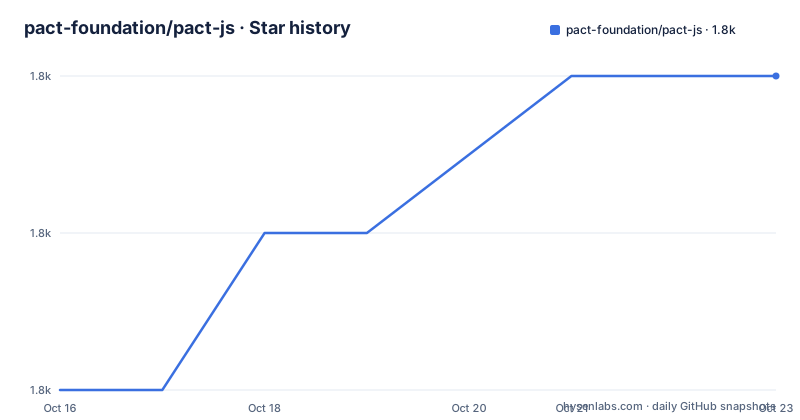
- pact-foundation/pact-js1,825 ★ · +2
| Repository | 2026-10-16 | 2026-10-23 |
|---|---|---|
| pact-foundation/pact-js | 1.8k | 1.8k |
2 Stars in the last 7 days, measured from the daily GitHub snapshot. Compare with other projects
Editorial analysis
Pact JS Targets Consumer and Provider Compatibility
Pact JS addresses a specific coordination problem: a consumer makes assumptions about an HTTP API or asynchronous message provider, but those assumptions can drift before an integration environment is available. The intended users are teams building JavaScript or TypeScript clients, particularly API clients whose requests and expected responses can be expressed in tests. The consumer writes those expectations first. Pact then gives the provider a contract that can be checked against its implementation.
The README distinguishes the consumer from the provider in direct terms. A consumer is the application that writes and runs the assumptions; a provider is the API or messaging service that must satisfy them. This direction matters. Pact JS is not primarily a general API crawler, schema validator, or substitute for every kind of endpoint test. Its unit is an interaction between named consumer and provider participants.
This approach is most useful where a full integration suite is slow or difficult to provision. It also helps teams replace some brittle integration checks with focused tests around a client. However, a contract does not remove the need to understand the service as a whole. It records and checks only the interactions that the consumer tests declare, so incomplete expectations remain incomplete.
PactV3 Builds Contracts from Consumer Test Interactions
The main consumer interfaces named by the README are PactV3 and MatchersV3 from @pact-foundation/pact. A PactV3 instance identifies the output directory, consumer, and provider. The consumer test then describes a request or message interaction. For HTTP, that interaction includes a provider state, the event that should be received, request details, and an expected response. Pact uses a mock provider during the consumer test, records the agreed interaction, and writes the contract into the configured directory.
The example uses the Arrange, Act, and Assert pattern. It constructs a client method that sends a GET request to /dogs with an Accept header of application/json. The test begins arranging the Pact interaction through the fluent chain exposed by provider. The README excerpt ends partway through that chain, so it does not show the complete request and response block, test execution command, or resulting generated file.
MatchersV3 supplies expectations that can remain meaningful when values change. In the example, MatchersV3.eachLike is applied to a dog object. The repository also contains dedicated examples for matchers, HTTP, messages, GraphQL, XML, multipart interactions, plugins, and provider states. Based on the repository layout, Pact JS extends beyond a single HTTP helper, but the available documentation excerpt does not specify every message, GraphQL, or XML configuration option.
Installing Pact JS and Starting a Consumer Contract
The README requires Node.js 16 or later for pact-js v12 and later. Install the package as a development dependency from a Node.js project. This adds the consumer and provider testing APIs to the local development environment rather than declaring Pact as a production runtime dependency.
npm install --save-dev @pact-foundation/pactAfter installation, create the PactV3 object exactly as shown in the README. The dir value controls where contracts are written, while consumer and provider establish the participants recorded in those contracts. This snippet is the first complete setup in the example:
import { PactV3, MatchersV3 } from '@pact-foundation/pact';

const provider = new PactV3({
  dir: path.resolve(process.cwd(), 'pacts'),
  consumer: 'MyConsumer',
  provider: 'MyProvider',
});
The repository also supports Mocha as a topic and the README uses describe and it in its example, but the documentation does not give a complete test command. The repository package scripts include Vitest commands for development, while the consumer documentation references a Mocha-style test shape. A new user should therefore use the framework configuration already present in their repository rather than assume that one runner configuration covers every example.
Pact JS also sends an anonymous tracking event on its first installation according to the README. It states that the event includes the operating system type and package version, without PII. The documented opt-out is the PACT_DO_NOT_TRACK environment variable:
Pact Do Not Track Controls Installation Telemetry
PACT_DO_NOT_TRACK=1That block is the environment variable assignment documented by the README, not a complete shell export command. Users who need the setting applied to subsequent npm processes would need to place it in the environment used by their runner or CI job, but the README excerpt does not prescribe a project file for doing so.
This telemetry detail matters for organizations with strict installation policies because it changes what happens during dependency installation. It is separate from HTTP traffic collected by an application. The README also connects Pact JS to Pact Broker and PactFlow for CI/CD workflows, but the available text does not provide broker credentials, publishing commands, or provider verification configuration. Those parts of the workflow must be confirmed in the full documentation rather than inferred from the package installation command.
The project offers several extension areas, including GraphQL, XML, multipart requests, event-driven systems, and plugins. Those repository directories show where examples live, not that every feature has identical configuration or maturity. The most conservative adoption route is to begin with the exact HTTP interaction that currently causes consumer and provider disagreement.
Contract Tests Replace Selected Integration Dependencies
The real alternative described by the README is a conventional end-to-end integration suite. That approach starts connected components and exercises them together, usually within a shared environment. Pact JS reverses part of that dependency. The consumer runs against a Pact-generated mock provider during a unit test, and the contract moves the provider's verification work to a separate stage.
The difference is not that Pact JS executes less behavior by definition. It changes what is tested and where the contract is created. The consumer test preserves the real client code and its request behavior while replacing the network endpoint during that test. A provider verification stage can then compare the provider with the generated contract. This can remove the need for a complex shared environment for specific interactions, but it does not prove unrelated workflows, deployment configuration, or interactions absent from the contract.
For teams that mainly need broad smoke coverage and cannot define consumer expectations as repeatable contracts, a conventional integration suite may be easier to adopt. Pact JS asks engineers to decide which fields, headers, status codes, request bodies, or asynchronous messages matter, then keep those decisions synchronized. Contract coverage is therefore a deliberate design task rather than an automatic by-product of exercising an endpoint.
v17 Release Cadence and Native Dependency Boundaries
The repository is not archived. Its last push was on 2026-10-16, and the listed releases include v17.1.4 on 2026-09-07, v17.1.3 on 2026-08-26, and v17.1.2 on 2026-08-11. These dates indicate recent work around the current v17 line, but they do not establish compatibility with every Node.js runner, Pact Broker deployment, or provider language.
Upgrade cost differs by version. The README says pact-js v12 and later include prebuilt native dependencies. It warns that v11 and lower use native extensions installed through node-gyp and therefore require a compatible build chain. Projects moving from v11 or lower should account for that difference rather than treating the package update as a pure JavaScript dependency change. The repository also includes MIGRATION.md, but its contents are not available here.
The license information requires particular care. The repository metadata classifies the license as Other because GitHub could not classify its custom terms, while the README displays an MIT badge and links to a LICENSE file. This article does not provide legal advice or reproduce the license. Users should read LICENSE and consult their own approval process before adopting the package.
Editorial conclusion
Pact JS suits JavaScript and TypeScript teams that control a consumer API client and can publish contracts to a provider verification workflow. It is a poor fit for teams seeking only endpoint coverage, those unwilling to maintain provider states and matchers, or projects that need confirmed runtime behavior from a complete deployed environment. Before adoption, check the LICENSE file rather than relying on the README badge, confirm that the CI system can run provider verification, and inspect the first generated contract to ensure its expected fields, headers, status codes, and messages match the actual consumer dependency.
Frequently asked questions
What Node.js version does the current Pact JS line require?
The README states Node.js 16+ as the requirement for pact-js v12 and later. It separately documents build-chain requirements for v11 and lower because those releases install native extensions through node-gyp.
How do I install Pact JS in a TypeScript project?
The README installs @pact-foundation/pact as a development dependency with npm install --save-dev @pact-foundation/pact. The package declares TypeScript type declarations through its types entry.
Can Pact JS test asynchronous messaging as well as HTTP APIs?
Yes, the project description includes non-HTTP asynchronous messaging systems. The repository includes a messages example directory and an Event Driven Systems documentation link.
Does Pact JS replace every end-to-end integration test?
No. The README recommends replacing expensive and brittle end-to-end tests with focused contract tests where consumer expectations can be expressed. The available documentation does not claim that contract tests cover unrelated workflows or complete deployment behavior.
Official sources
Add this badge to your README
If you maintain this project, the badge below links readers to this analysis and shows its maintenance status from the daily GitHub snapshot. Paste the markdown into your README; add ?metric=license or ?metric=stars to the image URL for a different field.

[](https://hysenlabs.com/projects/pact-foundation-pact-js)Star history chart for your README
[](https://hysenlabs.com/projects/pact-foundation-pact-js)Was this useful?