Kalker: a scientific calculator with programmable syntax
Scientific calculator with math syntax that supports user-defined variables and functions, complex numbers, and estimation of derivatives and integrals
At a glance
- What is it?
- Kalker combines scientific expressions, numerical calculus, user-defined functions, vectors, matrices, and cross-platform delivery through Rust, WebAssembly, and mobile builds. It suits interactive mathematical work, while its documented estimation limits rule it out where certified symbolic results are required.
- Who is it for?
- Kalker fits users who want an interactive calculator with programmable variables, custom functions, vectors, matrices, calculus, and browser integration. It is the wrong choice for work that requires formal symbolic derivatives, certified integration results, or guaranteed root selection across all roots.
- Can I use it commercially?
- Yes. MIT is a permissive licence: you can use, modify and sell software built on it, as long as you keep its copyright and licence notices.
- Is it still maintained?
- Yes. The repository last received commits 35 days ago.
- What is it written in?
- Mainly Rust, according to GitHub's language statistics.
Answers come from the project's GitHub data, last synced on October 23, 2026, and from our analysis. They are not legal advice.
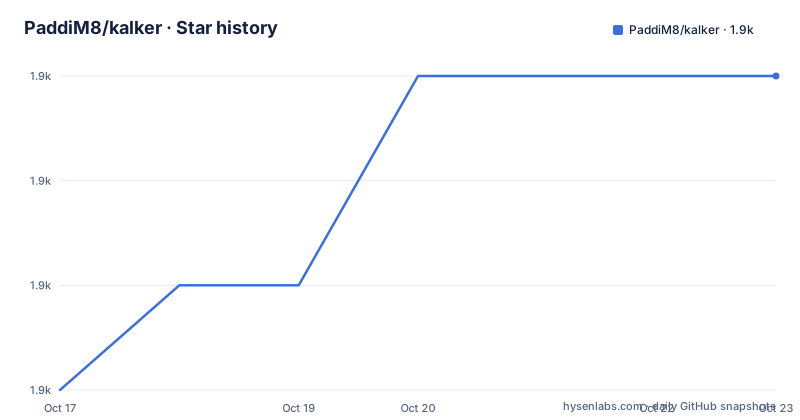
Star history
- PaddiM8/kalker1,929 ★ · +3
| Repository | 2026-10-17 | 2026-10-23 |
|---|---|---|
| PaddiM8/kalker | 1.9k | 1.9k |
3 Stars in the last 6 days, measured from the daily GitHub snapshot. Compare with other projects
Editorial analysis
Kalker's programmable scientific calculation model
Kalker occupies the space between a conventional scientific calculator and a full computer algebra system. It accepts expressions containing arithmetic, predefined functions, variables, and user-defined functions. That makes it relevant to students, mathematics learners, engineers, and developers who need more flexibility than fixed calculator keys provide.
The README gives direct examples of session state, including `f(x, y) = xy` and `x = 5`. Once defined, these names can participate in later expressions. Kalker's `ans` variable provides access to the previous result, and semicolons allow multiple expressions on one line. This session model is convenient for short calculations because it avoids turning every value into a literal, but the README does not document whether definitions persist across restarts. Users who need reproducible calculation files should therefore verify session behavior before depending on it.
Vectors and matrices extend the input beyond scalar arithmetic. Vectors use forms such as `(x, y, z, ...)`, while matrices use rows separated by semicolons. Kalker's parser also supports floor and ceiling groups, factorials, predefined constants, and number-base notation. These features make it more useful for general scientific notation, although they do not make it a replacement for a dedicated numerical matrix environment.
Kalker's numerical calculus and root estimation
Kalker supports root finding, differentiation, and integration, but the README explicitly describes these features as estimation rather than exact symbolic computation. Root finding uses Newton's method. An expression such as `x^2 = 64` is presented as an example, and the documentation limits the result to one root. That limitation matters because a polynomial equation can have several roots even when the equation itself looks simple. Kalker's root feature is better suited to selecting a particular numerical solution than to enumerating every solution.
Derivatives use function notation such as `f'(2)` and `sin'(-pi)`. The README warns that derivatives of noisy functions or higher-order derivatives can be inaccurate. This is a meaningful boundary for scientific work. A result may be useful for interactive checking while still failing when the underlying function has discontinuities, noisy data, or behavior that makes numerical differentiation unstable.
Integration follows a similar pattern. The documented forms are `∫(0, pi, sin(x) dx)` and `∫(0, π, sin(x) dx)`, and the README notes that results can sometimes be slightly off. Kalker's `sum` feature provides a separate way to evaluate a finite expression across a range. For example, `sum(1, 3, 2n+1)` is documented as equivalent to evaluating the expression for 1, 2, and 3, producing `15`.
The distinction is important. Kalker is designed as a calculator with numerical methods, not as a formal symbolic algebra engine. Its value comes from readable input and quick feedback, not from documented guarantees of exactness or interval-bounded error.
Installing Kalker's CLI and starting a calculation
The README gives several installation routes. Precompiled 64-bit binaries for Linux, Windows, and macOS are available from the repository releases page. Package-manager examples include `brew install kalker` on macOS and `kalker` in the AUR on Arch Linux. For Cargo users, the documented installation command is:
cargo install kalkerThe README does not specify a separate startup command, so users should consult the installed executable's documentation for how to begin a session. The README documents `ans` as the previously calculated value, so an expression following a calculation can reference that result:
ans * 2For a first programmable example, define a variable and then use it in a separate expression:
x = 5
2x + 1
The project also supports a function definition such as:
f(x, y) = xyThe README's syntax documentation is linked to the project website rather than fully reproduced. Users who need exact behavior for calculus, piecewise definitions, file loading, or special notation should consult that reference because the installation instructions do not enumerate every syntax rule.
Using Kalker with files, browser code, and mobile builds
Kalker can load a file containing predefined functions and constants. The README documents the `-i file` option at startup and a `load filename` command inside the calculator, with files placed in a designated directory. That mechanism can be useful for application-specific notation, such as physics constants and functions, but the repository summary does not give the directory path or a complete file format. A deployment should therefore verify the file-location and parsing rules against the linked website documentation.
The same core is exposed through three related libraries. `kalk` is the Rust crate that powers the project. `@paddim8/kalk` provides JavaScript bindings and supports browser use through WebAssembly. `@paddim8/kalk-component` is a web component that supplies a command-line-like interface in the browser. This packaging gives a web project a calculator engine without requiring the user to run the native CLI.
Kalker also has web and Android development workflows in the repository. The web directory is described as using Svelte, TypeScript, and Sass, with these commands:
npm install
npm run dev
For Android, the README lists this sequence:
npm install
npm run build
npx cap sync
The resulting mobile application is built with Android Studio or Gradle directly. The web and mobile instructions target project development, while package and binary routes target users who only need the calculator.
Building Kalker's Rust components and judging maintenance cost
For contributors working on the Rust library or CLI, the README recommends making changes in `kalk/` and starting the CLI from the repository root with `cargo run`. A manual release build starts in the `cli` directory:
cd cli
cargo build --release
The documented binary path is `targets/release`, although the repository's workspace layout also includes a top-level `Cargo.toml`. Contributors should follow the README's stated path and inspect their local build output rather than assuming a package-manager installation has the same layout.
The minimum Rust version is `v1.36.0`. The build also expects `diffutils`, `gcc`, `make`, and `m4`. Windows contributors are directed to the `gmp-mpfr-sys` documentation and are told to install `mingw-w64-x86_64-rust` in MSYS2. These prerequisites make source builds less convenient than installing a precompiled binary, particularly on Windows.
The project uses the MIT license. That is a permissive license according to the identifier supplied by the repository, but the license text should be reviewed for obligations before redistribution. Maintenance activity is supported by the last push on 2026-09-18. Releases listed in the repository include v2.2.3 on 2026-07-10, v2.2.2 on 2025-09-04, and v2.2.1 on 2024-10-03. The available facts indicate recent development, but they do not establish compatibility guarantees between every release.
Where Kalker is the wrong tool
Kalker is not the right choice when a calculation requires formal symbolic output, exact algebraic simplification, or certified numerical error bounds. The README specifically warns about derivative and integration accuracy, so high-stakes scientific or engineering analysis needs independent verification. Newton's method root finding has a documented one-root limitation, which makes it unsuitable when all roots must be found systematically.
It is also a weaker choice for users who want a conventional spreadsheet, matrix laboratory, or computer algebra package with established symbolic workflows. Kalker's syntax is expressive, but the repository summary does not document advanced symbolic manipulation, expression trees, result certificates, or formal proof features. It should be selected for interactive calculation and experimentation rather than inferred to cover complete scientific computing requirements.
There is one additional practical constraint for adoption. Native source builds require system tools and, on Windows, a specific MSYS2 dependency. Users who need a calculator in a browser can use the documented JavaScript packages, but the README does not describe browser support for every native installation path. The first deployment check should therefore be the intended platform and the first numerical calculation, not the feature list alone.
Editorial conclusion
Kalker fits users who want an interactive calculator with programmable variables, custom functions, vectors, matrices, calculus, and browser integration. It is the wrong choice for work that requires formal symbolic derivatives, certified integration results, or guaranteed root selection across all roots. Before adopting it, compare the first intended derivative, integral, or root calculation with a trusted reference and confirm that the documented platform build requirements fit the deployment environment.
Frequently asked questions
How do I install Kalker?
The README documents `cargo install kalker` for Cargo users and also lists package-manager options such as `brew install kalker`. Precompiled binaries are available for Linux, Windows, and macOS.
Does Kalker support user-defined variables and functions?
Yes. The README gives `f(x, y) = xy` and `x = 5` as examples of user-defined functions and variables.
Can Kalker calculate derivatives and integrals?
Yes, it supports expressions such as `f'(2)` and `∫(0, pi, sin(x) dx)`. The README says these features are numerical estimations and warns that higher-order derivatives, noisy functions, and some integrals can be inaccurate.
Official sources
Add this badge to your README
If you maintain this project, the badge below links readers to this analysis and shows its maintenance status from the daily GitHub snapshot. Paste the markdown into your README; add ?metric=license or ?metric=stars to the image URL for a different field.

[](https://hysenlabs.com/projects/paddim8-kalker)Star history chart for your README
[](https://hysenlabs.com/projects/paddim8-kalker)Was this useful?