Spool: public is the default for two of the five agents it indexes
Store, share, and resume AI coding sessions.
At a glance
- What is it?
- A CLI and hub that turn agent sessions into durable pages, with a sharing model where the disclosure default differs by provider and a Team namespace that fails closed. The details worth knowing are the visibility rules and the flag that controls them, plus the fact that the repository, the package scope and the trademark holder are three different names.
- Who is it for?
- Spool's sharing model is more deliberate than most, and its defaults deserve reading twice: two of the five indexed agents publish openly unless the author says otherwise, and a Team Project quietly tightens that. It suits a developer who wants to hand a colleague a real session with its tool calls and diff intact, and it does not suit anyone who assumes a share link is private by default, because for Claude Code and Codex CLI it is not.
- Can I use it commercially?
- Check first. The repository uses a licence we do not classify automatically, so read its LICENSE file before any commercial use.
- Is it still maintained?
- Yes. The repository last received commits 121 days ago.
- What is it written in?
- Mainly TypeScript, according to GitHub's language statistics.
Answers come from the project's GitHub data, last synced on November 25, 2026, and from our analysis. They are not legal advice.
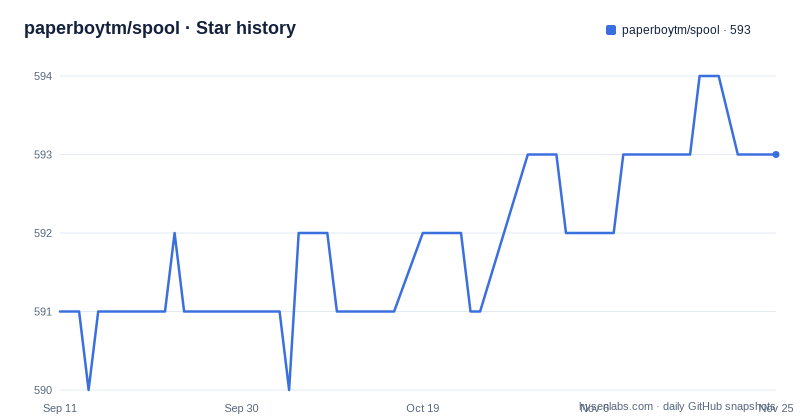
Star history
- paperboytm/spool593 ★ · +2
| Repository | 2026-09-11 | 2026-11-25 |
|---|---|---|
| paperboytm/spool | 591 | 593 |
2 Stars in the last 75 days, measured from the daily GitHub snapshot. Compare with other projects
Editorial analysis
The repository, the package scope and the trademark are three names
The repository is `paperboytm/spool`, the packages inside it are scoped `@spool-lab/*` and `@spool/*`, and the feedback links on the page point at `github.com/spool-lab/spool` rather than at the repository the page lives in. So the canonical organisation appears to be spool-lab while the code sits under a personal account.
The trademark section adds a fourth name. It states that Spool and the Spool logo are trademarks of TypeSafe Limited, and that the MIT licence covers the source code only and does not grant permission to use the name or logo.
On licensing itself, three sources have to be read together. The licence field carried by the repository reports no detected licence, the page has a licence section saying MIT, and a LICENSE file is present at the root. The grant is stated and the file exists, so the practical licence is clear even though the metadata field is empty.
The distribution itself is marked private with version 0.8.5, which matches the newest tag, so there is no package to install from a registry. The install route is a shell script.
Two of five indexed agents publish openly by default
The disclosure model is the thing to understand first, and it is not uniform. Sessions from Claude Code and Codex CLI are Public by default: they can appear on the author's Profile, in Explore and in search. Sessions from Gemini CLI, OpenCode and Pi remain Link-only, and the stated reason is that Discovery does not support them yet.
So an author with five agent CLIs indexed gets two that default to public and three that default to a private link, and the difference is a product gap rather than a decision. The page states this as an early-stage condition rather than a settled policy.
The confirmation step is what keeps it deliberate. Nothing leaves the machine until the author confirms, and the confirmation states both the Project owner and the initial visibility before any upload happens. Bare `spool` does the sequence in order: refresh the local index, sign in through the browser if needed, pick the latest Session in the current project, show what will be shared, scan for sensitive values, confirm the visibility, publish, and return a URL.
Dropping --public on a Team Project fails closed
One flag carries the whole disclosure decision:
spool share --project paperboy/spool --publicUsed together, they publish under a Team-owned Project while keeping the Session Public. Omit `--public` on a Team Project and the command fails closed to Team-only rather than inheriting the public default. In a personal Project, by contrast, the default stays Public.
That asymmetry is deliberate and worth internalising: the more ownership a namespace carries, the tighter the default gets. Teams are role-based, with Owner, Admin and Member, plus invitations, and a Team Project keeps Team ownership whether the Session inside it is Team-only, Link-only or Public. A Team named with the `Team · name` form limits reading to current members, and Team Owners and Admins can change disclosure afterwards.
Publishing into a Team Project therefore transfers control of the hosted asset to the Team, which is the point where a personal share stops being a personal decision.
Withdraw returns 410 Gone, and a Team withdrawal is final
Withdrawal is the one operation where personal and Team ownership diverge in a way that cannot be undone.
For a personal author, withdrawing makes the current hosted copy return `410 Gone`, and the same Session can later be explicitly shared again. For a Team-owned asset, a withdrawal by an Owner or Admin is permanent and cannot be revived by another member. The reason is structural rather than bureaucratic: once control has transferred to a Team, the individual who uploaded it no longer holds the rights needed to bring it back.
The neighbouring operation is designed to be safe. Resume takes a session URL and creates a new provider-native Session locally while preserving its relationship to the source, and the shared source is never modified. That applies to Claude Code and Codex CLI shares today, and a reader can open a shared URL without installing anything at all.
So the lineage is additive. Forking and resuming add work, and only withdrawal removes, which is the right shape for a system whose URLs are meant to be pasted into issues.
A native module is rebuilt before the test suite runs
The build tooling is unusual in three small ways that each say something about the project.
First, there is a native component. A `pretest` script runs `rebuild:native:node` before any test, and that rebuild belongs to `@spool-lab/core`, the package that handles local Session ingestion, SQLite and full-text search. So the local index is not pure JavaScript, and installing from source means compiling something.
Second, the test script passes a concurrency limit of one, so the suite runs serially rather than in parallel. For a project with a shared local index, that is a deliberate choice against flakiness.
Third, the task runner is not npm scripts in the usual sense. Build, typecheck, check, lint and format all go through `vp`, which is vite-plus, and both it and vite are pinned through the `catalog:` protocol rather than with version numbers, so their versions live in the workspace file. TypeScript is pinned exactly at 7.0.2 and the package manager is pnpm 11.14.0.
Two scripts are worth reading for what they imply: a release helper called `taze major -Ir` under the name `up`, and a shell script named `check:phantom-independence`.
Two Cloudflare surfaces are documented and a third is in the tree
The Share Stack section draws the architecture as a directory tree. Under `apps/` it lists a CLI for indexing, sharing, reading, resuming and automation, a web app that serves spool.new with the homepage, docs, Profiles, account and Team pages and the Session reader, and a backend that holds the Hub, identity, Teams, publication and media API on Cloudflare.
Under `packages/` it lists five: `core` for local ingestion, organisation, SQLite and full-text search; `redact` for sensitive-data detection shared by the publishing surfaces; `session-kit` for a browser-safe Session model with canonical records, views and diffs; `session-view` for the shared conversation renderer; and `share-kit` for curated `.spoo` files, which is where the listing cuts off.
The root of the repository adds a `workers/` directory, a root `vite.config.ts` and a `.vite-hooks/` directory, none of which appear in the Share Stack listing. So there is a third Cloudflare-side surface in the tree that the architecture section does not account for, next to a hooks directory whose contents are not described anywhere on the page.
The tooling files sit beside them: `AGENTS.md`, `CLAUDE.md`, `CONTEXT.md`, `CONTRIBUTING.md` and `DESIGN.md` at the root, a `skills/` directory with a `skills-lock.json`, and a `videos/` directory.
The provider Session stays authoritative, Git stays authoritative for code
One sentence in the Share Stack section settles the most important design question: the original provider Session remains authoritative, Git remains authoritative for code, and Spool publishes agent work and its context without replacing the project's source-control system.
That is reinforced elsewhere. A Project is described as a namespace that groups related Sessions without storing source code. The local preparation step collects and organises sessions from all five agents on the machine, before anything is decided about sharing. And the sensitive-data checks detect likely credentials, tokens, personal data and local paths before a share goes out, which is why the confirmation comes after the scan rather than before it.
What gets published is legible on purpose. A Session page moves from a Summary to the conversation, the tool activity, the files that were touched and the net diff, with deep links into individual records. A reader can walk from a one-line summary to the exact diff without installing the CLI.
Agent access is offered through a bundled Spool skill or JSON CLI output from any shell-capable agent, which is the same reason the CLI is designed to be scriptable rather than only interactive.
Editorial conclusion
Spool's sharing model is more deliberate than most, and its defaults deserve reading twice: two of the five indexed agents publish openly unless the author says otherwise, and a Team Project quietly tightens that. It suits a developer who wants to hand a colleague a real session with its tool calls and diff intact, and it does not suit anyone who assumes a share link is private by default, because for Claude Code and Codex CLI it is not. Before your first share, decide whether you want a personal Project or a Team one, read the visibility the confirmation dialog states, keep the redaction scan on, and remember that withdrawing from a Team is permanent while withdrawing a personal share is not.
Frequently asked questions
How do I install the Spool CLI and share a session?
Run curl -fsSL https://spool.new/install.sh | sh, open a new terminal, then run spool inside a project directory. Bare spool refreshes the local index, signs in through the browser, selects the latest Session, scans for sensitive values, confirms the visibility and returns a URL. Use spool share <session-uuid> to pick a specific Session.
Which agent sessions does Spool publish publicly by default?
Claude Code and Codex CLI Sessions, which can appear on the author's Profile, in Explore and in search. Gemini CLI, OpenCode and Pi Sessions stay Link-only until Discovery supports them. Nothing is uploaded before the author confirms, and the confirmation states the Project owner and the initial visibility.
Does sharing a Spool session upload my source code?
A Project groups related Sessions without storing source code, and the page states that Git remains authoritative for code while the provider Session remains authoritative for agent work. A Session page shows the Summary, conversation, tool activity, touched files and net diff, which is why a diff can appear without the code being stored.
Can I continue a shared Spool session on my own machine?
Yes, with spool resume <session-url>, which currently works for Claude Code and Codex CLI shares. Resume creates a new provider-native Session and preserves its relationship to the source, and the shared source is never modified. A reader can also open the URL without installing Spool at all.
Official sources
Add this badge to your README
If you maintain this project, the badge below links readers to this analysis and shows its maintenance status from the daily GitHub snapshot. Paste the markdown into your README; add ?metric=license or ?metric=stars to the image URL for a different field.

[](https://hysenlabs.com/projects/paperboytm-spool)Star history chart for your README
[](https://hysenlabs.com/projects/paperboytm-spool)Was this useful?