Path of Building Community: what its Lua planner actually computes
Offline build planner for Path of Exile.
At a glance
- What is it?
- An offline Path of Exile build planner whose numbers come from blue and red coded modifiers, three passive tree import sites, and a Lua toolchain pinned to Lua 5.1.5 and LuaJIT.
- Who is it for?
- Path of Building Community suits players who want to see the numeric consequence of a passive, a jewel or a unique before committing currency, and suits contributors who want a test harness they can start from one compose file. It does not suit anyone looking for documented support for Path of Exile 2, for cloud saves, or for a headless build service, because none of that appears in the repository.
- Can I use it commercially?
- Check first. The repository uses a licence we do not classify automatically, so read its LICENSE file before any commercial use.
- Is it still maintained?
- Yes. The repository received new commits within the last day.
- What is it written in?
- Mainly Lua, according to GitHub's language statistics.
Answers come from the project's GitHub data, last synced on November 15, 2026, and from our analysis. They are not legal advice.
Star history
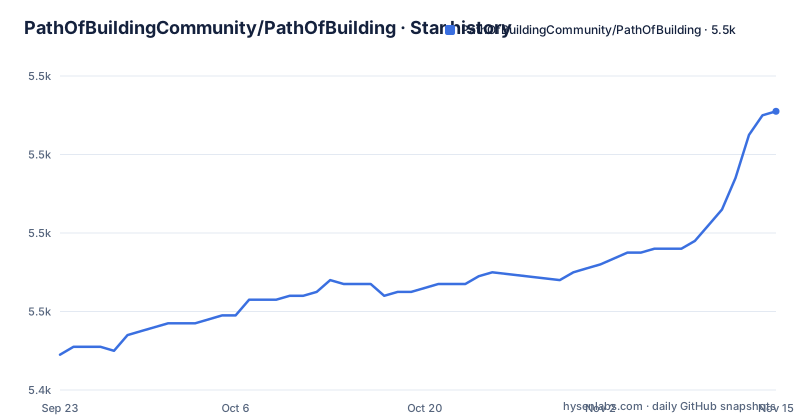
- PathOfBuildingCommunity/PathOfBuilding5,511 ★ · +62
| Repository | 2026-09-23 | 2026-11-15 |
|---|---|---|
| PathOfBuildingCommunity/PathOfBuilding | 5.4k | 5.5k |
62 Stars in the last 53 days, measured from the daily GitHub snapshot. Compare with other projects
Editorial analysis
Blue and red modifiers tell you where its maths stops
Every modifier the calculator recognises is shown in blue, and every modifier it does not recognise is shown in red. The coverage claim is deliberately uneven: all skills and support gems are supported, while most passives and item modifiers are, which means colour is the only warning you get before a number quietly means less than it should.
Inside that boundary the calculation side is dense. It reports skill DPS, damage over time, and life, mana and energy shield totals. Auras, buffs, charges, curses and monster resistances all feed the estimate of your effective DPS, and life and mana reservations are calculated too, so a reserved build shows the pool it actually has left rather than the raw stat on the sheet. A character stat summary sits in the side bar, and a separate calculations breakdown tab shows how each stat was derived. That breakdown is where the blue and red split earns its keep, because it exposes the chain instead of asking you to trust a total.
Minions have full support, and party play and support builds are handled too. What the calculator will not do is model a modifier it has not implemented. An unsupported modifier renders in red and drops out of the totals with no warning beyond the colour.
Share codes and pasted items replace save files
Passive tree, items and skills can be imported from existing characters, and a build is passed to other users by generating a share code.
Items travel the same way. The item planner takes an item straight from the game by copy and paste, and a pasted item that is not corrupted picks up quality automatically. Once it sits in the build it feeds the same offence and defence numbers as everything else, which is the whole point: the planner shows exactly how much an upgrade a given item is, rather than leaving you to read a tooltip and guess. Skill gems get similar treatment. Socketed Gem modifiers from the item a skill is socketed into are applied automatically, and support gems granted by items are applied without being added by hand.
The skill planner accepts any number of main and supporting skills. Auras, curses and buffs count as supporting skills, and each one can be toggled on and off, so the same build can be compared with and without a reservation or a curse.
The README documents no account layer, cloud library or sync path. A generated share code is the whole of the transport.
Passive tree imports only round trip with three sites
The passive skill tree planner reads links from PathOfExile.com and PoEPlanner.com, and shortened PoEURL.com links work as well. Those three sites are the entire documented import path for a tree, so a link from any other planner has to be reallocated by hand.
Jewels are handled as first class objects, including most radius and conversion jewels and most timeless jewels. Planning a reroll has its own trick: hold shift, mouse over a sequence of nodes, then click, and the whole sequence is allocated at once. That is the only bulk allocation path described, and it is a big saving on a long path.
The tree is not a separate spreadsheet. Allocations feed the offence and defence calculations directly, and the view shows what each node will do to the character before you commit to it. Gear and skill changes push back the other way into the same numbers, which is why removing a node shows up in your damage totals and not only in the shape of the tree.
The limit is the import side. Third party support covers the passive tree link alone. Items and skills are imported from existing characters, so a build taken from elsewhere has to have its gear and skills rebuilt by hand.
A unique database that also ships items not in game yet
The item planner carries a searchable database of all uniques currently in game, plus some that are not in game yet. That second group matters, because presence in the database is not proof that a unique can be traded. When you add a unique to a build you choose the modifier rolls yourself, so a build can be planned around a roll combination nobody owns.
League specific items and legacy variants live in the same database. Next to it is a set of rare item templates, where you create a rare for your own character by choosing which modifiers appear on each item and picking the roll for each one. The templates are described as covering the majority of builds, so they are a starting shape rather than a finished gear set.
The crafting system works at a lower level again. You pick any of the game's base item types, choose prefix and suffix modifiers from lists, and can add custom modifiers, with Master and Essence modifiers available. You can also search the trade site for the most impactful items, and the result drops into the same calculation model.
The planner cannot price any of it. Whether a crafted rare is worth the currency, and whether a unique listed on the trade site is a good buy, is settled outside the program, and the README does not cover pricing at all.
The only container in the repo runs the test suite
Both container files in this repository exist for the test suite, not for the planner. The compose service is named busted-tests, it pulls ghcr.io/pathofbuildingcommunity/pathofbuilding-tests:latest, and it runs a single command, busted --lua=luajit, against the source mounted read only at /workdir. HOME is set to /tmp, no-new-privileges is enabled, and port 9966 is published.
services:
  busted-tests:
    #build: .
    image: ghcr.io/pathofbuildingcommunity/pathofbuilding-tests:latest
    container_name: pathofbuilding-tests
    command: busted --lua=luajit
The build line in that compose file is commented out, so the published test image is used instead of a locally built one. The Dockerfile's CMD is not a program either: it echoes a message saying the container is meant to be run with docker compose, and points at CONTRIBUTING.md.
For players, the documented install path is the project's Releases page, which offers an install wizard or a portable zip. What the repository does not contain is an image that starts the planner itself, so headless use of the application is not something these two files get you.
Lua 5.1.5, LuaJIT and Alpine 3.18 are pinned exactly
The toolchain is pinned more tightly than most projects pin anything. The base image is alpine:3.18, the interpreter is Lua 5.1.5 compiled with make linux, and the package manager is luarocks 3.7.0. LuaJIT is not tracked on a branch: the Dockerfile clones it and checks out the commit 2460b3ff93a1c955de3d62cfc825de7d68dc272e. The EmmyLuaDebugger is pinned to the 1.7.1 tag and built with cmake -DCMAKE_BUILD_TYPE=Release.
FROM alpine:3.18 AS base
RUN apk add --no-cache cmake readline-dev build-base tar
RUN apk add --no-cache git
RUN wget https://www.lua.org/ftp/lua-5.1.5.tar.gz && tar -xf lua-5.1.5.tar.gz
RUN cd lua-5.1.5 && make linux && make install
Four luarocks packages are installed for the suite, each at an exact version: busted 2.2.0-1, cluacov 0.1.2-1, luacov-coveralls 0.2.3-1 and luautf8 0.1.6-1. Coverage reporting and the UTF-8 extension are therefore part of that baseline rather than an add on.
Scope is the catch. The documented source build compiles for Linux, and the Windows runtime is a separate archive, runtime-win32.zip, sitting next to the runtime directory in the tree. A container built from this Dockerfile is a test environment for the Lua code, not a cross platform installer for the application.
Three release tags in three days, then a push on 2 October 2026
Release 2.67.2 shipped on 7 August 2026, 2.67.1 on 6 August and 2.67.0 on 5 August, three tags inside seventy two hours. The default branch is dev rather than master or main, the last push to the repository is dated 30 October 2026, and the repository carries no archive flag.
The root holds two changelog files, CHANGELOG.md and changelog.txt, next to RELEASE.md for the release process and CONTRIBUTING.md for code and bug reports. The update machinery is visible in the tree as manifest.cfg, manifest.xml and update_manifest.py, and one script, fix_ascendancy_positions.py, is specific enough to suggest ascendancy node positions have needed correcting before. Automatic updating is part of the application, and most updates are described as taking a couple of seconds.
What those files do not tell you is how to turn the updater off, what it does when a download fails, or how a rollback works. No rollback path is documented in the repository, so the updater is best treated as a fixed part of the client rather than a setting you control.
Editorial conclusion
Path of Building Community suits players who want to see the numeric consequence of a passive, a jewel or a unique before committing currency, and suits contributors who want a test harness they can start from one compose file. It does not suit anyone looking for documented support for Path of Exile 2, for cloud saves, or for a headless build service, because none of that appears in the repository. Check the red modifiers in your own build before trusting a number, and take the installer from the project's Releases page rather than a third party mirror.
Frequently asked questions
How do I install Path of Building?
The install wizard or the portable zip are downloaded from the project's Releases page. The Dockerfile, which compiles Lua 5.1.5 and LuaJIT on alpine:3.18, builds a test environment rather than the planner.
How do I use Path of Building?
Paste an item in from the game, allocate passives on the tree, then add main and supporting skills. Every allocation feeds the offence and defence totals, the breakdown tab shows how a number was derived, and a generated share code passes the build to another user.
Is Path of Building safe to use?
It is an offline build planner, and sharing goes through a generated share code. The README also describes searching the trade site from the item planner, importing from existing characters, and automatic updating. The project's own code is MIT licensed, with third party licences in LICENSE.md.
How do I use Path of Building to find upgrades?
Search the trade site for the most impactful items inside the item planner, drop a candidate into the build, then read the change in damage and life totals. For gear you cannot buy, the rare item templates let you pick modifiers and rolls for an approximate version.
What is a Path of Building share code?
A code generated from a build so other users can open it. It is the only sharing path in the repository, alongside importing the passive tree, items and skills from existing characters.
Official sources
Add this badge to your README
If you maintain this project, the badge below links readers to this analysis and shows its maintenance status from the daily GitHub snapshot. Paste the markdown into your README; add ?metric=license or ?metric=stars to the image URL for a different field.

[](https://hysenlabs.com/projects/pathofbuildingcommunity-pathofbuilding)Star history chart for your README
[](https://hysenlabs.com/projects/pathofbuildingcommunity-pathofbuilding)Was this useful?