Claude Desktop extra shipped two patch builds of one upstream version
Unofficial Linux packages for Claude Desktop AI assistant with automated updates.
At a glance
- What is it?
- claude-desktop-extra repackages Anthropic's official Claude Desktop Linux build for Arch, Debian, Fedora, NixOS, and AppImage, adding Linux-only extras as patches on top. Its release history already holds two patch builds of the same upstream version published on the same day.
- Who is it for?
- claude-desktop-extra is the sane route to Claude Desktop on a distribution Anthropic does not ship a package for, and the pacman repository with a verifiable key fingerprint is the most careful of the four installers it documents. It is redundant on Ubuntu 22.04 or Debian 12, where the official package is available directly, and its Nix package is x86_64 only.
- Can I use it commercially?
- Yes. MIT is a permissive licence: you can use, modify and sell software built on it, as long as you keep its copyright and licence notices.
- Is it still maintained?
- Yes. The repository received new commits within the last day.
- What is it written in?
- Mainly JavaScript, according to GitHub's language statistics.
Answers come from the project's GitHub data, last synced on November 25, 2026, and from our analysis. They are not legal advice.
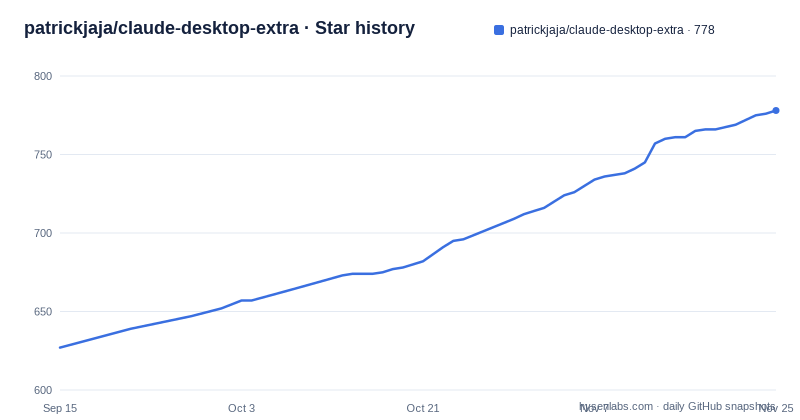
Star history
- patrickjaja/claude-desktop-extra778 ★ · +151
| Repository | 2026-09-15 | 2026-11-25 |
|---|---|---|
| patrickjaja/claude-desktop-extra | 627 | 778 |
151 Stars in the last 71 days, measured from the daily GitHub snapshot. Compare with other projects
Editorial analysis
The extras are patches on a pinned upstream build
The directory layout explains the whole mechanism. A baseline/ directory holds the upstream build, patches/ holds the modifications, and a file called .upstream-version at the root records which upstream release the tree is currently aligned to. That is the right shape for a repackager: the official artefact is not forked, it is patched, and the pin is a file you can read rather than a commit message you have to trust. The extras themselves are JavaScript, matching the repository's primary language, with a separate themes/ directory for the custom themes and a js/ tree for the rest. Everything beyond that is distribution plumbing: packaging/, contrib/, scripts/, site/, docs/, a flake, and git hooks. The boundary the readme draws is that chat, the agent VM, the coding tool, browser tools, and third-party inference all stay upstream.
Two patch releases of one upstream version shipped hours apart
The release history is worth reading as a versioning decision rather than a list. The upstream version is 2.9939.4. It was released on 29 September 2026 as a plain tag. Then on 2 October, two more releases appeared for the same upstream version: patch release 2 at 11:13 UTC and patch release 3 at 17:45 UTC, six and a half hours apart, both titled with the same Claude Desktop 2.9939.4 version string. The last commit to the repository is dated 29 September, before either of them. So the package version, the artefact, and the tag are three different things here, and a version string does not uniquely identify what you installed. For anyone pinning a package version in a reproducible build, that is the thing to design around rather than the upstream number.
The apt route replaces Anthropic's own package without asking
The Debian and Ubuntu route has one behaviour that deserves reading twice. The install script adds the repository once, after which the package installs through the normal manager, and the readme notes that it replaces Anthropic's own package if that is already present, because the two ship the same files. There is no conflict prompt and no migration step; the files simply match. That is the correct behaviour for a drop-in replacement and a surprising one for anyone who installed the official package first and expected dpkg to ask. The route also has the strictest platform floor in the document: Ubuntu 22.04 or Debian 12, which means a glibc of 2.34 or newer. Optional pieces arrive as recommendations rather than hard requirements, so the package installs cleanly on a machine with no virtualisation available at all.
The key fingerprint check is the one manual step
The signed pacman repository is the most carefully specified of the four installers, and the care is concentrated in one instruction. The manual path downloads the signing key, prints it, and then tells you the exact fingerprint it must produce, adding that you should stop if it does not. That is a real supply-chain check, and it is the kind of step people skip. The keyring initialisation command is annotated as necessary on fresh keyrings, containers, and chroots, which is where it usually fails silently. The repository block itself sets the signature level to required with database signatures, and points at the latest-release download path as its server:
[claude-desktop-extra]
SigLevel = Required DatabaseRequired
The result is a pacman repository that can be audited without trusting the install script that configures it.
Five optional dependencies, each tied to one feature
The optional dependency list is short and unusually well annotated, because each entry names the feature it enables. A virtual machine implementation and kernel module are needed for the agent VM feature. A JavaScript runtime is for system MCP servers. An SQLite client is for project detection. A GJS runtime is for the GNOME search provider. And the coding tool is listed as its own entry. None of the five is installed automatically, which is the right default for a desktop package and means the feature list is larger than the working feature list on a fresh machine. The Arch package names them explicitly in its own metadata, so a user reading the package file before installing sees exactly what the base install will and will not do. That mapping is more useful than a general statement that the package has extras.
Nix is the only x86_64-only route and bakes the VM tools in
Every other package format here covers x86_64 and aarch64; the Nix output is x86_64 only, which makes it the one architecture exception in the document. The Nix instructions are written for a declarative setup: a flake input pointing at the repository, one package attribute added to the system package list, and a flake update to move forward. Two details are specific to this packaging model. The login-at-start behaviour and the desktop shortcuts run through the package wrapper, so they survive a garbage collection, which is the failure mode a hand-written desktop entry would hit. And the virtual machine tools, three of them, are baked into the closure, with a documented override to drop them, so a machine that does not want them still carries them in the store until it says otherwise.
Three Arch routes, and none of them compiles anything
Arch users get three documented paths and the distinction between them is about trust, not effort. With an AUR helper it is a single install command, and the build definition is readable on the AUR before you run it: it downloads a prebuilt tarball pinned by checksum and repackages it, so nothing is compiled, and continuous integration rewrites the definition on every upstream release. Without a helper there is the signed repository described earlier, updated by the normal system upgrade. And without any third-party repository at all there is a direct build path that fetches the published build definition and installer script from the release assets and runs the local packaging tool:
makepkg -siThat still downloads a prebuilt artefact rather than building one. Every route therefore ends at the same bytes, which is what makes the checksum check meaningful.
What stays upstream and what the extras actually add
The split between official and extra is stated plainly and worth keeping in view, because it bounds what you are trusting. Chat, the agent VM, the coding tool, browser tools, and third-party inference are all the upstream build, unmodified. The Linux-only additions are computer use, custom themes, multiple profiles, and a quick entry feature, with more collected under a single extra settings entry in the application's own settings menu. Computer use is the one that is not purely cosmetic: it goes through accessibility bridges, which need per-desktop setup, and the readme points at a separate document for those dependencies including the NixOS override. On Ubuntu 22.04 and Debian 12 the documentation says outright that you can install the official package instead and use this project for the other distributions or for the extras.
Editorial conclusion
claude-desktop-extra is the sane route to Claude Desktop on a distribution Anthropic does not ship a package for, and the pacman repository with a verifiable key fingerprint is the most careful of the four installers it documents. It is redundant on Ubuntu 22.04 or Debian 12, where the official package is available directly, and its Nix package is x86_64 only. Before installing, check whether your distribution already has an official build, read which extra features you actually want, verify the printed key fingerprint matches the one in the documentation, and remember that installing over the official package replaces the same files without a conflict prompt.
Frequently asked questions
What is claude-desktop-extra?
It is an unofficial repackaging of Anthropic's official Claude Desktop Linux build for Arch, Debian and Ubuntu, Fedora and RHEL, NixOS, and AppImage, plus its own deb package. Updates arrive through your normal package manager.
Does claude-desktop-extra replace Claude Desktop itself?
On Debian and Ubuntu it replaces Anthropic's own package if that is installed, because the two ship the same files, and no conflict prompt appears. On Ubuntu 22.04 and Debian 12 you can instead install the official package directly and use this project only for the extras.
What extras does claude-desktop-extra add?
Computer use, custom themes, multiple profiles, and a quick entry feature, with more under the Extra entry in the application's settings. Chat, the agent VM, the coding tool, browser tools, and third-party inference remain the official upstream build.
What does the agent VM feature need on Linux?
It needs QEMU and KVM, which are listed as optional dependencies and are not installed automatically. On Debian and Ubuntu they arrive as recommendations and only the kvm group step remains, and on Nix the tools are baked into the closure with a documented override to drop them.
How do I verify the claude-desktop-extra signing key?
Download the key, print it, and check that the fingerprint matches the one in the documentation before importing and locally signing it. The readme says to stop if it does not, and notes that keyring initialisation is needed on fresh keyrings, containers, and chroots.
Official sources
Add this badge to your README
If you maintain this project, the badge below links readers to this analysis and shows its maintenance status from the daily GitHub snapshot. Paste the markdown into your README; add ?metric=license or ?metric=stars to the image URL for a different field.

[](https://hysenlabs.com/projects/patrickjaja-claude-desktop-extra)Star history chart for your README
[](https://hysenlabs.com/projects/patrickjaja-claude-desktop-extra)Was this useful?