Five frames per second is the whole design
Open-Source AI Camera Skills Platform, AI NVR & CCTV Surveillance. Local VLM video analysis with Qwen, DeepSeek, SmolVLM, LLaVA, YOLO26. LLM-powered agentic security camera agent — watches, understands, remembers & guards your home via Telegram, Discord or Slack. Pluggable AI skills. OpenAI, Google, Anthropic or local AI. Runs on Mac Mini & AI PC.
At a glance
- What is it?
- DeepCamera is a platform of interchangeable camera skills that run vision models on your own hardware. Its entire pipeline is governed to five frames per second, the two most privacy-sensitive skills are marked planned rather than built, and installing a community skill means letting a language model read a manifest and decide what to install on your machine.
- Who is it for?
- DeepCamera suits someone who wants detection and behaviour analysis on their own cameras without sending video anywhere, and the local-inference design plus the depth-based anonymisation skill are genuinely thoughtful answers to the privacy problem. Three things to weigh before you install anything into it.
- Can I use it commercially?
- Yes. MIT is a permissive licence: you can use, modify and sell software built on it, as long as you keep its copyright and licence notices.
- Is it still maintained?
- Yes. The repository last received commits 59 days ago.
- What is it written in?
- Mainly JavaScript, according to GitHub's language statistics.
Answers come from the project's GitHub data, last synced on November 14, 2026, and from our analysis. They are not legal advice.
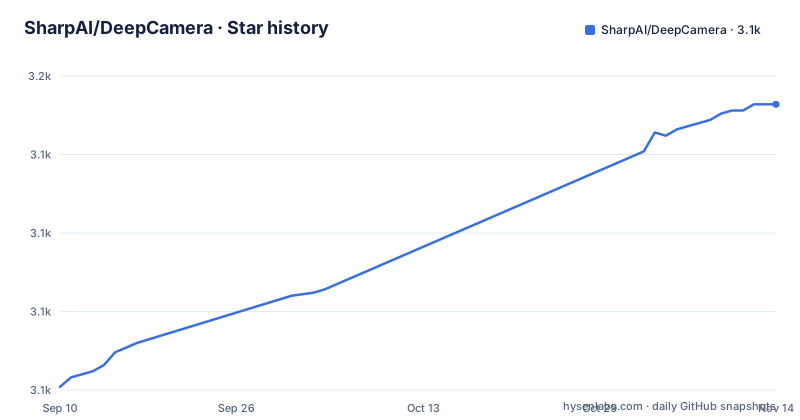
Star history
- SharpAI/DeepCamera3,141 ★ · +90
| Repository | 2026-09-10 | 2026-11-14 |
|---|---|---|
| SharpAI/DeepCamera | 3.1k | 3.1k |
90 Stars in the last 65 days, measured from the daily GitHub snapshot. Compare with other projects
Editorial analysis
Three releases, three products, three version schemes
The release list for this repository contains three tags and they do not belong to the same thing.
The newest is a calendar-style version with a milestone name attached, describing the skills platform milestone. The second is not a version number at all: it is a single word, the name of the desktop application, with a quick-release label. The third is an ordinary three-part version, and it is from 2022, described as a release of the hub package rather than of the camera platform.
So one repository has shipped three products under three naming conventions, and the oldest of them predates the other two by three and a half years.
The Python index tells you which thread is which. The badges on the front page point at a package whose name matches the oldest release, and a downloads badge sits next to it. So the language-runtime lineage of this project runs through a package whose last tagged version here is from 2022, while the platform people are actually told to install is versioned by calendar.
That is not necessarily bad; projects that rename themselves accumulate this. It does mean the release page cannot be read as a history of one thing, and anyone pinning needs to know which of the three they are pinning.
The pipeline is throttled to five frames per second
The single most consequential number in this readme is inside a diagram, in a box labelled as a governor, and it is five frames per second.
The flow it sits in is: a camera feed arrives, the governor samples it at that rate, writes a frame as an image file to a shared volume, and hands it to whichever skill is listening over the line protocol. Detection skills read that stream and write their results back.
So whatever hardware you have, the platform asks a vision model to look at five images a second and no more. That single decision is what makes local inference on a small machine plausible at all: a general detection model can comfortably do five frames a second on a recent laptop chip or a USB accelerator, and would struggle on much more than that. It also means the platform is built for event detection rather than for tracking, because at five frames a second you can see that something happened and roughly when, not what a person did between frames.
Anyone expecting high frame-rate tracking from this will be disappointed, and the diagram rather than the prose is where that is decided.
One protocol, four accelerator backends, one hardware layer
The interchangeability claim is concrete and it works by hiding everything behind one interface.
A skill is a self-contained module with its own model, its own parameters and its own communication protocol, and it may be a Python virtual environment or a container. The desktop application writes a frame to the shared volume, sends a frame event on the skill's standard input, and reads detections from its standard output. The documentation is explicit that every detection skill is interchangeable from the application's perspective, and that the application sees identical output from all of them, so overlays, alerts and post-hoc analysis work with any backend.
Underneath that, a shared module handles hardware detection and model conversion, and the documentation names four targets: a vendor toolkit for one GPU family, a CoreML path for Apple silicon, an OpenVINO intermediate representation for Intel hardware, and an ONNX path for the remaining cases. A fifth skill targets a USB edge accelerator through a different runtime and delegate.
Two details are worth noting. Model conversion happens at install time, so one published model becomes four runtimes. And the documentation pins a Python version range and three operating systems for the USB accelerator path specifically, which is the only place a version range appears.
A skill whose job is to anonymise your own feed
Among the catalogue entries there is one that is not about detection at all, and it is the most interesting idea in the readme.
It is a privacy skill, built on a depth-estimation model, described as a real-time depth-map privacy transform that anonymises camera feeds while preserving activity.
That is a different proposition from blurring. A depth map replaces the picture with geometry, so whatever a face or a number plate looked like is not recoverable from it, while the fact that a person moved through a room is. The status column marks it ready.
This matters because the platform's other planned skills are about identifying people, and the honest summary of the product is that it can both recognise and forget on the same feed. A deployment that installs the identification skills but not this one has chosen differently from a deployment that installs both, and nothing in the documentation says which combination is intended.
There is also a benchmark entry in the same table: an evaluation suite of one hundred and forty-three tests for the security performance of the language and vision models, which is the only measurement in the repository.
Installing a community skill means an LLM agent decides what to install
This is the part to read twice, because the documentation presents it as a feature and it is a supply-chain decision.
The stated position is that skills are installed by an autonomous language-model deployment agent, explicitly not by shell scripts described as brittle. When you click install in the desktop application, a focused agent session reads the skill's manifest and works out what to do. The first documented step is to probe: read the manifest, the Python requirements file and the JavaScript package file to understand what the skill needs. The second is to detect the hardware.
So the install path for a contributed skill is a language model reading three files written by whoever contributed the skill, and then choosing what to install and run on your machine. The alternative it replaces is a script whose contents you can read in full before running, which is the thing the documentation calls brittle.
Both framings are fair in isolation. What makes it worth flagging is the combination with the discovery surface: every skill is indexed in a JSON registry file in the repository for programmatic discovery, and the roadmap calls for community-contributed skills installed and configured by the agent.
That is an open pipeline from a community contribution to code execution on your host, with a model in the middle. If you install skills from outside your own control, review the three files the agent would read.
Face recognition and plate recognition are marked planned
The catalogue carries a status column with three values, and reading it changes what the product currently is.
Six entries are marked ready. One, the Intel-accelerated variant of the detection skill, is marked as still being tested. Everything else in the table is marked planned.
What is on the planned list matters. Face detection and recognition is there, described as identifying known faces from camera feeds. License plate detection and recognition is there, described as reading plate numbers from feeds. So are the model fine-tuning skill, the three automation triggers, and the bridge that would expose the platform to a home automation system.
So the two capabilities that would make this a recognition system rather than a detection system are not built. That is worth stating plainly, because the front page's prose lists person re-identification and facial recognition among what the skills give your cameras, and a reader who does not read the table will believe those work today.
The status legend is honest and the prose is expansive, and the table is the one to trust.
The only unfinished roadmap item is the extensibility
The roadmap has six entries and five of them are ticked.
Ticked: a pluggable interface for capabilities, a store interface in the desktop application for browsing and configuring skills, installation of community skills assisted by the agent, hardware-aware installation that detects the machine and installs matching frameworks, and a shared hardware configuration module covering the major accelerator families and plain processors.
The sixth is unticked, and it is the one that says skill development: nineteen skills across ten categories, described as actively expanding with community contributions.
So the platform's architecture is complete and its catalogue is not, which is the honest state of a young plugin system. It also means the nineteen number in that line is the one to plan against rather than the count of rows in the table, which is smaller because most of them are placeholders.
The framework is finished and the plugins are the work. That is a normal shape for this kind of project and it is the reason the agent-based install path matters so much: the extension surface is the product, and it is open.
Two contribution files that differ only in capitalisation
The repository root has small things in it that suggest how it grew, and one of them is a papercut.
There is a contribution guide and a contributions guide. They differ only in the capitalisation of one letter, on a project whose primary language is JavaScript and whose skills are Python, which means the development happens on case-sensitive filesystems and these are two different files. A contributor following one link will not find the other's content.
There is also a manifest file at the repository root using the same name and interface as the skills it distributes, which suggests the repository is itself packaged as one. Alongside it is a directory of the same name for agent instructions, a site configuration file for the documentation site, a container directory, and a continuous integration configuration file from a service that has largely been superseded.
None of that matters much on its own. It does add up to a picture of a project whose platform is well documented and whose repository housekeeping is being kept up by hand, which is worth knowing before you file anything here.
Editorial conclusion
DeepCamera suits someone who wants detection and behaviour analysis on their own cameras without sending video anywhere, and the local-inference design plus the depth-based anonymisation skill are genuinely thoughtful answers to the privacy problem. Three things to weigh before you install anything into it. Read what installing a skill actually means here, because the install step is a language model agent reading a contributed manifest and choosing what to put on your machine, which is a supply-chain surface rather than a checksum. Check the status column in the catalogue before planning around a capability, because most of the interesting entries are marked planned. And decide who is in frame before you turn on re-identification or face recognition, because those run over a feed that also sees everyone else who walks past your house.
Frequently asked questions
what is deep camera
In this repository, DeepCamera is an open-source skills platform that gives cameras local machine-learning capabilities: object detection, segmentation, person re-identification and scene analysis, run on your own hardware with inference kept local. It has nothing to do with physical depth sensors, which is the other thing the name usually refers to.
What is the best secure AI camera app for PC?
This repository does not rank applications. What it describes is its own platform: interchangeable skills behind one line-based protocol, all inference on local hardware, a frame governor that samples at five per second, and a desktop companion that sets the environment up for you.
What is a depth camera used for?
For measuring physical depth with a sensor, which this repository does not use. It does include a depth-estimation skill, and there its purpose is the opposite: to anonymise a camera feed by replacing identifiable detail with geometry while leaving activity detectable.
Which AI security camera is the best?
Not answered here, and the repository is not about camera hardware anyway. It is a software platform that runs on cameras you already have, and its catalogue marks most capabilities, including face recognition and plate recognition, as planned rather than ready.
Official sources
Add this badge to your README
If you maintain this project, the badge below links readers to this analysis and shows its maintenance status from the daily GitHub snapshot. Paste the markdown into your README; add ?metric=license or ?metric=stars to the image URL for a different field.

[](https://hysenlabs.com/projects/sharpai-deepcamera)Star history chart for your README
[](https://hysenlabs.com/projects/sharpai-deepcamera)Was this useful?