paxm: one local SQLite memory across eleven coding agent integrations
Persistent, provider-neutral memory for Codex, Claude Code, OpenCode, Pi, and MCP coding agents.
At a glance
- What is it?
- paxm is a Go CLI and hook set that stores decisions in a local SQLite file and hands them to later Codex, Claude Code, OpenCode, Pi and MCP sessions. The install path, the version pinning and the profile routing all have edges worth reading before you trust it.
- Who is it for?
- paxm is worth a trial on anyone who restates the same architecture decisions to every new agent session and wants one local database behind that habit. Before trusting it, set PAXM_VERSION so the installer stops moving, run the first recall check and find out which profile a write lands in, and read docs/agent-integrations.md before enabling Codex, since the passive hook there can end up registered twice.
- Can I use it commercially?
- Yes. Apache-2.0 is a permissive licence: you can use, modify and sell software built on it, as long as you keep its copyright and licence notices.
- Is it still maintained?
- Yes. The repository last received commits 79 days ago.
- What is it written in?
- Mainly Go, according to GitHub's language statistics.
Answers come from the project's GitHub data, last synced on November 15, 2026, and from our analysis. They are not legal advice.
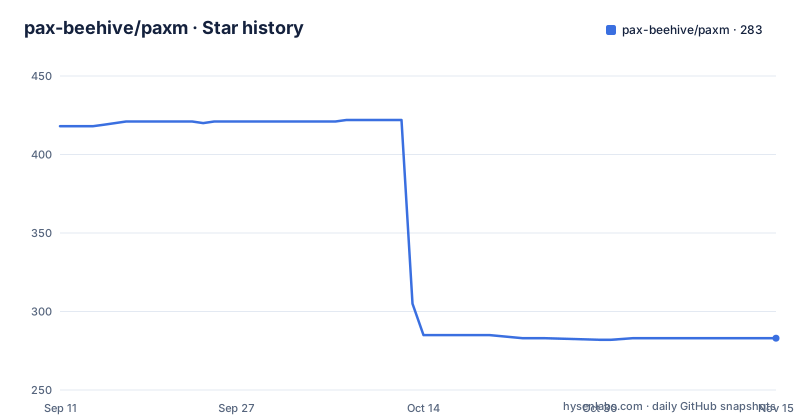
Star history
- pax-beehive/paxm283 ★ · -135
| Repository | 2026-09-11 | 2026-11-15 |
|---|---|---|
| pax-beehive/paxm | 418 | 283 |
-135 Stars in the last 65 days, measured from the daily GitHub snapshot. Compare with other projects
Editorial analysis
The Codex marketplace ref sits on a different version line from the releases
The four line Codex install pins the plugin marketplace to a named ref before it touches the binary:
codex plugin marketplace add pax-beehive/paxm --ref paxm-memory-v0.1.4
codex plugin add paxm-memory@pax-agent-nexus
curl -fsSL https://github.com/pax-beehive/paxm/releases/latest/download/install.sh | bash
paxm setup --integration codex-plugin
Two version numbers meet in one block. The published release line is at v0.2.6, cut on 2026-07-26, with v0.2.5 and v0.2.4 both dated 2026-07-25, while the marketplace ref belongs to a separate paxm-memory series sitting at v0.1.4. Nothing in those four lines says which one the hook code actually comes from, so a reader who assumes the plugin moves in step with the CLI has no way to check.
The Claude Code path adds the same marketplace with no ref at all, so the two plugin installs resolve to different states of one repository:
curl -fsSL https://github.com/pax-beehive/paxm/releases/latest/download/install.sh | bash
claude plugin marketplace add pax-beehive/paxm
claude plugin install paxm-claude@pax-memory
paxm setup --integration claude-plugin
One more asymmetry sits in the first block. The plugin registers active memory skills and owns the passive Codex hooks after setup, and it never installs a binary. That is why the curl line is still in the list: the block is a plugin install plus a separate binary install, not one step.
The installer follows latest, and PAXM_VERSION is the only brake on it
The generic path opens with the same unpinned line every time:
curl -fsSL https://github.com/pax-beehive/paxm/releases/latest/download/install.sh | bash
paxm setup
paxm config doctor
The `latest` segment of that download path follows whatever release is newest at the moment you run it, so two people installing on different days get different binaries with nothing in either shell history recording which one landed. The documented way to stop that is to set PAXM_VERSION before installation, which the project offers as the route to a reproducible version and to a rollback.
That advice matters more here than in most repositories, because the newest release is not the newest code. The last push to the default branch is dated 2026-08-28, while v0.2.6 was published on 2026-07-26. Everything committed in that gap, about a month of it, sits on the default branch and is absent from the installer. The README prints no version number inside that install block, so the only way to learn which build you have is to ask the binary, and `paxm config doctor` is placed at the end of the block for exactly that kind of question.
`paxm history --days 1` and the localhost dashboard serve the same need. Once a passive integration starts writing without you, you need a way to see what it captured.
Setup asks two questions and hands every routing decision to a config file
`paxm setup` with no integration flag opens a terminal form that asks exactly two things: which providers to enable, and which agents get passive memory. Agents already present on the machine come pre-selected and tagged `(detected)`, cloud provider API keys are masked as they are typed, and every other setting takes a default. Keys are the part to watch, because the local SQLite path needs none of them while the remote providers, Zep, Mem0, MemOS and OpenViking, all want connection details before they can be switched on.
Scripts do not have to answer either question. The repeatable flag form skips the prompts outright, and the documented example enables one provider and two agents:
`paxm setup --provider sqlite --agent codex --agent claude`
What the form deliberately never asks about is the part that decides behaviour later: storage paths, profile selection, routing policy between providers, and per hook behaviour. All four are named as living in the config file, with `docs/config.md` given as the place to read about them. The interactive path is therefore a two question installer sitting on top of a much larger policy surface, and the size of that surface is invisible from the terminal. The non interactive path has the same shape: `--user-id todd --team-id pax-core` sets identity and team in one call, and everything past that is still the config file.
Identity resolution is what makes per agent profiles possible, since agents are named by combining a user ID with the agent, in the form `codex-todd`.
Team Memory resolves identity from a paxl device, and paxl is not in this repository
Select Team Memory during setup and identity resolution leaves the project. Setup reads the on-prem user ID from paxl device status, falls back to channel status for compatibility, and only falls back to the `$USER` environment variable when neither is available.
Two consequences follow. The first is that the no account promise is scoped. A local SQLite setup needs no account, no API key and no embeddings, but a Team Memory setup depends on a device connection this repository does not contain. There is no paxl package in the top level tree, no vendor directory, and no module requirement for it in go.mod, so that lookup is a call out to a tool installed somewhere else on the machine. If the tool is absent, or if its status output changes shape, the documented fallback is a shell variable, and the resulting identifiers are whatever `$USER` happens to say.
The second is a deliberate limit on where secrets land. Team Memory can derive a scoped agent credential from that same paxl device connection, and the project states that paxm never writes that secret to `config.yaml`. That is a sensible boundary for a tool whose whole purpose is reading your prompts, and it also means the credential cannot be inspected or rotated by editing the config, which pushes the rotation question back to the device side.
Team IDs are the other half. Supplying one creates an explicit durable write profile, `team-pax-core` in the documented example, which is how a write becomes shared rather than personal.
Profiles decide where a write lands, and the documented recall never names one
The headline example writes with a profile and reads without one:
paxm remember --profile ltm --text \
"Production deploys run through GitHub Actions; never deploy from a laptop"paxm recall --query "how do we deploy production?"Nothing connects those two halves. `--profile` appears on the write and is absent from the read, so which stored profile a query searches, and whether a profile scoped write is visible to an unscoped read, is settled by routing policy in the config file rather than by the command line. Three profile names appear across the documentation: `ltm` in the deployment example, `stm` in the first run check, and `team-pax-core` for a team scoped durable write. The first run check is the one to copy when you want to know whether the loop is closed at all:
paxm config doctor
paxm remember --profile stm --text "PAXM_FIRST_RECALL_OK"
paxm recall --query "PAXM_FIRST_RECALL_OK"
paxm history --days 1
Read as a contract, that sequence goes: the doctor reports the environment, remember writes, recall reads back the same literal string, and history shows what was written on the day. If the recall comes back empty, the first suspect is not retrieval quality but a routing decision that kept the profile out of the read path, which is exactly the part routed to a file rather than to a flag. Run this loop before believing any claim about passive memory, since the passive path writes on its own and the same routing rules govern both.
SQLite error 14 is what a read-only parent directory looks like
The default provider is a local SQLite file, and the project is unusually candid about how that file fails. A SQLite database in WAL mode keeps its log and shared memory files beside the database itself, so a health check needs permission to create files in the parent directory, not merely permission to read the database. A sandbox that can open the file and read from it but cannot write next to it fails, and the symptom arrives as SQLite error 14 rather than anything mentioning permissions.
The documented workaround is to point sandboxed evaluations at an isolated writable path, and the sentence right after it is the one that should shape expectations: the same configuration can be healthy in the real agent process. A green result from a sandboxed run is therefore evidence about the sandbox, not about your setup, and a red result from one is not by itself evidence that the agent will fail. The top level tree carries an `evals/` directory and the path change is scoped to evaluations, so an eval run and a daily driver run are not comparable results unless the paths are aligned first.
`paxm config doctor` sits immediately after setup in the documented flow, which is the only place the project puts an environment check in front of the first write. Run it in the environment you actually intend to use, for the same reason.
Two claimants for the same Codex hook, and five hooks on the Claude side
Passive memory needs somewhere to hang, and for Codex there are two possible owners. The bundled paxm-memory plugin owns the passive hooks after setup, and the project is explicit that when that plugin is in use you should let it own them, because otherwise paxm registers a duplicate global hook. The cost of getting this wrong is not a slow degradation: the same event fires the memory path twice.
Trust is a separate step from ownership. A new Codex task asks you to trust the Pax Agent neXus hooks when `/hooks` prompts, and the plugin does not bypass that prompt on its own. A Codex install therefore has three places where the loop can be lost: the marketplace ref, the binary install, and the hook trust decision.
The Claude Code plugin is the one place where the full hook set is enumerated, and it has five: `SessionStart`, `UserPromptSubmit`, `PostToolUse`, `PostToolUseFailure`, and `Stop`. That set explains the shape of the design. Recall happens at session start and again before each prompt, and capture happens after tools run and when the turn stops, with tool failure tracked separately from tool success.
Bootstrap is not uniform across clients. Codex, Claude Code and Pi use their own session start events, while OpenCode has no such event, so paxm performs the same bootstrap before the first message in a session instead. There is a second clock as well: if a later user input arrives more than twelve hours after the preceding turn activity, the local time and time zone context is refreshed before the agent handles that input. A session left open overnight therefore does not inject yesterday's date.
Five targets in the summary line, eleven integrations in the body
The one line summary describes paxm as memory for Codex, Claude Code, OpenCode, Pi and MCP coding agents. The body of the page widens that to eleven named clients by adding Cursor, TRAE, TRAE CN, Kimi Code, ZCode, Kiro and Cline, and each is wired differently rather than through one adapter. OpenCode gets a global local plugin written under `~/.config/opencode/plugins/`, Pi gets a passive extension, and the remaining clients get a native hook or MCP integration documented as preserving unrelated client configuration.
The provider list has the same shape, and go.mod is where the asymmetry shows. Of the remote providers named in the documentation, exactly one has a Go client in the direct require block: `github.com/getzep/zep-go/v3 v3.23.0`. There is no module for Mem0, MemOS or OpenViking, and the only provider example checked into the repository is `examples/jsonrpc-provider/`, which is the private provider path rather than any of the three hosted ones. The local path has no client library beyond `modernc.org/sqlite v1.53.0`, consistent with a design that promises no embeddings and no extra memory layer model calls. Whether the three unlisted providers are reached over plain HTTP or over MCP cannot be answered from the module file.
One limit on all of the above: the published page stops mid-sentence, immediately after pointing at `docs/agent-integrations.md` for exact event mappings, paths, host limitations, verification and rollback. The provider reference, the documentation index and anything about licensing sit past that line and are not visible here.
Editorial conclusion
paxm is worth a trial on anyone who restates the same architecture decisions to every new agent session and wants one local database behind that habit. Before trusting it, set PAXM_VERSION so the installer stops moving, run the first recall check and find out which profile a write lands in, and read docs/agent-integrations.md before enabling Codex, since the passive hook there can end up registered twice.
Frequently asked questions
What does paxm need before it can store a memory?
On the local SQLite path, nothing beyond the installed binary: no account, no API key and no embeddings. Zep, Mem0, MemOS and OpenViking each want connection details during setup, and Team Memory resolves the user ID from paxl device status.
Which coding agents can read back a memory that paxm stored?
The integration list names Codex, Claude Code, OpenCode, Pi, Cursor, TRAE, TRAE CN, Kimi Code, ZCode, Kiro and Cline, plus any MCP compatible client. A decision captured in one session is read from another, which is the point of a single memory path.
How do I pin a paxm version so an install is repeatable?
Set PAXM_VERSION before installation. The documented installer resolves the releases/latest path, so without that variable the binary you get depends on which release happened to be newest when you ran it.
What should I do when paxm reports SQLite error 14?
SQLite has to create WAL and SHM files beside the database, so a sandbox that can read the database but cannot write its parent directory can fail that way. The documented fix is an isolated writable SQLite path for sandboxed evaluations.
Official sources
Add this badge to your README
If you maintain this project, the badge below links readers to this analysis and shows its maintenance status from the daily GitHub snapshot. Paste the markdown into your README; add ?metric=license or ?metric=stars to the image URL for a different field.

[](https://hysenlabs.com/projects/pax-beehive-paxm)Star history chart for your README
[](https://hysenlabs.com/projects/pax-beehive-paxm)Was this useful?