getspecstory writes every AI coding session into one folder, and its own repository keeps that folder in git
Install our local first extensions for your favorite AI IDE or Terminal Agent. Process your histories into reusable skills with Lore. Sync your conversations to the cloud. File issues and requests.
At a glance
- What is it?
- A Go CLI plus two closed source IDE extensions capture conversations from a long list of agents into .specstory/history/, with cloud sync and chat marked as the optional steps and the cloud column annotated as login required. The install table and the architecture diagram name different agent sets, the only documented install command is Homebrew, and an install.sh sits in the root that the install section never mentions.
- Who is it for?
- This is a good fit if you want one searchable record of what your agents actually did across a dozen tools, and if you are the kind of user who is comfortable with a background process writing files into every project directory. Decide before you install whether that history ever leaves the machine, because capture is unconditional and only sync is a choice you make per session.
- Can I use it commercially?
- Yes. Apache-2.0 is a permissive licence: you can use, modify and sell software built on it, as long as you keep its copyright and licence notices.
- Is it still maintained?
- Yes. The repository last received commits 2 days ago.
- What is it written in?
- Mainly Go, according to GitHub's language statistics.
Answers come from the project's GitHub data, last synced on November 15, 2026, and from our analysis. They are not legal advice.
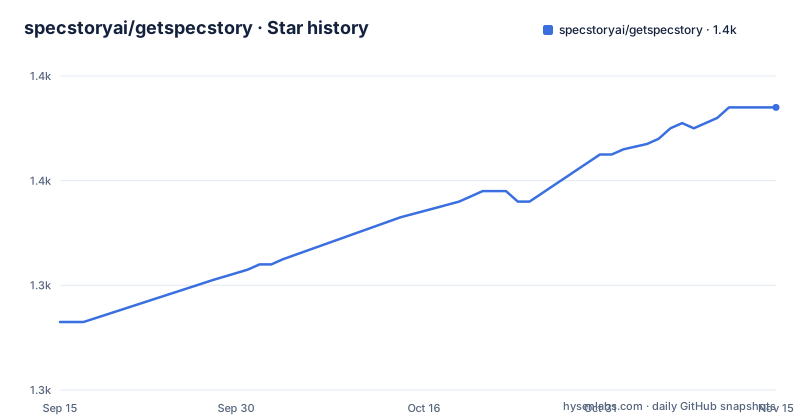
Star history
- specstoryai/getspecstory1,374 ★ · +41
| Repository | 2026-09-15 | 2026-11-15 |
|---|---|---|
| specstoryai/getspecstory | 1.3k | 1.4k |
41 Stars in the last 61 days, measured from the daily GitHub snapshot. Compare with other projects
Editorial analysis
Capture is unconditional and the cloud column is annotated as login required
The pipeline is one folder. Every listed agent writes into `.specstory/history/` inside the project, described as auto saved locally, and the workflow names that first step Capture with no opt in attached. Only two of the seven workflow steps carry an Optional label: Sync, to SpecStory Cloud for safekeeping and team sharing, and Chat, which asks questions across your sessions in the cloud. Search, Share, Resume, and Process are written without that label, though Search and Resume are each phrased with a local alternative first. The architecture diagram makes the same split visually, with the third column headed Cloud Platform and the parenthetical Login Required sitting above it while the Local First column carries none. So the boundary is not between free and paid features, it is between what lands on your disk and what needs an account.
The diagram and the install table name different sets of agents
Two lists of supported tools sit within a few lines of each other and they are not the same list. The diagram stacks thirteen names into the arrow pointing at the history folder: Cursor IDE, Copilot IDE, Claude Code CLI, Cursor CLI, Codex CLI, Droid CLI, DeepSeek TUI, Antigravity CLI, Grok Build, Muse Code, OpenCode, Pi, and Qwen. The installation table below it is a different shape, one row per agent with type, minimum version, product, source, and install command. Gemini CLI appears in that table, with its own minimum of 0.15.1+, and it does not appear in the diagram. Anyone counting integrations from the picture gets a different answer than anyone reading the table, and the page does not say which list is current.
Two integrations are closed and the rest are provider packages inside this repository
The Source Code column splits the list cleanly. The Cursor extension and the VS Code Copilot extension are both marked Closed, so for the two IDE agents there is nothing in the tree to read. Every CLI agent is marked Open and links into the same directory, `specstory-cli/pkg/providers/`, with one package per agent: claudecode, codexcli, cursorcli, droidcli, geminicli, deepseektui, antigravitycli, and musecode. That layout is the real architectural fact about this project. Adding an agent is adding a provider package behind a shared interface, not patching the capture path, and the fact that the directories exist in the tree means the provider list is enumerable by looking rather than by asking. The primary language of the repository is Go, and the CLI is the Go part.
Homebrew is the only install command offered, and install.sh is never mentioned
Every CLI row of the installation table repeats the same two line sequence:
brew tap specstoryai/tap
brew install specstory
The two IDE rows offer something different and equally manual: search for SpecStory in Extensions and install it from the marketplace. So there are exactly two install stories in the table, one per product type, and no third option for anyone. No curl one liner, no `go install`, no package from a language registry, and no Windows path, since Homebrew does not provide one and nothing else is offered. Meanwhile the repository root contains an `install.sh`, alongside a `.goreleaser.yml` for the Go release pipeline and a `scripts/` directory. A shell installer exists on disk and the installation section does not point at it, which leaves the script's behavior and its relationship to the tap undocumented here.
The repository keeps its own capture directory in git
`.specstory/` is listed as a top level entry, which means this project commits the conversation history that its own tooling produces. Sitting next to it are `workthreads/`, `PLAN.md`, `lore/`, `scripts/`, a `.claude-plugin/` directory, and `.cursorindexingignore`. That last file is the one with a mechanism worth understanding. If the capture folder sat inside a Cursor indexed workspace, the agent's own prior conversations would become retrievable context for the next prompt, so an ignore file at the root is how the loop is broken. The other committed artifacts say the same thing from a different angle: this is a working repository with internal notes in it, not a packaged distribution. The license is Apache-2.0 with the text in `LICENSE.txt`, which is the only file at the root with that extension rather than a bare LICENSE name.
The contribution link and the provider links point at two different branches
The README sends you two ways into the source. The Contribute to OSS link goes to `tree/main/specstory-cli`, and every Source Code link in the installation table goes to `tree/dev/specstory-cli/pkg/providers/...`. The repository's default branch is dev. So the top level pointer lands on a branch that is not the default, and the per provider pointers land on the one that is, and the page does not reconcile the two. Releases make the gap more consequential: v2.15.1, v2.15.0, and v2.14.1 all landed in the last ten days of September 2026, and the branch itself was pushed on 2026-10-02, the day before this snapshot. Reading a provider directory therefore means reading whatever is on dev now rather than what shipped in any of those three tags.
Every agent carries a minimum version, written three different ways
The Min Version column is the one that will bite someone on an older install, and its formatting is inconsistent. Most rows carry a v prefix: v0.43.6+ for Cursor, v1.300.0+ for Copilot, v1.0.27+ for Claude Code, v0.42.0+ for Codex CLI, v2025.09.18+ for Cursor CLI, v0.56.3+ for Droid CLI, v1.1.5+ for Antigravity CLI. Three rows carry bare numbers instead: 0.15.1+ for Gemini CLI, 0.8.39+ for DeepSeek TUI, and 0.1.0+ for Muse Code. The floors themselves differ by two orders of magnitude, from a patch level to a date based Cursor build to a 0.1.0 first release, so this column is really per agent compatibility trivia rather than one policy. What the page does not say is what an agent below its floor does: no error text, no warning, and no note about a missing history folder, which leaves the most useful diagnostic undocumented.
Editorial conclusion
This is a good fit if you want one searchable record of what your agents actually did across a dozen tools, and if you are the kind of user who is comfortable with a background process writing files into every project directory. Decide before you install whether that history ever leaves the machine, because capture is unconditional and only sync is a choice you make per session. Check two things the documentation does not settle: what happens to your capture when you work under an agent older than the listed minimum, and whether you want `.specstory/` committed, since this project keeps its own in the repository. Read the privacy section of the vendor's own site before you turn sync on, not the install table.
Frequently asked questions
Does SpecStory upload my AI conversations automatically?
No. Interactions are saved locally to .specstory/history/ and the page states the data stays on your machine unless you choose to sync to SpecStory Cloud. Sync and Chat are the two workflow steps marked Optional, and the Cloud Platform column of the diagram is annotated Login Required.
How do I install the SpecStory CLI?
Through Homebrew, with brew tap specstoryai/tap followed by brew install specstory. That same pair of commands is the documented installation for every CLI agent in the table, while the Cursor and Copilot extensions are installed from their marketplaces.
Which SpecStory integrations have open source code?
The CLI providers are open and live under specstory-cli/pkg/providers, one package per agent including claudecode, codexcli, cursorcli, droidcli, geminicli, deepseektui, antigravitycli, and musecode. The Cursor and VS Code Copilot extensions are marked Closed.
What does the lore command do in getspecstory?
It is the Process step of the workflow, mining your captured history into reusable, evidence backed agent skills. Its material is kept in the lore directory at the repository root, and it is what the OSS contribution link points at as well.
What minimum agent versions does SpecStory require?
Each row of the installation table carries one, such as v1.0.27+ for Claude Code, v0.42.0+ for Codex CLI, and 0.15.1+ for Gemini CLI, with the floor written both with and without a v prefix depending on the row. The page does not describe what happens when an agent is older than its listed minimum.
Official sources
Add this badge to your README
If you maintain this project, the badge below links readers to this analysis and shows its maintenance status from the daily GitHub snapshot. Paste the markdown into your README; add ?metric=license or ?metric=stars to the image URL for a different field.

[](https://hysenlabs.com/projects/specstoryai-getspecstory)Star history chart for your README
[](https://hysenlabs.com/projects/specstoryai-getspecstory)Was this useful?