Radiant: 94 canvas and WebGL shaders you drop in with an iframe
A curated collection of generative shader art
At a glance
- What is it?
- Radiant is a curated collection of 94 generative shaders, each a self-contained HTML file of style, canvas and script with no framework, no bundler and no runtime, embedded with a single iframe tag and controlled at runtime through postMessage. The gallery around them is a SvelteKit 2 and Svelte 5 application.
- Who is it for?
- Radiant suits a front end developer who wants an animated background or hero visual without pulling a WebGL library into the bundle, and who is comfortable with an iframe boundary and a postMessage protocol.
- Can I use it commercially?
- Yes. MIT is a permissive licence: you can use, modify and sell software built on it, as long as you keep its copyright and licence notices.
- Is it still maintained?
- Yes. The repository last received commits 58 days ago.
- What is it written in?
- Mainly HTML, according to GitHub's language statistics.
Answers come from the project's GitHub data, last synced on November 7, 2026, and from our analysis. They are not legal advice.
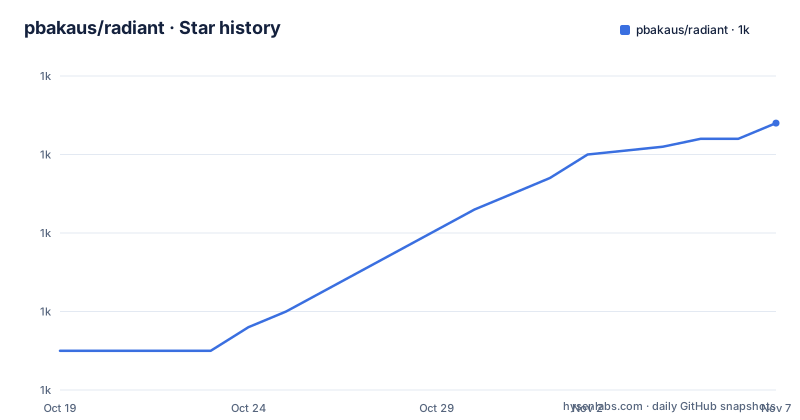
Star history
- pbakaus/radiant1,034 ★ · +29
| Repository | 2026-10-19 | 2026-11-07 |
|---|---|---|
| pbakaus/radiant | 1k | 1k |
29 Stars in the last 19 days, measured from the daily GitHub snapshot. Compare with other projects
Editorial analysis
What the artefact actually is: one HTML file per shader
Radiant is described as open source shaders and visual effects for the web, drop-in canvas animations with zero dependencies and zero build step, and the Quick Start section makes the unit of distribution explicit. Every shader is a self-contained HTML file, a style element, a canvas element and a script element, with no framework, no bundler and no runtime. You use them anywhere. That is the central design decision and everything else follows from it. A shader is an artefact you copy, like a stylesheet or an image, rather than a component you install, and because it is a complete document it can be hosted anywhere and referenced by URL. The badge says 94 shaders, the licence is MIT, and the homepage is radiant-shaders.com, where a live gallery of them is published.
Getting one: the gallery, the pack, or a single file from static/
There are three ways to get a shader, and the third is the one that matters for a real integration. You browse the gallery or download the whole shader pack as a zip archive from radiant-shaders.com, or you grab individual files from the static/ directory in the repository. Taking a single file from static/ is what you do when you want one specific effect in your own project, and it means the shader arrives in your build as an asset you control, with no runtime dependency on the gallery site. The pack is for trying things out, and the gallery is for browsing. The repository layout supports the static/ arrangement, since there is a static/ directory at the top level alongside src/ for the gallery application and scripts/ for the build tooling.
Embedding it: one iframe tag with a negative z-index
The embed is a single iframe element pointing at the HTML file, with the styling set to position fixed, inset 0, full width and height, no border, and a z-index of minus one so the animation sits behind the page content rather than over it. The README calls the result a full-screen animated background in one tag. Using an iframe is what makes the zero-dependency promise work, because the shader gets its own document with its own canvas and its own script, and the host page is not affected by anything the shader does. The trade is that you now have a frame boundary, which is where the runtime control comes in and where the same-origin considerations of any embedded document apply. The example uses a relative src of event-horizon.html, so a shader used this way is normally served from your own origin.
<iframe
  src="event-horizon.html"
  style="position: fixed; inset: 0; width: 100%; height: 100%; border: 0; z-index: -1;"
></iframe>
Runtime control through postMessage, and where the parameter list lives
Shaders accept live parameter updates through postMessage, so the animation is not a static loop but something your page can drive. The example finds the iframe element, then posts a message with a type of param, a name and a value, and a target origin of the wildcard asterisk. Each shader's parameters, with the name, the range and the default, are listed in src/lib/shaders.ts, which is the reference you need before you can change anything, since the parameter names are per shader and there is no introspection. The example uses ROTATION_SPEED, which tells you the parameters are named constants in a shader-specific namespace. The wildcard target origin is worth noting, since it means the message is delivered to any origin, and a stricter target would be the better habit if the shader is same-origin with your page.
const iframe = document.querySelector('iframe');

// Adjust any parameter on the fly
iframe.contentWindow.postMessage(
  { type: 'param', name: 'ROTATION_SPEED', value: 0.6 },
  '*'
);
Seven tags, and the housekeeping every shader does
The shaders are organised by visual style with seven tags, and the tags map onto different jobs. fill covers full-canvas effects, backgrounds and textures, and object covers standalone centred elements, so the two differ in whether the shader owns the whole canvas or sits in the middle of it. particles covers particle systems and swarms, physics covers simulations with springs, waves and gravity, noise covers Perlin and simplex driven visuals, organic covers fluid, biological and natural forms, and geometric covers hard-edged patterns and tessellations. Every shader also includes the same housekeeping, which is what makes them usable in a real page rather than a demo. Mouse and touch interaction, tunable parameters via postMessage, visibility-based pause to save battery, DPR-aware rendering capped at 2x, and 60fps targeting on standard hardware. The DPR cap and the pause are the two that matter for a production page.
Six color schemes applied with a CSS filter, no shader edits
The gallery supports six color schemes applied via a CSS filter on the iframe, with no shader modification needed, and the table of filters is worth reading because it is a genuinely clever piece of economy. Amber is the default with a filter of none. Mono uses grayscale(1). Blue is a hue-rotate of 175 degrees. Rose combines a hue-rotate of 300 degrees with a saturate of 1.1. Emerald is a hue-rotate of 90 degrees with a saturate of 1.2. Arctic combines a hue-rotate of 180 degrees with a saturate of 0.5 and a brightness of 1.1. Because the filter applies to the iframe element, the same applies to everything inside it, so a single attribute recolours an entire animation. That is a reusability property the shaders inherit rather than implement, and it means a palette change is a one line change in the host page.
The gallery application, the build scripts and the state of the project
The gallery frontend is SvelteKit 2 with Svelte 5, while the shaders themselves require no build step, and the package.json confirms the toolchain with the SvelteKit adapter for static output, Vite, TypeScript 5.9, svelte-check and Sharp. The dev commands are npm install, npm run dev to start the dev server, npm run build for a production build, and npm run check for the TypeScript and Svelte checks. There is a build:zip script that runs before the build and produces the shader pack, and separate generate-previews, generate-videos and generate-share-image scripts, so the gallery imagery and the downloadable pack are generated artefacts rather than hand-made ones. Puppeteer at version 24 is the browser automation behind them. The repository has a static/ directory for the shaders, a scripts/ directory, a src/ directory, docs/, an errors/ directory, a vercel.json for the gallery deployment, a STYLE.md, a TODO.md and a CHANGELOG.md, and the licence is MIT with the copyright held by Paul Bakaus for 2025.
npm install
npm run dev       # Start dev server
npm run build     # Production build
npm run check     # TypeScript + Svelte checks
Editorial conclusion
Radiant suits a front end developer who wants an animated background or hero visual without pulling a WebGL library into the bundle, and who is comfortable with an iframe boundary and a postMessage protocol. It is the wrong choice if your content must be in the same DOM as the animation, since every shader runs in its own frame, and a poor fit for a site with a strict third-party script policy, because an embedded document with its own runtime is exactly what such a policy is aimed at. Before adopting one, read the parameter list in src/lib/shaders.ts, because the runtime control protocol is per shader, and note that each shader pauses when not visible and caps device pixel ratio at 2, so the animations are designed to be cheap rather than to fill every pixel.
Frequently asked questions
What is the Radiant shader collection?
It is a curated collection of 94 generative shaders, each a self-contained HTML file made of a style element, a canvas element and a script element, with no framework, no bundler and no runtime. The gallery frontend is SvelteKit 2 with Svelte 5, and the licence is MIT.
How do I embed a Radiant shader in a page?
With a single iframe pointing at the shader HTML file, styled position fixed, inset 0, full width and height, no border and a z-index of -1 so it sits behind the page content. You can browse the gallery, download the whole shader pack, or take individual files from the static/ directory in the repository.
Can I control a Radiant shader at runtime?
Yes, through postMessage. You post a message with a type of param, a parameter name and a value to the iframe's contentWindow, and each shader's parameters, with name, range and default, are listed in src/lib/shaders.ts. The example adjusts ROTATION_SPEED, so parameter names are shader specific.
What visual styles do the Radiant shaders cover?
Seven tags, each mapping to a different job: fill for full-canvas effects and backgrounds, object for standalone centred elements, particles for particle systems and swarms, physics for simulations such as springs, waves and gravity, noise for Perlin and simplex driven visuals, organic for fluid and biological forms, and geometric for hard-edged patterns and tessellations.
How does the Radiant gallery apply different color schemes?
With a CSS filter on the iframe element, so no shader needs modifying. Amber is the default with filter none, Mono uses grayscale(1), Blue a hue-rotate of 175deg, Rose a hue-rotate of 300deg with saturate(1.1), Emerald a hue-rotate of 90deg with saturate(1.2), and Arctic a hue-rotate of 180deg with saturate(0.5) and brightness(1.1).
Official sources
Add this badge to your README
If you maintain this project, the badge below links readers to this analysis and shows its maintenance status from the daily GitHub snapshot. Paste the markdown into your README; add ?metric=license or ?metric=stars to the image URL for a different field.

[](https://hysenlabs.com/projects/pbakaus-radiant)Star history chart for your README
[](https://hysenlabs.com/projects/pbakaus-radiant)Was this useful?