peco: A Single-Binary Interactive Line Filter, and the v0.6.0 Change That Turns -v Into an Exclusion
Simplistic interactive filtering tool
At a glance
- What is it?
- peco is a Go tool that filters lines from standard input as you type and prints the selected line to stdout. Since v0.6.0 a hyphen-prefixed term means exclusion, which silently changes old queries and breaks hyphen-heavy input like shell history unless you change the prefix.
- Who is it for?
- peco is a good fit for anyone who wants an fzf-style picker as one Go binary that slots into shell pipelines, and who will read the Changes file before upgrading. Be careful with v0.6.0 or later if your scripts or muscle memory depend on hyphen-prefixed terms, and note that freeze and range selection do nothing until you bind keys in the config file.
- Can I use it commercially?
- Yes. MIT is a permissive licence: you can use, modify and sell software built on it, as long as you keep its copyright and licence notices.
- Is it still maintained?
- Yes. The repository last received commits 2 days ago.
- What is it written in?
- Mainly Go, according to GitHub's language statistics.
Answers come from the project's GitHub data, last synced on November 15, 2026, and from our analysis. They are not legal advice.
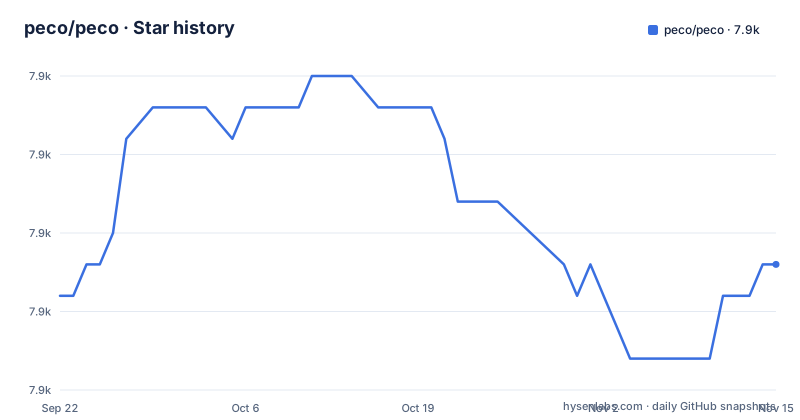
Star history
- peco/peco7,909 ★ · +1
| Repository | 2026-09-22 | 2026-11-15 |
|---|---|---|
| peco/peco | 7.9k | 7.9k |
1 Stars in the last 54 days, measured from the daily GitHub snapshot. Compare with other projects
Editorial analysis
From v0.6.0 a term starting with a hyphen excludes lines instead of matching them
The biggest behaviour change in the project is negative matching. You can exclude lines by prefixing a term with `-`: the query `SSO -tests -javadoc` shows lines matching SSO that do not contain tests or javadoc. The README's table spells out the cases. `foo -bar` means lines matching foo but not containing bar. `-foo -bar` means all lines containing neither. `\-foo` is a literal match for -foo, escaped with a backslash, and a lone `-` is a literal hyphen.
The upgrade note is blunt. In v0.5.x, a query like `test -v` matched lines containing both test and a literal -v. From v0.6.0 onwards, `-v` is a negative term, so the query matches test while excluding lines containing v. To search for a literal hyphen-prefixed term, write `\-v`.
That is a silent semantic change, not an error. A saved alias, a script that feeds an initial query, or habit built over years will now return fewer lines than before and give no warning. If you maintain shell functions around peco, search them for queries with hyphens before you upgrade from v0.5.11.
The negation prefix can be changed or switched off for hyphen-heavy input
The `-` prefix is configurable. Passing `--negation-prefix=` with an empty value matches every term as typed, which is what you want when the input is full of hyphens, such as shell history. Passing another character, for example `--negation-prefix='!'`, keeps negative matching while leaving hyphens alone. The same setting lives in the configuration file as `NegationPrefix`.
Three details limit how far negative matching goes. First, it works with all built-in filters: IgnoreCase, CaseSensitive, SmartCase, Regexp, IRegexp and Fuzzy. But for the Fuzzy filter, negative terms use regexp-based exclusion rather than fuzzy matching. Second, external custom filters receive the query as-is and are responsible for their own parsing, so a plugin filter will not understand the prefix unless it implements it.
Third, only positive terms produce match highlighting. Lines matched solely by negative exclusion, such as the results of an all-negative query like `-foo`, are shown without highlighting. If you rely on the highlight to see why a line was kept, an exclusion-only query will look unmarked.
SmartCase with negative terms can show incomplete results until you retype
The README carries an explicit caveat. When you use the SmartCase filter with negative terms, results may be incomplete if the query transitions from all lowercase to mixed case. Its example is typing `foo -bar` and then adding an uppercase character. The suggested remedy is to clear the query and retype it, which gives the correct results.
SmartCase itself is simple. It uses case-insensitive matching when all of the queries are lower case, and case-sensitive matching otherwise. The incompleteness appears at the moment the mode flips mid-query, because the earlier narrowing was done under the other rule.
The consequence is a small trust problem. If a line you expect is missing after you type a capital letter, the list on screen may simply be stale, not proof that nothing matches. When the result matters, for example when picking a process to kill from a list, retype the query before you press enter. The default filter is case-insensitive, so the issue only touches people who switch to SmartCase.
Six filters rotate, and Fuzzy sorting needs a config flag
The default filter is case-insensitive. You can toggle among IgnoreCase, CaseSensitive, SmartCase, Regexp case insensitive, Regexp and Fuzzy. The Regexp filter accepts any valid regular expression. The Fuzzy filter finds partial patterns: searching ALS finds ALongString. It uses smart case search like the SmartCase filter.
By default Fuzzy only matches. With the `FuzzyLongestSort` flag enabled in the configuration file, it does a smarter match and sorts the matched lines by three rules in order: a longer substring first, then an earlier left-positioned substring, then a shorter line. If you use fuzzy matching on file paths and the best hit sits low in the list, this flag is the first thing to try.
Cycling through all six filters is clumsy if you only use two. The `Filters` configuration section and the `--filter` command line option cut the rotation down to the filters you name, in the order you name them. Multiple search terms become an AND query, so `foo bar` keeps lines that match both. Pressing enter prints the chosen line to stdout so you can pipe it into another tool.
Freeze and range selection do nothing until you bind keys
Two useful features ship unbound. Freezing lets you snapshot the current results, clear the query and keep filtering on top of the frozen set. It uses `peco.FreezeResults` and `peco.UnfreezeResults`, and the README says plainly that these actions are not bound to any key by default. You add them in your config file:
{
    "Keymap": {
        "M-f": "peco.FreezeResults",
        "M-u": "peco.UnfreezeResults"
    }
}
In the README's example, `ls | peco` shows app.go, app_test.go, filter.go, filter_test.go, main.go and readme.md. Typing `_test` leaves app_test.go and filter_test.go. Pressing M-f freezes those two as the new base and clears the query, and typing `filter` then leaves filter_test.go. You can freeze several times to narrow progressively, while unfreezing always reverts to the original unfiltered input, not to the previous stage.
Range selection has the same catch. You can select multiple lines one by one, with C-Space in the demo, or select a range of lines, but the ToggleRangeMode action is not enabled by default and needs a custom key binding. Without these edits the features exist but are invisible.
One Go binary replaced percol, and building from source needs goreleaser
peco, pronounced peh-koh, is based on a Python tool called percol. The author found percol useful but wanted a single binary and no Python. Because peco is written in Go, you grab a binary release and put it in your PATH. The stated use cases are filtering logs, process stats and file lists. The pitch against grep is that you type as you think and look through the current results.
The Go module declares `go 1.25.0` and depends on `tcell/v2` for the terminal screen, `go-flags` for options, `go-runewidth` for character widths and `go-yaml` among others. The repository includes a Makefile whose default `build` target runs `goreleaser build --snapshot --single-target --clean`, and it stops with a message if goreleaser is missing. `make test` runs `go test -v -race ./...` and `make lint` runs golangci-lint.
So a contributor needs goreleaser and a recent Go toolchain, while a user only needs the binary. The source tree also contains layout_windows.go next to layout_any.go, which shows that Windows is handled in the code, though the README has no platform support table.
The last tagged release is February 2026, and the README describes the branch, not the release
The release list shows v0.6.0 on 2026-02-24, v0.5.11 on 2023-03-21 and v0.5.10 on 2021-06-08. Releases are spaced years apart, yet the last push was on 2026-10-27, so the master branch carries work that no tag includes yet.
The README opens with a warning about exactly this. If you are viewing it on GitHub, the document refers to the state of peco in whatever branch you are viewing, not necessarily the state of a released version, and you should check the Changes file for features and changes. A feature described in the README may therefore be absent from the binary you downloaded.
In practice, compare the README against the release tag you installed, and read the Changes file for the version in your PATH. The project is MIT licensed, is not archived and asks users to consider sponsoring the authors through the Sponsor button on GitHub, with plans from $1. For wider usage samples, the README points to the project wiki, including combinations of zsh, peco and ghq for jumping around a large development directory.
Editorial conclusion
peco is a good fit for anyone who wants an fzf-style picker as one Go binary that slots into shell pipelines, and who will read the Changes file before upgrading. Be careful with v0.6.0 or later if your scripts or muscle memory depend on hyphen-prefixed terms, and note that freeze and range selection do nothing until you bind keys in the config file.
Frequently asked questions
What are alternatives to peco?
peco itself is based on percol, a Python tool. The author wanted a single binary without Python, which is why peco is written in Go.
How do I exclude lines in peco?
Prefix a term with a hyphen, so SSO -tests -javadoc shows lines matching SSO without tests or javadoc. Use a backslash to match a literal hyphen term, and change the prefix with --negation-prefix.
Why does peco v0.6.0 treat -v differently?
From v0.6.0, a hyphen-prefixed term is a negative term. In v0.5.x, test -v matched lines with a literal -v, while now it excludes lines containing v.
Official sources
Add this badge to your README
If you maintain this project, the badge below links readers to this analysis and shows its maintenance status from the daily GitHub snapshot. Paste the markdown into your README; add ?metric=license or ?metric=stars to the image URL for a different field.

[](https://hysenlabs.com/projects/peco-peco)Star history chart for your README
[](https://hysenlabs.com/projects/peco-peco)Was this useful?