PegaProx encrypts its whole database only on Linux x86_64, and its own notes record a cookie replay bug
The ultimate datacenter management solution for Proxmox VE and XCP-NG. Unified multi-cluster control, intelligent load balancing, and seamless cross-cluster VM migrations — all in one beautiful interface.
At a glance
- What is it?
- A Flask and JavaScript dashboard for Proxmox VE and XCP-ng clusters, released under AGPL-3.0 and funded by sponsors. The interesting parts are in the comments: a platform-gated SQLCipher dependency, a websockets floor written to close a header replay bug, a base image pinned by digest because a stale OpenSSL shipped once, and a compose file that documents pinning advice while defaulting to latest.
- Who is it for?
- PegaProx is worth an afternoon on a lab cluster, because the engineering notes are unusually honest about what has bitten the project. Before it goes anywhere near production, check four things.
- Can I use it commercially?
- Yes, with strict conditions. AGPL-3.0 is a network copyleft licence: if people use a modified version over a network, for example as a hosted service, you must offer them its source code under the same licence.
- Is it still maintained?
- Yes. The repository last received commits 5 days ago.
- What is it written in?
- Mainly JavaScript, according to GitHub's language statistics.
Answers come from the project's GitHub data, last synced on November 23, 2026, and from our analysis. They are not legal advice.
Star history
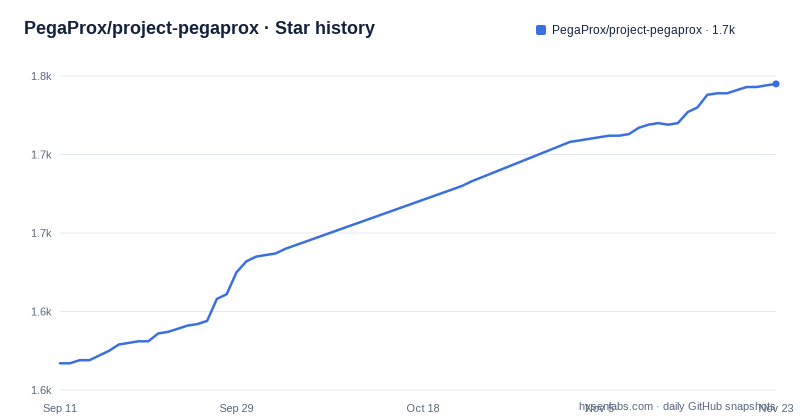
- PegaProx/project-pegaprox1,745 ★ · +178
| Repository | 2026-09-11 | 2026-11-23 |
|---|---|---|
| PegaProx/project-pegaprox | 1.6k | 1.7k |
178 Stars in the last 73 days, measured from the daily GitHub snapshot. Compare with other projects
Editorial analysis
Full-database encryption exists only on Linux x86_64
The feature list promises Full-DB Encryption with SQLCipher, AES-256-CBC plus HMAC-SHA512, format v4, wrapping the entire database at rest, with sensitive fields individually Fernet-encrypted everywhere else. The dependency list is more precise about where that first half runs:
sqlcipher3-binary>=0.6.0; sys_platform == "linux" and platform_machine == "x86_64"An environment marker gates the install to Linux on x86_64, and the comment above it says the prebuilt wheels exist for that platform only, so anywhere else PegaProx falls back to plain SQLite plus Fernet field encryption, pointing at `docs/SECURITY.md` for the details. That means the same feature bullet describes two very different deployments: a whole-file encrypted database on the platform the Docker image and the Debian packaging target, and field-level encryption on a Mac, on ARM Linux, or on Windows. The feature also says plain databases are migrated automatically on the first boot after an update, so the change happens without being asked for.
The master key is deliberately kept out of the config backup
The same feature entry describes where the encryption key comes from, and the design is the interesting part. A multi-tier master-key loader resolves from an environment variable, from a systemd LoadCredentialEncrypted credential, or from `/etc/pegaprox/secret.key`, with the stated goal that a `config/` backup never carries the key alongside the data it protects. That lines up with the rest of the tree, which ships a `systemd/` directory and a `debian/` packaging directory, and with the compose file, which mounts `pegaprox-config` at `/app/config`. The tiers are ordered so the two that travel with the host come first and the file on disk comes last. If you run in Docker without setting an environment variable and without the key file present, the loader has nothing to resolve, and the page does not say what happens in that case.
The requirements file records a cookie replay bug and an untested console
One comment block in `requirements.txt` is longer than most changelogs. It explains that websockets 16.1 fixes two advisories against the 11.x line, and that the client-side one applies directly here: `api/vms.py` and a generated `.ssh_ws_server.py` both call `websockets.connect()` with a live PVEAuthCookie in `additional_headers`, and the bug replays those headers on a cross-origin redirect. A live Proxmox authentication cookie being sent to a redirect target is the kind of defect that matters more than most version floors. The same comment then says no test in CI opens a real console, which is why the library is capped below version 18 rather than trusted at its latest major. That is a project telling you its console path is unexercised by automation. The floor is deliberately not a pin, so an environment resolving to an older websockets gets the old behaviour with no error.
The compose file explains how to pin a version and then defaults to latest
The service block is annotated at length about the image tag:
image: ghcr.io/pegaprox/pegaprox:${PEGAPROX_VERSION:-latest}
ports:
  - "5000:5000"   # web UI + API
  - "5001:5001"   # VNC websocket (noVNC console)
  - "5002:5002"   # SSH websocket (xterm.js)
The comment says `latest` is a moving target, that every `docker compose pull` takes whatever it points at with nothing to compare against, that this is fine for a lab and wrong for anything managing a production estate, and that the tag is therefore a variable. It shows the one-line fix, `PEGAPROX_VERSION=1.2.0 docker compose up -d`, and calls a digest the strictest option because a digest cannot be repointed at all, with a digest from `docker buildx imagetools inspect`. The default in the shipped file is still `latest`, so the advice and the out-of-the-box behaviour disagree. The example version in the comment matches the newest release tag, v1.2.0 from 2026-09-21.
A stale OpenSSL shipped in the image until the base digest moved
The Dockerfile pins its base by digest, which is the practice the rest of the project is trying to live up to:
FROM python:3.12-slim@sha256:9d3abd9fc11d06998ccdbdd93b4dd49b5ad7d67fcbbc11c016eb0eb2c2194891A comment explains that `apt-get upgrade -y` pulls the latest Debian security patches at build time, including an OpenSSL fix that a scanner flagged, and that the release build therefore runs with no cache, because the GitHub Actions layer cache had kept that step frozen and republished the stale OpenSSL. The next comment covers pip: the base image pins whatever pip shipped with that python:3.12-slim build and `apt-get upgrade` cannot reach it because it is not a dpkg package, so a pip advisory sat in the published image until the base digest moved. The install step itself is one line,
pip install --no-cache-dir -r requirements.txtrun after `pip install --no-cache-dir --upgrade pip`. A non-root user named pegaprox with `/bin/false` as its shell is created earlier in the build.
Three ports are published by default and the proxy settings are commented out
The compose file maps three host ports and leaves the environment block disabled. Port 5000 carries the web UI and the API, port 5001 carries the VNC websocket for the noVNC console, and port 5002 carries the SSH websocket for the xterm.js terminal. That is two unauthenticated-by-default websocket endpoints published on every interface the Docker daemon binds, for features whose own documentation notes that nothing in CI opens a real console. The three environment variables that would put the app behind a reverse proxy are present but commented out: `PEGAPROX_BEHIND_PROXY`, `PEGAPROX_TRUSTED_PROXIES` with an example CIDR of `172.16.0.0/12`, and `PEGAPROX_ALLOWED_ORIGINS`. The application does have IP whitelisting and blacklisting by address or CIDR range as a feature, so the control exists in the product; it is simply not part of the default compose run.
XCP-ng and backup verification are labelled preview and experimental
The name and the one-line description both present the product as multi-cluster management for Proxmox VE and XCP-ng, with no hint of maturity levels. The feature list carries the hint instead, as a heading. The entire XCP-ng block is marked Tech Preview, and what sits inside it is not cosmetic: pool support for XCP-ng and Xen hypervisor pools alongside Proxmox, VM power actions including suspend and resume, a VNC console through XAPI, disk and network management, and maintenance mode with automatic VM evacuation. The other label is on Backup Verification, marked Experimental, described as an automated restore, boot, health check and cleanup cycle. The ESXi path carries its own caveats in the same style, with SSH required on the ESXi host and a recommendation of at most one VM for the near-zero downtime transfer. So the cross-hypervisor story spans a tech preview, an experimental check and a single-VM recommendation.
Compliance frameworks are named next to the experimental flag
The Backup Verification entry reads, in full, automated restore, boot, health check and cleanup, followed by ISO 27001, SOC 2 and HIPAA compliance in the same bullet. Three frameworks sit next to a feature labelled Experimental, and the wording does not say the checks satisfy those standards, only that the feature serves that purpose. Around it sits a genuine audit stack: a CVE scanner doing per-node package vulnerability scanning via debsecan, one-click CIS hardening against benchmarks, an HMAC-signed audit log described as tamper-evident on every entry, audit logging of user actions with IP addresses, and full-text plus date-range plus severity audit search. An external audit badge links to a report hosted off repository. The distinction to hold on to is between what the software records and what an auditor concludes; a signed log proves the log was not edited, not that the estate is compliant.
Editorial conclusion
PegaProx is worth an afternoon on a lab cluster, because the engineering notes are unusually honest about what has bitten the project. Before it goes anywhere near production, check four things. Confirm the platform you will run it on, since the full-database encryption story changes completely off Linux x86_64 and you get field-level encryption instead. Pin the image by digest rather than by tag, because the default is a moving `latest` and the maintainers say so in the file. Confirm your websockets resolves to 16.1 or newer, since a live Proxmox auth cookie in a redirect header is the exact thing the requirements file says was vulnerable. And decide how you feel about XCP-ng support and backup verification, both of which are labelled Tech Preview and Experimental while the project presents them as part of the product.
Frequently asked questions
What is PegaProx?
It is an AGPL-3.0 web dashboard for managing Proxmox VE and XCP-ng clusters, written as a Flask application with a JavaScript front end and published as the ghcr.io/pegaprox/pegaprox image. It covers live metrics over SSE, VM and container actions, snapshots, backups, scheduled tasks and cross-cluster migration, and the project says it is funded by sponsorships and donations.
Does PegaProx encrypt its whole database?
On Linux x86_64 it uses SQLCipher, AES-256-CBC with HMAC-SHA512 in format v4, around the entire database at rest, and it migrates plain databases on the first boot after an update. The sqlcipher3-binary dependency is gated to Linux x86_64 by an environment marker, so on other platforms the project falls back to plain SQLite with Fernet encryption on individual fields.
Which ports does the PegaProx docker container publish?
Three: 5000 for the web UI and API, 5001 for the VNC websocket behind the noVNC console, and 5002 for the SSH websocket behind xterm.js. All three are mapped without a host IP restriction in the compose file that ships with the project.
Which PegaProx features are still labelled preview or experimental?
The whole XCP-ng integration block is marked Tech Preview, covering pool support, VM power actions, a VNC console through XAPI, disk and network management and maintenance mode with evacuation. Backup Verification is marked Experimental, and the ESXi import path notes that SSH must be enabled on the source host and recommends at most one VM for the near-zero downtime transfer.
How does PegaProx handle users and permissions?
It has role-based access control with Admin, Operator and Viewer roles plus custom roles, per-VM ACLs, multi-tenancy for isolating clusters between customers, TOTP two-factor authentication with a force option, WebAuthn or FIDO2 hardware keys, and LDAP or OIDC against Active Directory, OpenLDAP, Entra ID, Keycloak, Google Workspace and Authentik with PKCE. API bearer tokens can be created, listed and revoked, scoped per role.
How do I pin a PegaProx version in Docker?
The compose file parameterises the tag, so `PEGAPROX_VERSION=1.2.0 docker compose up -d` pins it, and the file notes that a digest is stricter because it cannot be repointed, in the form `PEGAPROX_VERSION=1.2.0@sha256:<digest>`. As shipped the default is `latest`, which the same comment calls fine for a lab and wrong for a production estate.
Official sources
Add this badge to your README
If you maintain this project, the badge below links readers to this analysis and shows its maintenance status from the daily GitHub snapshot. Paste the markdown into your README; add ?metric=license or ?metric=stars to the image URL for a different field.

[](https://hysenlabs.com/projects/pegaprox-project-pegaprox)Star history chart for your README
[](https://hysenlabs.com/projects/pegaprox-project-pegaprox)Was this useful?