tower turns a subscription into a client config and then leaves the proxy to somebody else
Tower — a native SwiftUI iOS app for managing proxy ('airport') subscriptions and your own nodes locally, generating Surge, Clash, Shadowrocket, Loon and Quantumult X configs.
At a glance
- What is it?
- A native SwiftUI app for iPhone and Mac that keeps subscriptions and self-hosted nodes, ships ACL4SSR rule sets with offline region data, and exports per-client configuration for a long list of proxy clients. It sells no nodes and opens no proxy connection of its own.
- Who is it for?
- tower earns its place for the two jobs it does not advertise: deciding which export shape a given client can actually consume, and writing a Tailscale network into that export so your own machines stay reachable while a proxy is on. Check three things first.
- Can I use it commercially?
- Check first. The repository uses a licence we do not classify automatically, so read its LICENSE file before any commercial use.
- Is it still maintained?
- Yes. The repository received new commits within the last day.
- What is it written in?
- Mainly Swift, according to GitHub's language statistics.
Answers come from the project's GitHub data, last synced on November 15, 2026, and from our analysis. They are not legal advice.
Star history
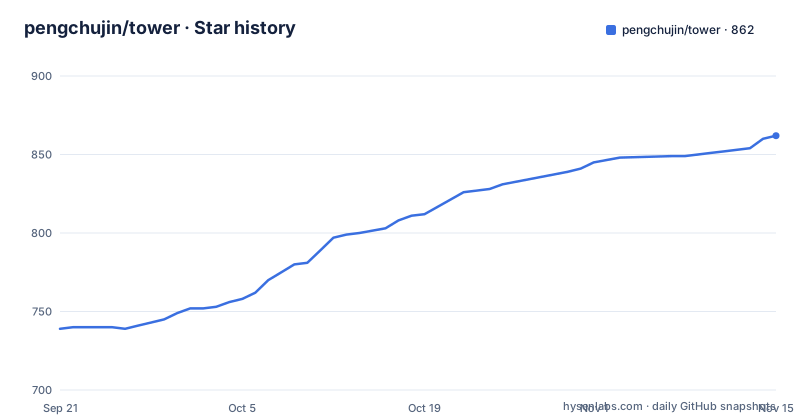
- pengchujin/tower862 ★ · +123
| Repository | 2026-09-21 | 2026-11-15 |
|---|---|---|
| pengchujin/tower | 739 | 862 |
123 Stars in the last 55 days, measured from the daily GitHub snapshot. Compare with other projects
Editorial analysis
Add a subscription, pick rules, export, and the app stops there
The scope statement is short and load-bearing. Tower does not provide nodes and does not establish proxy connections. Once a configuration is exported, you enable it in the client you exported for. Nothing in the app is a proxy, which also means there is no server component to trust with your traffic.
The work it does do happens on the device: subscription parsing, rule matching and configuration generation. No third-party conversion service sits in the middle, so a subscription URL never leaves the machine and there is no conversion endpoint that could rewrite your rules in transit.
The workflow is three steps, stated as the document's own heading. Add a subscription, select rules, export for use. Alongside that the app keeps subscriptions and self-hosted nodes together with traffic figures and expiry reminders, which is the part that has no equivalent in a plain client: a subscription that silently stops working is usually found by noticing it stopped.
Cross-device use is arranged in three ways rather than one. A Mac-specific layout exists for the desktop form factor, a LAN sharing path is offered, and iCloud sync is present but off by default, left as your choice to enable.
Anywhere takes nodes only, so the export shape differs per client
The client list is long and deliberately split by platform. On Mac: Surge Mac, Clash Verge, ClashMac, FlClash and Mihomo Party among others. On mobile and elsewhere: Shadowrocket, Surge, Stash, Loon, Quantumult X, Egern, sing-box, Hiddify, V2Box, Clash, Clash Mi, Karing and others.
Long lists are cheap, so the interesting entry is the exception. Anywhere receives a node subscription and a one-tap local import, and its rules are then configured inside Anywhere itself. Everywhere else, the export takes whichever form the client can consume: a one-tap import, a copied subscription link, or an exported file. The capability table for each client lives in a separate compatibility document rather than in the main text.
That negotiation is the feature. A tool that emitted one universal format would fail on the clients that want a file and on the ones that want a live link, and the failure would surface as an import error with no explanation. Doing the mapping per client means the failure mode is a client that is simply not on the list.
One consequence for anyone scripting this: the exported artefact is not uniform, so automation that parses Tower's output has to branch on the target client rather than assume a single shape.
ACL4SSR and the region data travel with the app, not with a service
Rule handling is built in rather than fetched. ACL4SSR is bundled, and on top of it you can import rule files and define your own policy groups. Nothing in the document describes a rule subscription endpoint, so the shipped set is the floor and your imports are the addition.
The same is true of location. Nodes get an offline region identification, you can override a region by hand, and there is a map view and a latency test alongside it. Doing region lookup offline means the feature keeps working with no network path and no lookup service, at the cost of a bundled data set that has to be updated inside the app. The document does not say how often that data set changes or how stale it is allowed to become.
The repository layout makes the bundling visible rather than hidden. A Config directory and a Rulesets directory sit at the top level next to the Xcode project and the app sources, so the rule sets and the per-client templates are versioned artefacts you can read in a diff instead of an opaque blob inside a binary.
The section that would normally show this off as screenshots is a three-column table with header cells and an empty row, and the client list that follows it is preceded by a block of spacing with no readable content. The names are all there in the text; the pictures are not in the file.
The Tailscale path writes your own network into the client's config
One feature goes beyond subscription handling. Tower can write a Tailscale network into the configuration it exports for Surge, Stash, Clash and mihomo, and sing-box, so machines on your own network stay reachable while a proxy is active. That is the case where a rule set full of proxies would otherwise send your own LAN traffic somewhere you did not want it to go.
The credential handling is stated tightly. The Tailscale Auth Key lives only in the local keychain and is not part of sync, which is the right place for a key that grants access to your own devices. It also means the key is not portable, so a second machine needs its own.
How much Tower does on your behalf is not written down. The document says the network is written into the exported configuration, and it does not say whether the app installs Tailscale itself, whether it renews the key, or what happens to that entry when the exported config is later edited by hand in the client. Anyone relying on this should read it once in the client's own configuration UI before assuming it survives an edit.
Three download channels and one link pinned to a single build
There are three ways in, and they update on different schedules. The document links a macOS universal disk image by name, Tower-1.0.23-61-macOS-universal.dmg, which encodes both the marketing version and a build counter in the file name. The App Store entry is the second route, under application identifier 6797458927. The third is a Homebrew cask:
brew install --cask pengchujin/tap/towerThe disk image link is the awkward one. It points into a specific release tag, so a reader who follows it installs 1.0.23 build 61 and stays there while newer releases accumulate, and the document gives no way to notice that a newer build exists short of visiting the releases page. The cask and the App Store handle their own updates, which means three machines can end up on three different builds with nothing in the app reporting a skew.
The release numbering itself is worth noting. The three newest are 1.0.21 on 2026-09-18, 1.0.22 on 2026-09-29 and 1.0.23 on 2026-10-02, and each tag name carries a second number in parentheses, 59, 60 and 61. So the version moved twice in a fortnight while the build counter moved twice as often, which suggests an internal build you are not shown.
Documentation for users sits at a separate site, tower.shenqi.uk, with the privacy policy and support pages under docs in the repository.
The licence metadata and the licence file do not agree
The platform metadata for this repository carries no licence value, while the document states that the source code is under MIT and a LICENSE file exists at the repository root. Those two sources do not match, and this write-up does not pick a winner between them; confirm which applies before you redistribute anything.
Third-party content is a separate layer again. A THIRD-PARTY-NOTICES file at the root states that third-party resources are distributed under their own licences. That matters more than usual here, because ACL4SSR is bundled and the rule sets in the Rulesets directory are not the project's own work. A permissive licence on the app's code does not automatically extend to a bundled ruleset written by someone else, and the notices file is where the distinction is supposed to be recorded.
For an end user who only exports a configuration, none of this is visible. For anyone building from source, packaging a fork, or redistributing the disk image, it is the first thing to settle.
An Xcode project with agent workflow files sitting beside it
There is no package manifest at the top level. The build unit is Tower.xcodeproj with the app sources under Tower and two test targets, TowerTests and TowerUITests, so this is a project you open in Xcode rather than one you build with a package manager.
Next to those sits a layer that has nothing to do with the app. An .agents directory, AGENTS.md, CLAUDE.md, a skills-lock.json, and separate plans and animation-plans directories. CLAUDE.md is linked as required reading before contributing. Whatever convention those files establish for a contributor, the document says nothing about how the repository's own agent configuration is governed, and skills-lock.json in particular implies pinned tooling whose lock format is not described anywhere a new contributor would look.
The documentation set is organised by audience. Development, architecture and release process each have their own page under docs, the user guide and support pages sit on the external site, and the client compatibility detail has a page of its own. The release page is the one worth reading before filing a bug, since the build counter in the file name suggests the maintainer tracks something finer than the marketing version.
Editorial conclusion
tower earns its place for the two jobs it does not advertise: deciding which export shape a given client can actually consume, and writing a Tailscale network into that export so your own machines stay reachable while a proxy is on. Check three things first. Which client you actually use, because the supported list is long and not uniform, and Anywhere in particular receives nodes only with its rules set inside its own app. Where your data lands, since business data stays on device but iCloud sync is a separate switch you enable yourself and a Tailscale Auth Key sits in the local keychain. And which build you are installing, because the download link in the document names one release while the cask and the App Store move on their own schedules. The licence file and the platform metadata disagree about which licence applies, so confirm that before you redistribute anything.
Frequently asked questions
Does tower provide proxy nodes or connect to a server itself?
No. It provides neither nodes nor proxy connections. Subscription parsing, rule matching and configuration generation happen on the device with no third-party conversion service, and after you export a configuration you enable it in the client you exported for.
Which proxy clients can tower export to?
On Mac there is Surge Mac, Clash Verge, ClashMac, FlClash and Mihomo Party. On mobile and elsewhere there is Shadowrocket, Surge, Stash, Loon, Quantumult X, Egern, sing-box, Hiddify, V2Box, Clash, Clash Mi and Karing. Export takes whichever form each client can consume: one-tap import, a copied subscription, or a file.
How does tower handle Anywhere differently from other clients?
Anywhere supports a node subscription only, with a one-tap local import, and its rules are configured inside Anywhere itself rather than coming from the export. For every other client on the list, the rules travel with the exported configuration.
How do I install tower on a Mac?
Three ways: a macOS universal disk image linked from the document for the current release, the App Store entry under application identifier 6797458927, or the Homebrew cask with `brew install --cask pengchujin/tap/tower`. The disk image link names one release and does not follow newer ones.
Does tower sync my subscriptions through iCloud by default?
No, iCloud sync is off by default and enabling it is your choice. A Tailscale Auth Key is kept only in the local keychain and is not part of sync, so it does not travel to a second machine. Cross-device use otherwise comes from a Mac-specific layout and a LAN sharing option.
Official sources
Add this badge to your README
If you maintain this project, the badge below links readers to this analysis and shows its maintenance status from the daily GitHub snapshot. Paste the markdown into your README; add ?metric=license or ?metric=stars to the image URL for a different field.

[](https://hysenlabs.com/projects/pengchujin-tower)Star history chart for your README
[](https://hysenlabs.com/projects/pengchujin-tower)Was this useful?