pgvector's Makefile defaults to -march=native, so your build fits your CPU only
Open-source vector similarity search for Postgres
At a glance
- What is it?
- pgvector is a Postgres extension that adds a vector type, six distance operators and two approximate index types, and the README is unusually honest that adding an approximate index changes your query results. The Makefile adds a build detail: the default build is tuned with -march=native, so an extension compiled on one machine is not portable to an older CPU.
- Who is it for?
- pgvector fits a team whose vectors already live beside relational data in Postgres and who want JOINs, transactions and point-in-time recovery in one place. It does not fit a workload that must run the same binary across a mixed CPU fleet, because the default build assumes -march=native, and it does not fit anyone needing reproducible distances across build flags, since the compile options relax floating point semantics.
- Can I use it commercially?
- Check first. The repository uses a licence we do not classify automatically, so read its LICENSE file before any commercial use.
- Is it still maintained?
- Yes. The repository last received commits 1 day ago.
- What is it written in?
- Mainly C, according to GitHub's language statistics.
Answers come from the project's GitHub data, last synced on November 14, 2026, and from our analysis. They are not legal advice.
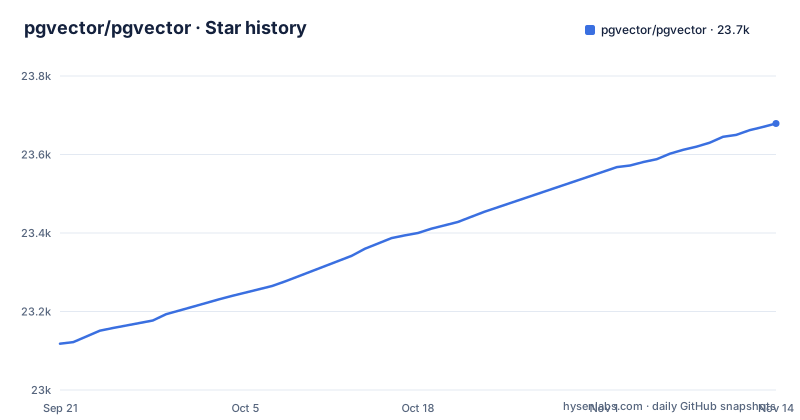
Star history
- pgvector/pgvector23,679 ★ · +561
| Repository | 2026-09-21 | 2026-11-14 |
|---|---|---|
| pgvector/pgvector | 23.1k | 23.7k |
561 Stars in the last 54 days, measured from the daily GitHub snapshot. Compare with other projects
Editorial analysis
OPTFLAGS defaults to -march=native, with three platform carve-outs
Read the install instructions in the README and you run plain make. Read the Makefile and you learn what that does.
cd /tmp
git clone --branch v0.8.7 https://github.com/pgvector/pgvector.git
cd pgvector
make
make install # may need sudo
OPTFLAGS is set to -march=native, with a comment right above it saying that to compile for portability you should run make OPTFLAGS="". The compiler flags then add -ftree-vectorize, -fassociative-math, -fno-signed-zeros, -fno-trapping-math and -ffp-contract=fast, the last four of which exist to let the compiler treat floating point arithmetic more freely than IEEE 754 requires.
Three carve-outs prove the default is understood to be risky. Mac ARM gets empty flags because -march=native is not always supported there, PowerPC gets empty flags because it does not support it, and RISC-V64 gets empty flags for the same reason.
The consequence is the one that bites in production. An extension built with the documented commands on a modern workstation is tuned to that CPU, and the Makefile's own comment says to run make OPTFLAGS="" to compile for portability. The Dockerfile in this repository builds with OPTFLAGS="" for exactly that reason.
Exact search is the default, and adding an index changes the answers
Two sentences in the README define the behaviour you have to design around. By default pgvector performs exact nearest neighbor search, which provides perfect recall. You can add an index to use approximate nearest neighbor search, which trades some recall for speed.
Then the sentence that makes this project unusual among databases: unlike typical indexes, you will see different results for queries after adding an approximate index.
That is an honest warning about a semantic change, not a performance footnote. Adding an HNSW or IVFFlat index does not change how a query is written, it changes what the query returns. Any test that asserts a specific top-k set can pass before the index and fail after it, and any deduplication or threshold logic built on exact results stops being exact.
There is a second condition hiding in the Querying section: combine ORDER BY and LIMIT to use an index. A query written as a filter on distance alone scans exactly, so the index sits unused, and the two query styles in the same table have different performance and different correctness characteristics with no syntax error to warn you.
Four types, four hard ceilings, and the largest is bit at 64,000
The HNSW section lists the types an HNSW index supports, with their limits, and those limits are the first thing to check against your embedding model.
vector goes up to 2,000 dimensions, halfvec up to 4,000, bit up to 64,000, and sparsevec up to 1,000 non-zero elements.
So a 1,536-dimension float embedding is within the vector limit, while one between 2,000 and 4,000 dimensions needs halfvec. These are the limits the README gives for HNSW indexing, not column declaration limits.
That is also why the type choice is a storage decision and not only a memory decision. halfvec exists to halve the width of a vector, which lets you store twice the dimensions for the same space, and bit turns a vector into bits, which is what makes Hamming and Jaccard distance available at all. The distance operators follow the type: L2, inner product, cosine and L1 for the float types, and Hamming and Jaccard for binary vectors.
One index per distance operator, and the suffix on the operator class names it
Creating an approximate index is not a single decision. The README says to add an index for each distance function you want to use, and the operator class carries the distance in its name.
CREATE INDEX ON items USING hnsw (embedding vector_l2_ops);The set is vector_l2_ops, vector_ip_ops, vector_cosine_ops, vector_l1_ops, bit_hamming_ops and bit_jaccard_ops, with the parallel names halfvec_l2_ops for halfvec and sparsevec_l2_ops for sparsevec.
The consequence is a cost multiplier that is easy to miss. A table queried by both cosine distance and inner product needs two HNSW indexes over the same column, each built and maintained on every insert, and HNSW is the type with slower builds and higher memory use. Choosing a second similarity measure is therefore not a query change, it is a second index, and it is worth deciding once which measure your application means rather than trying several.
The index parameters are the same knobs HNSW users elsewhere know: m, the maximum connections per layer, defaulting to 16, and ef_construction, the candidate list size used while building, defaulting to 64, where a higher ef_construction buys better recall at the cost of build time and insert speed.
<#> returns a negative inner product, and you multiply by -1 to get it back
Two of the six operators do not return what their name suggests, and both are documented.
The inner product operator is <#>, and the note says it returns the negative inner product, because Postgres only supports ASC order index scans on operators. Nearest neighbour ordering has to put the largest inner product first, and an index scan can only walk ascending, so the operator negates the value and the caller undoes it.
SELECT (embedding <#> '[3,1,2]') * -1 AS inner_product FROM items;Cosine has the same shape of surprise without the sign flip. Cosine similarity is 1 minus cosine distance, so getting it wrong does not flip your ranking, it inverts the scale, and a threshold copied from a distance into a similarity reads every row as a bad match.
This is a Postgres-shaped decision rather than a numerical one, and it is the kind of detail that survives into application code. It also means these operators are not interchangeable with a vector store that returns similarity directly.
It is an extension inside Postgres, and the scale path is quantization
The README frames the choice in one line: store your vectors with the rest of your data, plus ACID compliance, point-in-time recovery, JOINs and the other features of Postgres.
That is the difference in approach against a purpose-built vector store, and it is a real architectural choice rather than a feature gap. Because vectors live in a table, they participate in joins, they are inside your existing transactions, and a point-in-time restore covers them without a second backup system to keep consistent. The cost is that the retrieval layer is made of Postgres access methods, so the recall and rebuild trade-offs described above apply to every query on the table, and the front page points to quantization for scaling.
The scale answer is one sentence on the front page: have a lot of vectors, use quantization to scale. That is a deliberate ceiling on ambition, in exchange for not operating a separate system.
Version 0.8.7 appears in three files, and Postgres 13 is the floor
The documented version is pinned, and pinned in more than one place. The clone command uses --branch v0.8.7, the Dockerfile adds the same source with a #v0.8.7 reference, and the Makefile sets EXTVERSION = 0.8.7 with DATA_built pointing at sql/vector--0.8.7.sql, a file generated by copying sql/vector.sql. Those three have to agree, and nothing enforces it.
Platform support is stated once: Postgres 13 and later. The Dockerfile is built around a newer one, defaulting to a Postgres 17 image on Debian bookworm, while the Windows instructions set PGROOT to a PostgreSQL\18 install and build with nmake /F Makefile.win from an x64 Native Tools Command Prompt run as administrator, with Visual Studio C++ support required first.
Beyond the two compile routes the distribution list is long: Docker, Homebrew, PGXN, APT, Yum, pkg, APK and conda-forge, preinstalled with Postgres.app and with hosted providers, plus a separate GitHub Actions setup repository.
Activity is current, with the last push on 2026-10-31 and no GitHub releases published, so versions come from packages and source rather than from tags.
Editorial conclusion
pgvector fits a team whose vectors already live beside relational data in Postgres and who want JOINs, transactions and point-in-time recovery in one place. It does not fit a workload that must run the same binary across a mixed CPU fleet, because the default build assumes -march=native, and it does not fit anyone needing reproducible distances across build flags, since the compile options relax floating point semantics. Verify first how your production extension gets built, because the fix is one documented switch, make OPTFLAGS="", and both the Dockerfile and the portability note in the Makefile already use it.
Frequently asked questions
How do you install pgvector?
On Linux and Mac, clone the repository at the versioned branch, then run make and make install, which may need sudo. The README also lists Docker, Homebrew, PGXN, APT, Yum, pkg, APK and conda-forge, notes that it ships preinstalled with Postgres.app and many hosted providers, and links a separate repository for GitHub Actions setup.
How do you install pgvector in PostgreSQL on Windows?
Install C++ support in Visual Studio, run x64 Native Tools Command Prompt for VS as administrator, then build with nmake. The instructions set PGROOT to your PostgreSQL install, clone the repository, and run nmake /F Makefile.win followed by nmake /F Makefile.win install. Docker and conda-forge are also offered on Windows.
How do you use pgvector in PostgreSQL?
Enable the extension once in each database where you want it with CREATE EXTENSION vector, declare a column such as embedding vector(3), insert rows, then order by distance and limit the rows. The L2 operator is <->, inner product is <#>, cosine is <=> and L1 is <+>.
How do you use pgvector for retrieval augmented generation?
pgvector describes storing vectors in the same table as your other data with ACID compliance, point-in-time recovery and JOINs, then searching them exactly by default or approximately through an HNSW or IVFFlat index, with quantization named as the path for large collections.
What is the difference between PostgreSQL and pgvector?
PostgreSQL is the database; pgvector is an extension for it, written in C and built with make against the PostgreSQL server headers. pgvector supplies the vector, halfvec, bit and sparsevec types, the six distance operators, and the HNSW and IVFFlat index types, and it requires Postgres 13 or later.
Official sources
Where this project is recommended
Where developers are discussing it
Posts on Hacker News, dev.to and Lobsters that link to this repository, found by our scan of those communities. 2 in the last 30 days; newest first.
- Crunchy Bridge vs ClickHouse Managed Postgres for AI Agentsdev.to · Nov 13, 2026 · 4 points · 0 comments
- AI Memory in a Nutshell: The Model Forgets, the System Remembersdev.to · Oct 16, 2026 · 2 points · 0 comments
Add this badge to your README
If you maintain this project, the badge below links readers to this analysis and shows its maintenance status from the daily GitHub snapshot. Paste the markdown into your README; add ?metric=license or ?metric=stars to the image URL for a different field.

[](https://hysenlabs.com/projects/pgvector-pgvector)Star history chart for your README
[](https://hysenlabs.com/projects/pgvector-pgvector)Community discussions
Was this useful?