codebase-memory-mcp: A Tree-Sitter Knowledge Graph for AI Coding Agents
High-performance code intelligence MCP server. Indexes codebases into a persistent knowledge graph, average repo in milliseconds. 158 languages, sub-ms queries, 99% fewer tokens. Single static binary, zero dependencies.
At a glance
- What is it?
- DeusData's codebase-memory-mcp indexes a repository into a persistent knowledge graph in milliseconds, answering structural queries in under a millisecond. It trades a single static binary for a dependency-free MCP server that claims 99% fewer tokens.
- Who is it for?
- Adopt codebase-memory-mcp if you run an AI coding agent on a large codebase and want to cut token usage and tool calls by replacing grep/read cycles with graph queries. Skip it if you need a hosted service, multi-user collaboration, or if you cannot accept a binary that writes agent configuration files.
- Can I use it commercially?
- Yes. MIT is a permissive licence: you can use, modify and sell software built on it, as long as you keep its copyright and licence notices.
- Is it still maintained?
- Yes. The repository received new commits within the last day.
- What is it written in?
- Mainly C, according to GitHub's language statistics.
Answers come from the project's GitHub data, last synced on November 13, 2026, and from our analysis. They are not legal advice.
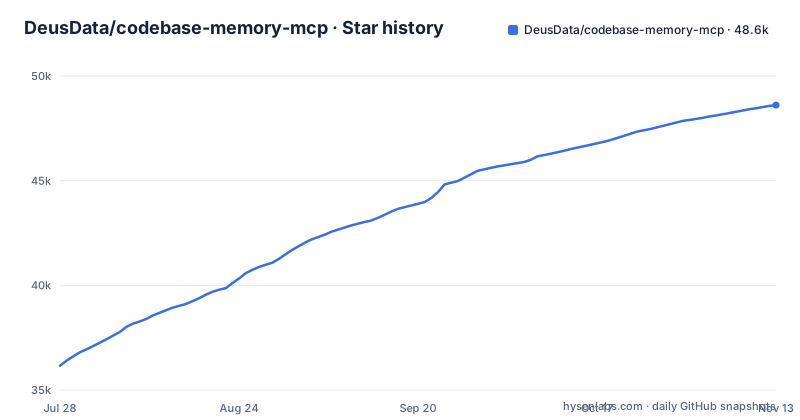
Star history
- DeusData/codebase-memory-mcp48,611 ★ · +12,457
| Repository | 2026-07-28 | 2026-11-13 |
|---|---|---|
| DeusData/codebase-memory-mcp | 36.2k | 48.6k |
12,457 Stars in the last 108 days, measured from the daily GitHub snapshot. Compare with other projects
Editorial analysis
What It Solves: The Token and Latency Problem in Code Exploration
AI coding agents that read a repository file by file burn tokens and time. A typical exploration cycle involves dozens of grep and read operations, each one a round trip to the model. codebase-memory-mcp attacks that directly. It builds a persistent knowledge graph of functions, classes, call chains, HTTP routes, and cross-service links, then exposes that graph through 17 MCP tools. The README says focused graph queries can reduce repeated file reads and token use, and the repository description claims 99% fewer tokens. The target user is a developer running a local coding agent like Claude Code or Continue on a large repository, where the cost of repeated reads becomes the bottleneck. The repository description claims an average repo indexed in milliseconds and sub-millisecond queries. Those are the project's own claims, so treat them as vendor claims until you reproduce them.
The Mechanism: Tree-Sitter ASTs, Hybrid LSP, and a RAM-First Pipeline
The indexing engine is built in C and uses vendored tree-sitter grammars compiled directly into the binary. That is why it supports 158 languages (per the repository description) with no external runtime or grammar installation. Parsing produces an AST for each file, and the project adds a layer called Hybrid LSP for semantic type resolution for supported languages. This is the key differentiator from a plain tree-sitter index: it resolves types and symbols that pure syntax parsing cannot, such as cross-file imports and inferred types. The graph is persisted, so queries do not re-parse the repository each time. The README also mentions infrastructure-as-code indexing, where Docker, Kubernetes, Helm, Kustomize, Terraform/OpenTofu, Terragrunt, Ansible, scripts, Make and CI configuration can be traced as supported relationships, which is unusual and useful for platform engineers. The built-in 3D visualization at localhost:9749 is served from the binary itself, giving a human-readable view of the graph without a separate service.
Installation and First Run: One Command, Then a Phrase
The install path is deliberately short. On macOS or Linux, the one-liner is:
curl -fsSL https://raw.githubusercontent.com/DeusData/codebase-memory-mcp/main/install.sh | bash
Windows uses a PowerShell script: download install.ps1, optionally inspect it with notepad, unblock it with Unblock-File, then run it. The install command auto-detects installed coding agents and configures their MCP settings. It also strips macOS quarantine attributes and ad-hoc signs the binary, so you do not need manual xattr or codesign steps. There is a --skip-config option that installs only the binary without touching agent configurations, and --dir=<path> to control the install location. After installation, you restart your agent and say "Index this project". The manual route is equally direct: download the archive for your platform, extract it, and run install.sh or install.ps1.
The 15 MCP Tools and What They Actually Do
The README says the native C backend exposes 17 MCP tools. Its capability list covers combined symbol, text and semantic search with callers, dependencies, source snippets and file outlines; documentation indexed alongside code; tracing relationships through Docker, Kubernetes, Helm, Kustomize, Terraform/OpenTofu, Terragrunt, Ansible, scripts, Make and CI configuration; impact analysis of affected symbols, snapshot comparison and related-test discovery (experimental Smart CI); and architecture decision management. The full tool list is in the README's MCP tools section.
Limitations and Failure Modes: False Positives, Config Writes, and Language Gaps
The most obvious limitation is trust: a security-conscious team may refuse to run a prebuilt native binary that installs agent configuration, and the README points to its Security section and SECURITY.md for release verification. The tool also writes to your agent configuration files. That is by design, but it means the install step has side effects beyond placing a binary. If you do not want that, the --skip-config flag exists, but then you must configure the MCP endpoint manually. Another limitation: Hybrid LSP type resolution applies only to supported languages, so check your primary language against the README's language-support section. The README also says the tool reads your codebase; it processes everything locally, so no data leaves the machine, but that is a trust statement, not a verified claim. Finally, the 'average repo in milliseconds' figure comes from the repository description and will depend on repository size.
Alternatives: File-by-File Search and Other MCP Servers
The most direct alternative is no MCP server at all: letting the agent read files directly. That is the baseline the project compares against, with a claimed 99% fewer tokens. The trade-off is that the agent loses the ability to see raw file contents unless it queries the graph and then reads specific files. A more structured alternative is a semantic code search tool like Sourcegraph's Cody or a local indexer such as ctags-based navigation, but those do not expose a knowledge graph via MCP. If you want a similar graph-based approach without a compiled binary, you could build a custom MCP server that uses tree-sitter directly, but you would need to implement the graph persistence and query layer yourself. The key difference is that codebase-memory-mcp ships as a single static binary with zero runtime dependencies, while a custom solution would require a language runtime and dependency management. For teams that already use an MCP-compatible agent, this project is a drop-in; for teams on a different protocol, it is not.
Maintenance and Upgrade Cost: Release Cadence and Provenance
The project is under active development. The last push is 2026-11-02, and the latest releases are v0.12.1 (2026-10-16), v0.12.0 (2026-10-15) and v0.11.0 (2026-09-15). That cadence suggests rapid iteration, which is good for bug fixes but implies frequent upgrades. The README points to its Security section and SECURITY.md for release verification, so verify release artifacts after every upgrade, not just the first install. The project is licensed under MIT, which permits commercial use and modification with attribution. The README says indexing and graph queries need no hosted service or API key, so the maintenance cost is entirely on your side: you manage the binary, the graph storage, and any agent config changes. The project also publishes a preprint on arXiv, which gives you a reference for the design and benchmarks, but that is not a guarantee of ongoing support.
Editorial conclusion
Adopt codebase-memory-mcp if you run an AI coding agent on a large codebase and want to cut token usage and tool calls by replacing grep/read cycles with graph queries. Skip it if you need a hosted service, multi-user collaboration, or if you cannot accept a binary that writes agent configuration files. Before adopting, verify the release artifact's SHA-256 against the release notes, run the binary in a sandbox first, and test the Hybrid LSP resolution on your primary language, since Hybrid LSP type resolution covers only supported languages. Also confirm that your agent is among the 45 supported client surfaces, or you will have to configure the MCP endpoint manually.
Frequently asked questions
What is codebase memory mcp?
It is a code intelligence MCP server that indexes a codebase into a persistent knowledge graph through tree-sitter AST analysis, producing functions, classes, call chains, HTTP routes, and cross-service links. It ships as a native executable for macOS, Linux, and Windows, needs no language runtime, hosted service, or API key, and exposes 17 MCP tools.
How do I install codebase-memory-mcp?
On macOS and Linux the one-line install is a curl of install.sh piped to bash. On Windows, download install.ps1 with Invoke-WebRequest, optionally inspect it in notepad, run Unblock-File on it, then execute it. The install command strips macOS quarantine attributes and ad-hoc signs the binary, and the options are --skip-config for the binary without agent setup and --dir=<path> for a custom location.
Is codebase memory mcp safe?
The project states that the tool reads your codebase and writes to your agent configuration files, and that all processing happens locally.
What are the differences between Graphify and Codebase memory MCP?
The README states about itself a C implementation with vendored tree-sitter grammars compiled into a native binary, Hybrid LSP type resolution for supported languages, 17 MCP tools, and a graph visualisation UI served from the binary at localhost:9749.
Does codebase-memory-mcp work with vscode?
The install command auto-detects installed coding agents and configures their documented configuration across 45 supported automatic and conditional client surfaces, activating a conditional client only when its documented platform, marker, or explicit existing config path is present. The complete matrix is in the Multi-Agent Support section.
Official sources
Where developers are discussing it
Posts on Hacker News, dev.to and Lobsters that link to this repository, found by our scan of those communities. 0 in the last 30 days; newest first.
- Build without Limits - SDLC Briefing - Edition #1dev.to · Oct 12, 2026 · 8 points · 0 comments
Add this badge to your README
If you maintain this project, the badge below links readers to this analysis and shows its maintenance status from the daily GitHub snapshot. Paste the markdown into your README; add ?metric=license or ?metric=stars to the image URL for a different field.

[](https://hysenlabs.com/projects/deusdata-codebase-memory-mcp)Star history chart for your README
[](https://hysenlabs.com/projects/deusdata-codebase-memory-mcp)Was this useful?