Pharo Image Sources, Live Programming, and Bootstrap Workflow
Pharo is a dynamic reflective pure object-oriented language supporting live programming inspired by Smalltalk.
At a glance
- What is it?
- Pharo is a dynamic, reflective, pure object-oriented language whose image, development tools, and object system are designed for live programming. This repository builds the image from source rather than containing the virtual machine or a ready-made installation.
- Who is it for?
- Pharo fits developers who specifically want its live-programming model and are prepared to work with an image-based toolchain. It is a poor fit for teams whose primary requirement is a conventional source tree, compiler, and IDE deployed as separate components, or whose licensing process cannot accommodate the custom LICENSE file.
- Can I use it commercially?
- Check first. The repository uses a licence we do not classify automatically, so read its LICENSE file before any commercial use.
- Is it still maintained?
- Yes. The repository last received commits 1 day ago.
- What is it written in?
- Mainly Smalltalk, according to GitHub's language statistics.
Answers come from the project's GitHub data, last synced on November 7, 2026, and from our analysis. They are not legal advice.
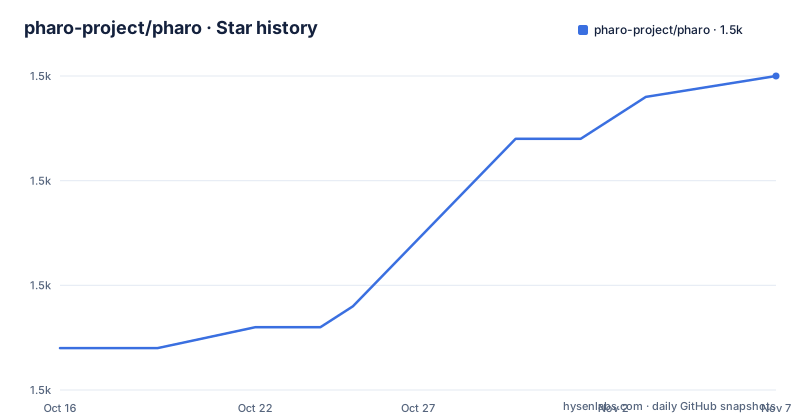
Star history
- pharo-project/pharo1,510 ★ · +13
| Repository | 2026-10-16 | 2026-11-07 |
|---|---|---|
| pharo-project/pharo | 1.5k | 1.5k |
13 Stars in the last 22 days, measured from the daily GitHub snapshot. Compare with other projects
Editorial analysis
Pharo's Live Image Model and Intended Users
Pharo addresses developers who want immediate feedback while changing a running object-oriented system. The README describes it as a pure object-oriented programming language and an environment focused on simplicity and immediate feedback. Its central metaphor combines the IDE and operating system into one environment. That is a different starting point from a workflow in which source files, build tools, and an editor remain separate applications.
The language is dynamic and reflective, so programmers work with an object system that can participate in its own inspection and modification. The README does not enumerate particular reflection APIs or live-coding commands, so this article does not assume features beyond the repository's stated model. What is confirmed is the design emphasis: developers work inside Pharo while modifying and evaluating a live system, with the language, tools, and runtime state assembled into the Pharo image.
This makes the project relevant to language implementers, tool builders, educators interested in live programming, and application developers who prefer Smalltalk-style development. It also creates a clear boundary. A team that mainly wants ordinary object-oriented application code may have little reason to accept an image-based development model unless that model is itself part of its requirements. Pharo is designed to make code and environment part of the same interactive system, not simply to offer another syntax for classes and methods.
Pharo Image Sources and the Separate Virtual Machine
This repository contains the sources of the Pharo image, but it does not contain the virtual machine. The README directs users to the separate `pharo-project/pharo-vm` repository for VM source code. That boundary matters when evaluating installation, contribution, and licensing because cloning this repository alone does not provide a complete executable stack assembled from both source repositories.
The repository layout separates several parts of the language system. Top-level `src/` and `tests/` directories separate implementation sources from tests, while `bootstrap/` contains the bootstrap workflow and scripts. `resources/` and `doc/` provide additional project content. The `Jenkinsfile` and the README's automated-build section indicate that images are produced through CI rather than stored directly in this Git tree.
Pharo source files use Tonel format. According to the README, packages are represented as directories and every class is contained in one file. This differs from many object-oriented repositories whose classes may be split among implementation, interface, and test files. Tonel makes that structural choice explicit, but the README does not document compatibility constraints, migration tools, or the complete differences between supported Pharo versions. The repository should therefore not be treated as a generic Smalltalk package directory without first checking how the intended Pharo release loads it.
Downloading Pharo and Choosing Full or Minimal Images
For ordinary evaluation, the README does not prescribe command-line installation steps. It directs users to `http://pharo.org/download` for the stable version for their platform. This is also the documented route when the goal is to use Pharo rather than modify its implementation. The download page is responsible for platform selection; this README does not identify supported operating systems, package formats, installation paths, or startup commands.
The repository also publishes automated build artifacts. The README lists separate 64-bit and 32-bit full images and identifies the minimal image as containing basic packages without the graphical user interface. It describes that minimal image as useful for server-side application deployment. This gives prospective users a concrete choice between a GUI-bearing development environment and a smaller base without the GUI, although the README does not document the exact contents of each basic package.
Using a published build and bootstrapping from source are different approaches. A published image avoids making the developer responsible for constructing the image in this checkout. Bootstrapping creates an image from the source tree and archives intermediate stages, but it requires an existing stable Pharo release and additional execution details. Teams should choose based on whether they are evaluating the language or maintaining its implementation, not merely on the presence of a downloadable archive.
Bootstrapping a Pharo Image from the Source Tree
The documented source-build entry point is `bootstrap/scripts/bootstrap.sh`. The README says bootstrapping requires the latest stable version of Pharo. It also directs contributors to `guillep/PharoBootstrap` for more information. On a branch following the expected `PharoX.Y` naming convention, the documented command is:
./bootstrap/scripts/bootstrap.shThe script generates and archives images at multiple bootstrap stages, ending with a full image named using the pattern `Pharo12.0-64bit-hhhhhhh.zip`, where the placeholder represents the hash of the current checkout. The README says stage details and snapshot instructions are comments in `bootstrap.sh`. That file is therefore part of the operational documentation for understanding the intermediate archives.
Several environment variables alter the process. `BOOTSTRAP_ARCH` accepts `64`, which is the default, or `32`. `BOOTSTRAP_REPOSITORY` and `BOOTSTRAP_CACHE` allow bootstrap work outside the source repository. `BOOTSTRAP_VMTARGET` points the process at a VM already present on the system; otherwise the bootstrap process downloads one. `BUILD_NUMBER` supplies a unique integer and defaults to `0`. These options matter for isolated builds because they control architecture, cache location, repository location, and VM acquisition.
There is a documented versioning issue. The repository's default branch is `Pharo15`, while the README's sample final filename and custom-branch example refer to Pharo12. A branch that does not follow the expected convention receives a default such as `Pharo12.0`. To build Pharo12.0 from a custom branch, set `BRANCH_NAME=Pharo12` before running the script.
Developers should inspect `VERSION`, the active branch, and the comments in `bootstrap.sh` before treating the sample names as current release instructions. The documentation mixes branch generations, and the README does not explain how the Pharo15 default branch corresponds to the listed releases.
Ubuntu 22.04 Container for a Pharo Bootstrap
The README provides a Dockerfile based on `ubuntu:22.04`, giving contributors a documented way to control the bootstrap environment. It installs the named packages, clones the repository, pulls its current contents, and runs the bootstrap script during image construction. Its entry point opens Bash.
# docker build --tag pharo .
# docker run --rm --name pharo -it pharo
FROM ubuntu:22.04
RUN apt-get update && apt-get -y install build-essential git wget zip
RUN git clone https://github.com/pharo-project/pharo.git /root/pharo
WORKDIR /root/pharo
RUN git pull && ./bootstrap/scripts/bootstrap.sh
ENTRYPOINT [ "bash" ]
The comments show the build and run commands. Building should perform package installation, repository acquisition, update, and bootstrap. Running the resulting image should open the container's Bash entry point. The README says this approach can be repeated inside a container at any time by performing a pull and bootstrap run.
A second Docker workflow mounts the host's current project directory. The README calls this useful for Windows environments because the project files remain in the host checkout while commands run in an Ubuntu container. The host-side container command is:
docker run --rm -it -v $(pwd)/:/pharo --workdir /pharo ubuntu:22.04 bashInside that container, the README directs the developer to install the required packages and run the bootstrap script:
apt-get update && apt-get -y install build-essential git wget zip
./bootstrap/scripts/bootstrap.sh
These examples build an image, but they do not demonstrate launching a completed Pharo image or evaluating an expression inside it. The README is silent about that first interactive command, so no such command can be stated from the repository documentation.
Tonel Layout, Jenkins Builds, and Source Changes
Pharo combines a source representation with an image-producing build. The README says Jenkins builds the repository and uploads artifacts to `files.pharo.org`. It lists full and minimal image URLs for 32-bit and 64-bit builds. Those links demonstrate that the source tree, automated build system, and distributable images are connected, even though they are not stored in the same Git repository.
This arrangement creates two review paths. Developers using Pharo can obtain a stable platform build and work inside an image. Language contributors can clone the image sources, run the bootstrap script, inspect generated artifacts, and use the tests directory as part of the repository structure. The README does not document a complete contributor test command, release procedure, migration policy, or compatibility matrix, so those details cannot be inferred from the presence of CI alone.
The repository is not archived, and its last push was on 2026-10-16. The listed releases include `v13.1.0` dated 2025-06-26, `v13.0.0` dated 2025-05-24, and `v12.0.0` dated 2024-04-26. The later push confirms repository activity, but it does not establish compatibility between the default `Pharo15` branch and those releases. Maintainers and adopters need to verify that distinction before using a branch name as a release target.
Custom Licensing and the Limits of the Pharo Source Repository
The repository is classified as having a custom licence, and it includes a `LICENSE` file. The README calls Pharo an open source project, but it does not reproduce the licence text or explain its permissions and restrictions. No conclusion about redistribution, modification, or deployment can therefore be drawn from the short description alone.
Maintenance cost depends on what is being adopted. Using a stable download means following the distribution process at `http://pharo.org/download` rather than maintaining the image source. Building this repository means operating the bootstrap script, managing architecture and cache settings, obtaining or supplying a VM, and reconciling branch-specific naming. A containerized build adds an Ubuntu 22.04 environment and the listed build packages, but it does not remove the need to inspect generated images.
Pharo is also different from a toolchain built around separate language, compiler, IDE, and deployment units. Its image combines runtime state and development tools, which is central to live programming but can complicate workflows that assume independently versioned components. Teams should assess that operational boundary directly. For licensing, the first source to consult is the repository's `LICENSE` file, not the topic list, project description, or release naming.
Adoption Boundaries for Live Programming Teams
Pharo fits developers who specifically want its live-programming model and are prepared to work with an image-based toolchain. It is a poor fit for teams whose primary requirement is a conventional source tree, compiler, and IDE deployed as separate components. It may also be unsuitable when Tonel source and a generated runtime image do not satisfy an organization's delivery or review process.
For language contributors, the repository offers more than a collection of class sources. The bootstrap process produces and archives images at several stages, while Jenkins supplies automated builds and the documentation describes both full and minimal outputs. That workflow increases the number of artifacts to inspect. In particular, the difference between the `Pharo15` default branch and Pharo12 examples in the README must be resolved before a build can be treated as reproducible.
The concrete verification sequence is defined by the repository itself. Visit `http://pharo.org/download` for an evaluation image, or run `./bootstrap/scripts/bootstrap.sh` with the required stable Pharo release. Use `BOOTSTRAP_ARCH` to select the documented architecture and `BOOTSTRAP_VMTARGET` when a suitable VM already exists. Then inspect `LICENSE` and the branch metadata. Adoption should proceed only if the intended image can be reproduced, delivered, and used under the terms in that file.
Editorial conclusion
Pharo fits developers who specifically want its live-programming model and are prepared to work with an image-based toolchain. It is a poor fit for teams whose primary requirement is a conventional source tree, compiler, and IDE deployed as separate components, or whose licensing process cannot accommodate the custom LICENSE file. Before adoption, verify the download or bootstrap route that matches the intended release, confirm that a separate virtual machine is available, and have legal reviewers examine LICENSE directly. The first concrete adoption decision is whether the generated Pharo image can be reproduced and delivered within the team's operating environment.
Frequently asked questions
Does the pharo-project/pharo repository include the Pharo virtual machine?
No. The README says this repository contains only the Pharo image sources. Virtual machine source code is maintained separately in the `pharo-project/pharo-vm` repository.
How do I bootstrap Pharo from the pharo-project/pharo source tree?
The README requires the latest stable Pharo release and directs users to run `./bootstrap/scripts/bootstrap.sh`. It also documents `BOOTSTRAP_ARCH`, `BOOTSTRAP_REPOSITORY`, `BOOTSTRAP_CACHE`, and `BOOTSTRAP_VMTARGET` as build controls.
Can I use the minimal Pharo image for server-side deployment?
The README describes the minimal image as containing the basic packages without the graphical user interface and identifies it as useful as a base for server-side application deployment. It does not document a complete deployment procedure.
What file format does pharo-project/pharo use?
The repository uses Tonel format. According to the README, packages are represented as directories, and each class is stored in a single file.
Can I bootstrap Pharo in Docker?
Yes. The README provides a Dockerfile based on `ubuntu:22.04` that installs `build-essential git wget zip`, clones the repository, runs the bootstrap script, and opens Bash as the container entry point.
Official sources
Add this badge to your README
If you maintain this project, the badge below links readers to this analysis and shows its maintenance status from the daily GitHub snapshot. Paste the markdown into your README; add ?metric=license or ?metric=stars to the image URL for a different field.

[](https://hysenlabs.com/projects/pharo-project-pharo)Star history chart for your README
[](https://hysenlabs.com/projects/pharo-project-pharo)Was this useful?