Building and starting Phosh without installing anything outside the source tree
Read-only mirror of https://gitlab.gnome.org/World/Phosh/phosh
At a glance
- What is it?
- Phosh is a C implementation of a pure Wayland shell for touch-first mobile hardware, developed on GNOME's GitLab and mirrored read-only on GitHub. Building it is three commands, running it from a checkout takes two, and the packaged systemd unit quietly assumes a user with id 1000 exists.
- Who is it for?
- Phosh is the right target if you are building a Wayland phone shell for a Librem 5 or PinePhone and can accept the phoc pairing that design assumes. Skip this repository if you want release artifacts or a package feed, because it carries no releases at all and the clone command points at gitlab.gnome.org instead.
- Can I use it commercially?
- Yes, with conditions. GPL-3.0 is a copyleft licence: if you distribute software that includes it, you must release that software's source code under the same licence. Running it internally without distributing it does not trigger that obligation.
- Is it still maintained?
- Yes. The repository last received commits 3 days ago.
- What is it written in?
- Mainly C, according to GitHub's language statistics.
Answers come from the project's GitHub data, last synced on October 19, 2026, and from our analysis. They are not legal advice.
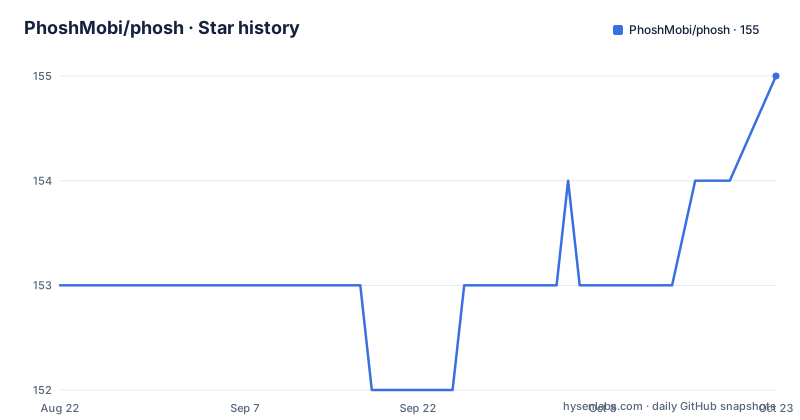
Star history
- PhoshMobi/phosh154 ★ · +1
| Repository | 2026-08-22 | 2026-10-19 |
|---|---|---|
| PhoshMobi/phosh | 153 | 154 |
1 Stars in the last 58 days, measured from the daily GitHub snapshot. Compare with other projects
Editorial analysis
The clone command does not point at this repository
This GitHub project is a read-only mirror. Development happens on the GNOME GitLab instance under the World/Phosh group, and that is where the build instructions send you:
git clone https://gitlab.gnome.org/World/Phosh/phosh
cd phosh
So the URL you would guess from the repository name is the wrong one for actual work, and there are no GitHub releases to fall back on. The one branch worth tracking is main, which the source section calls the current development version, so a clone is a clone of a moving target rather than of a tagged snapshot. The project page at phosh.mobi is the public face, and the tree mirrors the upstream layout rather than adding GitHub-specific packaging: debian/, po/, meson.build, meson_options.txt, and subprojects/ all sit at the top level. The last push to the mirror landed on September 29, 2026, and the mirror is not archived.
Five hardware constraints, then two named devices
The scope statement is a list of device properties rather than a feature list, and it is worth reading as a requirements document. A target device uses touch input, runs on battery most of the time, has limited screen space, has a limited number of buttons, and might be docked to a keyboard, screen, or other input devices. Two concrete machines are named as typical: the Librem 5 and the PinePhone. The third category is more interesting, devices formerly running proprietary operating systems, with the OnePlus 6 and 6T given as the example, which is how phosh ended up on hardware that was never designed for it. The companion Wayland compositor is a separate project, phoc, developed in its own repository. Everything about how the shell is launched follows from that split, because the compositor and the shell are two programs with two different build trees.
build-dep does the dependency work and debian/control holds the list
On a Debian based system the dependency step is two apt invocations:
sudo apt -y install build-essential
sudo apt -y build-dep .
The second one is the load-bearing line. It reads the Build-Depends entry from the debian/control file sitting in the same checkout, which is also where the project points anyone who wants the explicit list rather than the shorthand. The build itself is meson, and therefore Ninja, with the two commands given as the quickest path:
meson setup _build
meson compile -C _build
There is no configure script anywhere in the tree, which is the first thing that tells you this is a meson project rather than an autotools one. A subprojects/ directory sits next to meson.build and meson_options.txt, so dependencies that meson knows how to wrap can be resolved into the build rather than installed system wide. Both facts matter for a shell that has to build on whatever minimal image a phone vendor happens to ship.
The test command deliberately drops the screenshots suite
One command runs the suite, and it excludes a suite by name:
xvfb-run meson test --no-suite screenshots -C _buildThe wrapper matters as much as the flag. `xvfb-run` supplies a virtual framebuffer, which is what lets a Wayland shell test anything at all on a machine with no display, and `--no-suite screenshots` says the visual comparison tests are not part of this run. A top-level screenshots/ directory confirms the suite exists as a distinct thing, so the exclusion is a deliberate split between tests that pass headless and tests that want pixels. The CI definition is the reference for what actually runs, and it lives in .gitlab-ci.yml rather than in the GitHub mirror's .github/ directory, another reminder of where the real pipeline is. Coverage tooling is configured too, through a gcovr.cfg at the root, which is a sensible fit for a project whose source language is C.
Two launch paths from a checkout, and one gsettings detail
Running from the source tree means starting the compositor first, then the shell:
_build/runIf phoc was built from source in a sibling directory, the same thing collapses into one command:
../phoc/_build/run -C ./data/phoc.ini -E _build/runThe flags are the interesting part. `-C ./data/phoc.ini` points phoc at a configuration file that lives in the phosh tree, not in the phoc tree, and `-E _build/run` hands phoc the shell binary to execute. Both paths exist so the needed gsettings schema is found, and the source section is explicit that no files need to be installed outside the source tree. A top-level run.in template is what the build turns into the launcher the first command invokes. What that looks like is left to a screenshot rather than a written description, so if you are comparing your own build against something, there is no documented reference frame on this page.
The packaged unit runs phosh as user id 1000
The Debian package route has three entry points. If a display manager such as GDM or LightDM is running, the `Phosh` session appears in its menu. For development there is a systemd unit:
systemctl start phoshThat unit runs phosh as the user with id 1000, and the source section flags that the account has to exist. If you do not have it and do not want to create it, the documented fix is an override file:
cat <<EOF > /etc/systemd/system/phosh.service.d/override.conf
[Service]
User=<your_user>
EOF
All three paths funnel through the /usr/bin/phosh-session script, which starts the compositor and the shell together, and the source section notes that you can invoke that script directly if all you want is one run from the system console. The uid 1000 assumption is the part to check first on a fresh image, since a system where the first user is not 1000 will need the override before anything appears on screen.
Translations, contacts, and no named alternatives
Localization is handled entirely outside the repository, through GNOME infrastructure: the TranslationProject wiki page and the l10n.gnome.org module page for phosh. That matches the top-level po/ directory, which holds the translation template rather than the translation workflow. Contact channels are the same: the issue tracker lives at the GitLab project, and chat is a Matrix room at #/#phosh:phosh.mobi. Development documentation, including public API notes for application developers, is published separately at world.pages.gitlab.gnome.org/Phosh/phosh. What the README does not do is name any alternative shell, so there is no stated comparison to draw from here, and phoc is the only related project it points at. The rest of the tree describes a release process rather than a comparison table: COPYING carries the GPL-3.0-or-later licence, phosh.doap is the GNOME release metadata file, and NEWS is the changelog.
Editorial conclusion
Phosh is the right target if you are building a Wayland phone shell for a Librem 5 or PinePhone and can accept the phoc pairing that design assumes. Skip this repository if you want release artifacts or a package feed, because it carries no releases at all and the clone command points at gitlab.gnome.org instead. Before building, read Build-Depends in debian/control, and decide whether a hardcoded uid 1000 fits your system.
Frequently asked questions
What is Phosh?
A pure Wayland shell for mobile devices such as smart phones and small tablets, for hardware that uses touch input, runs on battery most of the time, has limited screen space and a limited number of buttons, and might be docked to a keyboard or screen. The companion Wayland compositor is phoc.
What devices run Phosh?
The source section names the Librem 5 and the PinePhone as typical devices, and adds a third group of devices formerly running proprietary operating systems, with the OnePlus 6 and 6T as the example.
Is Phosh based on Gnome?
It is developed on the GNOME GitLab instance under World/Phosh, its translations go through GNOME infrastructure at l10n.gnome.org/module/phosh/, and its public API documentation is served from GNOME pages. The README names phoc as the companion compositor rather than describing phosh as a GNOME Shell derivative.
How do you install phosh?
The source section has no command that installs the phosh package itself. It gives a build path with `git clone https://gitlab.gnome.org/World/Phosh/phosh` followed by `meson setup _build` and `meson compile -C _build`, and a package path where you select the `Phosh` session from a GDM or LightDM menu, or run `systemctl start phosh`.
Official sources
Add this badge to your README
If you maintain this project, the badge below links readers to this analysis and shows its maintenance status from the daily GitHub snapshot. Paste the markdown into your README; add ?metric=license or ?metric=stars to the image URL for a different field.

[](https://hysenlabs.com/projects/phoshmobi-phosh)Star history chart for your README
[](https://hysenlabs.com/projects/phoshmobi-phosh)