OLAINDEX turns a OneDrive account into a Laravel-served file index, with its last release in 2020
✨ Another OneDrive Directory Index
At a glance
- What is it?
- OLAINDEX is a PHP and Laravel application that lists and previews files from OneDrive through Microsoft Graph. The code was pushed to in April 2026, but the newest tagged release is v6.0 from December 2020, so check which branch you deploy.
- Who is it for?
- Use OLAINDEX if you already run PHP hosting and want a self-hosted page that lists a OneDrive folder with previews and password-protected directories. Skip it if you need a hosted service or a project with recent tagged releases: the newest release is v6.0 from 31 December 2020.
- Can I use it commercially?
- Yes. MIT is a permissive licence: you can use, modify and sell software built on it, as long as you keep its copyright and licence notices.
- Is it still maintained?
- Activity is slowing. The repository last received commits 7 months ago.
- What is it written in?
- Mainly PHP, according to GitHub's language statistics.
Answers come from the project's GitHub data, last synced on November 25, 2026, and from our analysis. They are not legal advice.
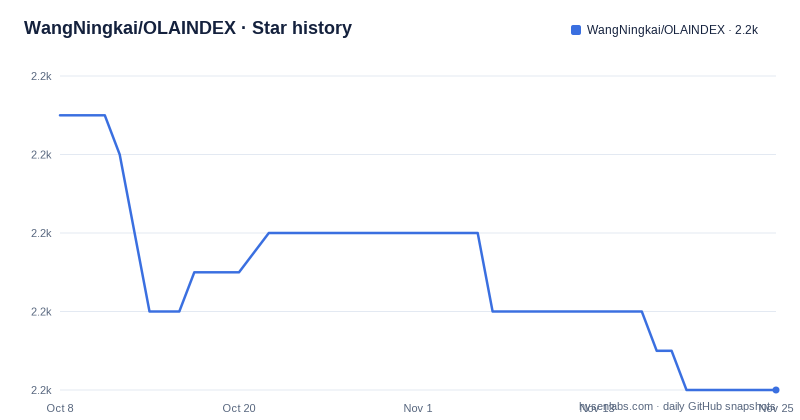
Star history
- WangNingkai/OLAINDEX2,202 ★ · -7
| Repository | 2026-10-08 | 2026-11-25 |
|---|---|---|
| WangNingkai/OLAINDEX | 2.2k | 2.2k |
-7 Stars in the last 48 days, measured from the daily GitHub snapshot. Compare with other projects
Editorial analysis
Microsoft Graph sits between the index and your OneDrive files
OLAINDEX is a Laravel application that reads a OneDrive account through the Microsoft Graph API and presents the folders as a browsable web index. Visitors open pages served from your own PHP host, and the application fetches the file listing from Microsoft on their behalf. The project describes itself as supporting multiple account types, so the same codebase is meant to cover more than one kind of Microsoft account.
The lineage is stated plainly in the acknowledgments: the project was inspired by oneindex, an earlier OneDrive index at github.com/donwa/oneindex. OLAINDEX is MIT licensed, written in PHP, and the repository's default branch is dev, not master. That last detail matters when you clone, because a plain git clone lands on dev.
Four commands install it, and the last two touch file ownership
The quick start is a clone followed by two Composer calls and two permission commands:
# Clone repository
git clone https://github.com/WangNingkai/OLAINDEX.git
cd OLAINDEX

# Install dependencies
composer install

# Initialize application
composer run install-app

# Set permissions
chmod -R 755 storage
chown -R www:www *
The chown line assumes a user and group both named www, which is a convention on some control-panel hosts and absent on many Linux distributions where the web server runs as www-data or nginx. If your server uses another account, that command fails or assigns the wrong owner, and the storage directory stays unwritable to PHP. Adjust the user and group before running it. The composer run install-app step is the project's own setup script, and the quick start gives no description of what it writes, so read the script in composer.json before running it on a shared host.
PHP 7.4 or newer, plus nine extensions, is the stated floor
The requirements list names PHP 7.4 or later, Composer, and these extensions: OpenSSL, PDO, Mbstring, Tokenizer, XML, Ctype, JSON, BCMath and Fileinfo. BCMath is the one shared hosting plans most often leave out, and the Dockerfile confirms it is not optional by running docker-php-ext-install bcmath explicitly on its Alpine base image.
There is a newer-PHP wrinkle in .env.example. A comment, written in Chinese, says deprecation warnings from PHP 8.4 and later are suppressed because Laravel 8 does not fully support PHP 8.4, and the file ships with REPORT_DEPRECATIONS=false. The same comment says to set it to true for development debugging. Running on PHP 8.4 therefore works only with the warnings hidden, so a deprecation that points at a real problem will not appear in your logs until you flip the flag.
The Docker image clones GitHub at build time and sets the clock to Shanghai
The Dockerfile starts from php:7-cli-alpine and installs tzdata, git and composer. It writes Asia/Shanghai into /etc/timezone, copies the matching zoneinfo file to /etc/localtime, then deletes tzdata. Anyone outside that timezone gets log and timestamp output in Shanghai time unless they change those lines.
The image does not copy your working tree. It runs git clone --depth 1 against the GitHub repository, then composer install -vvv and composer run install-app, so the contents depend on what the default branch held on the day you built, not on a tag. After that it creates a group and user named olaindex with id 900, hands them ownership of /OLAINDEX, and applies chmod 755 to storage. The container exposes port 8000 and starts with su olaindex -c "php artisan serve --host=0.0.0.0 --port=8000 --tries=0 --no-interaction". That is Laravel's built-in development server, so putting a reverse proxy in front of it is your job if you want TLS or a public hostname. The maintainer label on the Dockerfile names xczh, not the repository owner.
SQLite is the default database, and the queue runs synchronously
The .env.example ships with APP_ENV=production, APP_DEBUG=false and APP_URL=http://localhost:8000. APP_KEY is empty and has to be generated. Storage defaults to DB_CONNECTION=sqlite, with the MySQL host, port, database, username and password lines left commented out, so a first install needs no database server.
Caching is CACHE_DRIVER=file, with memcached and redis listed as the alternatives, and Redis connection values are pre-filled for 127.0.0.1 on port 6379. QUEUE_CONNECTION=sync means queued work runs inside the web request instead of a background worker. SESSION_DRIVER=file with SESSION_LIFETIME=120 keeps sessions on disk for 120 minutes. Moving to Redis or MySQL is a matter of editing these keys, but the example file does not say which of them a heavily used index actually needs.
API_LIMIT is an address whitelist, and PROXY is a single empty setting
Two settings in .env.example control who reaches the application's API and how it reaches Microsoft. API_LIMIT=127.0.0.1,192.168.1.1 is described in a comment as an API access whitelist. Those two addresses are the shipped example values: loopback and a typical private LAN address. A deployment where the API is called from any other host needs its own address added to the comma-separated list.
PROXY= is blank. The example file comments it only with the word for proxy, so what format it expects, such as a scheme and port, is not in the example. A server that cannot reach Microsoft directly will need that value set, and you should check the documentation site before guessing the syntax. The project points to wangningkai.github.io/OLAINDEX for pages on environment requirements, installation, account setup, configuration, the API and an FAQ, and none of that content is reproduced in the repository's top-level README.
Visitor-facing features are listed, but none of them is documented in the README
The feature list covers rich previews for images, video, audio, code and documents, plus password-protected directories, hidden paths, a short URL sharing mode, resource preloading, and two themes, a default Bootstrap theme and a Material Design one. Multi-account support is listed too. Search works inside a directory and, according to the list, needs no API calls, which means it covers the folder you are looking at and not the whole drive.
What the README does not give you is any configuration detail for these. There are no screenshots, no option names for the password feature, no statement of which file types the preview handles, and no explanation of how hidden paths are declared. A demo is linked at demo.olaindex.com, and that is the quickest way to judge the interface before installing anything.
The release history is the weak spot. The three most recent tagged releases are v6.0 on 31 December 2020, v5.0 on 24 December 2020 and v4.0 on 7 July 2020, and the last two are marked 归档 (archived) on the release list. The repository itself was last pushed to on 23 April 2026, and the repository is not archived. A push inside the last year is not the same as a maintained release line, so whatever branch you deploy, record the commit.
Editorial conclusion
Use OLAINDEX if you already run PHP hosting and want a self-hosted page that lists a OneDrive folder with previews and password-protected directories. Skip it if you need a hosted service or a project with recent tagged releases: the newest release is v6.0 from 31 December 2020. Before installing, decide whether you track the dev branch or a release, and test the Microsoft account setup on the PHP version you intend to run, since the .env.example warns that Laravel 8 is not fully compatible with PHP 8.4.
Frequently asked questions
What does OLAINDEX need to run?
PHP 7.4 or later, Composer, and the OpenSSL, PDO, Mbstring, Tokenizer, XML, Ctype, JSON, BCMath and Fileinfo extensions. The project is built on Laravel and uses the Microsoft Graph API.
How do I install OLAINDEX with Docker?
The repository includes a Dockerfile based on php:7-cli-alpine that clones the GitHub repository, runs composer install and composer run install-app, and serves on port 8000 with php artisan serve. Building it pulls whatever the default branch holds at build time.
Is OLAINDEX still maintained?
The latest tagged release is v6.0 from 31 December 2020, and the repository was last pushed to on 23 April 2026. It is not archived, but the project's own release list has not moved since 2020.
Official sources
Add this badge to your README
If you maintain this project, the badge below links readers to this analysis and shows its maintenance status from the daily GitHub snapshot. Paste the markdown into your README; add ?metric=license or ?metric=stars to the image URL for a different field.

[](https://hysenlabs.com/projects/wangningkai-olaindex)Star history chart for your README
[](https://hysenlabs.com/projects/wangningkai-olaindex)Was this useful?