PhotoPrism ships a development compose file, a develop branch and date-hash tags
GitHub describes it as AI-Powered Photos App 🌈💎✨. The repository metadata lists Go as its primary language. The metadata lists the NOASSERTION license. This article stays within the project description and details documented in the GitHub repository README.
At a glance
- What is it?
- PhotoPrism is a Go photo and video library you run with Docker, index with machine learning, and query through a typed filter syntax. The repository you would clone is not the one you deploy: its default branch is develop, its compose.yaml is labelled for tests only, and its releases are named by date and commit hash rather than by version number.
- Who is it for?
- Adopt PhotoPrism if you want one Docker container to index a mixed RAW and video library, expose it over WebDAV as well as HTTP, and search it with a filter language you can put in a bookmark. Do not adopt it expecting a free feature set equal to the README's feature list, because membership is where the interactive world maps and the team chat live, and do not deploy from the repository's own compose.yaml, which is labelled for test and development only.
- Can I use it commercially?
- Check first. The repository uses a licence we do not classify automatically, so read its LICENSE file before any commercial use.
- Is it still maintained?
- Yes. The repository received new commits within the last day.
- What is it written in?
- Mainly Go, according to GitHub's language statistics.
Answers come from the project's GitHub data, last synced on November 15, 2026, and from our analysis. They are not legal advice.
Star history
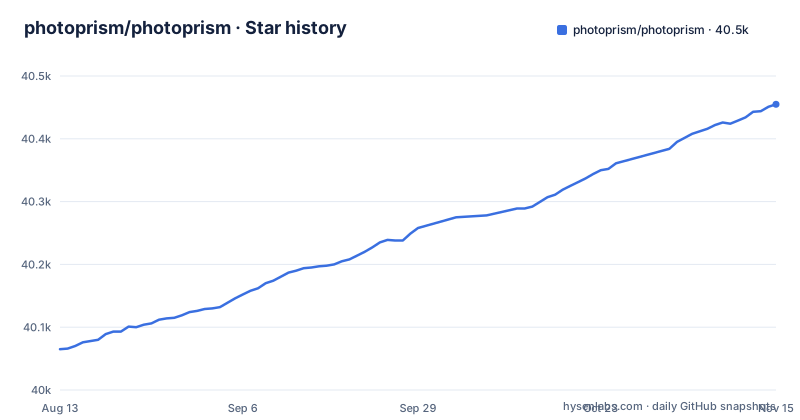
- photoprism/photoprism40,455 ★ · +390
| Repository | 2026-08-13 | 2026-11-15 |
|---|---|---|
| photoprism/photoprism | 40.1k | 40.5k |
390 Stars in the last 94 days, measured from the daily GitHub snapshot. Compare with other projects
Editorial analysis
The compose file in the repository is labelled do not use in production
The first line of the root compose.yaml is a warning, not a comment of convenience: it says the file is for test and development only, and points at a developer setup guide. What it starts is a development harness:
  services:
    photoprism:
      build:
        context: .
        dockerfile: ${DOCKERFILE:-Dockerfile}
      image: photoprism/photoprism:develop
      depends_on:
        - mariadb
        - dummy-webdav
        - dummy-oidc
      security_opt:
        - seccomp:unconfined
        - apparmor:unconfined
Read those five lines together. The image tag is `develop`, not a release. The dependencies are a MariaDB service plus two stubs named dummy-webdav and dummy-oidc, which exist so tests have something to talk to. And both seccomp and apparmor are set to unconfined, which is a reasonable thing to do for a container that needs a debugger attached and an unreasonable thing to do for a container holding your photographs.
Cloning the repository and running compose gets you a test rig. The supported install path is documented separately, on docs.photoprism.app, and the README describes it as needing a web browser and Docker.
Nine compose files are the deployment matrix
The root carries compose.yaml plus compose.intel.yaml, compose.latest.yaml, compose.local.yaml, compose.mariadb.yaml, compose.mysql.yaml, compose.nvidia.yaml and compose.preview.yaml. That list is the honest feature matrix for a self-hosted app, because each file is a decision the operator has to make.
The remaining files are named for what they vary, such as intel and nvidia hardware.
The rest are choices with real consequences. mariadb and mysql pick the metadata database. By name, nvidia adds GPU support, and preview and latest select an image channel. Only after you have picked from all of these do you have a configuration, which is why people who want a set-and-forget photo library sometimes look elsewhere.
Port 2342 is HTTP, 2443 is TLS, and both start on loopback
The dev compose file publishes four ports and binds all of them to 127.0.0.1 unless you override it:
    ports:
      - "${SERVICES_BIND_HOST:-127.0.0.1}:2342:2342"   # HTTP (default)
      - "${SERVICES_BIND_HOST:-127.0.0.1}:2443:2443"   # TLS (default)
      - "${SERVICES_BIND_HOST:-127.0.0.1}:2343:2343"   # HTTP (acceptance tests)
      - "${SERVICES_BIND_HOST:-127.0.0.1}:40000:40000" # Go debugger
The loopback default is the right call. To reach an instance from a phone or another machine you have to set `SERVICES_BIND_HOST` to an address or interface, and that single variable decides whether your library is on your LAN or on the internet.
Note the fourth line. A Go debugger port is in the same list as the HTTP and TLS ports, and the file also raises `shm_size` to 2gb and wires seven Traefik hostnames, including ones for a vector database and an OIDC provider. This is a test harness that publishes its internals on purpose, which is exactly why it should never be the file you copy into production.
Search is a typed filter language, and s2: is an open location code
The library URLs in the README show the query syntax by example. `q=mp:4` is a resolution filter, `q=color:red` is a colour filter, `q=mono%3Atrue` is a chroma filter, `q=type%3Alive` selects Live Photos, and `q=s2:47a85a63f764` is a location filter.
That last one is a location filter written as s2: followed by a hexadecimal value; the README shows it only by example.
The practical consequence is that the query string is an interface. These URLs are bookmarkable, shareable and scriptable, and a filter can be handed to someone else as text.
Releases are named by date and commit, not by version
Three releases appear on the feed: 261029-963b58c50 from October 29, 2026, 261007-65faaae5d from October 7, 2026, and 260919-28c46a116 from September 19, 2026. The pattern is a six-digit date followed by a nine-character commit hash, with the human date spelled out in the tag description.
There is a `.semver` file at the repository root, and the docs distinguish stable releases from a development preview, so a version exists somewhere behind these tags. But a semver range does not match a tag called 261029-963b58c50, and that has a direct effect on your infrastructure: an automated updater that speaks semver has nothing to resolve here, so pinning and upgrading are both manual.
The default branch is `develop`, not master or main, which is the other half of the same story. The last push was on 2026-11-02, so the branch is being worked on.
The supported install needs a browser and Docker, and tar.gz is the exception
The documented self-hosted community edition install is described as needing a web browser and Docker, and it is available for Mac, Linux and Windows. Images are published as a multi-arch build for 64-bit AMD, Intel and ARM, which is the line that puts Raspberry Pi and Apple Silicon users on the same installation steps as everyone else.
The escape hatch is named explicitly. A getting started FAQ entry covers installing without Docker, and the answer is the tar.gz packages published for Linux. That is a different operating model rather than a variant: with tar.gz you own the service unit, the port, the upgrade path and the log rotation, instead of handing all of that to a container runtime.
One detail from the Dockerfile worth knowing before you build anything yourself: the default base is `photoprism/develop:261027-resolute`, and the alternatives are listed in comments, from `photoprism/develop:questing` for Ubuntu 25.10 down to `photoprism/develop:buster` for Debian 10. Which base you pick is part of the install, not an afterthought.
Membership gates features, and the privacy claim is a README statement
The funding section is unusually direct. PhotoPrism describes itself as completely self-funded and independent, states it will never sell your data, and says your data is not shared with Google, Amazon, Microsoft or Apple unless you intentionally upload files to one of their services. Members get additional features, named as access to interactive world maps, and a private chat room with the team. Payment runs through Stripe with credit card or SEPA, or through Patreon with PayPal, more currencies and a monthly or annual choice, and GitHub Sponsors supporters can link their existing account.
Read the feature list against that. The overview advertises six high-resolution world maps and a privacy-preserving geocoding service, and the membership section says interactive world maps are a member feature. So the headline list and the paywalled list overlap.
The other place to look is the repository itself, which carries a `.telemetry` directory at the root. A privacy promise is a statement in a README. If the promise is load-bearing for what you put in the library, that directory is worth reading before you import anything.
Where the money goes is the difference from the usual alternative
Immich is another self-hosted photo and video manager that people evaluate alongside this one. PhotoPrism's backend is Go, and its frontend is a separate JavaScript workspace, since the root package.json is private and declares `workspaces` of `frontend` alone.
One difference to weigh is the funding model. PhotoPrism's README is explicit that the project is funded by membership and that members receive extra features, which means the feature list and the free tier are not the same set and you have to check which is which. Payment handling adds a second wrinkle for self-hosters: a Stripe, SEPA, Patreon and GitHub Sponsors arrangement is a vendor relationship that exists alongside your deployment, whatever your privacy settings say about your photos.
On licensing, the repository's license field does not resolve and the README's licence badge points at a documentation page rather than at the LICENSE file in the root, so read that file before you expose an instance to anyone.
Editorial conclusion
Adopt PhotoPrism if you want one Docker container to index a mixed RAW and video library, expose it over WebDAV as well as HTTP, and search it with a filter language you can put in a bookmark. Do not adopt it expecting a free feature set equal to the README's feature list, because membership is where the interactive world maps and the team chat live, and do not deploy from the repository's own compose.yaml, which is labelled for test and development only. Verify three things: that the tags you pin are the ones your instance was built from, since releases are named like 261029-963b58c50 rather than by version, that the port you expose is 2342 for HTTP or 2443 for TLS and not the debugger port the dev file also publishes, and that whatever the telemetry directory at the root actually does matches the privacy statement in the README before you point it at family photos.
Frequently asked questions
Is PhotoPrism free?
The self-hosted community edition is free to run, and the project states it is completely self-funded and independent, promising never to sell your data. Members receive additional features, named as access to interactive world maps, plus a private chat room, and pay through Stripe, Patreon or a linked GitHub Sponsors account.
What is a PhotoPrism?
PhotoPrism is described as an AI-powered, privacy-first app for browsing, organizing and sharing photos and videos, written in Go. It tags, searches and labels media automatically based on content and location, and recognises the faces of people you add.
how to install photoprism
The documented install is the self-hosted community edition, and all it requires is a web browser and Docker, with images published as a multi-arch build for 64-bit AMD, Intel and ARM. Step-by-step instructions are on docs.photoprism.app, and a getting started FAQ entry covers installing without Docker using the tar.gz packages published for Linux.
how to install photoprism on windows
The community edition is available for Mac, Linux and Windows, and because it runs in a container the host operating system mainly decides which Docker install you use. Raspberry Pi and Apple Silicon users are given the same installation steps as everyone else on the multi-arch image.
how to install photoprism on docker
Docker is the supported route, and the root compose.yaml is explicitly labelled for test and development only, building the image photoprism/photoprism:develop with seccomp and apparmor unconfined. The production compose configuration is documented separately on docs.photoprism.app rather than taken from the repository root.
how to use photoprism
Browse and search the library through the web interface or the installable progressive web app, and combine search filters for labels, location, resolution, color, chroma and quality. The README also describes WebDAV access from Windows Explorer and Apple Finder for opening, editing and deleting files, and background phone backup through a compatible native app such as PhotoSync.
Official sources
Where this project is recommended
Add this badge to your README
If you maintain this project, the badge below links readers to this analysis and shows its maintenance status from the daily GitHub snapshot. Paste the markdown into your README; add ?metric=license or ?metric=stars to the image URL for a different field.

[](https://hysenlabs.com/projects/photoprism-photoprism)Star history chart for your README
[](https://hysenlabs.com/projects/photoprism-photoprism)Was this useful?