Four names, a 163 word readme, and two paid apps carrying the development
Advanced firmware to add native Apple HomeKit and custom configurations, compatible with any SoC based on ESP32, ESP32-S, ESP32-C and ESP8266 series. (Shelly, Sonoff, Electrodragon, Tuya...)
At a glance
- What is it?
- HAA is firmware that adds Apple HomeKit support to ESP32 and ESP8266 hardware, and its repository is named after the chips while the product has an acronym, a second release location and a codename on every tag. The readme points at a wiki for everything it does not say, the compatibility claim names other vendors' products, and two App Store apps are the stated funding.
- Who is it for?
- This firmware is worth investigating if you have one of the named device families and want native HomeKit exposure rather than a bridge, and the HomeKit service type list in the linked wiki is the thing to read first, because it determines whether your accessory model can be expressed at all. Three things to check before you commit a device to it.
- Can I use it commercially?
- Check first. The repository uses a licence we do not classify automatically, so read its LICENSE file before any commercial use.
- Is it still maintained?
- Yes. The repository last received commits 7 days ago.
- What is it written in?
- Mainly C, according to GitHub's language statistics.
Answers come from the project's GitHub data, last synced on November 15, 2026, and from our analysis. They are not legal advice.
Star history
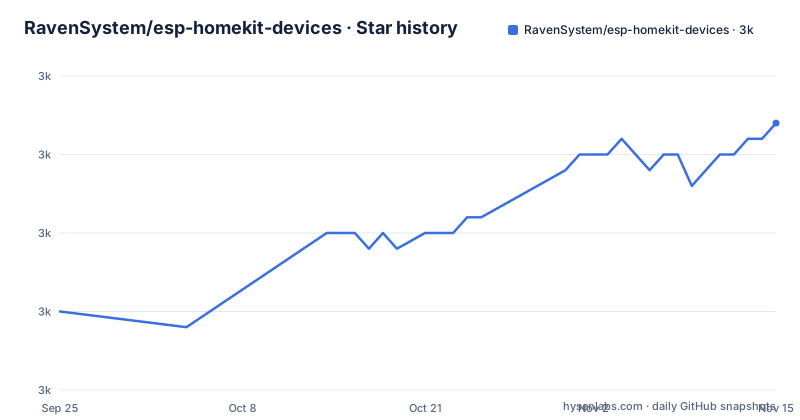
- RavenSystem/esp-homekit-devices3,017 ★ · +12
| Repository | 2026-09-25 | 2026-11-15 |
|---|---|---|
| RavenSystem/esp-homekit-devices | 3k | 3k |
12 Stars in the last 51 days, measured from the daily GitHub snapshot. Compare with other projects
Editorial analysis
One project, four identifiers
The naming here takes a moment to untangle, and it is the first thing anyone integrating this has to deal with.
The repository is named after the hardware it targets. The project's own name in the readme heading is an acronym, expanded in the release titles as an architectural metaphor. The release tags are prefixed with that acronym and carry a version and a codename, so the visible history reads like a sequence of releases all attributed to the same wizard.
And then there is a fourth identifier. Two release links sit side by side in the badge row, one on the repository you are reading and one on a different repository under the same organisation whose name is the acronym on its own. So the project publishes from two places, and nothing in the readme explains the relationship between them.
Add the hardware brands in the repository description and you have four things to keep straight: the project name, the release prefix, the release location, and the codename that does not change.
The readme is 163 words and everything else is a wiki link
This is the single most useful fact about the project, and it is measurable.
The readme opens with a title, five links, a description of what the firmware does in one sentence, a sentence about how many HomeKit service types it supports, one instruction to go to the wiki, two advertisements for paid apps, and a request to subscribe to a video channel.
That is the whole document. There is no installation section, no build instructions, no toolchain version, no hardware list, no configuration reference, no licence section, and no troubleshooting.
So every practical question lives in a wiki, which is a separate repository's wiki and therefore versioned independently of the code. For a firmware project that is a defensible choice: documentation for a dozen device families is genuinely too large for a readme, and a wiki can be revised without touching the source tree.
It also means the readme cannot answer a question on its own. If you are evaluating this firmware, the wiki is the document, and the readme is a signpost with two advertisements attached.
The compatibility claim is as broad as the chip family, and names rival hardware
The scope statement is the most assertive thing in the readme and it deserves to be quoted closely.
The firmware brings native HomeKit support and custom configurations to any device based on one microcontroller family, and the readme widens that to all WiFi-compatible chips in that family's software stack, plus a second, older microcontroller line. The repository description restates it as any system-on-chip based on the named variants, and then gives commercial examples in parentheses: four different brands of off-the-shelf smart home hardware.
Read plainly, that means the project is intended for devices other people sold under their own names, which is why the readme is careful to say any and why it does not list models. The hardware list is not here.
What is also not here is the mechanism. Nothing on this page explains how firmware ends up on a device from one of those brands, whether over a serial connection or over the network, whether any partitioning or backup step is involved, or what happens to the vendor's own software afterwards. All of that is, again, in the wiki, and all of it matters before you start.
Two paid apps are the funding, and each one says so in parentheses
The readme advertises two applications on the App Store, and both descriptions end with the same parenthetical: this purchase will help to support the development of this project.
The first is a companion application for managing devices running this firmware, and it is described as offering batch updates, a way to enable a setup mode, and other features. Batch updates is the significant word: it implies the app can push configuration changes to multiple devices at once, which is a fleet-management capability rather than a single-device convenience.
The second is a benchmarking tool, introduced for people who want to measure the performance of their Home setup. Its claim is that it is the only application that runs speed tests directly against accessories using Apple's HomeKit programming interface. That is a strong uniqueness claim, and it rests on access to a vendor interface that is not a public general-purpose API, so it is worth treating as a positioning statement rather than a verifiable fact.
Around the two apps sit the other funding and engagement routes: a payment address, a social account, a chat invite, and a video channel subscription request.
The licence metadata is empty while a licence file is in the tree
Two licence signals, and they disagree in the way that matters.
There is a licence file at the repository root. The licence attached to the project's metadata is empty, which means no licence could be determined from it.
For an open firmware project whose readme does not contain a licence section, that is the only signal there is, and it is a file rather than a field. Any automated check that trusts the metadata will find nothing, and any human has to open the file.
It is worth pairing with the funding arrangement from the previous section rather than reading it separately. The firmware is open, the licence file is the licence, and the paid applications are stated to be what pays for the work. That is a coherent arrangement and it is also one where the boundary between what is licensed and what is sold is entirely in that one file.
If you plan to modify the firmware and ship the result, that file is the document to read, not the metadata.
An sdk directory, two library directories, and a submodules file
The readme tells you almost nothing about the tree, so read the tree.
At the root there are eight entries. Beyond the readme, the licence and the automation directory, there is a directory holding the firmware itself, and three more that describe the shape of the build: one named for an SDK, one for external libraries, and one for libraries in general. There is also a submodules file.
Two things follow, and neither is stated on the front page. First, some dependencies are fetched as git submodules rather than resolved by a build system, so a plain clone does not give you a complete tree. That is a normal arrangement and it is the kind of thing that costs an afternoon once.
Second, and more interesting: an SDK directory is committed to the repository, and the readme never says what is in it or where it came from. For firmware whose entire purpose is speaking a vendor's accessory protocol, that directory is the first thing to inspect, because a protocol implementation that came from somewhere else has a provenance question attached to it. Nothing on this page answers it, and it is not a question the wiki is obviously going to answer either.
Editorial conclusion
This firmware is worth investigating if you have one of the named device families and want native HomeKit exposure rather than a bridge, and the HomeKit service type list in the linked wiki is the thing to read first, because it determines whether your accessory model can be expressed at all. Three things to check before you commit a device to it. Read the licence file, since the licence metadata attached to the project is empty while a licence file sits in the repository. Work out how your particular unit is flashed, since the repository contains no flashing instructions, no toolchain version and no model list. And assume the documentation you find is the wiki rather than the repository, because that is where everything actually lives.
Frequently asked questions
What does RavenSystem/esp-homekit-devices do?
It is firmware that adds native Apple HomeKit support and custom configurations to devices built on the ESP32 family, including its WiFi-compatible chips, and to ESP8266 microcontrollers. The project is called HAA, short for Home Accessory Architect, and it states that it supports many HomeKit service types with a range of customisations.
What is required to use Apple HomeKit with HAA firmware?
The repository does not answer that. It states that the firmware targets devices based on those two microcontroller lines and points to its wiki for further information. There are no build, flashing, toolchain or configuration instructions in the repository itself.
Which devices does HAA firmware work on?
The repository description names the microcontroller variants it is built for and then gives commercial hardware as examples, listing Shelly, Sonoff, Electrodragon and Tuya. It does not list specific models, and the wiki it links is where a supported hardware list would live.
Is Apple HomeKit free to use with this firmware?
The repository does not address the question. It ships a licence file in its tree while the licence metadata attached to the project is empty, and it points at two paid applications on the App Store, describing both purchases as helping to support the development of the project.
Official sources
Add this badge to your README
If you maintain this project, the badge below links readers to this analysis and shows its maintenance status from the daily GitHub snapshot. Paste the markdown into your README; add ?metric=license or ?metric=stars to the image URL for a different field.

[](https://hysenlabs.com/projects/ravensystem-esp-homekit-devices)Star history chart for your README
[](https://hysenlabs.com/projects/ravensystem-esp-homekit-devices)Was this useful?