Phpactor: a PHP language server with a warning attached
Mainly a PHP Language Server with more features than you can shake a stick at
At a glance
- What is it?
- Phpactor is a PHP language server and standalone refactoring tool built by one maintainer, and its README opens with an unusually direct warning: there are new and interesting open source language servers being developed that may serve you better, and the project has shortcomings in performance, accuracy, and maintainability the author is not able to address.
- Who is it for?
- Adopt Phpactor if you want code actions, auto-import, and navigation in a PHP editor today and are willing to run something the maintainer describes as having performance and accuracy shortcomings. Do not adopt it if a newer language server will serve you better, which is what the README itself tells you to check first.
- Can I use it commercially?
- Yes. MIT is a permissive licence: you can use, modify and sell software built on it, as long as you keep its copyright and licence notices.
- Is it still maintained?
- Yes. The repository last received commits 3 days ago.
- What is it written in?
- Mainly PHP, according to GitHub's language statistics.
Answers come from the project's GitHub data, last synced on October 24, 2026, and from our analysis. They are not legal advice.
Star history
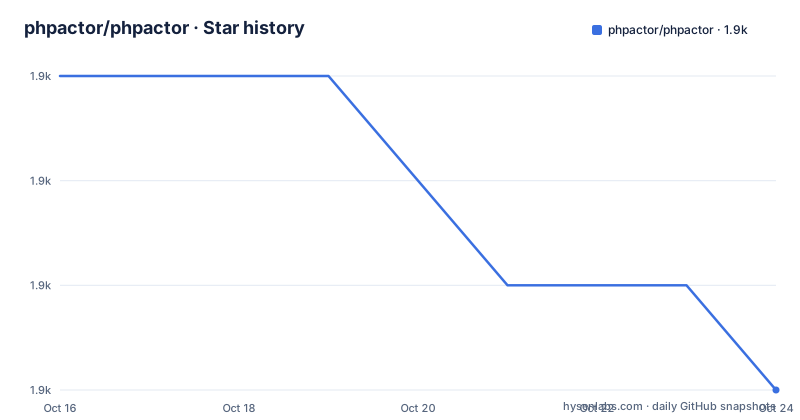
- phpactor/phpactor1,929 ★ · -3
| Repository | 2026-10-16 | 2026-10-24 |
|---|---|---|
| phpactor/phpactor | 1.9k | 1.9k |
-3 Stars in the last 8 days, measured from the daily GitHub snapshot. Compare with other projects
Editorial analysis
The warning comes first, and it is unusual
The Phpactor README opens with a warning block rather than a feature list, and that framing tells you more about the project than any feature list could.
The warning says this language server may not be the one you are looking for. The author says he personally uses it and will continue to maintain it until he does not use it anymore, and that there are new and interesting open source language servers being developed that can offer far more performant capabilities. He thinks Phpactor still offers some great features, especially in regards to code actions, and that he genuinely misses some functionality when using servers for Rust, Go, and Typescript.
He then concedes that there are many parts of the project he is proud of but that it ultimately has some shortcomings in regards to performance, accuracy and maintainability that he is not capable of addressing at this time, ending with the initials YMMV and a link to the your mileage may vary entry on Wiktionary.
That is an unusual thing to find at the top of a language server README, and it is a statement about the state of the project rather than a marketing claim. The reason to write an article about Phpactor is that this is what a well-known tool in this space looks like when its maintainer is honest about where it stands, and that honesty is itself the most useful signal in the document.
The project is MIT licensed, written in PHP, the default branch is master, and the last push to the repository was on 2026-10-16. The release names are dated, with 2026.10.07.0 from 2026-10-07 and 2026.07.22.0 from 2026-07-22, so the versioning is calendar based.
What it does, and how it is meant to be run
The project aims to provide heavy-lifting refactoring and introspection tools which can be used standalone or as the backend for a text editor to provide intelligent code completion.
The features are listed as accurate code completion including class name auto-import, various refactoring, fixes and code generation options, a Language Server, a native VIM plugin with an emacs plugin in development, and navigation including jump to definition, related classes, and references.
The standalone point is the one that makes it different from most language servers. It is a general tool, and it is not intended that it be installed as a project dependency. That is a deliberate design choice, and it is what lets the refactoring and code generation commands run outside an editor, which is what a script or a one-off command needs.
There is a dedicated section on project recommendations, and it is short: Phpactor will perform better with Composer and, to a lesser extent, with Git. That is worth taking literally. An analyser that can resolve your Composer dependencies and autoloading knows the shape of your project, and without that it is guessing at names, which is exactly where a language server's accuracy goes.
The requirements are PHP 8.2 or newer, the PHP mbstring extension, Composer, and Linux or macOS, with Windows users needing to use WSL. That last constraint is the one that will rule the tool out for a team on Windows, and the README is direct about it rather than implying a workaround.
The documentation toolchain, and what the repository holds
The repository is a large PHP application with a documentation build, and the Makefile shows how the two are wired together.
The documentation is Sphinx, and the requirements file pins the versions: docutils 0.18.1, sphinx 6.0.0, sphinx-tabs 3.4.1, sphinx-autobuild 2021.3.14, standard-imghdr 3.13.0, and setuptools 80.9.0. The Makefile targets are the standard Sphinx ones, with build, help, sphinxwatch, sphinx, sphinxlatex, and clean, and every one of them runs inside a container through docker compose run php rather than on the host.
The container approach is set up by a docker-compose file with a single service that builds from docker/Dockerfile, runs sleep infinity so it stays up, and mounts the repository at /phpactor with the cache directory pointed at XDG_CACHE_HOME inside the build tree. The COLUMNS environment variable is set to 100, which is a small detail that only matters if you have ever had a tool produce a different result depending on terminal width.
The vimdoc target is worth noting. It runs the same container with a vimdoc argument, and the repository has a ftplugin/ directory, which is how the native Vim plugin is delivered.
There is also a configreference target that generates three documentation pages from the tool itself, by calling the development:generate-documentation command with an extension, an rpc, and a diagnostic argument. The reference documentation is therefore generated from the code rather than written by hand, which is why it does not drift.
The rest of the tree shows the tool's own engineering: a phpstan.neon with a phpstan-baseline.neon, phpunit.xml.dist, a phpbench.json for benchmarks, a rector.php for automated refactoring, a .php-cs-fixer.dist.php for style, a box.json for building the phar, flake.nix and flake.lock for Nix, and templates/ for the code generation.
Why a language server for PHP was hard
The project description gives the aim in one line: mainly a PHP Language Server with more features than you can shake a stick at. The word mainly is doing the work, because the PHP language itself is not a well-specified target for a static analyser.
PHP is dynamically typed, has no enforced module boundaries, and the conventions that make a codebase analysable, an autoloader that maps names to files, a namespace convention, a dependency manager with a lock file, are conventions rather than language guarantees. That is what the project recommendations section is about, and why Composer and Git are listed as requirements for good behaviour rather than as conveniences.
This is also why the tool leans on runtime introspection rather than pure static analysis. A PHP language server that can load your classes and reflect over them can answer questions that a static reader cannot, at the cost of the performance and accuracy problems the maintainer names. The two are the same trade.
The feature set the author is most proud of is code actions, and that is a reasonable place for a PHP server to compete, because the biggest everyday annoyance in a dynamic language is the repetition of import statements and boilerplate. Auto-import and code generation address that directly, and they are things a server can do well even with an imprecise model of the codebase.
The project also has a community dimension that is worth mentioning for anyone evaluating it. There is a Mastodon account, and a channel on the Symfony Devs Slack, and a sponsors list that names Tinkerwell and others providing either financial support or free services. The sponsorship arrangement is a reasonable signal about where the time budget comes from, given the maintainer's own statement about how much he can take on.
Editorial conclusion
Adopt Phpactor if you want code actions, auto-import, and navigation in a PHP editor today and are willing to run something the maintainer describes as having performance and accuracy shortcomings. Do not adopt it if a newer language server will serve you better, which is what the README itself tells you to check first. Verify first that it runs against your project's PHP version and Composer setup, since its quality depends heavily on both being present.
Frequently asked questions
What is Phpactor and what does it provide?
It provides heavy-lifting refactoring and introspection tools that can be used standalone or as the backend for a text editor, including accurate code completion with class name auto-import, various refactoring, fixes and code generation options, a Language Server, a native VIM plugin, and navigation such as jump to definition, related classes, and references.
What requirements does Phpactor have?
PHP 8.2 or newer, the PHP mbstring extension, Composer, and Linux or macOS, with Windows users needing to use WSL. The README also notes that Phpactor performs better with Composer and, to a lesser extent, with Git, and that it is a general tool not intended to be installed as a project dependency.
What does the Phpactor README warn about?
It warns that this language server may not be the one you are looking for, that new and interesting open source language servers are being developed that can offer far more performant capabilities, and that the project has shortcomings in performance, accuracy and maintainability that the author is not capable of addressing at this time.
How is the Phpactor documentation built?
With Sphinx, run inside a container through docker compose. The Makefile targets include build, help, sphinxwatch, sphinx, sphinxlatex, and clean, plus a configreference target that generates the configuration, RPC command, and diagnostic reference pages from the tool itself via the development:generate-documentation command.
Does Phpactor work on Windows?
The requirements list Linux or MacOS, and Windows users will need to use WSL. There is also a native VIM plugin, with an emacs plugin in development.
Official sources
Add this badge to your README
If you maintain this project, the badge below links readers to this analysis and shows its maintenance status from the daily GitHub snapshot. Paste the markdown into your README; add ?metric=license or ?metric=stars to the image URL for a different field.

[](https://hysenlabs.com/projects/phpactor-phpactor)Star history chart for your README
[](https://hysenlabs.com/projects/phpactor-phpactor)Was this useful?