Shopware 6: a Symfony 7 and Vue.js 3 commerce platform that is also a framework you install as a dependency
Shopware 6 is an open commerce platform based on Symfony Framework and Vue and supported by a worldwide community and more than 3.100 community extensions
At a glance
- What is it?
- shopware/shopware is the MIT-licensed core of Shopware 6, a PHP commerce platform built on Symfony and Vue.js. It runs as a shop, as a vendor package in a Flex project, or headless, and it releases two version lines in parallel.
- Who is it for?
- Shopware 6 fits PHP teams and agencies that want a commerce platform they can extend with Symfony bundles or apps, run headless, or pull in as a dependency through the Flex template. It is a poor fit if you want a one-file install or no PHP stack at all, because even the contributor setup brings up a web container, MariaDB and OpenSearch.
- Can I use it commercially?
- Yes. MIT is a permissive licence: you can use, modify and sell software built on it, as long as you keep its copyright and licence notices.
- Is it still maintained?
- Yes. The repository received new commits within the last day.
- What is it written in?
- Mainly PHP, according to GitHub's language statistics.
Answers come from the project's GitHub data, last synced on November 25, 2026, and from our analysis. They are not legal advice.
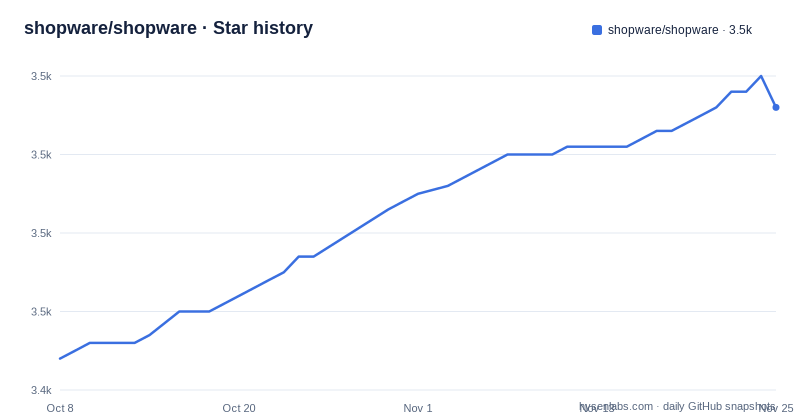
Star history
- shopware/shopware3,476 ★ · +32
| Repository | 2026-10-08 | 2026-11-25 |
|---|---|---|
| shopware/shopware | 3.4k | 3.5k |
32 Stars in the last 48 days, measured from the daily GitHub snapshot. Compare with other projects
Editorial analysis
A shop, a vendor dependency and a headless backend from the same code
Shopware 6 is described as an open headless commerce platform powered by Symfony 7 and Vue.js 3. The README adds a twist: it is a ready-to-use shopping cart system, but it also serves as an ecommerce framework. In the README's own list, Shopware is a vendor dependency in a Flex project, API-first, headless if you need it to be, and extensible through plugins and apps.
The primary language is PHP and the license is MIT, stated as completely free. The repository sits on the trunk branch. It is not archived, and the last push was on 25 October 2026.
The README mentions more than 3,100 extensions in a community store and a worldwide community of developers, agencies and merchants. The count is the project's own figure and the README gives no breakdown of how many of those extensions are free or maintained.
The practical reading for a developer is that this repository is the platform core. A shop built on it usually lives in a separate project that requires it.
Plugins load Symfony bundles, apps stay outside the PHP process
There are two extension routes, and the README describes them differently. Plugins let you use the full power of Symfony by creating bundles and loading them as part of the application. That gives deep access, since a plugin runs inside the same application as the core.
Apps are called a modern, lightweight but powerful way to add functionality, requiring very little Shopware-specific knowledge. The README does not spell out the mechanism, but its wording sets the trade: apps ask less of the developer, plugins reach further into the code. Each route has a base guide on developer.shopware.com, linked from the README as the plugin-base-guide and the app-base-guide.
The repository root hints at how change is managed. It contains a changelog/ directory and a CHANGELOG.md, ADR records in adr/, coding-guidelines/, and UPGRADE files from UPGRADE-6.1.md through UPGRADE-6.9.md. Anyone writing a plugin should read the UPGRADE file for their target minor line, because those documents are where breaking changes are collected.
Two release lines ship in the same weeks
The recent GitHub releases show 6.6 and 6.7 moving at once. v6.6.10.30 was tagged on 26 October 2026, v6.6.10.29 on 7 October 2026, and v6.7.15.1 on 7 October 2026 as well. So the project maintains the 6.6 line with a fourth numeric segment and the 6.7 line in parallel.
The root also holds RELEASE_INFO-6.7.md and a codeowners.toml, a .allowed-licenses file and a delivery-process/ directory. The README excerpt does not explain the version scheme, and it does not say how long a given minor line receives fixes. For a production shop that is the first thing to ask, because the choice between 6.6 and 6.7 decides which UPGRADE file you work through.
COMPOSER_ROOT_VERSION in compose.yaml is set to 6.7.9999999-dev, which places the development environment on the 6.7 line.
The recommended on-premise route is the Flex template, not a clone of this repository
The README splits installation into cases. The easiest is a commercial plan in the Shopware cloud, a fully managed setup. For on-premise shops, the recommended way is to install through the Flex template, documented under developer.shopware.com. A web-based installer is available from the Shopware download page, hosting partners offer pre-installed shops, and a course on hub.shopware.com walks through setup.
The README says commercial plans are also available for on-premise and enrich a shop with additional functionality. It does not list which features are plan-only, so a team comparing the MIT code against a paid setup has to look at the pricing page.
No shell command appears in the README excerpt for a production install. The commands live in the linked installation guide, and this article copies none.
The repository you are reading is where contributors work. A merchant who clones trunk to run a shop is not the path the README describes.
The contributor setup brings up MariaDB, OpenSearch and a Caddy web container
compose.yaml defines a web service from the image ghcr.io/shopware/docker-dev:php8.4-node24-caddy, so the development container bundles PHP 8.4, Node 24 and Caddy. It publishes ports 8000, 5173, 5175, 9998 and 9999. APP_URL is http://localhost:8000, and STOREFRONT_VITE_ORIGIN is http://localhost:5175, which points at the storefront dev server.
A database service uses mariadb:latest with MARIADB_ROOT_PASSWORD set to root and a database named shopware. Its command list sets values such as innodb_buffer_pool_size=1024M and join_buffer_size=1024M, so the database wants real memory. The web service connects through DATABASE_URL mysql://root:root@database/shopware, sets MAILER_DSN to smtp://mailer:1025, and points OPENSEARCH_URL and ADMIN_OPENSEARCH_URL at http://opensearch:9200.
The root credentials are fine for a local container and wrong for anything exposed. For the full steps the README points to CONTRIBUTING.md and to a Docker development environment guide on developer.shopware.com, and the compose file in the excerpt is cut off before its remaining services.
Contributing means signing a CLA that grants rights to shopware AG
Code contributions come with a Contributor License Agreement, signed automatically when you submit. The README says the CLA keeps Shopware an open and living product, and in short you give the explicit right to use your code in Shopware to shopware AG. The platform is MIT-licensed for users, but contributors hand rights to one company, which is worth knowing before sending a large patch.
The README also asks contributors to follow a contribution guideline, hosted on docs.shopware.com, so changes fit the team's daily workflow. Bugs go to the GitHub issue tracker, feature ideas to feedback.shopware.com, and translations to translate.shopware.com. Questions can go to the Community Hub, the Discord community, Stack Overflow under the shopware6 tag or the community forum.
The repository contains AGENTS.md, CLAUDE.md, .agents/, .agents-templates/ and a .claude/ directory, which are files for AI coding assistants. The README excerpt does not describe their contents.
What the README leaves out: system requirements, upgrade steps and cost
A reader arriving with practical questions finds few answers in the README itself. It lists no minimum PHP version, and the only hint is the PHP 8.4 in the development image. It gives no system requirements table, no database version beyond mariadb:latest in compose.yaml, and no upgrade procedure. The UPGRADE files and the developer docs hold those.
Cost is also absent. The README states the software is free under the MIT license, and says commercial plans exist for cloud and on-premise, but it does not print a monthly price. The Shopware cloud is fully managed and is booked as a plan.
Finally, the README says nothing about performance, scale or the number of shops running it beyond calling it used by thousands of shops. Phpbench.json and phpstan configuration in the root suggest benchmarks and static analysis exist in the project, but their results are not in the excerpt. Treat load behaviour as something to measure on your own catalogue.
Editorial conclusion
Shopware 6 fits PHP teams and agencies that want a commerce platform they can extend with Symfony bundles or apps, run headless, or pull in as a dependency through the Flex template. It is a poor fit if you want a one-file install or no PHP stack at all, because even the contributor setup brings up a web container, MariaDB and OpenSearch. Before committing, decide between Shopware cloud and an on-premise install, and check which commercial plan features you would need on-premise, since the README says some of the functionality sits in paid plans.
Frequently asked questions
What is Shopware used for?
Shopware 6 is an open headless commerce platform, used as a ready-to-use shopping cart system, as a vendor dependency in a Flex project or as an API-first backend. It is built on Symfony 7 and Vue.js 3.
How do you install Shopware 6?
The README recommends the Flex template for on-premise shops and a commercial plan in the Shopware cloud for a managed setup. A web-based installer and installation docs on developer.shopware.com are also provided.
Is Shopware PHP?
Yes. The repository's primary language is PHP, and the platform is based on the Symfony framework with a Vue.js administration. The code is released under the MIT license.
What is Shopware 6?
Shopware 6 is an open commerce platform based on Symfony and Vue.js, supported by a worldwide community and more than 3,100 community extensions. It can be extended through plugins and apps.
Official sources
Add this badge to your README
If you maintain this project, the badge below links readers to this analysis and shows its maintenance status from the daily GitHub snapshot. Paste the markdown into your README; add ?metric=license or ?metric=stars to the image URL for a different field.

[](https://hysenlabs.com/projects/shopware-shopware)Star history chart for your README
[](https://hysenlabs.com/projects/shopware-shopware)Was this useful?