515 strings from one minified bundle: inside claude-code-system-prompts
All parts of Claude Code's system prompt, 27 builtin tool descriptions, sub agent prompts (Plan/Explore/Task), utility prompts (CLAUDE.md, compact, statusline, magic docs, WebFetch, Bash cmd, security review, agent creation). Updated for each Claude Code version.
At a glance
- What is it?
- Piebald-AI keeps an extraction of Claude Code's system prompts with a token count on every file, refreshed within minutes of each release. It mirrors a shipped bundle rather than specifying one, so it describes exactly one version at a time and tells you nothing about the next.
- Who is it for?
- Use this repository when you need to read or diff the prompt text Claude Code v2.1.317 actually runs, or when you are deciding how many tokens a feature such as status line setup costs against a budget you control. Do not treat it as documentation that will stay true, since it is an extraction of one compiled artifact and CHANGELOG.md is the only record of how the text has moved across 330 versions since v2.0.14.
- Can I use it commercially?
- Yes. MIT is a permissive licence: you can use, modify and sell software built on it, as long as you keep its copyright and licence notices.
- Is it still maintained?
- Yes. The repository last received commits 2 days ago.
- What is it written in?
- Mainly JavaScript, according to GitHub's language statistics.
Answers come from the project's GitHub data, last synced on November 15, 2026, and from our analysis. They are not legal advice.
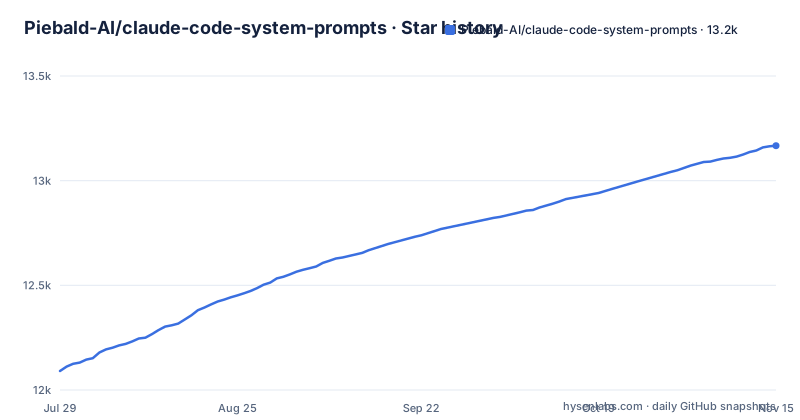
Star history
- Piebald-AI/claude-code-system-prompts13,167 ★ · +1,076
| Repository | 2026-07-29 | 2026-11-15 |
|---|---|---|
| Piebald-AI/claude-code-system-prompts | 12.1k | 13.2k |
1,076 Stars in the last 109 days, measured from the daily GitHub snapshot. Compare with other projects
Editorial analysis
There is no single system prompt, there are 500+ strings
Ask for Claude Code's system prompt and there is no single string to hand back. What exists is 500-plus strings assembled at runtime from large portions that are conditionally added depending on the environment and various configs, descriptions for builtin tools such as Write, Bash and TodoWrite that are themselves fairly large, separate system prompts for builtin agents such as Explore and Plan, and a layer of AI-powered utility functions including conversation compaction, CLAUDE.md generation and session title generation, each carrying its own prompt. The tool description layer alone accounts for 27 builtin tool descriptions. The practical consequence is that the phrase has no stable referent, so any document claiming to quote it is quoting one slice conditioned on a machine nobody has described.
The text is extracted from a minified bundle, so it describes one build
Prompts here are pulled by a script out of the latest npm version of Claude Code and read straight from the compiled source, which the README gives as the reason they match what the product ships. Those strings live inside a very large minified JS file where both their content and their position shift between releases. The consequence is narrow and worth stating plainly. The repository is authoritative for one version, v2.1.317 as of November 2nd, 2026, and it cannot speak about a later build, because a later build is a later extraction. Anyone treating this mirror as the specification of how the tool behaves is reading a description of one artifact.
One GitHub release per Claude Code version, and a changelog over 304 of them
Freshness is handled by tying each extraction to a release of Claude Code itself. A GitHub release is created for every new Claude Code version, which is why starring the repository is the documented way to hear about them, and the README states the update arrives within minutes of the upstream release. CHANGELOG.md tracks the prompts across 330 versions since v2.0.14, and the recent tags are v2.1.315 and v2.1.316, both dated 2026-10-31, followed by v2.1.317 on 2026-11-03. The last commit push was 2026-10-31.
Token counts drift by about 20 because parts of the text are interpolated
Every prompt file carries a token count, and those numbers come with a caveat. Some prompts contain interpolated bits, such as references to builtin tool names, lists of available sub agents and other context specific variables, so the count measured in a live session will not equal the count printed in the repository. The README puts the difference at roughly plus or minus 20 tokens. That is small enough to ignore when budgeting and large enough to embarrass an author who quotes a figure as an exact session measurement. Treat each number as a size for one configuration, not as a constant.
Status line setup costs 4815 tokens while Explore costs 862
Sizes span a wide range and the spread is the useful part. The statusline-setup agent prompt is listed at 4813 tokens, followed by the /batch slash command for orchestrating a large parallelizable change at 1524 and the enhanced Plan mode prompt at 1066. The Explore subagent sits at 862. Among the smaller ones, the /code-review inline gap sweep phase is 105 tokens and the part 1 base finder angles prompt is 145. One feature, configuring a status line, costs several times more prompt budget than an entire subagent.
The /code-review family is numbered files with hard finding caps
The code review prompts are where the numbering shows. Part 1 supplies the finder angles at 145 tokens, part 2 low effort mode returns up to four hunk visible runtime correctness findings at 778, part 2 low effort minimum findings mode targets at least min(files_changed, 4) and performs one extra pass when it comes up short at 740, part 3 covers the extra-high and maximum modes with five finder angles, one-vote verification, a gap sweep and capped JSON findings at 553, and part 10 fixes the ReportFindings output format with capped severity ranked findings at 448. Minimal mode is its own file at 632 and reports up to fifteen findings. The mode name alone tells you nothing about how many findings come back.
Reading is the mirror; tweakcc is where the patching happens
Reading the prompts is half of what a mirror like this enables. For changing them, the README points at tweakcc, a separate repository from the same team, which lets you customize individual pieces of the system prompt as markdown files, patches an npm based or native binary Claude Code installation with them, and provides diffing and conflict management for the case where you and Anthropic have both modified the same prompt file. It patches the same strings this repository extracts, which is what makes the two consistent. The conflict path deserves the attention, because every upstream release moves text you may have edited.
A mirror with a product banner above it, and no configuration matrix
This repository is documentation attached to a commercial product. The top of the README advertises Piebald, an agentic AI developer experience at piebald.ai, with Discord and X links, and the prompt list sits below it as the second half of the page. The tree holds CHANGELOG.md, CLAUDE.md, a LICENSE, system-prompts/ and a tools/ directory, and its primary language reads as JavaScript. Utility prompts cover compaction, statusline, magic docs, WebFetch, Bash command handling, security review and agent creation.
Editorial conclusion
Use this repository when you need to read or diff the prompt text Claude Code v2.1.317 actually runs, or when you are deciding how many tokens a feature such as status line setup costs against a budget you control. Do not treat it as documentation that will stay true, since it is an extraction of one compiled artifact and CHANGELOG.md is the only record of how the text has moved across 330 versions since v2.0.14. Verify two things before you rely on a count: which Claude Code version the file you are reading was extracted from, and whether your own configuration adds the conditional portions the README describes. For editing rather than reading, use tweakcc, which patches the same strings and handles the conflicts every upstream release creates.
Frequently asked questions
What are system prompts in Claude code?
Claude Code does not have one single system prompt. The repository counts large conditionally added portions, descriptions for builtin tools such as Write, Bash and TodoWrite, separate prompts for builtin agents like Explore and Plan, and utility prompts for conversation compaction, CLAUDE.md generation and session title generation.
What prompts does the Claude code use?
They are the markdown files under system-prompts/, each with a token count, such as Explore at 862 and the enhanced Plan mode prompt at 1066, with creation assistants for CLAUDE.md at 631 and status line setup at 4813. The set was expanded from 350 to 515 prompts on June 12, 2026.
What is the best system prompt for Claude code?
The repository does not rank any of them or name a best one. It lists each prompt with a measured token count as of Claude Code v2.1.317, from 105 tokens for the /code-review inline gap sweep phase to 4813 for the statusline-setup agent.
What are Claude prompts?
In this repository they are the system prompt files covering sub agents, slash commands, creation assistants and 27 builtin tool descriptions. They are extracted from the compiled Claude Code npm package, and CHANGELOG.md tracks how they changed across 330 versions since v2.0.14.
Official sources
Add this badge to your README
If you maintain this project, the badge below links readers to this analysis and shows its maintenance status from the daily GitHub snapshot. Paste the markdown into your README; add ?metric=license or ?metric=stars to the image URL for a different field.

[](https://hysenlabs.com/projects/piebald-ai-claude-code-system-prompts)Star history chart for your README
[](https://hysenlabs.com/projects/piebald-ai-claude-code-system-prompts)Was this useful?