Gestalt's end of life: what Pinterest's React design system leaves behind
A set of React UI components that supports Pinterest’s design language
At a glance
- What is it?
- Gestalt is the React component library behind Pinterest's design language, split across three npm packages. Its own README declares it deprecated with no successor named, which makes it a reference implementation rather than a dependency anyone should adopt today.
- Who is it for?
- Adopt Gestalt only if you already sit inside Pinterest's stack and can live on v177.0.13 indefinitely. Do not start new work on it: the README states that issues, pull requests and support are all closed, and the migration target in the deprecation banner is still an unfilled placeholder link.
- Can I use it commercially?
- Yes. Apache-2.0 is a permissive licence: you can use, modify and sell software built on it, as long as you keep its copyright and licence notices.
- Is it still maintained?
- Yes. The repository last received commits 48 days ago.
- What is it written in?
- Mainly TypeScript, according to GitHub's language statistics.
Answers come from the project's GitHub data, last synced on November 22, 2026, and from our analysis. They are not legal advice.
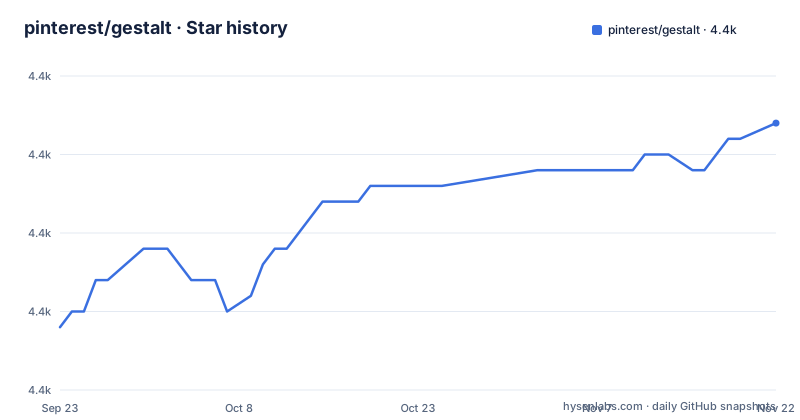
Star history
- pinterest/gestalt4,387 ★ · +13
| Repository | 2026-09-23 | 2026-11-22 |
|---|---|---|
| pinterest/gestalt | 4.4k | 4.4k |
13 Stars in the last 60 days, measured from the daily GitHub snapshot. Compare with other projects
Editorial analysis
Three npm packages, one CSS file, and no successor
It ships as three separate packages on npm: `gestalt` for the component library, `gestalt-charts`, and `gestalt-datepicker`. Each is installed on its own, so a team that wants charts or the date picker adds a dependency for it explicitly.
The library ships precompiled CSS rather than a build-time style pipeline, and every component is exported as an ES6 module. The README describes the system as Pinterest's design system and points readers at a hosted documentation site at gestalt.pinterest.systems, where each component carries usage guidelines alongside its API.
What makes this repository worth reading now is its status banner. The README opens with a deprecation notice stating the project has reached end of life, that issues, pull requests and support are no longer accepted, and that the code remains for archival and reference only. The banner names a migration target as a placeholder link pointing at a placeholder repository path, which means the successor was never filled in. If you came to this page expecting a live project, that single line explains your confusion.
Global CSS imports are the hard constraint on bundlers
The import style pins down how Gestalt expects to be consumed. You import named components from the package and then import CSS from the package's dist directory as global side effects. The README is explicit that this syntax is Webpack specific and works with Create React App, and that Gestalt can be used anywhere supporting ES6 module bundling and global CSS.
That constraint matters more than it looks. A project using CSS Modules, styled-components, or a component-scoped styling convention cannot import a single global stylesheet without either accepting global leakage or bridging it. No per-component style import is documented, and no theming entry point appears in the installation section.
The date picker has its own stylesheet separate from the main one, which means a team that installs all three packages has to remember two CSS imports and keep them in the right order relative to any app-level styles.
Installing the three packages and wiring the stylesheets
Installation is documented for both npm and yarn. With npm the three packages are saved as dependencies:
npm i gestalt --save
npm i gestalt-charts --save
npm i gestalt-datepicker --save
The equivalent yarn commands add the same three names. Pick whichever package manager your repository already uses, since the README offers both with identical package names.
First use means importing one component and its stylesheets. This is the exact import block from the README, and it belongs at your app entry point:
import { Text } from 'gestalt';
import 'gestalt/dist/gestalt.css';
import 'gestalt/dist/gestalt-datepicker.css';
The README notes this syntax is Webpack specific and needs a setup that supports ES6 module bundling and global CSS, and it offers no alternative styling entry point.
Codemods exist only for the breaking changes Pinterest already shipped
Gestalt's upgrade story runs through jscodeshift codemods stored per version in `/packages/gestalt-codemods`. The stated policy is that a breaking change in usage or in typing ships a codemod to ease the upgrade, with a minor bump covering an added component or an API change that comes with a codemod, and a major bump reserved for a backwards incompatible change without one.
Running one requires a local clone of the Gestalt repository, then pointing the codemod at a file in your own repo:
yarn codemod --parser=tsx -t={relative/path/to/codemod} relative/path/to/your/code.tsxTwo flags matter before you commit anything. One is dry run, showing changes without writing them. The other prints the resulting output, which the README says you can pipe to a file for easier inspection.
Here is the catch. With the project at end of life and the last supported version fixed at `v177.0.13`, that codemod history stops. Nothing exists for the migration the deprecation banner tells you to make, because the migration target does not exist.
The end of life banner sits on top of a live commit trail
Two facts in this repository do not agree. The README says the project was deprecated in November 2025, yet v177.0.13 was published afterwards, on 2026-01-07, and the last push is recorded as 2026-10-05.
The reading that fits both is that the banner was written and then the repository kept receiving pushes without the banner being updated or reverted. Either way, a reader looking for a signal of activity finds a live commit date next to a README that says the project is finished. Treat the README as authoritative on support, because it is the only document that speaks to the question. The repository is still clonable rather than frozen, which is why the code stays browsable.
Version numbers therefore tell you nothing about whether fixes are coming.
One CSS import and a five-engineer team explain the support boundary
The Issues section states the constraint directly: the web component library is almost exclusively developed by a five engineer team inside Pinterest, and the primary customers are Pinterest engineers who use it. The team says it has no resources for features or issues requested only by external developers, and that a large volume of internal support requests takes precedence over answering external GitHub issues.
So the failure mode is not a bug, it is a triage queue. An external team can hit a component bug with no path to a fix, and the deprecation notice removes the issue tracker as a channel entirely. Contact is offered by email address, which is the only route the README still offers.
The monorepo layout compounds this. Docs and components are organised as separate packages under yarn workspaces sharing similar tooling, so a bug in one component's documentation and a bug in its rendering both land in the same queue. Development happens behind a local docs server: `yarn` installs dependencies, `yarn test` runs the suite, and `yarn start` builds and watches the packages before serving the site on http://localhost:8888/.
Where Material UI or Radix differ in approach
The alternative for most teams is a general purpose React library such as Material UI, or an unstyled set of primitives such as Radix, and the difference in approach is where Gestalt stops being a competitor.
Material UI ships a themed design language with a configuration object at the app level. Change the theme, and components restyle. Gestalt exposes no theme object in its documented surface: the styling story is one global CSS file plus named module exports, which suits an organisation that has already standardised its CSS and does not suit one that wants runtime theming.
Radix inverts the tradeoff by shipping unstyled primitives and leaving visual decisions to the consumer. That fits when a component should match an existing brand rather than impose one, and fails when you want an opinionated spacing and typography scale on day one.
Gestalt's value is narrower and real: it is a reference implementation of how a large company kept its engineers on one component set, with an upgrade policy that pairs every breaking change with a codemod and documentation hosted alongside each component. Read it for that. Do not install it for that.
Editorial conclusion
Adopt Gestalt only if you already sit inside Pinterest's stack and can live on v177.0.13 indefinitely. Do not start new work on it: the README states that issues, pull requests and support are all closed, and the migration target in the deprecation banner is still an unfilled placeholder link. Teams migrating away get no codemod, because the codemods stop at the last supported version. Before anything else, check whether the successor repository named in the README has been filled in, then pin your version in the lockfile rather than tracking the master branch, and read the CSS import requirement in the installation section against your bundler configuration.
Frequently asked questions
Is the Pinterest Gestalt React component library still maintained?
No. The README states the project is no longer actively maintained, has reached end of life, and that issues, pull requests and support are no longer accepted.
Which npm packages does Pinterest Gestalt require?
Three, all installed separately: gestalt for the component library, gestalt-charts, and gestalt-datepicker. The stylesheets are imported from the package dist directories rather than bundled as JavaScript.
Does Gestalt support TypeScript?
Yes. The README states that Gestalt officially supports and maintains TypeScript declaration files, and the codemod example runs with the tsx parser for a TypeScript codebase.
How does Gestalt handle breaking changes in a release?
Codemods are organised by release in /packages/gestalt-codemods and run against files in your own repository, not the Gestalt repo, which has to be cloned first.
How do I run the Gestalt docs site locally?
Run yarn in the repository root to install dependencies, then yarn start to build and watch the packages and serve the docs. The site is then available at http://localhost:8888/.
Official sources
Add this badge to your README
If you maintain this project, the badge below links readers to this analysis and shows its maintenance status from the daily GitHub snapshot. Paste the markdown into your README; add ?metric=license or ?metric=stars to the image URL for a different field.

[](https://hysenlabs.com/projects/pinterest-gestalt)Star history chart for your README
[](https://hysenlabs.com/projects/pinterest-gestalt)Was this useful?