Sushitrain runs a full Syncthing node inside the iOS app process
Securely synchronize files with your devices on iOS using Syncthing
At a glance
- What is it?
- Sushitrain embeds a complete Syncthing node in a SwiftUI app for iOS and macOS, adding selective folders, on-demand streaming of files that never land on the device, photo back-up and remote thumbnails. Its sharp edge is the Go bridge, where gomobile cannot carry slices, so every new core feature has to be shaped to survive the crossing.
- Who is it for?
- Sushitrain is worth adopting when you already run Syncthing across your own machines and want a phone client that streams on demand instead of mirroring whole folders. It is the wrong tool for a team that needs centrally managed, policy-driven sync, and building it from source is out of reach without a Mac and Apple signing credentials.
- Can I use it commercially?
- Yes, with conditions. MPL-2.0 is a weak copyleft licence: you can use it inside commercial and closed-source software, but if you distribute changes to its own files, you must publish those changes under the same licence.
- Is it still maintained?
- Yes. The repository last received commits 3 days ago.
- What is it written in?
- Mainly Swift, according to GitHub's language statistics.
Answers come from the project's GitHub data, last synced on October 23, 2026, and from our analysis. They are not legal advice.
Star history
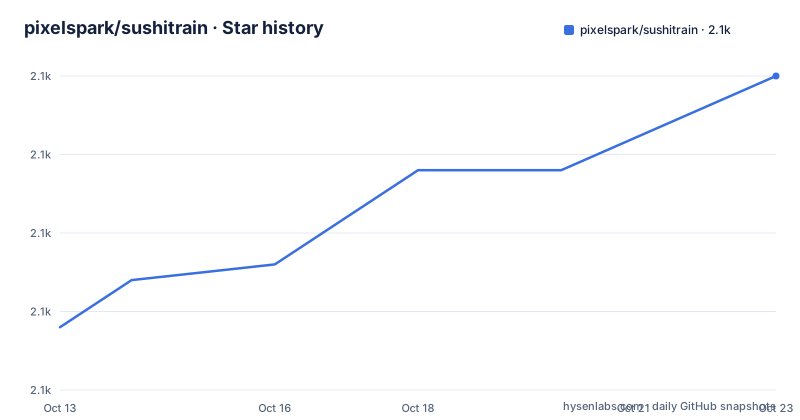
- pixelspark/sushitrain2,105 ★ · +16
| Repository | 2026-10-13 | 2026-10-23 |
|---|---|---|
| pixelspark/sushitrain | 2.1k | 2.1k |
16 Stars in the last 10 days, measured from the daily GitHub snapshot. Compare with other projects
Editorial analysis
Files you never download, streamed from your own peers
Sushitrain puts Syncthing on iOS and macOS, where a phone's storage ceiling decides what can reasonably live on the device. Selective file synchronization handles that: only chosen files or subdirectories from a larger folder are kept locally. On-demand access goes one step further. A file that is not present on the handset gets downloaded or streamed straight from another peer, over the Syncthing protocol rather than over some side channel.
The README states the point of that arrangement plainly: it gives you access to your files, from your own devices, without setting up a VPN. That is the difference between a mirror and a window. A mirror consumes local space whether or not you ever open the file; this design keeps the bytes on whichever device already holds them, and reaches across the peer list when you need them.
A full Syncthing node runs in-process behind one Client struct
The app embeds a full-blown Syncthing node in its own process, which is why discovery, ignore files and the wider synchronization behaviour of Syncthing arrive with it instead of being reimplemented on top. Not every feature is surfaced in the interface, for ease of use or because it does not make sense on iOS, but the node underneath is the real one.
The interface on the Go side is a struct called Client. Swift constructs one instance, assigns a Swift class as its delegate, and receives events through it. Those events mutate Swift-side state, and SwiftUI redraws from that state without any explicit refresh call. One constraint catches people out: state may only be changed from the main thread, so callbacks arriving from Go must defer their work.
Traffic in the opposite direction is looser. Calls from Swift into Go usually happen on the main thread anyway, in response to a UI action, but that is not a requirement, because most mutating operations are guarded by mutexes inside Syncthing. The configuration change and save path is the example the architecture notes call out, and much of the app's functionality hangs off it.
gomobile hides the array types Syncthing leans on
The two languages meet through gomobile, a tool that generates bindings so Go code can be called from Objective-C, and from Swift in turn. What it cannot do is carry the whole type system across. Gomobile supports no slices, and therefore no arrays, which removes almost all of the more complicated data types in Syncthing from the boundary in one stroke.
SushitrainCore works around this by exposing only the bits the app actually needs, and by flattening anything iterable into a simple list of strings that the Swift side walks item by item. Devices and folders travel that way. The price is paid by whoever extends the codebase: a new core capability has to be expressible as strings, or it has to live inside the Go framework and be wrapped on the Swift side before the UI can touch it.
This is the single hardest constraint in the project, and it shapes the repository layout. Between SushitrainCore, the SwiftUI target in Sushitrain/, the share extension and the shared code in SushitrainShared/, any feature that touches a Syncthing collection needs Go work as well as Swift work.
Photo export and send-only albums take different paths
Photos are covered by two mechanisms that do not overlap. Photo back-up automatically exports photos from the system album to a folder, which means a copy lands in your synced tree. Photo folders, documented on their own page, go the other way: a system photo album is synchronized directly as a send-only folder, with no export step at all.
Remote thumbnails address previews rather than the images themselves. The app generates thumbnails for files sitting on other devices, images or videos, and those thumbnails can be synchronized between devices. The arrangement is useful when one device holds the originals: it generates previews there, ships the small files outward, and the rest never need to move.
Platform integration is the last strand. Background synchronization runs to the extent iOS and macOS allow it, and the app adds Shortcuts integration and Continuity support. None of that removes the operating system's own limits on when a background process may run, which is the reason the README hedges on the subject rather than promising continuous background sync.
Building the Go core before XCode touches the project
Nobody compiles this to use it. The README points at an App Store download for the shipped app and a TestFlight link for beta versions, so the build instructions below matter only to people changing the code.
The framework is built and checked on its own before XCode is ever opened, since a Go failure inside the build surfaces without the compiler output that explains it. The requirements are a macOS computer, XCode carrying the iOS 17.5 or higher SDK, developer certificates, and Go at whatever version SushitrainCore/go.mod pins. Then run make inside the core directory:
cd SushitrainCore
make
What you want to see is no errors and a built framework in the build directory. One environmental assumption is baked into that Makefile: Go is expected to have come from Homebrew in /opt/homebrew, so a different layout has to be edited before the first run rather than debugged after it. XCode invokes the same Makefile during a normal build, and a later invocation should be quick when nothing has changed since your manual one.
Once the framework builds, XCode handles the rest of the app. Remove one entitlement, set the team ID so certificates can be provisioned automatically, adjust the bundle ID if you need to, and Cmd-B produces the app.
The entitlement that leaves your peer registered as localhost
The first XCode step is a removal, not an addition. Delete the com.apple.developer.device-information.user-assigned-device-name entitlement from the project configuration for iOS. That entitlement is what lets the app set its Syncthing device name to the device's real hostname, and Apple grants it only to distributed apps.
Without it, iOS hands the app localhost as a host name, and the app takes that as its peer name on first startup. It is recoverable, because the settings screen and the configuration both allow the device name to be changed afterwards, so peers that already know the localhost entry need it replaced rather than left alone.
The root Makefile does the same removal for archive builds, editing the entitlements file in place before calling xcodebuild:
mac: core
	# Build .app
	plutil -remove "com\.apple\.developer\.device-information\.user-assigned-device-name" Sushitrain/Sushitrain.entitlements
	xcodebuild -scheme "Synctrain release" \
		-archivePath "$(BUILD_DIR)/synctrain-macos.xcarchive" \
		-sdk macosx \
		-configuration Release \
		-destination generic/platform=macOS \
		CODE_SIGNING_REQUIRED=NO \
		CODE_SIGNING_ALLOWED=NO \
		clean archive
Two details in that recipe are easy to skim past. The plutil call rewrites Sushitrain.entitlements and nothing restores it, so a local archive build leaves your working copy modified. And CODE_SIGNING_REQUIRED=NO next to CODE_SIGNING_ALLOWED=NO yields an unsigned archive, which is a different thing from the automatic provisioning the manual XCode steps describe.
The phony list names targets the Makefile never defines
The root Makefile has an internal inconsistency, and anyone who runs make at the top of the repository runs into it. Its phony declaration lists lint, format, macos, ios, clean, build and cleanup. The targets it actually defines are lint, format, build, clean, core, mac and ios. macos and cleanup are declared and never defined anywhere in the file, which carries a 2025 copyright header for Tommy van der Vorst.
The build target depends on the one that does not exist:
build: macos iosThe archive targets that do work are named mac and ios, and each one first runs the core target, which pulls dependencies and builds the framework:
core:
	cd SushitrainCore && make deps
	cd SushitrainCore && make
Output lands in a directory named by BUILD_DIR, defined as the current working directory plus Build, and clean removes that directory before running make clean inside SushitrainCore. So the documented path of building from inside the core directory is not a stylistic preference: the top-level entry point has a dangling dependency and stops there.
Log levels, lint rules and the Syncthing version bump
Day to day maintenance is small and mostly mechanical. Debug output is controlled by one environment variable, SUSHITRAIN_MIN_LOG_LEVEL, set to DEBUG, INFO, WARN or ERROR and attached to the run through Edit scheme in XCode. Left alone, the minimum level for stdout is WARN, and file logging stops at INFO. Style is enforced across the tree by swift-format:
brew install swift-format
swift format lint -r .
swift format -r -i .
Translations run through a Node script. It calls ChatGPT for any string with at least one missing translation, and takes its key from the environment:
OPENAI_KEY=sk-xxxx node ./localize.mjsAfterwards you open Localizable.xcstrings in XCode and save once, so the file keeps XCode's own JSON formatting and the commit diff stays free of whitespace churn. Moving Syncthing forward takes four steps: bump the version in go.mod, run go get -u ./... inside SushitrainCore, run go mod tidy, then update the version number in SushitrainCore/src/sushitrain.go. Following the development branch instead means go get -u github.com/syncthing/syncthing@main, and a local checkout is wired in with a replace directive:
replace github.com/syncthing/syncthing => /local/path/to/syncthingSushitrain carries the MPL-2.0 licence, so a fork that modifies the Go core keeps file level obligations on the files it changes. The last push was on 2026-10-04, and the App Store build at 2.7.83 shipped on 2026-08-17, nearly three months after the previous one on 2026-05-27.
Editorial conclusion
Sushitrain is worth adopting when you already run Syncthing across your own machines and want a phone client that streams on demand instead of mirroring whole folders. It is the wrong tool for a team that needs centrally managed, policy-driven sync, and building it from source is out of reach without a Mac and Apple signing credentials. Before committing, check that your Go toolchain sits where the Makefile expects it, remember that a first contact registers your peer as localhost until you rename it, and expect every new core feature to need Go work as well as Swift.
Frequently asked questions
What does Sushitrain need before I can build it from source?
A macOS computer with XCode carrying the iOS 17.5 or higher SDK, developer certificates, and Go at the version pinned in SushitrainCore/go.mod. The Go framework is built and checked separately with make inside the SushitrainCore directory before XCode is opened.
Why does my Sushitrain peer name read localhost?
Without the com.apple.developer.device-information.user-assigned-device-name entitlement, iOS gives the app localhost as its host name, and the app sets that as the peer name on first startup. That entitlement can only be obtained from Apple, and only for distributed apps. You can rename the device afterwards from the settings screen or in the configuration.
How does Sushitrain reach files it has not downloaded to the device?
Selective file synchronization keeps only the files or subdirectories you choose from a larger folder, while on-demand access downloads or streams anything missing from another peer over the Syncthing protocol. The README states this gives you access to your files, from your own devices, without setting up a VPN.
How do I raise the log level while debugging Sushitrain?
Set the SUSHITRAIN_MIN_LOG_LEVEL environment variable to DEBUG, INFO, WARN or ERROR, which you can attach through Edit scheme in XCode. Without it, the minimum level for messages sent to stdout is WARN, and file logging keeps INFO as its floor.
Can Sushitrain build against a local copy of Syncthing?
Yes. Add a replace directive for github.com/syncthing/syncthing in go.mod pointing at your local path, then run go mod tidy. To follow the development branch instead, run go get -u github.com/syncthing/syncthing@main inside the SushitrainCore directory.
Official sources
Add this badge to your README
If you maintain this project, the badge below links readers to this analysis and shows its maintenance status from the daily GitHub snapshot. Paste the markdown into your README; add ?metric=license or ?metric=stars to the image URL for a different field.

[](https://hysenlabs.com/projects/pixelspark-sushitrain)Star history chart for your README
[](https://hysenlabs.com/projects/pixelspark-sushitrain)Was this useful?