Skip has two modes, one of them a real compiler, and the comparison section answers with a link to its own page
Skip enables the creation of native SwiftUI apps for iOS and Android
At a glance
- What is it?
- Skip builds native iOS and Android apps from one Swift codebase, either by compiling Swift for Android with the official Swift SDK or by transpiling it to Kotlin, with SwiftUI mapped to Jetpack Compose in both cases. It is MPL-2.0 licensed, installed through a Homebrew tap, and its README answers the Flutter and React Native question by pointing at skip.dev/compare/.
- Who is it for?
- Use Skip if you already write Swift and SwiftUI and want an Android build that is native rather than a web view in a shell, and if you are willing to pick a mode before you start. Everything else about the project follows from that choice.
- Can I use it commercially?
- Yes. Apache-2.0 is a permissive licence: you can use, modify and sell software built on it, as long as you keep its copyright and licence notices.
- Is it still maintained?
- Yes. The repository last received commits 3 days ago.
- What is it written in?
- Mainly Swift, according to GitHub's language statistics.
Answers come from the project's GitHub data, last synced on November 14, 2026, and from our analysis. They are not legal advice.
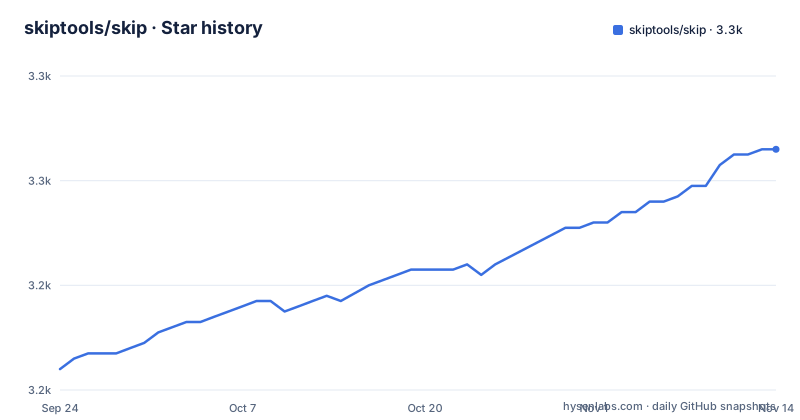
Star history
- skiptools/skip3,266 ★ · +42
| Repository | 2026-09-24 | 2026-11-14 |
|---|---|---|
| skiptools/skip | 3.2k | 3.3k |
42 Stars in the last 51 days, measured from the daily GitHub snapshot. Compare with other projects
Editorial analysis
One mode compiles Swift, the other rewrites it as Kotlin
The whole product is two build modes, and the difference between them is not a preference.
Skip Fuse compiles Swift natively for Android using the official Swift SDK for Android. In that mode you get the full Swift language, the standard library and Foundation on both platforms, and you bridge to Kotlin and Java APIs when you need to call them.
Skip Lite takes the other route and transpiles your Swift source to Kotlin, which the file says maximizes interoperability with existing Kotlin and Java libraries and the Android ecosystem.
So the trade is a compiler against an ecosystem. Fuse means Android code that is really Swift output; Lite means Android code that reads like the rest of your Android codebase. Neither is described as experimental, and the sample list carries a mode column so you can see which one each example targets.
The comparison section points at the project's own comparison page
There is a section headed against Flutter, React Native, Compose Multiplatform, MAUI and others, and it contains no table.
What it does contain is an argument about stakes. Choosing a cross-platform technology is called a make-or-break decision, on the grounds that everyone knows a bad app or a crummy port within moments of launching, and that consumers delete bloated, slow or oddly feeling apps quickly.
Then it redirects: you can read the project's own assessment of its strengths at skip.dev/compare/.
The one concrete claim made in the section is a negative one about the alternatives. Other cross-platform tools ask you to write JavaScript, Dart or Kotlin, whereas Skip lets you keep writing Swift. That is a real difference and a matter of taste, but the head-to-head data a reader would want is on a marketing page rather than in the repository, and the repository is where the rest of this file lives.
The 2,200 package claim comes with a query you can re-run
The ecosystem bullet makes a number and, unusually, attaches its source to the sentence.
It says over 2,200 Swift packages already build for Android, and that the figure is tracked at the Swift Package Index, with a link carrying a search query filtered on the Android platform rather than a link to a general package listing.
That is worth more than a round number would be. The claim is a count over an index that changes, so it is falsifiable, and you can check whether the count has moved rather than trusting a number frozen in a README.
The same bullet makes a related point about what a Skip app can reach: Swift packages work on both platforms, and Kotlin and Java APIs can be called directly on Android. The no-lock-in bullet underneath adds that Skip builds on the officially supported Swift SDK for Android, so your code, packages and skills work on Android with or without Skip.
The sample set uses three naming conventions for the same thing
Nine sample apps are listed in a table with a mode column, and the names do not follow one rule.
Four are Fuse projects. One of those, skipapp-howdy, carries no suffix at all. Another, skipapp-bookings-fuse, uses `-fuse`. A third, skipapp-travelposters-native, uses `-native` instead.
Five are Lite projects, and each of those carries no suffix either: skipapp-hello, skipapp-fireside, skipapp-weather, skipapp-calculatrix and skipapp-lottiedemo.
So a suffix means two different things and its absence means two different things as well. Only one pair is disambiguated both ways, the fireside demo, which exists as a Lite project and as skipapp-fireside-fuse.
The Skip Showcase app outside the table does it properly, with one repository for Fuse and a separate one for Lite, named `skipapp-showcase-fuse` and `skipapp-showcase`. Everything else leaves you reading the mode column.
One create command expects a simulator and an emulator at the same time
Installation is four commands.
brew tap skiptools/skip
brew install skip
skip checkup
skip create
The last one does more than create a directory. The project is created and opened in Xcode, and the README says that running it against an iPhone simulator will make Skip build and launch the Android version on a running emulator at the same time.
That is a real precondition rather than a convenience. To see both platforms from the first run you need Xcode with a simulator and a booted Android emulator, and any problem with either one stops the demonstration. `skip checkup` is the step that exists to catch that, and the full setup guide is linked separately for the cases it does not.
Distribution is also a Homebrew tap rather than a package from a language ecosystem, so the tool that builds your app is installed through a tap the project maintains.
The native path adds an SDK install and a different init flag
Fuse needs one extra command before a project will build, and the file shows it separately from the Lite flow.
skip android sdk installThat installs the Swift Android SDK, the component Fuse compiles against. Only after it does the second command run.
skip init --native-app --appid=com.example.myapp my-app MyAppCompare that with the plain `skip create` used for the Lite path: the native path needs an explicit flag, an application identifier, and two names, one for the project directory and one for the app itself. The example identifier is the placeholder form you would replace.
So there are two project shapes and two ways of asking for one, and the documentation splits them into separate sections rather than documenting the flags together. Anyone scripting project creation has to know which of the two shapes it is producing.
The compatibility layer is built on top of Compose state
Skip's answer to SwiftUI on Android is a set of libraries, and one entry in that set names its own backing store.
The suite implements standard Apple frameworks so existing Swift code keeps working. `skip-foundation` covers Foundation APIs such as URL, Data, Date, JSON and FileManager. `skip-ui` does the SwiftUI to Jetpack Compose mapping that both modes depend on. `skip-fuse` is the Fuse mode umbrella, covering OSLog, Observable and AnyDynamicObject.
The interesting one is `skip-model`, which provides Observation and Combine and is described as backed by Compose MutableState. That is the architectural commitment stated plainly: SwiftUI's observation model is reimplemented on Android as Compose state rather than as a parallel reactive system.
It also sets the boundary of the portability claim. Foundation, Combine, Observation and OSLog are covered by named libraries, so anything outside them is a bridging question, which is what the Kotlin and Java bridging in Fuse mode exists for.
Eight entries at the root, and a tag one minute after the last commit
The repository itself is small: a .github directory, a .gitignore, a LICENSE.TXT, a Package.swift, a Plugins directory, the README, Sources and Tests.
There is no documentation directory, no CI configuration outside .github, and no vendored SDK. The tool is a Swift package, and the samples, the framework libraries, the compare page and the setup guide all live on separate sites and separate repositories.
The licence file is named LICENSE.TXT rather than LICENSE, and the project is MPL-2.0.
The release cadence is the other thing the metadata shows. Three of the newest tags are 1.9.11 on 2026-09-19, 1.9.12 on 2026-09-29 and 1.9.13 on 2026-10-02, and that last tag was published at 13:46:27 while the last push to the default branch main is timestamped 13:45:26 the same day, one minute earlier. Patch releases land every few days, and the release follows the commit rather than leading it.
Editorial conclusion
Use Skip if you already write Swift and SwiftUI and want an Android build that is native rather than a web view in a shell, and if you are willing to pick a mode before you start. Everything else about the project follows from that choice. Fuse compiles, so you get the Swift language, the standard library and Foundation on both platforms at the cost of bridging to reach Kotlin and Java APIs. Lite transpiles, so interoperability with the existing Android ecosystem is the strong suit at the cost of the compiler. Check three things before committing. Which mode each sample you plan to copy is written in, because the sample set is split across both and the naming does not tell you which. Whether both toolchains are present, since a single create command expects an iPhone simulator and a running Android emulator at the same time. And the ecosystem number, which is honest about its own source: the claim that over 2,200 Swift packages already build for Android comes with a package index query you can re-run yourself.
Frequently asked questions
What is Skip?
It is a free, open source tool for building native iOS and Android apps from a single Swift codebase, licensed MPL-2.0. You write Swift and SwiftUI, Skip produces real Jetpack Compose for Android, and the file states there are no web views, no custom rendering engine and no additional runtime. It installs from a Homebrew tap with brew tap skiptools/skip followed by brew install skip.
What is the difference between Skip Fuse and Skip Lite?
Fuse compiles your Swift natively for Android using the official Swift SDK for Android, giving you the full Swift language, standard library and Foundation on both platforms, with bridging when you need to call Kotlin or Java APIs. Lite transpiles your Swift source to Kotlin instead, which maximizes interoperability with existing Kotlin and Java libraries. Both modes map SwiftUI to Jetpack Compose through the SkipUI framework.
How do I create a Skip project?
Run skip checkup and then skip create, which creates the project and opens it in Xcode. Running it against an iPhone simulator makes Skip build and launch the Android version on a running emulator at the same time, so you need both toolchains present. For a native Fuse project, install the Android SDK first with skip android sdk install, then use skip init --native-app --appid=com.example.myapp my-app MyApp.
Which Apple frameworks can Skip code use on Android?
Skip ships libraries implementing the standard ones. skip-foundation covers Foundation APIs such as URL, Data, Date, JSON and FileManager, skip-model provides Observation and Combine backed by Compose MutableState, skip-ui maps SwiftUI to Jetpack Compose, and skip-fuse is the Fuse mode umbrella covering OSLog, Observable and AnyDynamicObject. Anything outside that set needs Kotlin or Java bridging.
Does using Skip lock me into Skip?
The project says no, on the grounds that it builds on the officially supported Swift SDK for Android, so your Swift code, packages and skills work on Android with or without Skip. It also states that over 2,200 Swift packages already build for Android, with that figure tracked at the Swift Package Index under a search query filtered on the Android platform.
How does Skip compare with Flutter or React Native?
The README has a section headed against Flutter, React Native, Compose Multiplatform and MAUI, but it contains no comparison table. It argues that a cross-platform choice is make-or-break, then sends readers to skip.dev/compare/ for the project's own assessment. The one concrete difference it states is that the alternatives ask you to write JavaScript, Dart or Kotlin while Skip lets you keep writing Swift.
Official sources
Add this badge to your README
If you maintain this project, the badge below links readers to this analysis and shows its maintenance status from the daily GitHub snapshot. Paste the markdown into your README; add ?metric=license or ?metric=stars to the image URL for a different field.

[](https://hysenlabs.com/projects/skiptools-skip)Star history chart for your README
[](https://hysenlabs.com/projects/skiptools-skip)Was this useful?