GPUPixel's newest release by date sits on the older 1.2 line
Real-time image filter engine based on GPU
At a glance
- What is it?
- A C++11 and OpenGL/ES image and video filter library from Pixpark, with a small footprint and demo targets for Android, desktop and iOS. The version tags run backwards, the Linux container build installs CMake from an Ubuntu repository on a Debian base, and the README never names a single filter.
- Who is it for?
- This suits an integrator who already has an OpenGL or OpenGL ES context and needs beauty filtering on a mobile or desktop target, and it does not suit anyone choosing a filter set from the README, because no filter is named there. Two things deserve a check before you build on it.
- Can I use it commercially?
- Yes. Apache-2.0 is a permissive licence: you can use, modify and sell software built on it, as long as you keep its copyright and licence notices.
- Is it still maintained?
- Yes. The repository last received commits 51 days ago.
- What is it written in?
- Mainly C++, according to GitHub's language statistics.
Answers come from the project's GitHub data, last synced on November 15, 2026, and from our analysis. They are not legal advice.
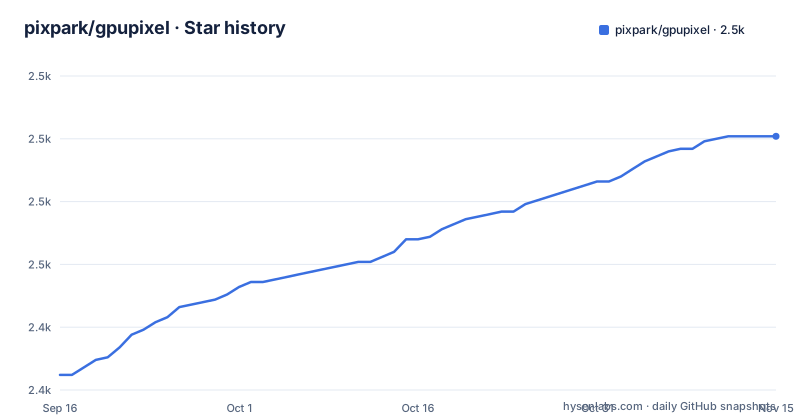
Star history
- pixpark/gpupixel2,501 ★ · +95
| Repository | 2026-09-16 | 2026-11-15 |
|---|---|---|
| pixpark/gpupixel | 2.4k | 2.5k |
95 Stars in the last 60 days, measured from the daily GitHub snapshot. Compare with other projects
Editorial analysis
The newest release by date carries the lower version number
Three tags are visible, and they do not sort. v1.3.0-beta.7 was published 2025-04-21, v1.3.1 followed on 2025-06-27, and then v1.2.x.8 was published on 2026-01-23. The most recent release is therefore on the 1.2 line, seven months older in version terms than the 1.3.1 that preceded it in time. Anything that resolves a dependency by picking the highest minor line will choose 1.3.1 and miss the January build entirely, while a script that simply takes the newest tag by date lands on 1.2.x.8 and reads the version as older. The branch itself has moved since: the last commit is dated 2026-09-26, roughly eight months after the newest tag, and the README names no release other than through a link to the latest one.
The Linux image installs CMake from an Ubuntu bionic repository on a Debian base
The Dockerfile starts from debian:bullseye and then adds the Kitware package repository by hand. It fetches the signing key, pipes it through gpg --dearmor into a keyring under /usr/share/keyrings, and writes an apt source line reading deb, signed by that keyring, pointing at https://apt.kitware.com/ubuntu/ with the distribution bionic and the component main. Ubuntu 18.04 is not Debian 11, so the CMake offered to this image comes from a repository built for a different distribution and an older C runtime. Two steps also swallow their output: the key download redirects stderr to /dev/null, and the writes to the keyring and the sources list go to /dev/null. If the key fetch fails, the sources line is still written. The comment calls this a newer CMake, 3.20.0, but the install command asks for cmake with no version pinned.
A comment naming Debian 10 sits above a bullseye base image
The first line of the Dockerfile reads debian 10 with GLIBC 2.28 in a comment, and the very next line is FROM debian:bullseye. Debian 10 is buster and bullseye is Debian 11, so the stated baseline and the image actually used are two releases apart, and the glibc version named in the comment belongs to the older one. Whoever wrote that line was recording the platform they had in mind rather than the platform the build runs on, and the note is the kind of thing that gets read as a requirement. It matters for a library like this one, because the C runtime underneath it decides which prebuilt binaries will load. Nothing else in the Dockerfile corrects the comment, and no other file in the root repeats a distribution or glibc version.
The build container installs an X11 and desktop GL stack, with no GLES package named
The packages installed for the build are build-essential, wget and gnupg, then libx11-dev, libxrandr-dev, libxinerama-dev, libxcursor-dev, libxi-dev, and libglu1-mesa-dev with freeglut3-dev and mesa-common-dev. That is a desktop X11 and OpenGL development set, ending in GLU and a windowing toolkit for demos. The project describes itself as OpenGL/ES and claims iOS, Android, Mac, Windows and Linux, yet no EGL or GLES development package appears in this list, and glibc plus desktop drivers are what this image provides. The container entry point runs ./script/build_linux.sh from /workspace, and the two usage comments bind an output directory and a build directory into the container. The build itself therefore happens on a desktop stack even for the platform advertised as mobile capable.
The Introduction link and the Build link point at the same page
The getting started section offers four links into the hosted documentation: Introduction, Build, Demo and Integration. The first two have identical destinations, both resolving to the guide/build address, while Demo goes to guide/demo and Integration to guide/integrated. So the entry point a newcomer is pointed at for orientation lands on the build instructions instead, and there is no separate introduction page to find from here. The repository has its own documentation tree under docs/, with the contributing guide at docs/docs/en/guide/contributing.md, which shows the locale directory nesting that the hosted site also uses. That in-tree copy is where the contributing rules live, not in the README, which keeps only a link to it.
No individual filter is named anywhere in the README
The introduction describes GPUPixel as an image and video filter library with a small footprint that provides beauty filters, and the effects section that follows is a single video asset link with no caption, no list and no description of what is being shown. There is no table of filters, no count, and no indication of which filters exist. A reader cannot answer the most basic question about the library from the README alone: what it does to a frame. The names live in the hosted documentation, which the README links for build, demo and integration but does not summarise. The acknowledgements name GPUImage, GPUImage-x and CainCamera as reference projects, which suggests the lineage of the approach, and the root carries a third_party directory, but the README does not say which of those projects is vendored there and which was only read.
The section before you start asks for a star, not for a prerequisite
There is a heading called Before You Start, and under it one sentence asking readers to star the repository on GitHub to receive notifications about new releases. No toolchain version, no platform check and no dependency appears there, so the heading sets an expectation of prerequisites and then does not meet it. The actual build requirements are in the hosted guide rather than in this file. Two other root entries say something about how the project is worked on: a .cursor directory sits alongside .clang-format, holding editor configuration for an AI coding assistant inside a C++ library, and README_CN.md gives a Chinese counterpart to the English file, matching the Chinese path on the documentation site. The sponsor section names one company as the special sponsor, a face beauty effects SDK vendor, followed by three individual usernames.
Editorial conclusion
This suits an integrator who already has an OpenGL or OpenGL ES context and needs beauty filtering on a mobile or desktop target, and it does not suit anyone choosing a filter set from the README, because no filter is named there. Two things deserve a check before you build on it. The release tags do not sort by version, so pinning a minor line by hand can hand you an eight month old build, and the only Linux build recipe in the repository mixes an Ubuntu apt repository into a Debian image. Build against your own toolchain, verify the filter list in the hosted documentation, and read the third_party directory before you assume the licence covers every file you compile.
Frequently asked questions
Which platforms does GPUPixel target?
The introduction names iOS, Android, Mac, Windows and Linux, and describes the library as compatible with any OpenGL/ES platform. The repository carries demo directories for android, desktop and ios, with no separate demo directory for Windows or Linux.
How does the Docker build for GPUPixel run?
The image is debian:bullseye with build tools, X11 development packages and mesa packages installed, and its entry point runs ./script/build_linux.sh from /workspace. Two bind mounts are given in the usage comments, one for output and one for build.
Which filters does GPUPixel provide?
The README describes the library as providing beauty filters and shows a single video preview, but it names no individual filter and gives no count. The filter list is kept in the hosted documentation rather than in the README.
What license is GPUPixel released under?
Apache-2.0, with a LICENSE file at the repository root. The repository also carries a third_party directory for vendored dependencies, whose contents and licences the README does not itemise.
What is the relationship between GPUPixel and GPUImage?
GPUImage, GPUImage-x and CainCamera are listed as reference projects the work was informed by. The README does not state which of them is vendored in the third_party directory or whether any code was taken from them.
Official sources
Add this badge to your README
If you maintain this project, the badge below links readers to this analysis and shows its maintenance status from the daily GitHub snapshot. Paste the markdown into your README; add ?metric=license or ?metric=stars to the image URL for a different field.

[](https://hysenlabs.com/projects/pixpark-gpupixel)Star history chart for your README
[](https://hysenlabs.com/projects/pixpark-gpupixel)Was this useful?