Lemonade: A Local AI Server With AMD-Tuned Optimizations
Lemonade helps users discover and run local AI apps by serving optimized LLMs right from their own GPUs and NPUs. Join our discord: https://discord.gg/5xXzkMu8Zk
At a glance
- What is it?
- Lemonade is an Apache-2.0 local AI server that serves optimized LLMs from your own GPU or NPU, with a focus on AMD Ryzen AI and Radeon hardware. It exposes OpenAI, Anthropic, and Ollama-compatible APIs, but its hardware-specific tuning and evolving ecosystem deserve scrutiny before you commit.
- Who is it for?
- Adopt Lemonade if you run an AMD Ryzen AI, Radeon, or Strix Halo PC and want a local server that speaks OpenAI, Anthropic, and Ollama APIs with hardware-tuned optimizations. Skip it if you need mature multi-GPU orchestration or a stable API surface across frequent releases.
- Can I use it commercially?
- Yes. Apache-2.0 is a permissive licence: you can use, modify and sell software built on it, as long as you keep its copyright and licence notices.
- Is it still maintained?
- Yes. The repository received new commits within the last day.
- What is it written in?
- Mainly C++, according to GitHub's language statistics.
Answers come from the project's GitHub data, last synced on November 14, 2026, and from our analysis. They are not legal advice.
Star history
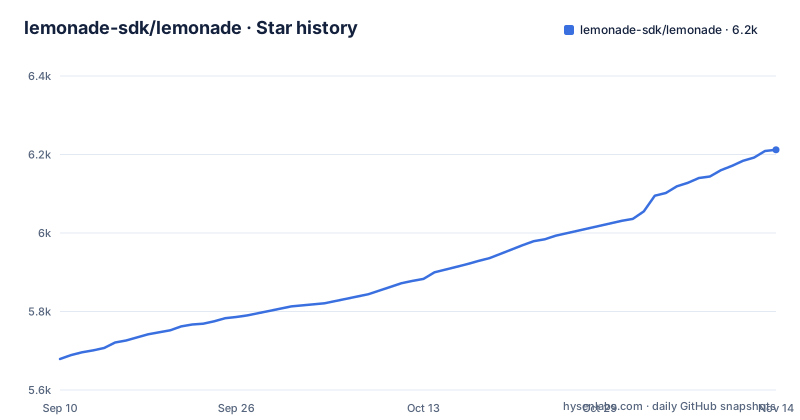
- lemonade-sdk/lemonade6,212 ★ · +533
| Repository | 2026-09-10 | 2026-11-14 |
|---|---|---|
| lemonade-sdk/lemonade | 5.7k | 6.2k |
533 Stars in the last 65 days, measured from the daily GitHub snapshot. Compare with other projects
Editorial analysis
What Lemonade Solves and Who It Targets
Lemonade is a local AI server that aims to replicate cloud API capabilities for chat, coding, speech, and image generation while running entirely on your own hardware. The README frames it as '100% free and private,' which appeals to developers who want to avoid per-token costs and data leaving their machine. The project targets two distinct user groups. First, individuals who want a drop-in replacement for cloud APIs, because Lemonade Server exposes standard OpenAI, Anthropic, and Ollama APIs, so existing applications can point at a local endpoint without rewriting their integration code. Second, application developers who want to embed a portable binary into their product, giving it multi-modal local AI that auto-optimizes for the end user's PC. The project has a strong AMD connection: the README states that optimizations come from AMD engineers targeting Ryzen AI, Radeon, and Strix Halo PCs. The README also says the project is built by the community for every PC, and its text-generation engine is llamacpp, with backends for CPU (system), Apple Silicon (metal), NVIDIA GPUs (cuda) and Vulkan.
Two Flavors: Server and Embeddable Binary
The project ships in two forms. Lemonade Server installs as a service that you can connect to 'hundreds of great apps' using standard OpenAI, Anthropic, and Ollama APIs. That means you run an installer, start the service, and then configure a client like Claude Code or Open WebUI to point at the local endpoint. The embeddable flavor is a portable binary designed to be packaged inside your own application. The README claims it 'auto-optimizes for your user's PC,' which suggests the binary inspects the hardware at runtime and selects appropriate acceleration paths. This dual approach is pragmatic: it lets end users get a working server quickly while giving developers a way to distribute local AI without forcing users to install a separate service. However, the embeddable path likely requires more integration work, and the documentation would need to clarify how the binary discovers hardware and which models it bundles.
Under the Hood: Hardware-Tuned Inference
Lemonade supports multiple inference engines for LLM, speech, TTS, and image generation, and each has its own backend and hardware requirements. For text generation, the llamacpp engine has system (x86_64/ARM64 CPU, GPU on Linux), metal (Apple Silicon GPU on macOS), cuda (NVIDIA GPUs, Turing or newer, on Windows and Linux) and vulkan backends. Models come in GGUF, FLM and ONNX formats, plus whisper and stable diffusion, across CPU, GPU and NPU, and are downloaded with lemonade pull or the built-in Model Manager. Lemonade Server then exposes them through standard OpenAI, Anthropic and Ollama APIs.
Installation and Supported Platforms
Getting Lemonade running depends on your operating system. The README links install guides for Windows, Linux, and macOS, plus a Docker installation guide and a source build option. For Linux, the supported platforms table links guides for Arch, Debian, Fedora and Ubuntu, plus a snap package, each with a build badge. The built-in Model Manager, or lemonade pull on the command line, is how you browse and download models, and the built-in interfaces cover chat, image generation, and speech generation. The README also mentions mobile apps for iOS and Android, with a separate repository for the mobile source, but those are client apps, not the server itself.
API Compatibility and Ecosystem Integration
A major selling point is the ability to connect to 'hundreds of great apps' using standard OpenAI, Anthropic, and Ollama APIs. This is not a single API; it is three different compatibility layers. That is ambitious because each API has its own request and response formats, tool-calling conventions, and streaming behaviors. The README lists specific integrations: Claude Code, AnythingLLM, Dify, GitHub Copilot (via a third-party guide), Open WebUI, OpenHands, n8n, and a Firefox chatbot. The presence of a marketplace directory where apps can be submitted via PR suggests an active ecosystem, but it also implies that integration quality may vary. An app that works with OpenAI-compatible endpoints may not work perfectly with Anthropic or Ollama endpoints, and the server must translate between model capabilities and the client's expectations. For example, a coding agent like Claude Code expects specific tool-use schemas, and if Lemonade's translation is incomplete, the agent may fail. You should test your specific client before relying on it.
Limitations and Wrong-Tool Scenarios
The optimizations credited to AMD engineers target Ryzen AI, Radeon, and Strix Halo PCs; other hardware runs through backends such as llamacpp with cuda for NVIDIA GPUs (Turing or newer) or metal for Apple Silicon. The frequent release cadence (v2026.44.1 on October 28, followed by a v2026.45.3 release candidate on October 29) indicates active development but also implies that APIs or configurations may change between minor versions. The README's claim of 'auto-optimizes for your user's PC' in the embeddable flavor is a promise that needs verification; auto-optimization is hard. Finally, the repository is not archived, but the last push date is November 2, 2026, which is recent relative to the release dates, so the project is alive, but you should check the issue tracker for unresolved problems.
Alternatives and How They Differ
The obvious alternative is llama.cpp with its server example, which also exposes an OpenAI-compatible API and runs on a wide range of hardware including NVIDIA, Apple Silicon, and AMD. The key difference is approach: llama.cpp is a from-scratch C++ inference engine with its own quantization formats (GGUF) and a focus on CPU and GPU portability. Lemonade, by contrast, uses llamacpp as its text-generation engine and wraps it in a server that also handles FLM and ONNX models, speech, image generation and NPU devices. Another alternative is the GAIA project, which is listed in the marketplace as an integration, and it appears to be an AMD-related agent framework that can use Lemonade as a model backend. The choice comes down to whether you prioritize AMD-specific optimizations or broad hardware support.
Maintenance and Licensing Considerations
Lemonade is licensed under Apache-2.0, which is permissive for both commercial and personal use. You can embed the binary in a proprietary application without releasing your source code, though you must preserve the license notice. The project has a contribution guide and a PRs-welcome badge, indicating an open development process. The release history shows a steady stream of updates, with v2026.44.1 and two release candidates published on October 28 and 29, 2026, which signals active maintenance but also a fast-moving target. For an embeddable product, this means you will need to track upstream changes and re-test your integration frequently. The documentation is hosted on a separate site (lemonade-server.ai), and the README links to install guides for each platform, so there is a documentation structure. Before adopting, you should check the release notes for v2026.44.1 to see if any breaking changes affect your use case. The project's heavy reliance on AMD-specific optimizations also means that maintenance cost is tied to AMD's driver and ROCm updates; if AMD changes its software stack, Lemonade may need corresponding updates. Overall, the license is favorable, but the operational cost is ongoing due to the rapid release pace and hardware dependence.
Editorial conclusion
Adopt Lemonade if you run an AMD Ryzen AI, Radeon, or Strix Halo PC and want a local server that speaks OpenAI, Anthropic, and Ollama APIs with hardware-tuned optimizations. Skip it if you need mature multi-GPU orchestration or a stable API surface across frequent releases. Before adopting, verify that your exact GPU or NPU appears in the supported platforms matrix, check the latest release notes for breaking changes, and test the server with your target client (Claude Code, Open WebUI, or a custom app) because the project's rapid release cadence (v2026.44.1 and a v2026.45.3 release candidate a day apart) suggests active but volatile development. The project's real value is its AMD-first optimization, so confirm that value on your specific hardware before building around it.
Frequently asked questions
What kinds of models can Lemonade run?
Chat, coding, image generation, speech and transcription models, in GGUF, FLM and ONNX formats, plus whisper and stable diffusion, across CPU, GPU and NPU. Custom GGUF and ONNX models can be pulled from Hugging Face or ModelScope with their source retained for later updates.
How do I install Lemonade Server?
Separate install guides exist for Windows, Linux, macOS, Docker and building from source under the docs guide directory. Distributions include an Arch package, a Launchpad PPA for Ubuntu, GitHub Actions builds for Debian, Fedora, macOS and Windows, and a snap built in the separate lemonade-server-snap repository.
Which command runs a model with Lemonade?
lemonade run followed by the model name, with the modality following the model: SDXL-Turbo for image generation, kokoro-v1 for speech, Whisper-Large-v3-Turbo for transcription, and Gemma-4-E2B-it-GGUF for chat. lemonade list shows available models, lemonade pull downloads them, and lemonade backends reports the backends present on the machine.
How do I point another app at Lemonade?
Lemonade Server exposes the standard OpenAI, Anthropic and Ollama APIs, so apps connect to it over those interfaces rather than through a Lemonade specific client. The README says it connects to hundreds of apps, and its marketplace section names Claude Code, Open WebUI, AnythingLLM, Dify, n8n, GAIA and OpenHands.
Does Lemonade keep inference on my own machine?
Locally, yes: the server runs models from your own NPU and GPU, which is the basis of its private and free claim. There is also a documented cloud offload path that routes to OpenAI compatible providers such as Fireworks, OpenAI, OpenRouter and Together, and that path is marked experimental.
Official sources
Add this badge to your README
If you maintain this project, the badge below links readers to this analysis and shows its maintenance status from the daily GitHub snapshot. Paste the markdown into your README; add ?metric=license or ?metric=stars to the image URL for a different field.

[](https://hysenlabs.com/projects/lemonade-sdk-lemonade)Star history chart for your README
[](https://hysenlabs.com/projects/lemonade-sdk-lemonade)Was this useful?