Plakar: encrypted snapshots, a package manager, and a cache that starts cold
plakar is a backup solution powered by Kloset and ptar
At a glance
- What is it?
- Plakar stores each backup run as a snapshot inside an encrypted, deduplicated Kloset, so you can diff two snapshots or pull one file back without a full restore. The plumbing matters as much: one Go binary, a package manager for extra backends, and a container image that discards its cache on every run.
- Who is it for?
- Plakar fits engineers who want one Go binary, snapshots they can diff before restoring, and object storage inside the replication plan. It does not fit teams that need a documented upgrade path or a support contract, because the storage module is pinned to an alpha build and the Go floor is stated three different ways across the repository.
- Can I use it commercially?
- Yes. ISC is a permissive licence: you can use, modify and sell software built on it, as long as you keep its copyright and licence notices.
- Is it still maintained?
- Yes. The repository received new commits within the last day.
- What is it written in?
- Mainly Go, according to GitHub's language statistics.
Answers come from the project's GitHub data, last synced on October 23, 2026, and from our analysis. They are not legal advice.
Star history
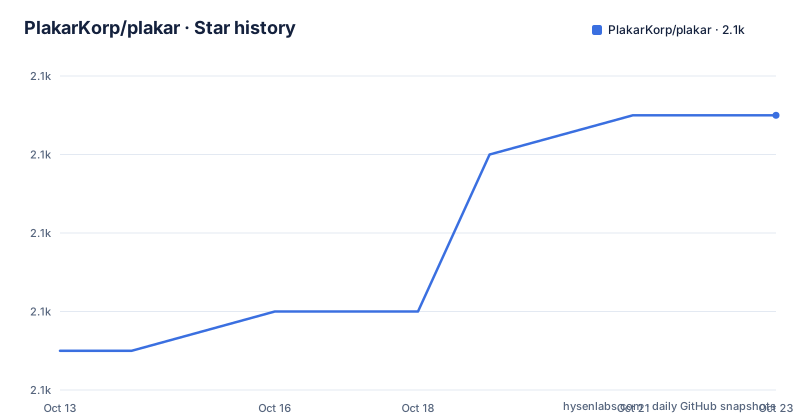
- PlakarKorp/plakar2,093 ★ · +6
| Repository | 2026-10-13 | 2026-10-23 |
|---|---|---|
| PlakarKorp/plakar | 2.1k | 2.1k |
6 Stars in the last 10 days, measured from the daily GitHub snapshot. Compare with other projects
Editorial analysis
The first backup in six commands against a local repository
The command line puts the store location before the verb, so every operation reads the same way: plakar at /var/backups create, then plakar at /var/backups backup /etc. That one shape covers a complete first run:
# Install
go install github.com/PlakarKorp/plakar@latest

# Create a local repository
plakar at /var/backups create

# Back up a directory
plakar at /var/backups backup /etc

# List snapshots
plakar at /var/backups ls

# Restore a snapshot
plakar at /var/backups restore -to /tmp/restore <snapshot-id>

# Open the web UI
plakar at /var/backups ui
The create verb turns /var/backups into a repository rather than a folder of copies, and backup writes one snapshot from /etc. Listing returns the snapshot identifiers that restore then takes as a positional argument, written as `<snapshot-id>` in the block above. Two details are easy to misread: the destination flag is `-to`, with a single hyphen, and it points at a fresh directory, so a restore does not overwrite the tree you just captured. The last verb starts the built-in browser interface against the same repository, which is how a snapshot gets inspected without being restored.
Prebuilt binaries for your platform sit at https://www.plakar.io/download if you would rather not build. Note that the repository home page is https://plakar.io, without the www prefix the download and documentation links carry.
Every run becomes an immutable snapshot inside a Kloset
The storage layer is not written inside this repository. Snapshots land in a Kloset, the project's own immutable store, pulled in as the module `github.com/PlakarKorp/kloset`. What keeps many snapshots affordable is visible in the dependency list: `PlakarKorp/go-cdc-chunkers` v1.1.0 for content defined chunking, and `DataDog/zstd` v1.5.7 for compression. Chunk boundaries follow file content instead of fixed offsets, so an edited configuration file keeps most of the chunks it shared with yesterday's snapshot, and storage cost stops scaling with the number of runs.
Encryption covers data and metadata together, which is the claim worth checking first, because a snapshot nobody can verify after a failed restore is a liability rather than a backup. Snapshots can be checked without restoring anything, diffed against each other, and searched for a single file. An audit post on plakar.io is what the documentation links to, rather than a statement of the algorithm in use, and the truncated module graph shows one authenticated encryption dependency, `PlakarKorp/aes-gcm-siv`, pinned at a pseudo-version dated 20260921114103.
Three different Go versions inside one repository
The installation section states that Plakar requires Go 1.23.3 or higher. The module file declares `go 1.26.0`. The container build stage uses a third figure, `golang:1.25-alpine`. Only the lowest of the three can be the real floor for a given checkout, and `go install github.com/PlakarKorp/plakar@latest` follows the module directive rather than the sentence in the documentation, so a developer on the stated minimum gets a toolchain error instead of a binary.
Dependency stability has the same shape. The Kloset module is pinned to `v1.2.0-alpha.2.0.20261002143921-a800b168f281`, a pre-release pseudo-version carrying a commit hash, while the newest tag on this repository is v1.1.7 dated 2026-09-24 and the last push landed on 2026-10-05. The layer holding every snapshot is therefore tracking an alpha build. Terms are simpler: Plakar is ISC, so embedding it in a product you distribute carries no copyleft condition, and the alpha pin is a stability question rather than a legal one.
Documentation drifts in the same direction. Every documentation link in the README carries a v1.1.0 path, including the quickstart guide and the command reference, so the walkthrough you are pointed at describes a build seven patch versions behind the newest tag.
Every container run begins with a cold cache
The bundled Dockerfile opens with its own limitations block, which is unusually direct for a project image. The container runs Plakar with no shared host cache, and each invocation starts cold: no VFS cache, no cached daemon persistence. The comment names the volume to mount at the cache directory to fix that:
docker run -v plakar-cache:/home/plakar/.cache/plakar ...Without that volume the incremental work that deduplication removes happens again on every run, which is the wrong shape for a scheduled container job repeating the same backup hourly. Its runtime base is alpine:3.23, with `ca-certificates` installed for HTTPS connections to remote repositories and plakar.io, so a remote backend or a package fetch over TLS fails loudly without them. Inside that image the process runs as a dedicated account built with `addgroup` and `adduser`, and the build comment explains why it cannot be skipped: /etc/passwd is read by user.Current(). Without an entry there, a cache path resolved from the running account has nothing to resolve to.
Databases and clusters arrive through the package manager
The installed binary covers files. Everything else is fetched at run time:
plakar pkg add <integration>Named integrations include PostgreSQL, MySQL, etcd, Kubernetes, and S3-compatible object stores. None of them ship inside the module you install, because the bundled integration modules are `integrations/fs` v1.1.8, `integrations/http` v1.1.3, `integrations/ptar` v1.1.1, `integrations/stdio` v1.1.0 and `integrations/tar` v1.1.1, with `integration-grpc` v1.1.2 carrying the transport they speak over. A recovery drill then has two failure points, the snapshot and the connector, and the connector is absent from any host that never ran the add command.
Replication changes the argument shape again:
plakar at /var/backups sync to @s3The left side is a filesystem path, the right side is a name prefixed with @, and the verb is what pushes a local Kloset into object storage for a 3-2-1 layout. Pull and sync flows across mixed environments are described alongside it. What the documentation never gives you is the inventory side of that: the quickstart shows `plakar pkg add` and nothing that lists which integrations a given client already holds, so a rebuilt host has to be rediscovered by trial.
ptar carries one snapshot out as a single file
`plakar ptar` exports one or more snapshots into a single `.ptar` file, described as self-contained, deduplicated, compressed and encrypted. A snapshot then travels as one object: copy it off a failing host, hand it to someone with no repository and no credentials, and it still opens. Writing is a module of its own, `integrations/ptar` v1.1.1, so the archive container is not the snapshot format itself.
Written commands disagree about where the repository belongs. Every quickstart verb names its repository first, while the ptar sentence shows the bare `plakar ptar` with no location argument, and the package verb is written the same bare way. Meanwhile the repository ships `plakar-query.7`, a man page for a query command that no quickstart line invokes, next to `plakar.1` and `complete.go`, which generates shell completions for a command tree the documentation never prints in full. Written instructions cover a narrower surface than the shipped one, and neither the quickstart nor the download page says by how much.
What the Makefile counts and what it installs
Installing through the Makefile does more than copy a binary. The install target creates man1, man5 and man7 directories under /usr/local/man and installs every page it finds into them with mode 0444, while the program itself lands in /usr/local/bin with mode 0555. At the top level of the repository sit `plakar.1` and `plakar-query.7`, and no man5 page at all, so the generic find across the tree will always create a man5 directory that stays empty.
Coverage accounting deserves a closer read. The coverage target runs the suite with `-covermode=atomic`, then filters the profile, dropping every block that belongs to a `/plakar/testing/` path before the totals are calculated, because Go offers no package level exclude. Those packages hold mocks and fixtures, and the Makefile comment states that the filter exists to match the Codecov ignore config, so the headline figure counts shipping code only and quietly drops the scaffolding that makes the suite runnable. The junit target adds `-timeout 2m` and `-p 4`, then pipes the results through go-junit-report with `-parser gojson` and `-set-exit-code`, which puts a failing test in charge of the job status.
Tree entries no quickstart command ever reaches
Much of this project is application rather than backup logic. Eight test files sit beside main.go, including `main_cov80_test.go`, `main_coverage_test.go`, `main_plaintext_test.go` and `main_extra_test.go`, next to the testing and unittests directories. Behind the ui verb sits an interface in `ui/`, `server/`, `cookies/` and `login/`, with `golang-jwt/jwt/v5` v5.3.1 for tokens and `github.com/alecthomas/chroma` v0.10.0 for syntax highlighting. Nothing in the documentation says whether that server binds beyond localhost, so treat the ui verb as a local tool until you have read the binding yourself. `term_windows.go` beside `term.go` answers how this runs on Windows, and `github.com/anacrolix/fuse` in the module graph answers how a snapshot can be browsed as a mounted filesystem, which fits the container comment about a VFS cache the image does not persist.
Two entries have nothing to do with capturing files. `AGENTS.md`, `CLAUDE.md` and a `.claude/` directory are checked into the tree, so the repository ships its own instructions aimed at coding agents. `signify/` and `github.com/PlakarKorp/go-signify` v0.1.0 point at signed artifacts, a coherent choice for a tool whose central promise is that stored data can be checked after the fact.
Editorial conclusion
Plakar fits engineers who want one Go binary, snapshots they can diff before restoring, and object storage inside the replication plan. It does not fit teams that need a documented upgrade path or a support contract, because the storage module is pinned to an alpha build and the Go floor is stated three different ways across the repository. Before a first real backup, read that mismatch, run a restore drill against a copy of a snapshot, and record which integrations `plakar pkg add` pulls over the network on each rebuilt host.
Frequently asked questions
How do I install Plakar and make my first backup?
Either download a binary for your platform from https://www.plakar.io/download or run `go install github.com/PlakarKorp/plakar@latest`, then create a repository with `plakar at /var/backups create` and capture a directory with `plakar at /var/backups backup /etc`. Snapshots are listed with `plakar at /var/backups ls` and restored to a separate path with `plakar at /var/backups restore -to /tmp/restore <snapshot-id>`.
What is a Kloset and how does Plakar avoid storing every snapshot twice?
A Kloset is the immutable, open source store that holds Plakar snapshots, maintained as the separate module `github.com/PlakarKorp/kloset`. The module graph pulls in `PlakarKorp/go-cdc-chunkers` v1.1.0 for content defined chunking and `DataDog/zstd` v1.5.7 for compression, so unchanged content in a new snapshot is stored once.
Can Plakar back up PostgreSQL, Kubernetes or object storage, and how are those connectors installed?
Yes, through integrations added at run time with `plakar pkg add <integration>`. The named set includes PostgreSQL, MySQL, etcd, Kubernetes and S3-compatible object stores; the bundled modules cover files, HTTP, ptar, stdio and tar, so the database and cluster connectors are not part of the installed binary.
Does the Plakar container image do incremental backups efficiently out of the box?
Not without a volume. The bundled Dockerfile states that the container runs without a shared host cache, that each invocation starts with no VFS cache and no cached daemon persistence, and that a persistent volume should be mounted at the plakar cache directory, as in `docker run -v plakar-cache:/home/plakar/.cache/plakar ...`.
What Go version is required to build Plakar from source?
The installation section states Go 1.23.3 or higher, the module file declares `go 1.26.0`, and the Dockerfile builder stage uses `golang:1.25-alpine`. The build follows the module directive, so treat 1.26.0 as the effective floor and verify your toolchain before running the install command.
Official sources
Add this badge to your README
If you maintain this project, the badge below links readers to this analysis and shows its maintenance status from the daily GitHub snapshot. Paste the markdown into your README; add ?metric=license or ?metric=stars to the image URL for a different field.

[](https://hysenlabs.com/projects/plakarkorp-plakar)Star history chart for your README
[](https://hysenlabs.com/projects/plakarkorp-plakar)Was this useful?