wireproxy: the build instructions clone a different owner than the module path
Wireguard client that exposes itself as a socks5 proxy
At a glance
- What is it?
- A userspace WireGuard client that presents itself as a SOCKS5 or HTTP proxy, whose README clones one GitHub account, installs from another, pins an install tag behind its newest release, and whose health endpoint reports ready unless you configure it to do otherwise.
- Who is it for?
- wireproxy fits a specific need well: routing chosen traffic through a WireGuard peer without creating a network interface and without root, on a machine you do not want to reconfigure. It is a poor fit if you need UDP, since the feature list covers CONNECT only and UDP is still on the project's own todo list.
- Can I use it commercially?
- Yes. ISC is a permissive licence: you can use, modify and sell software built on it, as long as you keep its copyright and licence notices.
- Is it still maintained?
- Yes. The repository last received commits 33 days ago.
- What is it written in?
- Mainly Go, according to GitHub's language statistics.
Answers come from the project's GitHub data, last synced on November 13, 2026, and from our analysis. They are not legal advice.
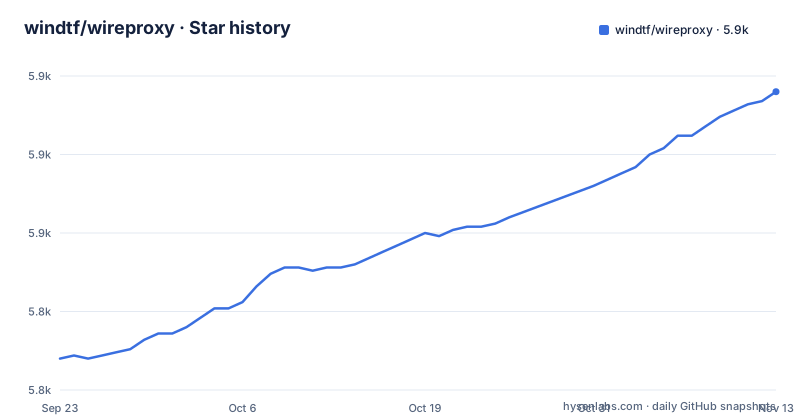
Star history
- windtf/wireproxy5,895 ★ · +85
| Repository | 2026-09-23 | 2026-11-13 |
|---|---|---|
| windtf/wireproxy | 5.8k | 5.9k |
85 Stars in the last 51 days, measured from the daily GitHub snapshot. Compare with other projects
Editorial analysis
The badges and the clone line name a different account
The repository lives under one owner and its documentation names another. The module path is `github.com/windtf/wireproxy`, the install line goes to the same place, and the release tags come from there. But the build instructions say:
git clone https://github.com/octeep/wireproxy
cd wireproxy
make
The action badge and the documentation badge point at the `octeep` path as well. So two of the three badges at the top of the page and the only build recipe on it describe a repository one account over from the one hosting the code you are reading.
Forks and renames make this survivable rather than fatal, since a renamed repository on that host redirects and the build still produces a working binary. What it costs is traceability. The install instructions and the build instructions lead to two different places, and only one of them is where the tagged releases in this repository's history were cut.
The default branch is `master`, the license is ISC, and the license file and an ISC label in the container build both agree with that.
The install line pins a tag that is two releases behind
The install recipe is a single line:
go install github.com/windtf/wireproxy/cmd/[email protected] # or @latestThe tag in that example is v1.1.2. The newest tag in this repository is v1.1.3, published on 2026-07-16, four months after v1.1.2. The comment offers `@latest` as the alternative, so the fixed example trails the newest release by exactly one tag, which is the kind of drift that survives because the fixed form is the one people copy.
The March releases are worth a look too. v1.1.1 was published on 2026-03-05 at 04:01:21 and v1.1.2 the same day at 15:04:39, eleven hours later. Two patch releases inside one working day, then four months of nothing tagged, while the repository itself was pushed to as recently as 2026-10-12. The three most recent releases are all patch bumps, so the project is not releasing features here; it is fixing and repackaging.
The usage block promises seven options and explains five
The README reproduces the help block:
usage: wireproxy [-h|--help] [-c|--config "<value>"] [-s|--silent]
                 [-d|--daemon] [-i|--info "<value>"] [-v|--version]
                 [-n|--configtest]
Seven options appear in that summary. The body of the same block documents five of them: help, config, silent, daemon and info. The `-v` line is present with no description beside it, and `--configtest` is listed in the summary but has no entry at all below.
The config flag does carry the one piece of information a new user needs, which is where the file is looked for when the flag is omitted: `/etc/wireproxy/wireproxy.conf` or `$HOME/.config/wireproxy.conf`. Remember those two paths, because the container image uses a third one.
The `--info` flag takes an address and a port, and that is the entry point to the health server described further down the page.
The container looks for a config file nobody has heard of
The image declares a volume and a default command:
VOLUME [ "/etc/wireproxy"]
ENTRYPOINT [ "/usr/bin/wireproxy" ]
CMD [ "--config", "/etc/wireproxy/config"]
So inside the container the config file is expected at `/etc/wireproxy/config`. The documentation's own default paths are `/etc/wireproxy/wireproxy.conf` and `$HOME/.config/wireproxy.conf`. Same directory, different filename, and the shorter one is the only one that appears nowhere else on the page.
The build half of the image copies the whole context in and runs `make`. The Makefile derives the version string from the newest tag matching `v*` using git, and passes it into the binary with a linker flag. A build that runs `make` over a copied directory therefore gets its version from whatever git history arrived, and a `.dockerignore` at the root of this repository decides how much of that history is there. The binary you get from the image is built correctly either way; the version string it reports is the part that depends on the build context.
The runtime image is distroless static running as a non-root user, which is consistent with the project's argument that you need no privileges to route traffic through a peer.
The health endpoint answers ready until you tell it otherwise
The `--info` flag starts an HTTP server with two endpoints. One is `/metrics`, which returns the same information as the WireGuard tool's show command. The other is `/readyz`, and its default behaviour is the thing to know.
If `CheckAlive` is not configured, `/readyz` responds with an empty JSON object and a 200. Readiness passes by default, with nothing being checked. Configure `CheckAlive` with one or more addresses and the endpoint starts sending pings through the tunnel on an interval, `CheckAliveInterval`, which defaults to 5 seconds, and records when a reply last arrived from each address. If a reply is older than that interval plus two seconds of leeway, the response is a 503. The sample output on the page shows exactly that shape, with one address carrying a timestamp and the other carrying zero:
{"1.1.1.1":1712796899,"3.3.3.3":0}Two details are easy to miss. Which peer the probe travels through is decided by the `AllowedIPs` of each peer, so a routing mistake sends your health check down the wrong tunnel. And the example responses are dated April 2024, well before the current tag.
Landlock, a userspace network stack and a Windows TUN driver
The dependency list explains how the no-root claim works. Three direct dependencies do the interesting work: a userspace WireGuard implementation, a SOCKS5 server library, and an INI parser for the config format the page's samples use. Two more are unusual. One is a Linux Landlock binding, and the other is a small library named for protecting a running process.
The indirect dependencies carry the rest of the story. A userspace network stack appears there, which is what lets a tunnel interface hold an address without the process touching the host's routing table. A Windows TUN driver package and a Linux capabilities library are listed too.
A command line parser library and a heredoc helper round out the direct list, which is what produces the usage block quoted above and the multi-line sample configs. The root of the repository is flat and testable: config, http and router each have a test file beside them, plus one named for leak checking and a shell script for testing configs.
CONNECT only, no UDP, and a proxy file that suggests otherwise
Three features are claimed. TCP static routing, in both directions, so wireproxy can dial out through a peer and can also accept a connection and forward it. A SOCKS5 and HTTP proxy. And transparent TLS proxying by server name indication, which is how a client can be handed a tunnel without configuring a proxy at all.
The qualifier on the second one is the important part: currently only CONNECT is supported. An HTTP proxy limited to CONNECT is a tunnel, not a forward proxy, so ordinary GET requests through the HTTP listener are not part of what works. The page is upfront about this.
UDP is listed under the project's own todo heading, in two forms: UDP support inside SOCKS5, and UDP static routing. WireGuard tunnels carry UDP, so neither is available yet, which means anything that depends on it, including a WireGuard peer forwarding QUIC or DNS to the tunnel, is out of reach. Worth noting that the repository root already contains a file named for UDP proxying.
For a variant aimed at a different client the page points at a fork for Amnezia VPN, maintained by someone else.
A residential proxy with a referral link sits above the project's own pitch
Editorial conclusion
wireproxy fits a specific need well: routing chosen traffic through a WireGuard peer without creating a network interface and without root, on a machine you do not want to reconfigure. It is a poor fit if you need UDP, since the feature list covers CONNECT only and UDP is still on the project's own todo list. Before you deploy the container, check the config path inside it, because the image defaults to a filename that appears nowhere in the documentation, and set `CheckAlive` before trusting the health endpoint, since an unconfigured readiness check always answers ready. The documentation is worth reading past the first page: the usage block lists fewer options than its own summary promises.
Frequently asked questions
how to use wire proxy
Run `./wireproxy [-c path to config]`, and omit the flag to use `/etc/wireproxy/wireproxy.conf` or `$HOME/.config/wireproxy.conf`. The config follows wg-quick semantics for the interface and peer sections, plus tunnel and proxy sections, and the proxy listener supports CONNECT only.
Can SOCKS5 be detected?
The project does not discuss detection. What it states is scope: it is a userspace WireGuard client that exposes a SOCKS5 or HTTP proxy with CONNECT supported, TCP static routing in both directions, and transparent TLS proxying by server name indication. UDP inside SOCKS5 is still on its own todo list.
Is SOCKS5 a VPN or a proxy?
This repository implements the proxy side: it dials into a WireGuard peer you already have and offers a SOCKS5 or HTTP listener on the machine, rather than creating a VPN interface. The README's stated reason is to avoid setting up a new network interface and to avoid needing root.
Does wireproxy support UDP?
Not yet. The todo section lists UDP support in SOCKS5 and UDP static routing as outstanding, and the feature list claims only CONNECT for the proxy plus TCP static routing. The root of the repository does contain a file named for UDP proxying.
What config path does the wireproxy container use?
The image declares a volume at `/etc/wireproxy` and a default command pointing at `/etc/wireproxy/config`. The two documented default paths are `/etc/wireproxy/wireproxy.conf` and `$HOME/.config/wireproxy.conf`, neither of which matches the filename the image uses.
Official sources
Add this badge to your README
If you maintain this project, the badge below links readers to this analysis and shows its maintenance status from the daily GitHub snapshot. Paste the markdown into your README; add ?metric=license or ?metric=stars to the image URL for a different field.

[](https://hysenlabs.com/projects/windtf-wireproxy)Star history chart for your README
[](https://hysenlabs.com/projects/windtf-wireproxy)Was this useful?