Plasmic hands your React app the pages built in its canvas
Visual builder for React. Build apps, websites, and content. Integrate with your codebase.
At a glance
- What is it?
- Plasmic is a visual builder whose output is React code rendered inside an app you already own, and whose Studio is a pnpm monorepo that wants Postgres 15 and a Jenkins job to publish. It pays off when your design system is already React components, and costs you when you expected a hosted page with no server side work.
- Who is it for?
- Plasmic fits teams that already own a React codebase and want marketing pages or internal tools assembled from their own components. It does not fit a team that wants a hosted page with no server side work, or one that reads GitHub release notes before upgrading, since there are no GitHub releases and the platform subdirectory ships license terms of its own.
- Can I use it commercially?
- Yes. MIT is a permissive licence: you can use, modify and sell software built on it, as long as you keep its copyright and licence notices.
- Is it still maintained?
- Yes. The repository received new commits within the last day.
- What is it written in?
- Mainly TypeScript, according to GitHub's language statistics.
Answers come from the project's GitHub data, last synced on November 7, 2026, and from our analysis. They are not legal advice.
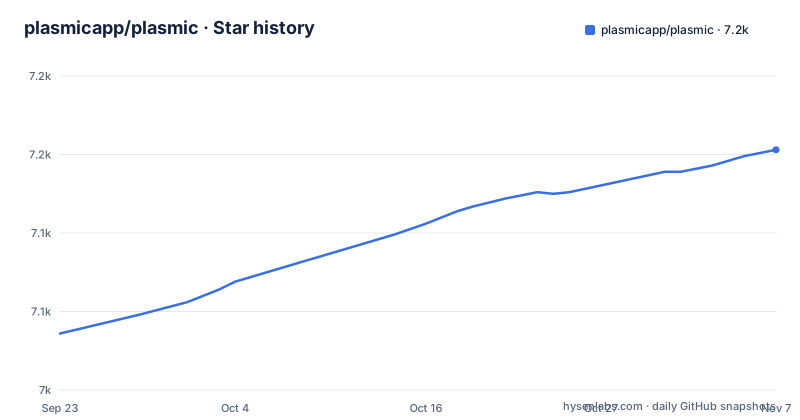
Star history
- plasmicapp/plasmic7,153 ★ · +117
| Repository | 2026-09-23 | 2026-11-07 |
|---|---|---|
| plasmicapp/plasmic | 7k | 7.2k |
117 Stars in the last 45 days, measured from the daily GitHub snapshot. Compare with other projects
Editorial analysis
Plasmic pages arrive as React components inside your app
The integration surface is two imports from a loader package. One is a root provider that carries the initialized Plasmic instance; the other is a component tag naming a specific page or component built in the visual editor, here `Summer22LandingPage`. Because what renders is an ordinary React component, your own components, your router and your data layer stay in charge of the surrounding page, which is the project answer to the complexity ceiling it says low-code tools hit. What you have to decide is when the fetch happens. The sample page in this repository fetches on the client, and the comment above it notes you can instead fetch and render server-side in SSG or SSR frameworks, such as via getStaticProps in Next.js. Publishing adds three further paths: webhooks that trigger rebuilds, incremental static revalidation, or dynamic fetching from the Plasmic CDN.
npm install @plasmicapp/loader-nextjs// pages/index.tsx
import {
PlasmicComponent,
PlasmicRootProvider,
} from "@plasmicapp/loader-nextjs";
import { PLASMIC } from "../plasmic-init";
// Here we fetch dynamically on the client, but you can also fetch and render
// components server-side in SSG/SSR frameworks, such as via getStaticProps
// in Next.js.
export default function IndexPage() {
return (
<PlasmicRootProvider plasmic={PLASMIC}>
<PlasmicComponent component="Summer22LandingPage" />
</PlasmicRootProvider>
);
}registerComponent is the door your own components walk through
`PLASMIC.registerComponent` is the entire integration surface for your design system, and the shape of its config decides what an editor can change. You pass the component and an object whose `props` key lists what to expose. In the example below, `children` is declared as `"slot"`, which turns it into a place another component can be dropped into. Anything you leave out of `props` stays invisible in the canvas: it keeps its default value and nobody editing a page can reach it from the visual editor. That is the failure mode to plan around, because the walkthrough marks this step optional, and a team can adopt Plasmic for one marketing page and later find that the forty components in its design system are all registered with empty prop maps.
// Take any component from your app or design system...
export default function HeroSection({ children }) {
  return <div className="hero-section">{children}</div>;
}

// ...and make it available for drag-and-drop, along with any props you want to
// expose.
PLASMIC.registerComponent(HeroSection, {
  props: {
    children: "slot",
  },
});
The monorepo splits Studio into platform, canvas and packages
This is not a single package you install from npm. The top level holds `packages/`, `plasmicpkgs/`, a separate `plasmicpkgs-dev/`, an `examples/` directory with 25 projects covering Gatsby, Preact, Rive, i18next, Lingui, Contentful, Cloudinary, Split.io and Hydrogen, plus `docs/`, `ai/`, `scripts/` and a `platform/` tree whose subdirectories are named `wab`, `sub`, `canvas-packages`, `live-frame` and `react-web-bundle`. Orchestration is doubled up: `pnpm-workspace.yaml` with `pnpm-lock.yaml` for installs, and both `lerna.json` and `nx.json` for task running, with husky in `prepare`, prettier and eslint for formatting, knip for unused dependencies, tstyche for type tests, and vitest at the root. Running Studio yourself is the expensive part. `docker-compose.yml` starts `postgres:15` with database and user `wab` and `POSTGRES_PASSWORD=SEKRET`, plus a `plasmic-wab` service built from `Dockerfile.dev.aio` that runs TypeORM migrations, seeds the database, and only then starts `pnpm dev`, using named volumes so container-installed node_modules are not shadowed by the mounted source tree. Publishing is not yours either: the `bump` script only echoes a pointer to a Jenkins job.
Targeting decides whether a page is baked at build time or fetched per request
The `examples/` directory states one decision three times under three names: `build-time-targeting`, `custom-targeting`, `custom-targeting-codegen`. Same question, different answers, and the question is when a visitor's segment becomes known. A split-testing directory sits beside those, another reports variations back to an analytics tool, and `optimized-multi-project-setup` covers one repository carrying several projects. The publish step names the matching mechanisms, webhooks that trigger rebuilds, incremental static revalidation, or dynamic fetching from the CDN. Pick build-time targeting for a homepage and you own a pipeline that grows a dimension with every segment you add. Pick dynamic fetching and the cost lands on the first request instead of on your build minutes.
Figma import rewrites a vector document into DOM and CSS
The Figma path gets one sentence here: designs are imported by translating the proprietary vector format into DOM and CSS. Read that as a lossy boundary, because what lands in the builder is markup, not Figma's constraint model. What you get on the other side is the codegen promise: static site generation, automatic image optimization and layout shift reduction are listed as platform features, and deployment is open to Vercel, Netlify or any provider. The workable sequence is Figma for rough composition, then hand correction inside Studio before anything ships. If a stakeholder signs off on a Figma file pixel by pixel, budget that correction pass, because the import is a starting point rather than a finished page.
Content creator mode and RBAC split one canvas between two audiences
Two audiences share the same canvas, and the project splits their permissions into two features. Content creator mode gives specific collaborators a simplified editing experience with design guardrails, aimed at marketing people assembling landing pages inside an existing Next.js site. End-user auth and permissions, including RBAC and user-scoped permissions, covers the application side, where a signed-in customer should see something different from an anonymous visitor. The wiring is less tidy than the feature list. The sample page above fetches a page by name from the client with no session handling in the snippet, and the listed deployments run from headless commerce storefronts to logged-in app content. So when your pages carry user-specific data, the order of operations stays in your app: who resolves the user, who fetches the page, and whether the result can be cached. Studio permissions decide who may change a page. They do not decide what your server returns to a signed-in visitor.
No GitHub releases, so npm carries the version history
The maintenance signals are simple and worth stating. The repository is not archived, and the last commit on the default branch `master` landed on 2026-10-31, so the tree is being worked on. It has no GitHub releases, which means no GitHub release notes to read before an upgrade; the npm packages are what you pin, and the ones named here include `@plasmicapp/loader-react` and `@plasmicapp/loader-nextjs`. Licensing carries a wrinkle. The metadata lists MIT, and the tree holds both `LICENSE.md` and `LICENSE.platform.md`, so the platform subdirectory carries terms of its own and you should read it before putting that Compose stack on your own infrastructure.
Editorial conclusion
Plasmic fits teams that already own a React codebase and want marketing pages or internal tools assembled from their own components. It does not fit a team that wants a hosted page with no server side work, or one that reads GitHub release notes before upgrading, since there are no GitHub releases and the platform subdirectory ships license terms of its own. Before committing, register a handful of components with real prop maps, choose build-time or runtime targeting deliberately, and read LICENSE.platform.md.
Frequently asked questions
how to use plasmic
Install the loader package for your framework, for example `npm install @plasmicapp/loader-nextjs`, then render editor-made pages with `PlasmicRootProvider` and `PlasmicComponent`. Optionally register your own components through `PLASMIC.registerComponent` so they can be dragged into the canvas, and let publishing arrive through rebuild webhooks, incremental static revalidation, or a CDN fetch.
is plasmic open source
Yes. The repository is MIT licensed and the project describes itself as an open-source platform you can always fork and control, so the builder runs from this repository. The tree does carry a second license file, `LICENSE.platform.md` next to `LICENSE.md`, whose separate terms are worth reading.
what is plasmic app
It is the visual builder covered here, and the project publishes runnable demos: apple.plasmic.run, commerce.plasmic.run for a Shopify headless storefront, twitter.plasmic.run, tickets.plasmic.run for a service desk app, and vercel-workflow.vercel.app for a marketing page.
plasmic vs webflow
This repository lists Webflow and WordPress among the site builder genres it combines, then sets itself apart on codebase integration: you drag and drop existing complex React components and publish screens into an existing application. Head to head comparisons are hosted at docs.plasmic.app/learn/comparisons/.
plasmic vs figma
Figma is an import source rather than a rival here. Designs are imported from Figma by translating its proprietary vector document format into DOM and CSS, so what lands in the builder is markup and stylesheet rules rather than Figma's own layout model.
Official sources
Add this badge to your README
If you maintain this project, the badge below links readers to this analysis and shows its maintenance status from the daily GitHub snapshot. Paste the markdown into your README; add ?metric=license or ?metric=stars to the image URL for a different field.

[](https://hysenlabs.com/projects/plasmicapp-plasmic)Star history chart for your README
[](https://hysenlabs.com/projects/plasmicapp-plasmic)Was this useful?