CoreProtect: the Minecraft plugin that remembers who broke what
CoreProtect is a blazing fast data logging and anti-griefing tool for Minecraft servers.
At a glance
- What is it?
- A data logging and anti-griefing plugin for Minecraft servers that records block and inventory changes so an operator can look up who did what and roll it back, now backed by embedded DuckDB by default. The scale of the logging is the interesting part, and the licence is Artistic-2.0 rather than the MIT a plugin ecosystem usually ships.
- Who is it for?
- CoreProtect suits a Minecraft server operator who needs to answer who griefed a build and put it back, especially on a large or long-running server where the log volume is the problem. It does not suit a server that has no griefing problem and cannot justify a database, and it does not suit a server that wants a permissive licence, since the project is Artistic-2.0 and a donation key is part of the commercial model.
- Can I use it commercially?
- Yes. Artistic-2.0 is a permissive licence: you can use, modify and sell software built on it, as long as you keep its copyright and licence notices.
- Is it still maintained?
- Yes. The repository last received commits 19 days ago.
- What is it written in?
- Mainly Java, according to GitHub's language statistics.
Answers come from the project's GitHub data, last synced on November 7, 2026, and from our analysis. They are not legal advice.
Star history
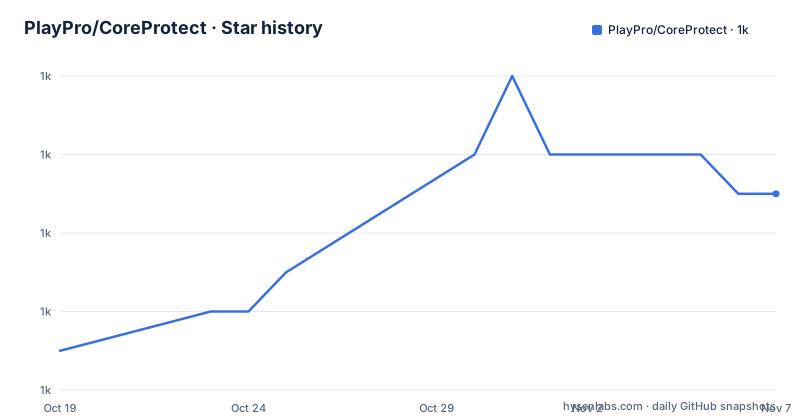
- PlayPro/CoreProtect1,005 ★ · +4
| Repository | 2026-10-19 | 2026-11-07 |
|---|---|---|
| PlayPro/CoreProtect | 1k | 1k |
4 Stars in the last 19 days, measured from the daily GitHub snapshot. Compare with other projects
Editorial analysis
What the plugin does and why it is on every server
CoreProtect is a fast, efficient data logging and anti-griefing tool for Minecraft servers. The description is that you can inspect, look up, rollback and restore any amount of damage without impacting your server performance.
The README calls it the number one anti-griefing plugin, with a link to the bStats plugin listing, and says it has been actively developed since early 2012. That is a long run for a Minecraft plugin, and the release history backs it up. The recent releases are v24.1 from 2026-09-24, v24.0 from 2026-07-07 and v23.2 from 2026-05-14, with the tags named CoreProtect CE, and the last push was on 2026-10-14.
The project is written in Java, the licence is Artistic-2.0, and the documentation is built with MkDocs, with a `mkdocs.yml` and a `requirements.txt` pinning mkdocs 1.3.1.
The distribution story is broader than a single jar. The quick links table points at downloads for Minecraft 1.14 to 26.2, a separate legacy set for 1.8 to 1.12, downloads for Fabric, and downloads for Hytale. That range of platform targets, from the oldest supported server through a new one, is a large surface to keep working, and it is the reason the project has survived since 2012.
There is also a commercial dimension. Donation keys are available through coreprotect.net/donate, and the project has a Patreon page and a Discord server.
Storage: DuckDB by default, with three alternatives
The storage decision is the one that matters most when you install this, and the default has changed.
The feature list says embedded DuckDB columnar storage by default, with optional ClickHouse, SQLite and MySQL support.
An embedded database as the default is a significant design choice for a plugin that logs every block change on a busy server. It removes the requirement to run a database server, which is the reason most server operators will ever install the plugin at all, and a columnar engine is a good match for the write-heavy, query-shaped workload of a block log.
The alternatives are there for scale. ClickHouse is the obvious choice for a very large server with a lot of history, SQLite is the familiar embedded option, and MySQL is there for operators who already have one running and want one more thing on it.
The other feature in that area is multi-threaded processing to ensure server performance is never impacted, and rollbacks and restores with lag-free processing. Those two claims are about the same underlying concern, which is that a logging plugin that makes the server stutter is worse than no logging plugin at all.
The configuration story is deliberately minimal. No configuration required. Install the plugin, and you are good to go. That is a reasonable default for a plugin whose job is to work for everyone, and it also means the tuning options that exist, such as the configurable global and per-world logging settings, are for operators who need them rather than for everyone.
The logging surface, which is where the engineering went
The What does it log section is the longest part of the README, and it is a catalogue of the cases that a naive block logger gets wrong.
The blocks and world changes list covers blocks placed or broken by players, and then the natural cases: natural block breakage such as attached blocks breaking when their support is removed, block movement including falling sand, gravel and piston movement, water and lava placement, removal and flow, and liquid tracking that associates flowing liquids with the player who placed the source.
Then fire, from flint and steel or fire charges, block burning and fire fade, with optional natural fire extinguishing. Then explosions, TNT, Creeper, Ghast and primed TNT removal. Then entities changing blocks, including Endermen, Ender Dragons and zombies breaking doors.
And then the growth cases, which is the part most logs get wrong. Leaf decay, tree growth linked back to the player who planted the sapling, mushroom, vine, amethyst, chorus and bamboo growth, sculk spread from sculk catalysts, natural portal generation, crops trampled by players and turtle eggs trampled by players or entities, snow generated by snow golems, and liquid-formed blocks such as obsidian, cobblestone and concrete. There is also dragon egg teleportation, suspicious sand and gravel, and custom blocks such as CraftEngine blocks.
The point of linking tree growth back to the sapling planter is that it makes the rollback meaningful. If a player plants a tree and it grows, the log has to say whose tree it is, or the rollback has to revert growth nobody caused.
Containers, inventories and player sessions
The second logging category is containers, inventories and items, and it is the one that changes the plugin from a block logger into a full anti-griefing tool.
Items taken from or placed into vanilla or supported third-party containers are logged. So are hopper, dropper and dispenser transactions, including container transfers, and player inventory transactions, including items dropped, thrown, shot or picked up, and items broken, created, destroyed, deposited or withdrawn by players.
Then the specific cases. Items placed on campfires and lectern book transactions, chiseled bookshelf, decorated pot and shelf inventory transactions, Copper Golem chest and jukebox transactions plus crafter slot changes, bundle actions through the `#bundle` tag, items crafted or traded with villagers, Allay item exchanges, and paintings and item frames.
The third category is entities and player activity. Entity deaths with detailed death reasons, player-caused entity kills including animals and monsters, armor stands and End Crystals, villagers killed by lightning along with gossip data and job-site memories, and thrown eggs, snowballs, potions, ender pearls, tridents and wind charges.
Then the player-facing activity: interactions with doors, buttons, levers, containers, bookshelves and jukeboxes, sign text, colour, glow, wax and modern double-sided signs, chat messages and commands, and sessions including logins and logouts, player deaths and username changes. There is also skull skin texture data on Paper servers and custom skull textures, and WorldEdit changes with supported FAWE clipboard pastes.
That last pair is the one that stands out. Logging chat messages and commands is a moderation and audit feature, and it is not something a plugin should do casually, so the configuration to exclude it matters.
The inspector, and how a moderator actually uses it
The README has a section on how to use the inspector, and it is the most practical part of the document for an operator.
You enable the inspector with `/core inspect` or `/co i`, and then you can left-click a block to see who placed that block, right-click a block to see what adjacent block was removed, and right-click while placing a block in a location to see what block was removed at that location.
That third gesture is the clever one. In a griefing investigation, the question is often not who put this block here but what was there before, and being able to ask that at the moment you are about to place something, rather than later from the console, is what makes the difference between a moderator who uses the tool and one who does not.
The rest of the feature list is built around that workflow. There is a permission system and advanced lookup permissions, so a moderator can be given the ability to look without the ability to roll back. There are advanced lookup filters and operation limits by radius, world or WorldEdit selection, which is the mechanism that stops a rollback from undoing an entire world by accident. Results are paginated with clickable pagination, and there are preview rollbacks and restores, plus undo rollbacks by restoring the same data.
That last one is a good design. A rollback that can itself be rolled back removes the main risk of the feature, which is that a well-meaning moderator restores the wrong region. Rollback or restore can target specific users, multiple users, or global activity, and there is inventory rollback support alongside the block one.
Old data is purged by time, world and block type, which is the answer to a log that grows forever, and there is multi-world support with configurable global and per-world logging settings, plus the ability to include or exclude specific blocks, items, entities or users, and logging blacklists.
Using CoreProtect as a dependency, and the licence model
The plugin is consumable as a library, and the README gives the Maven coordinates for it.
The repository block is:
<repository>
    <id>playpro-repo</id>
    <url>https://maven.playpro.com</url>
</repository>
And the dependency itself:
<dependency>
    <groupId>net.coreprotect</groupId>
    <artifactId>coreprotect</artifactId>
    <version>24.1</version>
    <scope>provided</scope>
</dependency>
The `provided` scope is the important detail. It means the plugin is on the server at runtime and the compilation does not bundle it, which is the correct arrangement for a plugin that other plugins hook into. The feature list mentions developer and networking API support, and the API documentation is linked from the README.
The licence is Artistic 2.0, and the badge in the README points at the LICENSE file. That is worth pausing on in the Minecraft plugin ecosystem, where MIT and GPL are the norms. Artistic-2.0 is a permissive licence with a naming and attribution condition, and it is a licence chosen by a project with a commercial model attached.
The commercial model is the donation key. To support the project and obtain a donation key, you visit coreprotect.net/donate. The README does not state what a donation key changes functionally, so whether your server needs one is a question for the documentation rather than something the README answers.
The other project links are a video tutorial, and two related plugins: DarkerNights, for making it darker at night, and TransitTubes, a server-wide transport system. Both are Petabridge-adjacent projects, and TransitTubes is distributed through Patreon, which is the same pattern.
Where CoreProtect is the wrong choice
The first wrong case is a server with no griefing problem and no operator who will look at the logs. A plugin that records every block change, every hopper transfer and every chat message is overhead on the server and a database to maintain, and the value of the log is realised only when somebody reads it.
The second is a server that cannot accept the licence terms. The plugin is Artistic-2.0 with a commercial layer, and an organisation with a policy of running only MIT or Apache licensed server software has to check whether that fits before installing.
The third is a server that already runs a plugin doing this job. CoreProtect is the number one anti-griefing plugin, and there is a long tail of alternatives. Installing two loggers means double the write cost and two inconsistent views of the same history.
The fourth is a deployment where the operator has no way to run a database and no disk for an embedded one. The default is embedded DuckDB, which removes the server requirement but not the storage requirement, and on a server with years of history the log is a serious amount of data.
The fifth is a network that wants to share a log across servers. The feature list mentions MultiPaper support, and multi-world and per-world logging, but the documentation is where you would find out whether a single log spans several servers.
What the plugin gives you is unglamorous and indispensable. A server owner can hand a moderator a block coordinate and get an answer, and can put the world back the way it was, and the difference between having that and not having it is the difference between a complaint and a rollback.
Editorial conclusion
CoreProtect suits a Minecraft server operator who needs to answer who griefed a build and put it back, especially on a large or long-running server where the log volume is the problem. It does not suit a server that has no griefing problem and cannot justify a database, and it does not suit a server that wants a permissive licence, since the project is Artistic-2.0 and a donation key is part of the commercial model. Before installing it, decide on the storage backend, because the default is embedded DuckDB and moving a large existing log to ClickHouse later is a migration, and read the `/core inspect` workflow, because the inspector is what your moderators will actually use day to day.
Frequently asked questions
What database does CoreProtect use by default?
Embedded DuckDB columnar storage by default, with optional ClickHouse, SQLite and MySQL support. The plugin also runs multi-threaded so that server performance is not impacted.
How do moderators inspect who changed a block?
They enable the inspector with `/core inspect` or `/co i`, then left-click a block to see who placed it, right-click to see what adjacent block was removed, and right-click while placing a block to see what was removed at that location.
Can a CoreProtect rollback be undone?
Yes. The feature list includes preview rollbacks and restores, and undo rollbacks by restoring the same data. It also supports rolling back specific users, multiple users or global activity, and inventory rollback.
How do I use CoreProtect as a Maven dependency?
Add the `playpro-repo` repository pointing at `https://maven.playpro.com`, then depend on `net.coreprotect:coreprotect` at the version you want, with the `provided` scope so the plugin is not bundled into your own build.
What licence is CoreProtect released under?
Artistic 2.0, with the licence file in the repository root. The project also has a commercial dimension, with donation keys available through coreprotect.net/donate.
Official sources
Add this badge to your README
If you maintain this project, the badge below links readers to this analysis and shows its maintenance status from the daily GitHub snapshot. Paste the markdown into your README; add ?metric=license or ?metric=stars to the image URL for a different field.

[](https://hysenlabs.com/projects/playpro-coreprotect)Star history chart for your README
[](https://hysenlabs.com/projects/playpro-coreprotect)Was this useful?