docx4j: the default branch is named after a version, and the tutorial is a Word file
JAXB-based Java library for Word docx, Powerpoint pptx, and Excel xlsx files
At a glance
- What is it?
- docx4j is a JAXB-based Java library for reading, writing and generating Word, PowerPoint and Excel files, and it is one of the more candid libraries about its own upgrade cost and about what an assistant will get wrong. The parts worth reading are a default branch called after a patch version, a canonical tutorial maintained as a Word document and converted by the library itself, and an explicit note that document merging is a commercial product rather than an open one.
- Who is it for?
- docx4j is the rare case of a mature library whose readme is more useful than its marketing. It names the two things an assistant or a new contributor gets wrong, it states the tested Java matrix and distinguishes what it has actually verified from what it merely expects, and it explains that its object model is generated from the schemas rather than hand-written, which is the fact that makes AI-assisted work on the codebase plausible at all.
- Can I use it commercially?
- Not without permission. GitHub finds no licence file in the repository, and without a licence all rights are reserved by default: you may read the code but not reuse it. Check the README, or ask the authors, before using it.
- Is it still maintained?
- Yes. The repository last received commits 1 day ago.
- What is it written in?
- Mainly Java, according to GitHub's language statistics.
Answers come from the project's GitHub data, last synced on October 22, 2026, and from our analysis. They are not legal advice.
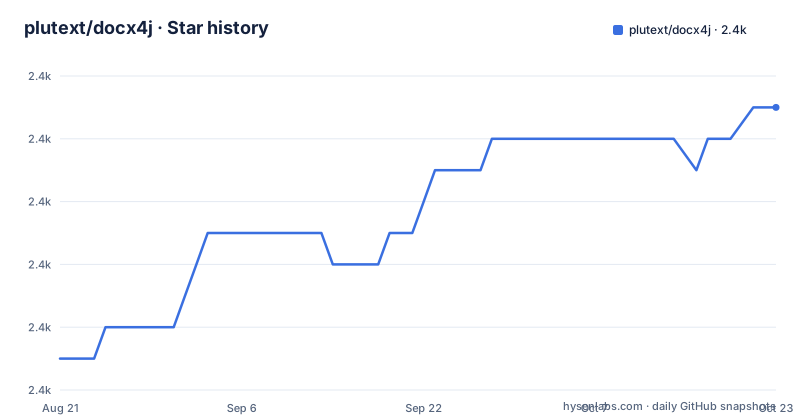
Star history
- plutext/docx4j2,387 ★ · +8
| Repository | 2026-08-21 | 2026-10-22 |
|---|---|---|
| plutext/docx4j | 2.4k | 2.4k |
8 Stars in the last 62 days, measured from the daily GitHub snapshot. Compare with other projects
Editorial analysis
The default branch is named after a patch version
The repository's default branch is called for its own version number, down to the patch. There is no main and no master in the usual sense, and that is not an oversight: the contributing guide instructs pull requests to be based on the current version-named development branch, so the project deliberately maintains one branch per supported line. For a library with fifteen years of users spread across several XML binding generations, that is a defensible model. It has two costs that are easy to miss. Anything that assumes a conventional branch name, which is most continuous integration configuration, most mirror tooling and most dependabot setup, needs configuring rather than defaulting. And the branch currently in use is a patch line while the readme documents the changes introduced by the major, so what you read and what you clone are versioned independently. A contributor following the instruction literally targets a patch branch for a change described against a major.
The canonical tutorial is a Word file that the library converts
The getting started guide is committed to the repository, and the page says it is also published as Word, HTML and PDF, adding that the Word file is the canonical one and the other formats are generated from it by docx4j itself. That is a nice piece of self-hosting: the project dogfoods its own export path on every documentation change, so a regression in the pipeline shows up as a broken tutorial rather than as a silent defect. It also has an unusual consequence. The authoritative text for the most important document in the project is a binary file in a directory whose sibling formats are build outputs. Anyone who wants to correct a sentence cannot diff it, cannot grep it and cannot review it as a pull request the way the rest of the repository can be reviewed. The same tension runs through the rest of the page, which separately recommends a language model for questions and points at a machine-readable text index for the documentation.
Upgrading is a global find and replace, and Maven will not do it for you
The readme's migration note is blunt about the cost. Moving from the older line to the current one means the namespace changed from the historical binding package to the Jakarta one, and the instruction is to search and replace that namespace across your whole codebase. There is no compatibility shim and no adapter offered, because there could not be one: the package name lives in your imports. The number the page gives for why the major version jumped is not a redesign but this. One of the three flagged changes is that the generated object model moved into a new module, another is a faster deep copy that replaces serialising objects to duplicate them and is used unless configured otherwise, and the third is a batch of method and collection renames plus one more package move. Six major versions to signal three changes, one of which is an internal move, will collide with any scheme that pins majors.
The readme names its own hallucination failure modes, including one paid operation
There is a section telling assistants and coding agents to feel free to write against this library, recommending a specific commercial assistant, and then naming the two ways they reliably get it wrong. The first is the binding namespace, which is the migration from the previous section. The second is invented APIs for merging documents, and the reason is given plainly: merging is a commercial extension rather than part of the Apache-licensed library. That is the most valuable sentence on the page, and it cuts both ways. Naming your own failure modes to a machine that is about to hallucinate against you is an unusually honest move, and putting the open-core boundary on the operation a developer is most likely to reach for first, rather than on a rarely used feature, tells you exactly what to budget for. The page also requires that AI assistance be disclosed in a commit trailer, which is how a reader would know to be careful.
The build skips signing, and the detail links are from 2015 and 2020
Building from source is two commands, and the first is a clean followed by an install that explicitly skips signature generation. Skipping signing for a local build is correct and worth stating. Running clean and install as two invocations rather than one is a small habit: if the install fails you have already discarded the previous output, and the reverse is not true. What is more costly is that both of this project's most load-bearing reference links are a decade and six years old respectively. The link explaining how to work with the project in an IDE is a post from 2015. The link that is the only documentation for a three-strategy PDF export path is a post from 2020.
mvn clean
mvn install -Dgpg.skip=true
Neither has been replaced by an in-repository document, even though the repository clearly can host one.
Eclipse project files, a hand-built repository directory and an SVN wagon at the root
The root directory has some company. There are Eclipse project files and an Eclipse settings directory committed at the top level. There is a directory named for the local artifact cache that a hand-rolled Maven layout uses, a library directory beside it, a schema directory holding the XML definitions the object model is generated from, a directory literally named etc, a legal directory with no root licence file beside it, and a suppressions file. And there is a POM named for a wagon that deploys to Subversion, which is a distribution mechanism Maven had before its central repository. Each of those is individually explicable and together they are a build environment assembled by hand across a decade and never tidied. The legal directory is the one with a consequence: the metadata records no licence value and there is no licence file at the root, while the page states the Apache licence twice, so a reader has to take the prose's word for it.
Three generations are documented, including an unsupported one that explains Java 6
The readme is organised by binding generation rather than by release, and it carries three of them. The current section covers the newest major, targeting a Java floor of 11, stating compatibility with 11, 17 and 21 and saying Java 25 is expected rather than verified, which is a distinction most libraries would have made less precisely. The middle section covers a release two majors back and explains the namespace migration. The third is labelled legacy and not supported, and it still explains that the code would in principle compile and run on Java 6, provided you also pin your dependencies to the versions an even older release uses. So the unsupported branch documents a three-deep compatibility matrix. Both of the current sections also carry the same warning about the two binding implementation modules: you should add exactly one, and picking both is a documented way to end up with a broken classpath.
Editorial conclusion
docx4j is the rare case of a mature library whose readme is more useful than its marketing. It names the two things an assistant or a new contributor gets wrong, it states the tested Java matrix and distinguishes what it has actually verified from what it merely expects, and it explains that its object model is generated from the schemas rather than hand-written, which is the fact that makes AI-assisted work on the codebase plausible at all. What it also does is document a migration that is a global find and replace across your codebase, and hide an operation most developers reach for first behind a commercial licence. Three things to check before you adopt it. Which branch and which major you are targeting, since the default branch is pinned to a patch and the readme documents the major, so a dependency declaration and a clone can disagree by design. Whether the operation you actually need is in the Apache half, because merging is named as the extension and the readme warns specifically that assistants will invent an API for it. And whether your document pipeline can tolerate the documentation being authored in a binary Word file, which is what the canonical source format means in practice for anyone who wants to contribute a fix by diffing text.
Frequently asked questions
how to use docx4j
Add the module you need for the format plus exactly one of the two binding implementation modules, then work from the getting started guide in the repository and the sample modules named for the core, PowerPoint and Excel libraries. The page also says the library generates documents through variables, content control binding or merge fields, exports to HTML and PDF, and can anonymise a document before publishing it.
docx4j vs poi
The project publishes a comparison page covering itself, Apache POI and a commercial library, and the readme describes docx4j's own scope as anything the file format allows, with the object model generated from the XML schemas at build time rather than hand-written. The page also offers a separate article on calling it from Python and on when it beats the Python alternatives.
Is docx4j free?
The page describes the library as open source under the Apache licence version 2, and names merging documents as a commercial extension, with the note that assistants will invent an API for it because it is not there. No licence value is recorded against the repository and there is no licence file at the root, only a legal directory, so the page is the only statement of terms.
Which Java versions does docx4j support?
The current major targets Java 11 as its floor and states compatibility with 11, 17 and 21, adding that Java 25 is expected rather than confirmed. Earlier generations are still documented, including a legacy line that explains how to run it on Java 6 by pinning dependencies to an older release's versions.
Can docx4j merge Word documents?
Not in the Apache-licensed library. The page states that merging is a commercial extension and warns specifically that coding assistants tend to invent an API for it. Everything else in the capability list, including creation, editing, format conversion, export to HTML and PDF, font substitution and document anonymisation, is presented as part of the open library.
Official sources
Add this badge to your README
If you maintain this project, the badge below links readers to this analysis and shows its maintenance status from the daily GitHub snapshot. Paste the markdown into your README; add ?metric=license or ?metric=stars to the image URL for a different field.

[](https://hysenlabs.com/projects/plutext-docx4j)Star history chart for your README
[](https://hysenlabs.com/projects/plutext-docx4j)