Triplex: a React Three Fiber editor that commits its own broken examples
The open source visual workspace for React / Three Fiber. Build the 2D and 3D web. React Three Editor.
At a glance
- What is it?
- Triplex is a visual workspace for React and Three Fiber components, installed as a VS Code extension and driven by on-canvas input controls. Underneath sits a monorepo of 21 example scenes, six of them built to fail.
- Who is it for?
- Triplex earns its place in a React Three Fiber team that wants designers moving props on a live canvas without leaving the editor, and it earns nothing outside that setup: the install path is one VS Code extension, the scaffolding package is never named to users, and the failure cases exist only as example folders.
- Can I use it commercially?
- Not without permission. GitHub finds no licence file in the repository, and without a licence all rights are reserved by default: you may read the code but not reuse it. Check the README, or ask the authors, before using it.
- Is it still maintained?
- Yes. The repository last received commits 150 days ago.
- What is it written in?
- Mainly TypeScript, according to GitHub's language statistics.
Answers come from the project's GitHub data, last synced on November 7, 2026, and from our analysis. They are not legal advice.
Star history
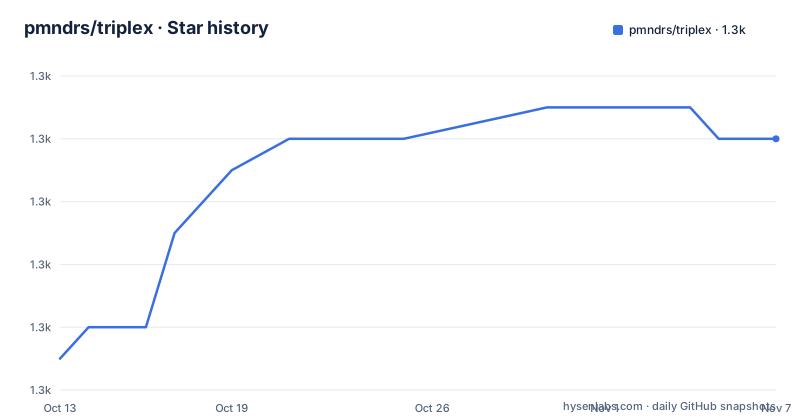
- pmndrs/triplex1,330 ★ · +7
| Repository | 2026-10-13 | 2026-11-07 |
|---|---|---|
| pmndrs/triplex | 1.3k | 1.3k |
7 Stars in the last 25 days, measured from the daily GitHub snapshot. Compare with other projects
Editorial analysis
Visual input controls on a live scene, one jump from the JSX
Triplex targets a narrow gap in React Three Fiber work: the same component has to be readable by people who will not read JSX. The description calls it the open source visual workspace for React and Three Fiber components, and the pitch is that you build 2D and 3D components with visual and input controls, then jump down to code when the canvas runs out of road. That pairing is the whole argument. A pure code editor pushes every prop change through a save and a reload. A pure visual tool strands you the moment the layout needs a loop, a hook or a conditional.
The topic tags tell you where the authors expect this to sit. Alongside reactjs, threejs, r3f, webxr and vscode, the list adds cursor, windsurf and ai. Those last three are not scene features. They are a positioning claim about competing for the same window as assistant tools, and no dependency in the root manifest implements any of them.
The audience that benefits is a mixed-skill React and Three Fiber team: an engineer keeps the file, and someone else adjusts positions, colours and scale values through controls bound to props. No competitor editor is named anywhere in the README, so the honest comparison is with the workflow you already have, not with another product.
The install path is a marketplace listing and a template page
Installation is the thinnest documented part of this project, and it is worth being exact about why. The Get Started block has three steps and not one of them is a command line. You install Triplex for VS Code from the marketplace listing trytriplex.triplex-vsce. You create a project from a starter template or open an existing one, with separate documentation pages for each path, create-from-template and pre-existing-project. Then you open a component and build. Learning the editor itself is a separate read at https://triplex.dev/docs/building-your-scene.
Now notice the gap. The monorepo contains create-triplex-project, a package whose name says it scaffolds projects, and the root build script compiles it. The install path never names that package, so no command is given for a headless machine, a container or a CI job that has no VS Code marketplace. Someone who wants the project generator without the editor has to find it in the source tree.
Broken example folders are committed on purpose as test fixtures
Read the example list before the documentation, because it maps the failure surface better than any guide would. Twenty-one directories sit under examples/, and six of them are named after the ways a project breaks: `examples/missing-deps/`, `examples/missing-deps-deno/`, `examples/postcss-invalid/`, `examples/no-config/`, `examples/error-renderer/` and `examples/edge-cases/`.
A folder called missing-deps and one called postcss-invalid are not demos anybody would build for fun. They exist so playwright.config.ts at the repository root can drive a browser at a project that fails in a specific way, with `examples/test-fixture/` standing in for the passing case. Missing dependencies, an invalid PostCSS setup, an absent config file and a throwing error renderer each get a committed reproduction, and the two runners that exercise them are declared in the root manifest:
"test": "vitest",
"test:e2e": "playwright test"
The rest of the list is the coverage argument. caustics, luma-splats, geometry, room, magic-box, mecha, snow and virese are 3D scenes. js and react-only cover projects that never import Three Fiber. react-router-declarative covers routing, uikit covers interface widgets, xr-bowling covers webxr, gitplex covers version control.
The root declares workspaces twice, and excludes one package
The repository root carries two workspace declarations, and reading them together explains the build better than any script name does. There is pnpm-workspace.yaml beside pnpm-lock.yaml, so pnpm drives installs, and there is also an npm-style workspaces array in the root package.json:
"workspaces": [
  "apps/*",
  "examples/*",
  "packages/*",
  "packages/*/*",
  "!packages/create-triplex-project/*"
]
Two details hide in that list. The doubled glob packages/*/* says the package tree sits one level deeper than a flat layout, which is why the recursive build has to be filtered as @triplex/* instead of by bare names. The single negative entry drops the children of packages/create-triplex-project, the scaffolder, out of the workspace graph, and the build script then names that package on its own:
"build": "pnpm clean && pnpm --filter @triplex/* --filter create-triplex-project --filter triplex-vsce build"So the one package a user without VS Code would want is built outside the family that the recursive filter sweeps. In a fork, that is the first place to look when the scaffolder starts behaving differently from the editor.
Published tarballs ship without their test folders
Publishing runs as one long script, and it edits the payload on the way out:
pnpm build && pnpm build:types && node ./scripts/ensure-clean-git.js && pnpm clean:drop-folders && pnpm publish --recursive --access=public --no-git-checks --provenance && changeset tagThe step worth understanding is clean:drop-folders, which runs rimraf over the source tree and over every __tests__ folder left inside dist, with --impl=move-remove and --max-retries=100. Test files are deleted from the built output before anything reaches the registry, so a broken test helper cannot fail a consumer install and nothing in the tarball lets that consumer re-run the suite. The build also opens with a clean pass that removes dist, out, targets, playwright-report and test-results, which tells you targets is where compiled output lands.
The root package.json is private at version 0.0.0, so the number there means nothing for users. Versions live inside the packages, and changeset tag is what writes them. For adopters the practical cost is narrow: an extension update is the only upgrade route, and the README does not document how to roll one back.
React 19 types sit beside a Testing Library from the 14 line
The dependency list carries a mismatch worth naming before anyone copies it. Type definitions are pinned to React 19 through @types/react at ^19.1.6, while the component test library sits on the older major line at ^14.0.0:
"@swc/core": "^1.6.5",
"@testing-library/react": "^14.0.0",
"@ts-morph/common": "*",
"@types/react": "^19.1.6",
"@playwright/test": "^1.50.1",
"@changesets/cli": "^2.27.8"
Every other root dependency uses a caret range, with one exception: @ts-morph/common is pinned to a bare wildcard. That package is the TypeScript AST layer an editor leans on hardest, since reading and rewriting component props is the core of the job. A wildcard means the resolved version can move with no edit to the manifest, so a fork that hits odd parse behaviour should suspect its install before its own code.
The rest of the tooling is ordinary for a pnpm monorepo: playwright.config.ts and vitest.config.js at the root, a .npmrc file, a patches/ directory for patched dependencies, lint-staged running eslint --cache --fix on ts and tsx files, and husky hooks installed through the install-git-hooks script.
Editor-bound by packaging, and what the alternative actually costs
Two facts set the boundary here. The repository is not archived, the last push was on 2026-06-11, and the two newest versions are both titled Triplex for VS Code, v0.72.5 on 2026-01-25 and v0.72.4 on 2026-01-24, while the earlier 0.70.51 from 2025-08-16 carries no product name at all.
That packaging makes this an editor for one host. No standalone build, no CLI entry point and no browser-only mode appear anywhere in the documentation, so a team outside VS Code has no supported path in. A second limit is quieter: the failure surface is documented only as committed example folders, which means a new failure mode discovered in your own project has no corresponding fixture to compare against.
The alternative is the workflow the project assumes you already have. Write the component in JSX, wire the props in code, and let a dev server do the reloading. The difference is concrete rather than ideological. You keep version control over every value, every loop and every conditional, and you lose the canvas, so a designer changing a position waits for a reload cycle instead of dragging a control. The jump down to code path is that same code-first workflow with a canvas in front of it, and for a mixed-skill team the canvas is the entire value. The licensing question stays separate and unresolved: no licence file appears among the top-level repository entries, even though examples/ carries its own LICENSE.
Editorial conclusion
Triplex earns its place in a React Three Fiber team that wants designers moving props on a live canvas without leaving the editor, and it earns nothing outside that setup: the install path is one VS Code extension, the scaffolding package is never named to users, and the failure cases exist only as example folders. Match your project against the 21 directories under examples/ before committing, then run pnpm test and pnpm test:e2e after every change, since Playwright and Vitest are the only documented way to catch an editor regression.
Frequently asked questions
How do I install Triplex for my own React Three Fiber project?
The documented route is the VS Code marketplace listing trytriplex.triplex-vsce, then creating a project from a starter template or opening an existing one, then opening a component. No command line install is given, and learning the editor itself is a separate read at https://triplex.dev/docs/building-your-scene.
Does Triplex run outside VS Code?
Nothing in the documentation offers a route. The two newest versions, v0.72.5 and v0.72.4, are packaged as Triplex for VS Code, the install step points at the VS Code marketplace, and no standalone build or browser-only mode is described.
What is create-triplex-project used for?
It is the project scaffolding package in the monorepo, and the root build script compiles it by name alongside the @triplex/* packages. The root package.json excludes packages/create-triplex-project/* from its workspaces array, and the install documentation never names the package or gives a command for it.
Why are there example folders called missing-deps and postcss-invalid?
They are failure fixtures for the browser tests, driven by playwright.config.ts at the repository root, with examples/test-fixture/ as the passing counterpart. Twenty-one example directories ship in total, and pnpm test runs vitest while pnpm test:e2e runs Playwright.
How are Triplex packages versioned and published?
The root package.json is private at version 0.0.0, so real versions live inside packages/* and packages/*/* and are written by changeset tag during ci:publish. That script also strips test folders from the build output with rimraf before pnpm publish --recursive runs with --access=public.
Official sources
Add this badge to your README
If you maintain this project, the badge below links readers to this analysis and shows its maintenance status from the daily GitHub snapshot. Paste the markdown into your README; add ?metric=license or ?metric=stars to the image URL for a different field.

[](https://hysenlabs.com/projects/pmndrs-triplex)Star history chart for your README
[](https://hysenlabs.com/projects/pmndrs-triplex)Was this useful?