uikit's newest release is tagged 1.0.46 and titled 1.0.0, and the only migration guide is from 0.x
🎨 user interfaces for react-three-fiber
At a glance
- What is it?
- uikit builds 3D user interfaces for three.js and react-three-fiber, ships two pre-styled kits under two npm scopes, and keeps its docs on two hosts at once. The README is 242 words and mostly links, so the version record and the root manifest say more about the project than the prose does.
- Who is it for?
- Use uikit if you are already building with react-three-fiber and want UI that lives inside the same canvas, and if the pre-styled kits save you more than the abstraction costs. The example in the README is short enough to judge from: a Canvas, a Fullscreen wrapper with flex direction, padding and gap, and two Containers whose opacity changes on hover, which tells you the layout model is flexbox rather than a fixed grid.
- Can I use it commercially?
- Check first. The repository uses a licence we do not classify automatically, so read its LICENSE file before any commercial use.
- Is it still maintained?
- Yes. The repository last received commits 19 days ago.
- What is it written in?
- Mainly TypeScript, according to GitHub's language statistics.
Answers come from the project's GitHub data, last synced on November 15, 2026, and from our analysis. They are not legal advice.
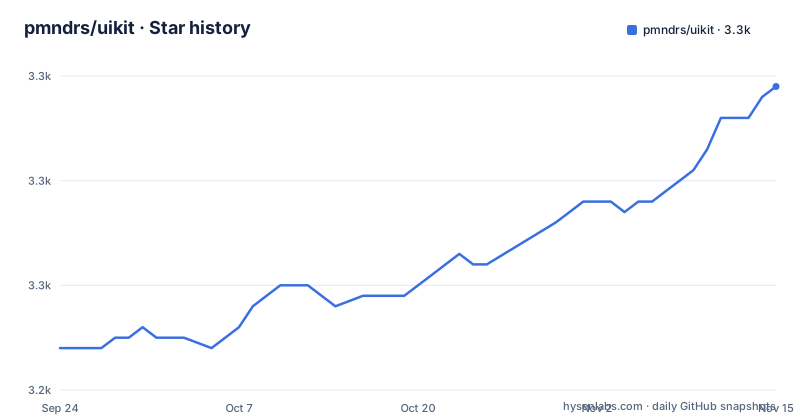
Star history
- pmndrs/uikit3,269 ★ · +25
| Repository | 2026-09-24 | 2026-11-15 |
|---|---|---|
| pmndrs/uikit | 3.2k | 3.3k |
25 Stars in the last 52 days, measured from the daily GitHub snapshot. Compare with other projects
Editorial analysis
The newest tag is 1.0.46 and the release attached to it is titled 1.0.0
The three newest releases do not line up.
The newest tag is `v1.0.46`, published 2025-10-16, and the release's name is `v1.0.0`. Before that, `v0.8.0` on 2024-11-04 and `v0.7.0` on 2024-11-02, both of which are titled the same as their tag.
So for the 1.0 line the tag and the title disagree, and the gap between them is large: a tag of 1.0.46 and a title of 1.0.0. Practically, the title is the string most people see on a release page and in a changelog, so anyone who reports a bug against 1.0.0 may be describing something between forty-six commits old and current.
There is a reason the number looks like a count rather than a plan. A GitVersion configuration sits at the repository root, so the patch figure is derived from history rather than chosen. Whatever a user pastes into an issue, the tag is what identifies the code.
One migration guide, from 0.x, and nothing for the 1.0 line
The migration section of the README contains a single entry.
It is a guide for coming from uikit 0.*, and there is no companion guide for the 1.0 line at all. The library crossed into 1.0 and then went to the fortysixth patch of it without acquiring a second document.
That gap lines up with the version record. Two releases sit below 1.0, both in the first week of November 2024, and the jump to the 1.0 line came almost a year later. Whatever changed at 1.0, and whatever changed in the forty-six patches after it, is documented in tutorial pages rather than in a migration path.
For anyone upgrading across that boundary, the practical consequence is that the components and properties page and the pitfalls page become the de facto migration notes, since those are the two links in the README aimed at people who already know the library.
The homepage field points at the older of two documentation hosts
Two addresses appear in this repository, and they are not the same page.
The homepage metadata field is `pmndrs.github.io/uikit/docs/`. That same host serves one tutorial link, the one for people who want to use the library with vanilla three.js. Every other documentation link in the README points somewhere else entirely: the first layout guide, the examples, the components and properties page, interactivity, custom materials, custom fonts, responsive interfaces, scrolling, sizing, common pitfalls, performance and theming all live under `docs.pmnd.rs/uikit/`.
So the host the repository advertises as its homepage is the one hosting a single tutorial, while the host serving the documentation is not named in the metadata at all.
That matters for anyone writing a link or a search query. Following the repository's own homepage field lands you on the legacy path, and following the tutorial list lands you where the documentation actually is.
Type definitions are pinned eight minors behind the library they describe
The root manifest is where the version discipline shows, and it is uneven.
`@types/three` is pinned to an exact version, 0.175.0, while the `three` package itself is declared as a caret range starting at 0.183.2. So the type definitions describe a library eight minor releases behind the one that will be installed, and the definitions are the stricter of the two because they carry no range.
`@react-three/fiber` is pinned more loosely still, to the literal tag `rc`, rather than to a version range. That is a release-candidate tag used as a dependency specifier, so the version of the renderer uikit builds against is whatever that tag moves to.
By contrast the rest of the development stack uses ordinary ranges: React and its types at version 19, the drei and xr helpers at recent minors, TypeScript at a caret range, and Vite at version 5. The pins that stand out are the two that decide what actually renders.
The core library and both kits live under two npm scopes
The install line in the README's own example imports from `@react-three/uikit`, and the repository description frames the library as user interfaces for react-three-fiber. The headline above it says something different again, that this builds 3D user interfaces for threejs.
So both frameworks are named in the same file: three.js in the subtitle, react-three-fiber in the package name and the example imports.
import { Fullscreen, Container } from '@react-three/uikit'

<Fullscreen flexDirection="row" padding={10} gap={10}>
  <Container flexGrow={1} opacity={0.5} hover={{ opacity: 1 }} backgroundColor="red" />
</Fullscreen>
That snippet is the whole public shape of the library in miniature: a wrapper that fills the viewport, a flex container with padding and gap, and children that take flex grow, opacity, a hover state and a background colour.
The pre-styled kits widen the ambiguity. Two kits are offered, a default one described as based on a component library, installable as `@react-three/uikit-default` or `@pmndrs/uikit-default`, and a horizon one described as based on a Meta Horizon design set, installable as `@react-three/uikit-horizon` or `@pmndrs/uikit-horizon`.
Each kit therefore has two published names under two scopes, and the README lists both for each. Nothing in it says which scope is preferred, which is the kind of decision a reader ends up making from whatever their package manager resolves first.
Two scripts at the root, and the version number comes from Git history
The root manifest is small, and what is in it is telling.
It declares the module type and lists development dependencies, but it defines exactly two scripts. One builds every package in the workspace recursively, and one runs a documentation check through a script that validates MDX files.
There is no root test command and no root lint command, even though the repository carries an ESLint configuration, a Prettier configuration and a mocha configuration at the root. Test running and linting are left to the individual packages in the workspace, which is a normal arrangement for a monorepo and means the root scripts are not a description of the whole build.
The versioning arrangement is the unusual part. A GitVersion file sits beside the manifest, so the patch number in that 1.0.46 tag is computed from the commit history rather than declared. Two other root files point the same way: a script that generates the component documentation for the kits, and a documentation check that validates the MDX those pages are written in.
Twelve examples, two of which mirror the kits and three of which are vanilla
The examples directory holds twelve projects, and reading the names tells you what the library is being tested against.
Two of them are named after the kits, a default example and a horizon example, which are the pre-styled kits the README offers. Two are named for the integration, an auth example and a dashboard example, beside a card example and a market example.
Three are variations on the same idea. There is a plain vanilla example, a vanilla example using a TrueType font, and a React version of that font example. Add the general `uikit` example, a lucide example for icons, and a performance example, and the count comes to twelve.
So the examples cover the two kits, the integration-shaped cases, the icon and font paths, performance, and a bare vanilla setup in three flavours. What they do not include is an example named for the 3D side, since the library is the UI layer and the scene is expected to come from whatever three.js code you already have.
The sponsors section is a sentence with no names in it
The last section of the README says the project is supported by a few companies and individuals building 3D web and XR work, and then tells the reader to check them out.
No company or person is named in the text.
That is the whole section: a statement of intent and an invitation, with nothing attached to it in the file. Whatever list exists is rendered from elsewhere, which for a repository whose README is otherwise built from links and one short example is a small inconsistency in an otherwise link-driven page.
The licence position has the same shape of gap. The repository metadata reports no recognised licence while a LICENSE file sits at the root, and the README does not mention licensing anywhere in its 242 words. A project meant to sit inside someone else's application, with pre-styled kits borrowed from other people's designs, is exactly the case where reading that file matters.
Editorial conclusion
Use uikit if you are already building with react-three-fiber and want UI that lives inside the same canvas, and if the pre-styled kits save you more than the abstraction costs. The example in the README is short enough to judge from: a Canvas, a Fullscreen wrapper with flex direction, padding and gap, and two Containers whose opacity changes on hover, which tells you the layout model is flexbox rather than a fixed grid. Three things to check first. The version you actually get, because the newest tag is v1.0.46 while the release attached to it is titled v1.0.0, and the repository versions itself with a GitVersion configuration rather than by hand. Which package name you import, since the core library and both kits exist under two scopes and the README uses both. And the documentation host, because the homepage field points at one address while every tutorial link points at another, so bookmark the one the tutorials use rather than the one the repository metadata advertises.
Frequently asked questions
What is pmndrs/uikit?
It builds performant 3D user interfaces for three.js and is published on npm as @react-three/uikit, with its example importing Canvas from @react-three/fiber. The README describes it as suited to games, XR for VR and AR, and any web-based spatial computing application, and the layout model is flexbox, with Fullscreen and Container components taking flex direction, padding, gap, flex grow, opacity and background colour.
How do I get started with uikit?
The README points react-three-fiber users at a first layout guide and an examples page, and vanilla three.js users at a separate tutorial hosted on pmndrs.github.io. From there it lists pages on all components and their properties, interactivity, custom materials, custom fonts, responsive interfaces, scrolling, sizing, common pitfalls, performance optimisation and theming. Every one of those tutorial links points at docs.pmnd.rs rather than at the host named as the homepage.
Which pre-styled component kits does uikit provide?
Two, and each is installable under two npm scopes. The default kit is described as based on a component library and installs as @react-three/uikit-default or @pmndrs/uikit-default. The horizon kit is based on a Meta Horizon design set and installs as @react-three/uikit-horizon or @pmndrs/uikit-horizon. The README does not say which scope is preferred.
How do I upgrade from an older version of uikit?
There is one migration guide, and it covers coming from version 0.x. Nothing is listed for the 1.0 line, even though the newest tag is v1.0.46 and the releases below it were v0.8.0 and v0.7.0 in November 2024. For a cross-boundary upgrade the components and properties page and the common pitfalls page are the closest substitutes the repository offers.
What is the current version of uikit?
The newest tag is v1.0.46, published 2025-10-16, and the release attached to that tag is titled v1.0.0. Before it come v0.8.0 on 2024-11-04 and v0.7.0 on 2024-11-02. Versions are computed from commit history through a GitVersion configuration at the repository root, and the last push to the default branch main is dated 2026-10-02.
What licence is uikit under?
The repository metadata reports no recognised licence, while a LICENSE file is present at the root. The README does not mention licensing at all, so the file at the root is the place to read the terms before shipping the library or one of its kits inside an application.
Official sources
Add this badge to your README
If you maintain this project, the badge below links readers to this analysis and shows its maintenance status from the daily GitHub snapshot. Paste the markdown into your README; add ?metric=license or ?metric=stars to the image URL for a different field.

[](https://hysenlabs.com/projects/pmndrs-uikit)Star history chart for your README
[](https://hysenlabs.com/projects/pmndrs-uikit)Was this useful?