SQLiteData for Swift: SQL Persistence and CloudKit Sync
A fast, lightweight replacement for SwiftData, powered by SQL and supporting CloudKit synchronization.
At a glance
- What is it?
- SQLiteData gives Swift applications a SwiftData-style persistence API backed by SQLite and GRDB, with direct queries, observation, and optional CloudKit synchronization. It is best suited to developers who want SQL control without giving up SwiftUI property wrappers and typed records.
- Who is it for?
- Adopt SQLiteData when the application uses Swift, needs direct SQLite or GRDB access, and values typed property-wrapper queries or CloudKit synchronization. Do not choose it if the team wants to avoid designing and preparing a SQLite database.
- Can I use it commercially?
- Yes. MIT is a permissive licence: you can use, modify and sell software built on it, as long as you keep its copyright and licence notices.
- Is it still maintained?
- Yes. The repository last received commits 9 days ago.
- What is it written in?
- Mainly Swift, according to GitHub's language statistics.
Answers come from the project's GitHub data, last synced on October 23, 2026, and from our analysis. They are not legal advice.
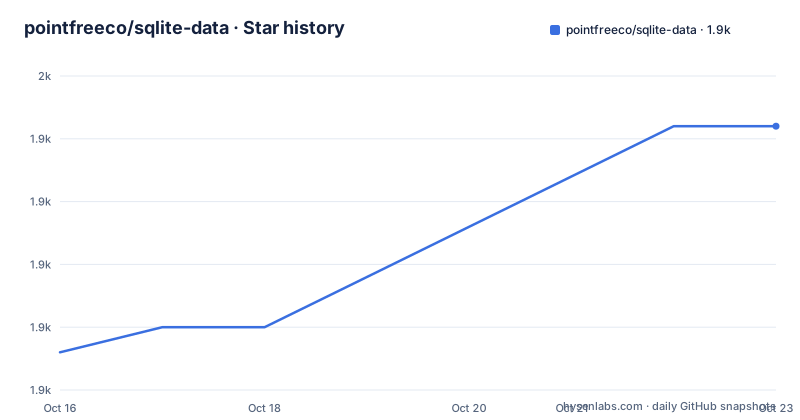
Star history
- pointfreeco/sqlite-data1,948 ★ · +9
| Repository | 2026-10-16 | 2026-10-23 |
|---|---|---|
| pointfreeco/sqlite-data | 1.9k | 1.9k |
9 Stars in the last 7 days, measured from the daily GitHub snapshot. Compare with other projects
Editorial analysis
Why SQLiteData Replaces the SwiftData Storage Layer
SQLiteData addresses applications that want the fetching and observation model associated with SwiftData while storing records directly in SQLite. Its intended users are Swift application developers, including SwiftUI teams that want declarative property wrappers and developers working with UIKit or `@Observable` models. The README describes it as a fast, lightweight replacement for SwiftData, but it does not provide benchmark figures or explain the performance claim. Accordingly, the sound interpretation is architectural: SQLiteData is built on SQLite and GRDB rather than on SwiftData's storage stack.
The central trade-off is explicit database setup. SwiftData presents `ModelContainer` configuration at the application boundary, while SQLiteData expects the application to create or migrate a database connection. In return, applications can query rows using SQL-oriented operations and can access the same `DatabaseQueue` throughout the app. This is useful when SQL behavior, explicit transaction control, or direct GRDB access matters. It adds setup work for teams that prefer SwiftData's higher-level model container configuration.
CloudKit synchronization is another distinguishing capability. The README states that SQLiteData includes CloudKit synchronization and sharing support. That feature is optional configuration rather than the default behavior of `@FetchAll` or table definitions.
Typed Tables, Fetch Wrappers, and the SQLite Data Flow
SQLiteData models application records with `@Table` rather than SwiftData's `@Model`. A table is a Swift struct, so fields such as `UUID`, `String`, and `Bool` participate in decoding and encoding at the SQL boundary. Query results are consumed through `@FetchAll` and `@FetchOne`. According to the README, fetched values are automatically observed by SwiftUI, causing dependent views to recompute when external database data changes.
The flow begins with the app registering a `DatabaseQueue` as `$0.defaultDatabase`. Property wrappers then use that dependency implicitly. A fetch such as `@FetchAll` asks SQLite for matching records, decodes them into the declared Swift array, and exposes that value to SwiftUI. A later database change updates the fetched value through the library's observation mechanism. Writes flow in the opposite direction: code resolves `\.defaultDatabase`, constructs a typed record, and executes an insert inside `database.write`.
The query vocabulary includes `where`, `order`, and SQL aggregation through `count()`. This goes beyond merely loading every record and filtering it in Swift. The README specifically contrasts a count query with SwiftData's lack of an equivalent shown there, and it notes that ordering by a boolean column is also not represented by its `@Query` example.
SQLiteData is not limited to SwiftUI. The project states that it works with UIKit and `@Observable` models, although the README does not provide a separate UIKit setup example.
Preparing the Default Database in a SwiftUI App
The README does not show package-manager installation commands or a dependency declaration in its installation section. It points to the Swift Package Index documentation and the “Preparing a SQLite database” article, so those are the documented places to begin installation and database preparation. No unverified Swift Package URL, version rule, or package product should be invented from the repository excerpt.
For a first SwiftUI use, the application must prepare dependencies as early as its app entry point. The following is the setup pattern published in the README. The comment stands in for the application's database creation and migration work, so this snippet does not by itself create a complete schema.
@main
struct MyApp: App {
  init() {
    prepareDependencies {
      let db = try! DatabaseQueue(
        // Create/migrate a database
        // connection
      )
      $0.defaultDatabase = db
    }
  }
  // ...
}
The comment is significant. `@Table` declares a typed schema record, but the app still has to create and migrate the SQLite database represented by `DatabaseQueue`. The README does not document error handling for the shown `try!`, and production applications would need to replace that sample behavior according to their own requirements.
First Fetch and Write with @Table and @FetchAll
After registering the database, define the record and request its rows through a property wrapper. The README uses a struct with a stable `UUID` identifier and several mutable fields.
@FetchAll
var items: [Item]

@Table
struct Item {
  let id: UUID
  var title = ""
  var isInStock = true
  var notes = ""
}
`@FetchAll` requests an array of `Item` values, and the README states that SwiftUI automatically observes the result. The database must already contain rows and a schema compatible with this table before the fetch can return the expected records.
Writing uses the database dependency rather than a SwiftData model context. The application constructs an item, enters `database.write`, inserts it through `Item.insert`, and executes the operation against the transaction's `db` value.
@Dependency(\.defaultDatabase)
var database

let newItem = Item(/* ... */)
try database.write { db in
  try Item.insert { newItem }
    .execute(db))
}
The README does not show error propagation, conflict handling, or deletion. It also does not claim that writes are automatically saved, because this example executes the SQL statement directly within the write closure.
Filtering, Ordering, and Counting Through Fetch Wrappers
The property-wrapper API is useful when a screen needs a constrained database query rather than a full in-memory collection. The README shows ordering by title, filtering on `isInStock`, combining the two operations, and counting without loading all entries into an array.
@FetchAll(Item.order(by: \.title))
var items

@FetchAll(Item.where(\.isInStock))
var items

@FetchAll(Item.order(by: \.isInStock))
var items

@FetchOne(Item.count())
var itemsCount = 0
These examples indicate that query construction is attached to the property declaration. The observed result changes when relevant database data changes. That keeps filtering and counting close to SwiftUI while the underlying execution remains SQL-backed.
The documentation also references a “Dynamic queries” article, but the README does not explain whether dynamic query results can be composed through every property wrapper or how invalid queries are handled. The documented examples should not be treated as proof of SwiftData feature parity. In particular, the README directly identifies missing equivalents in its comparison table, including counting without loading entries and ordering by a boolean column for `@Query`.
SQLiteData may therefore fit teams that want explicit query construction more closely reflected in their Swift declarations. It is a poorer fit when equivalent operations must exist across both storage systems.
CloudKit Synchronization Requires a Separate SyncEngine
CloudKit synchronization is configured through `SyncEngine`. The dependency graph is explicit: the engine receives the prepared database and lists the table types included in synchronization.
@main
struct MyApp: App {
  init() {
    prepareDependencies {
      $0.defaultDatabase = try! appDatabase()
      $0.defaultSyncEngine = SyncEngine(
        for: $0.defaultDatabase,
        tables: Item.self
      )
    }
  }
  // ...
}
This configuration does not replace database preparation. The `appDatabase()` call remains responsible for producing the database connection, and the `Item.self` table still needs a compatible SQLite schema. The README also points to separate documentation for synchronization and sharing, but it does not establish conflict resolution behavior, initial synchronization timing, retry rules, error reporting, or CloudKit deployment requirements.
The repository layout includes `Examples/CloudKitDemo`, `Examples/SyncUpTests`, and `Examples/SyncUps`, which indicates that synchronization is represented beyond the basic README snippet. Based on the directory layout alone, it is a substantial project area. That does not justify claims about production reliability. Anyone adopting it should first determine whether local-only persistence already meets the requirement, then consult the CloudKit synchronization documentation for configuration details missing from the README.
SQLiteData's Operational Boundaries and Release Activity
The largest concrete limitation is the requirement to understand SQLite. The README has a dedicated “SQLite knowledge required” topic, and the application setup depends on `DatabaseQueue`, migrations, SQL execution, and direct writes. This is a meaningful difference from a team that wants model storage configuration without designing the SQLite layer itself.
A second boundary is feature parity. SQLiteData deliberately offers SQL and GRDB operations that do not map neatly to SwiftData examples, while the README also identifies SwiftData cases without equivalent `@Query` functionality. The library is a replacement for the persistence workflow, not evidence that every SwiftData API behavior is reproduced.
CloudKit adds another surface area. The README supports the existence of synchronization and sharing, but it does not document entitlement setup, schema behavior, conflict policy, operational monitoring, or failure recovery. Those omissions limit an adoption decision that depends on cloud synchronization.
Maintenance activity is recent. The repository is not archived, and the last push was on 2026-10-13. Releases include 1.12.1 on 2026-10-09, 1.12.0 on 2026-08-31, and 1.11.2 on 2026-08-29. This supports an actively maintained status, while upgrade planning must still account for API and release changes between versions.
The repository uses the MIT license. The README links to the license, and teams should inspect `LICENSE` for the exact terms. This review does not provide legal advice or infer deployment obligations beyond the license identifier.
Editorial conclusion
Adopt SQLiteData when the application uses Swift, needs direct SQLite or GRDB access, and values typed property-wrapper queries or CloudKit synchronization. Do not choose it if the team wants to avoid designing and preparing a SQLite database. Before adoption, verify schema creation and migration in the application, then confirm whether the required CloudKit configuration matches the target app. The first project-specific decision is whether the explicit GRDB setup is preferable to SwiftData's model storage configuration.
Frequently asked questions
How do I install SQLiteData in a Swift project?
The README installation section does not include commands or a package dependency declaration. It directs readers to the Swift Package Index documentation and its database preparation article for setup details.
How does SQLiteData fetch and observe records in SwiftUI?
The app registers a `DatabaseQueue` as `\.defaultDatabase`, and property wrappers such as `@FetchAll` use it implicitly. The README states that SwiftUI automatically observes the fetched values and recomputes dependent views when database data changes.
Does SQLiteData support CloudKit synchronization and sharing?
Yes. The README describes CloudKit synchronization and sharing support, and it shows a `SyncEngine` configured with the default database and synchronized table types.
Official sources
Add this badge to your README
If you maintain this project, the badge below links readers to this analysis and shows its maintenance status from the daily GitHub snapshot. Paste the markdown into your README; add ?metric=license or ?metric=stars to the image URL for a different field.

[](https://hysenlabs.com/projects/pointfreeco-sqlite-data)Star history chart for your README
[](https://hysenlabs.com/projects/pointfreeco-sqlite-data)Was this useful?