circuitRF: an RF EDA tool that refuses to be a SPICE simulator
Lightweight cross-platform RF circuit simulator — DC, S-parameters, harmonic balance, loadpull/sourcepull. Not a SPICE simulator.
At a glance
- What is it?
- A cross-platform EDA application in C# on .NET 10 that pairs DC, S-parameter and harmonic balance analysis with loadpull and sourcepull, then adds a layout editor, a 2.5D method-of-moments solver and thermal simulation. The scope is RF and microwave only, and the boundary is stated rather than implied.
- Who is it for?
- circuitRF fits an RF designer who needs loadpull and harmonic balance in the same tool as layout, and who is put off by the cost or the weight of traditional EDA suites. Leave it if your circuit is a mixed-signal or power problem that needs a SPICE engine, since the project states it is not one.
- Can I use it commercially?
- Yes. MIT is a permissive licence: you can use, modify and sell software built on it, as long as you keep its copyright and licence notices.
- Is it still maintained?
- Yes. The repository received new commits within the last day.
- What is it written in?
- Mainly C#, according to GitHub's language statistics.
Answers come from the project's GitHub data, last synced on October 22, 2026, and from our analysis. They are not legal advice.
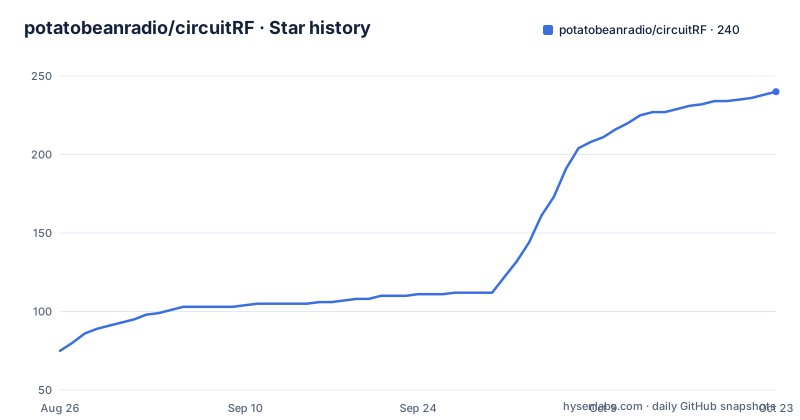
Star history
- potatobeanradio/circuitRF238 ★ · +163
| Repository | 2026-08-26 | 2026-10-22 |
|---|---|---|
| potatobeanradio/circuitRF | 75 | 238 |
163 Stars in the last 57 days, measured from the daily GitHub snapshot. Compare with other projects
Editorial analysis
The scope statement is a sentence, and it is a hard boundary
The repository description ends with four words that matter more than the feature list: not a SPICE simulator.
That is not a hedge about maturity, it is a statement about what the tool is for. The analyses on offer are DC, S-parameter and harmonic balance, plus loadpull and sourcepull, which are the RF engineer's vocabulary rather than the circuit analyst's. Harmonic balance in particular is a frequency-domain method for power amplifiers, and loadpull is a characterisation technique for a device under output loading, so the tool is aimed at the power amplifier, LNA and mixer designer named in the documentation.
The stated audience is specific too: practitioners and researchers who cannot justify the cost of traditional tools, or who find those tools too heavy for a quick investigation. That framing explains the design better than any feature does. A tool built for investigation has to open fast, start with an example, and let you leave again, rather than requiring a project setup ritual.
The README also keeps a section on what circuitRF does not do yet, linked from the features list. A project that publishes its own gaps alongside its features is telling you where not to plan your work around it.
Four analysis types, and the load data is first-class
The simulation side covers DC, S-parameter and harmonic balance analyses, with loadpull and sourcepull described as first-class rather than an add-on.
That word choice does real work. In most tools, loadpull is either a separate characterisation flow with its own import step or an export to another package. Here it sits in the same environment as the schematic, which means the impedance sweep that produces a loadpull contour and the matching network drawn on the schematic are in one document.
The data display section shows what comes out. You can plot S-parameters, spectra and power sweeps, and loadpull contours on a Smith chart with output power in dBm and power-added efficiency as contours over the load reflection plane, with markers for maximum power and maximum efficiency. Measured data can be overlaid on simulated results, with Touchstone, .spl and .lpcwave named as the formats. EM results from the method-of-moments, FEM and FDTD solvers plot alongside, including radiation patterns.
Overlaying measurement on simulation is the feature a hardware designer will use most, and the three measurement formats together suggest the tool was designed around a bench-to-simulation loop rather than a paper workflow.
The EM stack runs from 2.5D method of moments to full FDTD
The electromagnetic solvers are layered by fidelity, and each layer is a different answer to a different question.
The 2.5D method-of-moments solver works over the layout's own substrate stackup, so the model comes from the layer stack you already defined for the layout rather than from a separate material entry. That is the cheap solver, the one you run while iterating on a matching network.
Above it sit 3D FEM and FDTD, and these are not implemented from scratch. The documentation names Palace for FEM and openEMS for FDTD, which means the project is a frontend to existing solvers rather than the author of a new electromagnetic kernel. The 3D editor draws and edits geometry and sends it to those solvers, and the same editor handles Step import and export.
Thermal is a separate FEM solver built in rather than delegated, and the examples directory is telling about how much weight it carries. There are three thermal examples: channel versus surface, die to heatsink, and output wires. A power amplifier designer needs junction temperature as much as gain, so having thermal in the same tool is the difference between a layout tool and an amplifier tool.
The layout side does DRC and LVS, and reads KiCad boards
The layout editor is a technology-defined layer stack editor with microstrip components generated from their schematic parameters, hierarchy including arrays, and export to GDSII, DXF and Gerber.
Generating physical components from schematic parameters is the detail that matters most. A microstrip line in RF layout is not a drawing, it is a calculation: width, length, substrate and metal stack determine the impedance. Tying those parameters to the schematic means the network you analysed and the geometry you fabricated are the same network.
Design rule checking and layout versus schematic are both present, and the examples directory has a dedicated LVS example, so this is intended to be a checkable flow rather than a drawing surface. Interchange runs two ways, covering Gerber with Excellon, GDSII, DXF and .kicad_pcb.
That last format is the pragmatic one. Being able to read a .kicad_pcb means you can start from a board drawn in a free tool and bring it here for the analyses it does not do, rather than committing to a full redraw.
Installers per architecture, and the beta channel is on by default
The download table covers seven platform combinations, and the split is by CPU architecture rather than by operating system alone.
Windows gets three: Intel or AMD x64, ARM, and 32-bit x86, each as a user-scoped .msi with -user in the filename. macOS gets two disk images, one for Apple Silicon and one for Intel. Linux gets two tarballs, x64 and arm64.
The Linux route is a shell installer, and the licence to be careful about is spelled out:
tar xzf circuitRF-1.0.0-linux-x64.tar.gz
./circuitRF-1.0.0/install.sh
It writes only inside ~/.local, puts circuitrf on your PATH, and registers the menu entry and file types. An --uninstall flag removes it and leaves your work alone, which is the behaviour you want from an installer in a home directory.
For machine-wide installs there are non-user Windows .msi files and .deb packages on the releases page, and the trade-off is spelled out: they need administrator rights, so they cannot update themselves and instead notify you when a new version exists. Automatic updates are configurable under Settings, in the same Security and Permissions panel that holds the beta toggle, which is ticked by default.
The update channel ships betas unless you turn them off
The release history explains the default, and it is worth reading before you rely on what you get.
1.0.0 is described as the first stable release. Before it there were at least 37 public betas, the two most recent being 1.0.0-beta.37 and 1.0.0-beta.36 on consecutive days. The version file at the repository root, alongside a solution file, a benchmark runsettings file and a demo zip, is how the version is tracked in the build.
The setting that matters is Include beta releases, found under Settings, Security and Permissions. It is ticked by default, which means a fresh install receives beta builds. The documentation tells you to untick it to receive stable releases only.
For an engineering tool this is a defensible default and a questionable one at the same time. Contributors want the newest solver fixes, and a weekly installer on a design tool is a normal way to work. But a beta that changes a numerical result between two runs of the same design is a bad afternoon, and nobody reading a release announcement will notice that the default flipped a patch level. Turn the setting off on day one, then decide deliberately.
The project asks RF engineers, not programmers, to contribute
The contributor section is the most unusual thing in the documentation, and it is a statement about what the project thinks it lacks.
It asks specifically for RF domain experts, saying the project values domain knowledge as much as software experience, and naming the people it wants: power amplifier, LNA and mixer designers, RF EDA and device modelling engineers, people who develop transistor technology such as GaN-on-SiC, GaN-on-Si and LDMOS.
Then it makes the software barrier deliberately low. You do not need to be a professional developer, and if you have scripted in MATLAB or Python you have enough to start. The suggested workflow is to pair with an AI coding assistant and let it do the heavy lifting on the C#.
The README is direct that the application was built largely AI-assisted, and points to a section explaining that. For a project asking domain experts to write numerical C#, that is an honest and useful pairing: the hard part in an RF EDA tool is knowing what the solver should compute, and the C# is the part a language model can help with. The risk is on the other side, in a numeric kernel that looks right and is not, which is why the PDK and gap sections are where you should look before trusting a result.
Editorial conclusion
circuitRF fits an RF designer who needs loadpull and harmonic balance in the same tool as layout, and who is put off by the cost or the weight of traditional EDA suites. Leave it if your circuit is a mixed-signal or power problem that needs a SPICE engine, since the project states it is not one. Verify first what your foundry PDK actually provides, because support for PDKs is claimed without a list of supported vendors, and check the documented gaps section before planning around any solver, since the project keeps an explicit list of what it does not do yet.
Frequently asked questions
Is circuitRF a SPICE simulator?
No. The project states plainly that it is not a SPICE simulator. Its analyses are DC, S-parameter and harmonic balance with loadpull and sourcepull, which is an RF and microwave scope rather than a general circuit simulation scope.
Which analyses does circuitRF support?
DC, S-parameter and harmonic balance analyses, plus loadpull and sourcepull described as first-class features. Designs range from a handful of components up to hierarchical multi-port designs with thousands of elements.
What technology is circuitRF written in?
C# on .NET 10, with an Avalonia 12 GUI rendered through SkiaSharp. It is a cross-platform application, and the documentation notes it was built largely with AI assistance.
Can circuitRF open a KiCad board?
Yes. Interchange with .kicad_pcb boards is two-way, alongside Gerber with Excellon, GDSII and DXF. The layout editor also supports DRC and LVS against the schematic, with hierarchy and arrays.
How do I install circuitRF on Linux?
Unpack the tarball and run install.sh from the extracted directory. It writes only inside ~/.local, puts circuitrf on your PATH and registers the menu entry and file types, and an --uninstall flag removes it while leaving your work alone.
Will circuitRF give me beta builds by default?
Yes. The setting for including beta releases lives under Settings, Security and Permissions and is ticked by default, and the project went through at least 37 public betas before the 1.0.0 stable release. Unticking it limits you to stable releases.
Official sources
Where developers are discussing it
Posts on Hacker News, dev.to and Lobsters that link to this repository, found by our scan of those communities. 1 in the last 30 days; newest first.
- CircuitRF: An open source EDA tool for RF design and simulationHacker News · Oct 6, 2026 · 2 points · 0 comments
Add this badge to your README
If you maintain this project, the badge below links readers to this analysis and shows its maintenance status from the daily GitHub snapshot. Paste the markdown into your README; add ?metric=license or ?metric=stars to the image URL for a different field.

[](https://hysenlabs.com/projects/potatobeanradio-circuitrf)Star history chart for your README
[](https://hysenlabs.com/projects/potatobeanradio-circuitrf)