PowerJob: four execution modes, and the compose file that shows the ports
Enterprise job scheduling middleware with distributed computing ability.
At a glance
- What is it?
- PowerJob is a distributed computing and job scheduling framework for Java applications, with a web front end, four timing strategies, four execution modes from stand-alone to MapReduce, processors in Java, Shell and Python, and horizontal expansion by adding server and worker nodes. Its docker-compose file is the most concrete document in the repository, because it names the ports, the database and the wait-for-it startup ordering that everything else depends on.
- Who is it for?
- PowerJob suits a Java team that wants scheduled jobs with a UI, remote triggering and a worker fleet, and that already runs containers.
- Can I use it commercially?
- Yes. Apache-2.0 is a permissive licence: you can use, modify and sell software built on it, as long as you keep its copyright and licence notices.
- Is it still maintained?
- Yes. The repository last received commits 45 days ago.
- What is it written in?
- Mainly Java, according to GitHub's language statistics.
Answers come from the project's GitHub data, last synced on November 14, 2026, and from our analysis. They are not legal advice.
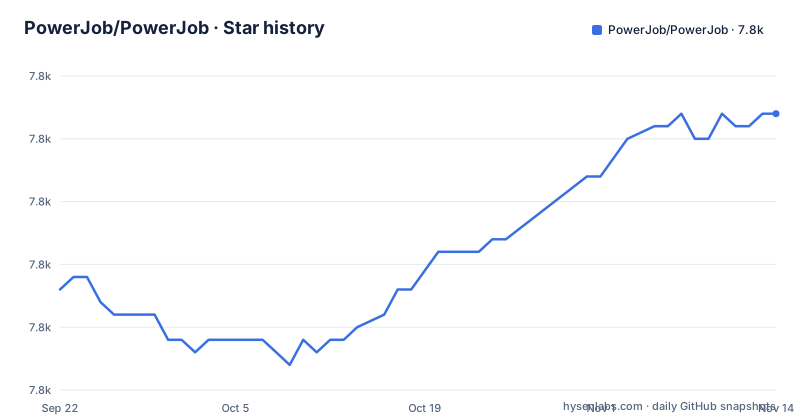
Star history
- PowerJob/PowerJob7,812 ★ · +14
| Repository | 2026-09-22 | 2026-11-14 |
|---|---|---|
| PowerJob/PowerJob | 7.8k | 7.8k |
14 Stars in the last 53 days, measured from the daily GitHub snapshot. Compare with other projects
Editorial analysis
The compose file is where the architecture becomes concrete
The repository root contains a `docker-compose.yml` whose header comment gives the whole procedure in Chinese: run `docker-compose up` in the PowerJob root directory, then wait for the service to start.
Three services are defined and the dependency chain is explicit. `powerjob-mysql` with `restart: always`, publishing 3307 on the host, mounting `./powerjob-data/powerjob-mysql` into `/var/lib/mysql`, and started with `--lower_case_table_names=1`. Then `powerjob-server`, which `depends_on` the database and publishes four ports:
      - "7700:7700"
      - "10086:10086"
      - "10010:10010"
      - "10077:10077"
Then `powerjob-worker-samples`, which depends on both, publishes 8081 and 27777, and has an entrypoint that chmods a script and runs it:
    entrypoint:
      - "sh"
      - "-c"
      - "chmod +x wait-for-it.sh && ./wait-for-it.sh powerjob-server:7700 --strict -- java -Xmx512m -jar /powerjob-worker-samples.jar --powerjob.worker.server-address=powerjob-server:7700"
That last line is the startup contract: a wait-for-it.sh script with `--strict` waits for powerjob-server:7700, and then the worker is started with the server address as a command line argument.
Four execution modes, and the database URL is a parameter
The server's configuration is passed as a single environment variable, `PARAMS`, and the sample value is worth reading as documentation:
PARAMS: "--oms.mongodb.enable=false --spring.datasource.core.jdbc-url=jdbc:mysql://powerjob-mysql:3306/powerjob-daily?useUnicode=true&characterEncoding=UTF-8&serverTimezone=Asia/Shanghai"One thing is switched off and one is pointed at MySQL. The MongoDB option is disabled with `--oms.mongodb.enable=false`, which tells you the server has an operations store abstraction with more than one backend behind it. The JDBC URL names the database `powerjob-daily`, sets UTF-8, and fixes the server time zone to Asia/Shanghai.
The heap is capped separately with `JVMOPTIONS: "-Xmx512m"` for the server and `-Xmx512m` for the worker sample.
For a reader deploying this, the two consequences are concrete. The database name and time zone are part of the connection string rather than separate settings, so they are easy to change and easy to get wrong. And the worker is addressed with `--powerjob.worker.server-address`, which is how a worker finds the server in the first place.
Four timing strategies, including one that is just an HTTP call
The features list names four timing strategies: a CRON expression, a fixed rate, a fixed delay, and OpenAPI, which the README says allows you to define your own scheduling policies such as delaying execution.
The fourth is the one that changes the shape of the system. A CRON job is a scheduler feature; an OpenAPI trigger is an HTTP endpoint, which means a job can be started by another application rather than by time. The applicable scenes section lists it as customized tasks triggered with OpenAPI.
The scenes themselves are the best description of the intended use, and they are ordinary: timed tasks such as allocating e-coupons at 9 AM every morning, broadcast tasks such as clearing logs across the cluster, MapReduce tasks such as updating large amounts of data, delayed tasks such as processing overdue orders, and customized tasks triggered with OpenAPI.
So the framework is not only a cron replacement. It is four shapes of work, and the choice between them is the first decision a user makes.
Stand-alone, broadcast, Map and MapReduce are four different contracts
Four execution modes are supported: stand-alone, broadcast, Map, and MapReduce. The README points at a documentation page for the distributed one, saying that distributed computing resources could be utilised in MapReduce mode.
The distinction is about what the worker fleet is doing. Stand-alone is one worker running one job. Broadcast sends the same work to every worker, which is why the log-clearing example sits with it. Map and MapReduce split the work across workers.
Workflow support covers both halves of that: job dependency management and data communications between jobs. The README describes it as Workflow (DAG) Support, so the dependency graph is a first-class object rather than something you build by chaining jobs in code.
The practical consequence is that MapReduce mode is where the interesting requirements live. A job that runs in stand-alone mode on one JVM can be written carelessly; the same job in MapReduce mode has to assume it can be retried on another node, which is why the next feature is about retries rather than performance.
Retry policies plus enough nodes is the whole tolerance story
The disaster tolerance entry says that as long as there are enough computing nodes, configurable retry policies make it possible for the task to be executed and finished successfully.
That sentence contains the whole design. The guarantee is conditional on the fleet, and the mechanism is a retry policy rather than a replication or consensus mechanism. There is no claim that a job runs exactly once, and the README does not make one.
High availability and performance are described the same way: PowerJob supports unlimited horizontal expansion, and it is easy to achieve high availability and performance by deploying as many PowerJob server and worker nodes as you want.
Both of those are statements about adding machines rather than about changing configuration, which is consistent with the compose file, where the server and the worker are separate services.
Processors in Java, Shell and Python, with HTTP planned for the rest
Extensive processor support means developers can write processors in Java, Shell, and Python, and will subsequently support multilingual scheduling via HTTP.
The wording puts the HTTP option in the future tense, which is the honest reading: three processor languages today, with multilingual scheduling via HTTP planned.
Shell is the one worth thinking about, because it is what the broadcast and MapReduce examples imply. A log-clearing job is not going to be written in Java, and the `others/` directory in the repository root, referenced by the compose file as the source of `script/wait-for-it.sh`, is where non-Java assets live.
The module list at the root is consistent with that split: `powerjob-official-processors/` for the processors that ship with the project, `powerjob-worker-samples/` for the samples, and `powerjob-worker-spring-boot-starter/` for embedding a worker in an existing Spring Boot application rather than running a standalone jar.
The root directory is a Maven multi-module project with a bilingual README
The tree is nine powerjob-* module directories, an others/ directory and a compose file, and the names describe the roles.
`powerjob-client/` is what an application uses to submit jobs. `powerjob-server/` is the scheduler and the UI backend. `powerjob-worker/` is the worker and `powerjob-worker-agent/` sits beside it, with the worker-samples module showing how one is configured and the Spring Boot starter showing how to run a worker inside an application you already own. `powerjob-common/` holds shared types, `powerjob-remote/` the remote transport, and `others/` the non-Java assets.
The README is bilingual from the first line, English with a link to `README_zhCN.md`, and the documentation lives on Yuque in both languages. Support runs through Reddit and Gitter, and the README names a direct email address, with the closing line that response may be late but not denied.
Releases are frequent patches on a 5.1 line: v5.1.7 on 2026-10-01, v5.1.6 on 2026-09-29 and v5.1.5 on 2026-09-28, with the last push to master on 2026-10-01. The licence is Apache 2.0, and the compose file pulls the powerjob/powerjob-server, powerjob/powerjob-mysql and powerjob/powerjob-worker-samples images.
Editorial conclusion
PowerJob suits a Java team that wants scheduled jobs with a UI, remote triggering and a worker fleet, and that already runs containers. It does not suit you if you need a scheduler with no database dependency, since the compose file starts MySQL as a separate service and the server is configured against it, and it does not suit you if you want to write processors in a language other than Java, Shell or Python, because those are the documented options with multilingual scheduling only planned over HTTP. Verify three things before you deploy: which ports the server actually binds, since the compose file publishes 7700, 10086, 10010 and 10077, whether your database user and schema match what the server expects, because the sample configuration points at a specific JDBC URL with a time zone, and whether the worker can reach the server, since the samples worker waits for powerjob-server:7700 with a wait-for-it.sh script before starting Java.
Frequently asked questions
what is power job
PowerJob is an open-source distributed computing and job scheduling framework that lets developers schedule tasks inside their own application. It provides a front-end page for managing tasks, monitoring status and checking logs, four timing strategies including CRON and OpenAPI, four execution modes from stand-alone to MapReduce, workflow DAG support, processors in Java, Shell and Python, and horizontal expansion by adding server and worker nodes. It is Apache 2.0 licensed.
What does a job scheduler do?
In PowerJob's terms it does two things: it decides when work runs, through CRON expressions, fixed rate, fixed delay or an OpenAPI trigger, and it decides where work runs, through stand-alone, broadcast, Map or MapReduce execution modes across a fleet of worker nodes. Retry policies and the size of that fleet are what make a task finish successfully according to the project.
How do I run PowerJob with Docker?
Run `docker-compose up` in the repository root and wait for the services to start. The compose file defines powerjob-mysql publishing 3307, powerjob-server publishing 7700, 10086, 10010 and 10077 and configured with a JDBC URL pointing at the MySQL service, and powerjob-worker-samples publishing 8081 and 27777, whose entrypoint runs wait-for-it.sh against powerjob-server:7700 in strict mode before starting the worker jar.
Official sources
Add this badge to your README
If you maintain this project, the badge below links readers to this analysis and shows its maintenance status from the daily GitHub snapshot. Paste the markdown into your README; add ?metric=license or ?metric=stars to the image URL for a different field.

[](https://hysenlabs.com/projects/powerjob-powerjob)Star history chart for your README
[](https://hysenlabs.com/projects/powerjob-powerjob)Was this useful?