lucide-animated: icons that move, with a generated registry and four external ports
beautifully crafted animated icons
At a glance
- What is it?
- An animated icon set layered on the lucide icons, built as a Next application with a generated component registry, style and duplicate checks, and a terms section that lets you use the components commercially while forbidding redistribution of the tutorials and demos. Ports for Svelte, Vue, Angular and Flutter exist, and none of them lives in this repository.
- Who is it for?
- It suits a React or Next project that already uses the lucide icon set and wants the same icons to move, and someone willing to run the registry and style scripts rather than hand-copying components. It does not suit a Svelte, Vue, Angular or Flutter project, where the ports are separate projects maintained by other authors, and it does not suit anyone planning to resell a tutorial or demo built from the site.
- Can I use it commercially?
- Yes. MIT is a permissive licence: you can use, modify and sell software built on it, as long as you keep its copyright and licence notices.
- Is it still maintained?
- Yes. The repository last received commits 8 days ago.
- What is it written in?
- Mainly TypeScript, according to GitHub's language statistics.
Answers come from the project's GitHub data, last synced on October 23, 2026, and from our analysis. They are not legal advice.
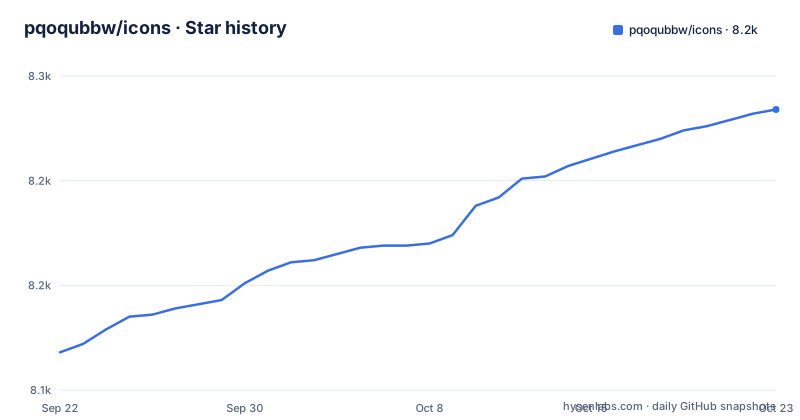
Star history
- pqoqubbw/icons8,234 ★ · +116
| Repository | 2026-09-22 | 2026-10-23 |
|---|---|---|
| pqoqubbw/icons | 8.1k | 8.2k |
116 Stars in the last 31 days, measured from the daily GitHub snapshot. Compare with other projects
Editorial analysis
The animation is the product, not a wrapper on a static set
The project's own description is short and unambiguous: these are beautifully crafted animated icons. That framing shows up in the dependencies, where a motion library is a first class runtime requirement rather than an optional extra, alongside a CSS animation utility. The base artwork is not invented here. The React icon package is pinned as a dependency in the manifest, so the shapes come from the existing lucide set and this project supplies the motion. That also explains the tooling. There is a dedicated style checker script with a fix mode and a check mode, which means the conventions of an animated icon, not just the conventions of a component, are something the project enforces mechanically. The site itself is where you judge that: a demo link and a sponsorship page are the first two destinations in the README. The manifest also names the commands that run the loop, and the prebuild step in particular is worth noting early.
"prebuild": "node scripts/download-fonts.js",
"build": "next build",
"check-style": "tsx scripts/check-icon-style.ts"Four framework ports exist and none of them is in this tree
Read the port list closely, because it is the first place a new user goes wrong. There is a Svelte version on a separate site by one author, a Vue version on another site by a second author, an Angular version in a separate repository by a third, and a Flutter package published to a package registry by a fourth. This repository is the React and web version. So if your project is Svelte, Vue, Angular or Flutter, the code you want is not here, and the four ports have four different authors and four different release cadences. The practical consequence is that cross-framework consistency is a community problem rather than something this repository controls, and if you need the same icon behaviour in two frameworks you are depending on two independent implementations.
The registry is generated, then checked by four scripts
Publishing the set is not a manual copy and paste. A registry file sits at the top level, and the scripts around it do the work: one builds the registry, one checks it, one synchronises it, and one synchronises the index. Alongside those there are checks for duplicates and for imports, and the style checker with its fix mode. That is six scripts whose entire purpose is to keep a large collection of similar looking components internally consistent, and their presence tells you something about the project's shape: the icon set is treated as generated output with a validation stage, not as hand-written files. For a contributor the loop is mechanical. Add an icon, run the style fix, run the duplicate and import checks, and let the scripts tell you what is wrong before a human reviewer does.
Components are free to use, demos cannot be redistributed
The terms section is the part most people skip and most people should not. The components themselves are free to use in both personal and commercial projects. The tutorials and the demos are a different category: they are available for use as they are, and they cannot be redistributed or resold. That split has a practical edge case worth thinking about. If you are building a paid course, a client template or a starter kit, the icons are fine and a demo page is not, and the line between the two is where projects get into trouble. The repository is MIT licensed, which covers the code; the terms paragraph is an additional statement about the surrounding material, so reading both is the safe move rather than assuming one covers everything.
There is a generated CLI, hotkeys, fuzzy search and toasts
The application around the icons is more than a gallery. The scripts include a generator for a command line interface and a check mode for it, so the CLI is kept in step with the set rather than maintained by hand. On the interface side the manifest carries a hotkey library, a fuzzy search library, a toast library, a theming package and a URL state library, which together describe a searchable, keyboard-driven site with shareable links and a dark mode. There is also a provider directory and a proxy file at the root, which in this framework usually means server-side handling. Two dependencies stand out as more than plumbing: the Model Context Protocol SDK and a handler for it, which suggests the site can be addressed by an agent, and a pair of analytics packages, which tells you the site measures its own traffic.
Fonts are fetched before every build, not committed
There is a prebuild step whose whole job is downloading fonts, running a script in the scripts directory before the framework build runs. A fonts directory sits at the top level to receive them. That arrangement is a deliberate choice about what belongs in the repository, and it has a consequence: the build is not hermetic. On a machine with no network access, or behind a proxy that blocks the download, the build stops before it starts rather than failing later in a confusing way. It also means two people building at different times can end up with different font files if the remote source changes, which is the trade every download-at-build-time setup makes. If you are embedding this in a locked-down pipeline, that step is the one to plan for rather than the framework build itself.
A private Next application with Biome, and no tagged releases
The stack is current and specific: a recent Next major with React 19, Tailwind through its PostCSS plugin, Biome for formatting and linting with its own configuration file at the root, and the React compiler plugin enabled in Babel. The manifest is marked private and sits at an early version, which is consistent with a site-first repository where the interesting artifact is the website rather than a published package. There is also a dedicated search engine directory and a proxy file, so search engine metadata is treated as part of the build. Two release facts are worth recording: the repository has no tagged releases, so there is nothing to pin, and the last push to the default branch is dated 2026-08-22, while the project describes itself openly as a work in progress that is still expanding.
Editorial conclusion
It suits a React or Next project that already uses the lucide icon set and wants the same icons to move, and someone willing to run the registry and style scripts rather than hand-copying components. It does not suit a Svelte, Vue, Angular or Flutter project, where the ports are separate projects maintained by other authors, and it does not suit anyone planning to resell a tutorial or demo built from the site. Check four things before you adopt it: whether the port for your framework exists somewhere else, whether you are copying demos rather than components, since the terms separate the two, whether your build environment can run the font download step before the build, and whether the icon set is stable enough for production, which the project itself calls a work in progress.
Frequently asked questions
What is lucide-animated?
A collection of animated icons built on top of the lucide icon set, presented as beautifully crafted animated icons with a demo site and a sponsorship page. The React and web version lives in this repository, and separate ports exist for Svelte, Vue, Angular and Flutter, each maintained by a different author.
Can I use lucide-animated icons in a commercial project?
The terms say the components are free to use in both personal and commercial projects. The tutorials and demos are a separate case: they are provided as-is and cannot be redistributed or resold. The repository itself is MIT licensed.
How do I contribute a new icon to lucide-animated?
Contributions are welcome, and the contributing guidelines in the repository explain how to submit improvements and new icons. The project also ships scripts that check icon style, duplicates, imports and the generated registry, so a new icon is validated mechanically before review.
Official sources
Add this badge to your README
If you maintain this project, the badge below links readers to this analysis and shows its maintenance status from the daily GitHub snapshot. Paste the markdown into your README; add ?metric=license or ?metric=stars to the image URL for a different field.

[](https://hysenlabs.com/projects/pqoqubbw-icons)Star history chart for your README
[](https://hysenlabs.com/projects/pqoqubbw-icons)Was this useful?