prerender-node: Express middleware that answers crawlers with static HTML
Express middleware for prerendering javascript-rendered pages on the fly for SEO
At a glance
- What is it?
- prerender-node intercepts requests from crawlers, fetches a rendered HTML version of the page from an external Prerender service and returns that instead of your JavaScript. It is a small, configurable piece of Express middleware whose real dependency is the rendering service behind it.
- Who is it for?
- prerender-node suits a team running a JavaScript rendered site on Node whose crawlers are not executing the JavaScript, and who already operate or can operate a Prerender service. It does not suit a team that wants server side rendering from its own application, since the middleware renders through an external service rather than through your own render function.
- Can I use it commercially?
- Not without permission. GitHub finds no licence file in the repository, and without a licence all rights are reserved by default: you may read the code but not reuse it. Check the README, or ask the authors, before using it.
- Is it still maintained?
- Yes. The repository last received commits 16 days ago.
- What is it written in?
- Mainly JavaScript, according to GitHub's language statistics.
Answers come from the project's GitHub data, last synced on November 7, 2026, and from our analysis. They are not legal advice.
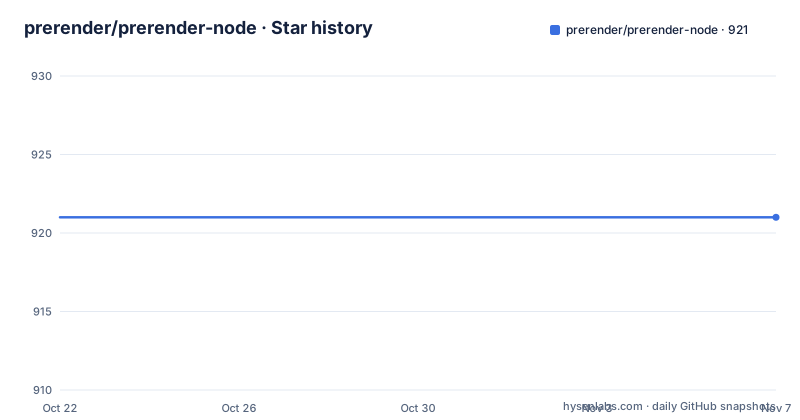
Star history
- prerender/prerender-node921 ★ · +0
| Repository | 2026-10-22 | 2026-11-07 |
|---|---|---|
| prerender/prerender-node | 921 | 921 |
0 Stars in the last 16 days, measured from the daily GitHub snapshot. Compare with other projects
Editorial analysis
Why a crawler needs HTML it can read
The README opens with the problem in one paragraph. Google, Facebook, Twitter and Bing are constantly trying to view your website, but Google is the only crawler that executes a meaningful amount of JavaScript, and Google even admits that it can execute JavaScript weeks after actually crawling. Prerender allows you to serve the full HTML of your website back to Google and other crawlers so that they do not have to execute any JavaScript, and the README notes that Google recommends using Prerender.io to prevent indexation issues on sites with large amounts of JavaScript.
So the mechanism is a substitution. Your server normally answers a crawler with an HTML shell plus script tags, and the crawler decides what to do with it. With this middleware in front, the crawler receives the rendered document.
The audience is a team running a single page application on Node, typically on Angular, React or Vue, where the search problem is real and the team does not want to rewrite the front end as a server rendered application. The README calls it perfect for Angular SEO, React SEO, Vue SEO and any other JavaScript framework.
One thing to keep in mind while reading the rest: this is a client of an external service, not a renderer. The middleware makes a call to the Prerender service to get the static HTML for that page and returns it to the crawler.
The four checks before anything is rendered
The How it works section lists the decision the middleware makes before it renders anything, and the order matters.
First, it checks if the request is from a crawler, by matching the user agent string against a default list of crawler user agents. Second, it checks that the request is not for a resource such as js or css. Third, optionally, it checks that the url is in the whitelist. Fourth, optionally, it checks that the url is not in the blacklist.
If all of those pass, the middleware makes a GET request to the prerender service for the page's prerendered HTML and returns that HTML to the crawler from your server.
The resource check is the one that saves you from a large bill. Without it, a crawler fetching your JavaScript bundle would trigger a full page render for the bundle, because the user agent says Googlebot and nothing else stops it. The two optional checks exist because the first two are too blunt: they treat every crawler request for every path as renderable, including search results pages, filtered listings and any URL that produces an infinite scroll of variants.
The design is otherwise stateless and synchronous in its logic, which is why the caching hooks later in the README matter so much.
Whitelist and blacklist are regex path filters
The whitelist accepts a single url path or multiple url paths, compares using regex, and the README advises being specific when possible. If a whitelist is supplied, only urls containing a whitelist path will be prerendered:
app.use(require('prerender-node').whitelisted('^/search'));app.use(require('prerender-node').whitelisted(['/search', '/users/.*/profile']));The blacklist is the mirror image. If a blacklist is supplied, all urls will be prerendered except ones containing a blacklist path:
app.use(require('prerender-node').blacklisted('^/search'));app.use(require('prerender-node').blacklisted(['/search', '/users/.*/profile']));The wording of the whitelist rule is worth reading precisely, because it is not an exact match. Only urls containing a whitelist path will be prerendered, and the comparison is by regex over the path. That means a pattern like '^/search' matches any path beginning with /search, including /search/anything, and a loose pattern such as 'profile' matches every path that merely contains the word. The README's advice to be specific is the mitigation, and the array form shows the intended granularity: anchoring with ^ and using .* for a parameter segment.
The practical effect of the two options together is that a site can render its article pages by default and skip the paths that are either huge in number or useless in search results. That single decision is usually the difference between a rendering service bill you can predict and one you cannot.
beforeRender and afterRender are your cache seam
The README says both methods are intended to be used for caching, but could be used to save analytics or anything else you need to do for each crawler request.
beforeRender runs before the render. If you return a string from it, the middleware serves that string to the crawler with status 200 instead of making a request to the prerender service. If you return an object, the middleware looks for a status and a body property, defaulting to 200 and an empty string, and serves those instead:
app.use(require('prerender-node').set('beforeRender', function(req, done) {
	// do whatever you need to do
	done();
}));
afterRender runs once the prerender service has returned HTML. It can also cancel the prerendered response and skip to the next middleware, which the README recommends for implementing your own fallback behaviour when Prerender returns errors or the HTML is missing expected content. To cancel the render you return an object containing cancelRender: true:
app.use(require('prerender-node').set('afterRender', function(err, req, prerender_res) {
	if (err) {
		return { cancelRender: true };
	}
}));
That cancellation is the escape hatch that keeps a broken rendering service from taking down your site, because the request falls through to your normal middleware instead.
The README states the middleware is ready to be used with redis or memcached to return prerendered pages in milliseconds, and gives a local redis example that pairs a client.get in beforeRender with a client.set in afterRender.
Getting the render service to see your site
The settings that are not about caching exist to solve a specific deployment problem: the rendering service is a separate process, often on another machine, and it has to be able to fetch your page.
The protocol option hard-sets the protocol, which the README says is useful for sites available on both http and https:
app.use(require('prerender-node').set('protocol', 'https'));The host option hard-sets the host, useful for sites behind a load balancer or internal reverse proxy. The README gives the case where your internal URL looks like http://internal-host.com/ and you want the request to Prerender.io to carry your real domain instead of internal-host.com:
app.use(require('prerender-node').set('host', 'example.com'));There are also forwardHeaders, to forward headers from the request to prerender, and prerenderServerRequestOptions, to add options to the request sent to the prerender server.
The last of these matters for authentication. The token option exists for exactly that, and the setup is one line:
app.use(require('prerender-node').set('prerenderToken', 'YOUR_TOKEN'));The README also flags a testing trap twice. If you are testing locally you will need to run the prerender server locally so that it has access to your server, because the rendering service fetches your page over the network, and on a developer machine your site is not reachable from outside. That loopback requirement is the first thing that breaks when someone tries this locally and concludes the middleware does not work.
Version 3.8.3, no tags, and a service dependency
The package is published on npm as prerender-node, and installation is:
$ npm install prerender-node --saveThe manifest records version 3.8.3, authored by Todd Hooper, with the description express middleware for serving prerendered javascript-rendered pages for SEO, and the licence field MIT. The repository, however, reports a licence that GitHub cannot classify, so the package.json field is the one to check if it matters to your compliance tooling.
The middleware itself is a single file. The main entry is index.js, with a test/ directory, a CHANGELOG.md, a SECURITY.md, and a .travis.yml for continuous integration. The dev dependencies are mocha, nock, request, sinon and supertest, and the test script is a single mocha invocation with a reminder to unset PRERENDER_SERVICE_URL when running locally. That last detail is a small window into how the project works: the middleware can be pointed at a different rendering service through an environment variable, which is how the tests stub the external call.
On maintenance, the repository is not archived and the last push was on 2026-06-12, but there are no GitHub releases, so version tracking happens through the npm version and the changelog. The middleware has no dependencies of its own, which is unusual and pleasant for an Express middleware: it will not drag a tree of transitive packages into your application.
The honest caveat about this project is the dependency it does not control. The middleware is the easy part; the rendering service is where the resources, the browser version, the queueing and the failures live. Prerender.io is a commercial service, and the alternative is to run the separate prerender server yourself, which the README links. Either way, the middleware is a thin adapter between your Express app and something that runs a browser.
Editorial conclusion
prerender-node suits a team running a JavaScript rendered site on Node whose crawlers are not executing the JavaScript, and who already operate or can operate a Prerender service. It does not suit a team that wants server side rendering from its own application, since the middleware renders through an external service rather than through your own render function. Before adopting, install prerender-node with npm install prerender-node --save, run the prerender server locally as the README instructs, and check the middleware's request to the rendering service by setting beforeRender and afterRender, because every page a crawler hits costs one render unless you cache it.
Frequently asked questions
What does prerender-node do?
It is Express middleware that intercepts requests from crawlers, makes a GET request to an external Prerender service to obtain the static HTML of that page, and returns that HTML to the crawler instead of the JavaScript that would otherwise have to be executed.
How do I install and enable prerender-node?
Run npm install prerender-node --save, then add app.use(require('prerender-node')); to your Express app, or use .set('prerenderToken', 'YOUR_TOKEN') if you have a prerender.io account. The middleware has no dependencies of its own.
How do I control which URLs get prerendered?
Use the whitelist or blacklist options, which take a single path or an array of paths and compare with regex. Only urls containing a whitelist path are prerendered when a whitelist is supplied, and all urls except those matching a blacklist path are prerendered when a blacklist is supplied.
How do I cache prerendered pages with prerender-node?
Implement beforeRender and afterRender as cache hooks. If beforeRender returns a string or an object with status and body, the middleware serves that instead of calling the prerender service, and the README gives examples pairing these hooks with redis or memcached.
Why does prerender-node not work when I test locally?
The rendering service has to fetch your page over the network, and on a developer machine your site is not reachable from it. The README states that if you are testing locally you will need to run the prerender server locally so that it has access to your server.
Official sources
Add this badge to your README
If you maintain this project, the badge below links readers to this analysis and shows its maintenance status from the daily GitHub snapshot. Paste the markdown into your README; add ?metric=license or ?metric=stars to the image URL for a different field.

[](https://hysenlabs.com/projects/prerender-prerender-node)Star history chart for your README
[](https://hysenlabs.com/projects/prerender-prerender-node)Was this useful?