Agor: a root manifest at 0.1.0, a licence named only in prose, and no release since March
Agor - team command center for all things agentic
At a glance
- What is it?
- Agor is a self-hosted web workspace that runs coding agents against isolated git branches, exposing itself over MCP and offering solo or team modes. The repository is a large pnpm and turbo monorepo, and the most informative things in it are the places where the metadata and the documentation disagree: the root manifest carries a placeholder version, the licence appears in a feature bullet rather than in the recorded metadata, and the newest tag is six months behind the newest commit.
- Who is it for?
- Agor is worth evaluating if you already run coding agents from a terminal and want per-branch working directories, per-prompt cost accounting and an MCP surface your agents can drive, because the branch-as-anchor model is the part that is genuinely hard to retrofit onto an existing setup. Three things to settle first.
- Can I use it commercially?
- Check first. The repository uses a licence we do not classify automatically, so read its LICENSE file before any commercial use.
- Is it still maintained?
- Yes. The repository last received commits 1 day ago.
- What is it written in?
- Mainly TypeScript, according to GitHub's language statistics.
Answers come from the project's GitHub data, last synced on October 21, 2026, and from our analysis. They are not legal advice.
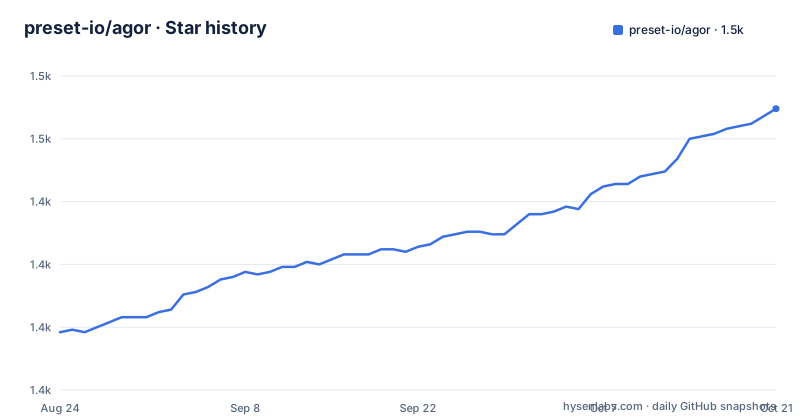
Star history
- preset-io/agor1,462 ★ · +89
| Repository | 2026-08-24 | 2026-10-21 |
|---|---|---|
| preset-io/agor | 1.4k | 1.5k |
89 Stars in the last 58 days, measured from the daily GitHub snapshot. Compare with other projects
Editorial analysis
The root manifest version is a placeholder, and says so in a comment
The package file at the top of the repository reads version 0.1.0 and marks itself private. A comment field next to it explains why that number should not be read as a release version: this is the monorepo root, and the published package version lives in the manifest of the package inside the packages directory.
That is a small courtesy most monorepos do not extend. A root manifest carrying a plausible-looking version is exactly what a release script, a dependency audit or a human glancing at a lockfile will read, and here the manifest tells you not to. The published artifact is named differently from the project: the installation command in the documentation installs a global package whose name is not the repository name.
The rest of the root manifest is a turbo and pnpm setup. Build, dev, test and typecheck are all thin wrappers that fan out across the workspace, and the docs commands filter to a single docs package by name. There is a dedicated script for auditing the MCP catalogue and a matching typecheck configuration for that audit, which means the agent-facing surface has its own static checks rather than riding along with the application build.
The tree around it is large: six compose files, a devcontainer directory, a hooks directory, a lint-staged configuration, a nvm version file, and separate configuration files for the formatter, the dependency checker and the task runner.
The newest tag is six months behind the newest commit
Three recent releases tell the story. Version 0.14.2 and version 0.14.3 were both published on the same date and within one second of each other, and version 0.15.0 followed several days later. That pattern is consistent with a fix going out as a patch and then being re-cut, rather than with three deliberate increments.
The dates matter more than the numbers. All three land in March 2026. The last push to the default branch is 2026-10-02, which is the day before the current date. So roughly six months of commits sit above the newest published package, and the documentation describes the tool in the present tense throughout, including a build whose start date is described as a few minutes.
That gap is the single most important operational fact for anyone installing this. If you install the global package you get the March behaviour. If you run from source you get six months of unreleased changes, and there is no changelog entry in that window to tell you what changed.
The project does keep a changelog at the root and a publishing guide, so the information exists somewhere. It is simply not reflected in the release timeline, which means the published version number is a poor guide to the state of the code.
The licence is named in a feature bullet and recorded nowhere else
The recorded licence field for this repository is empty. The documentation mentions a licence exactly once, at the end of the self-hosting bullet in the feature list, in a sentence about isolation modes. The clause names BSL 1.1.
So three sources exist and they do not agree in a straight line. A license file is present at the root. The prose names a specific source-available licence. The metadata records nothing. The documentation also links to that file in its badge row, so the project treats it as authoritative without stating its terms in the place a reader would check.
This is not a hypothetical concern for this particular project. BSL is a source-available licence, which means the code is available to read and to run and comes with restrictions on competing use that an open-source licence would not impose. If your organisation runs a licence allowlist, an empty metadata field will pass an automated check that a named restrictive licence would have failed.
The licence is worth resolving before anything else about this project, because every other property here is reversible and that one is a legal fact.
The Makefile marks six of its thirteen targets phony
The container Makefile is a small, pleasant file: a help target that greps its own comments, paired build, run, log and shell targets for the development and production compose files, and two levels of cleanup. The clean target removes containers, volumes and the three built images, suppressing errors so it does not fail when an image is already gone.
The declaration list is where it stops being tidy. The phony line names six targets: help, the two builds, the two run targets, and clean. The file then defines thirteen. The build-and-run variants, the soft cleanup, both log targets and both shell targets are all real file targets as far as make is concerned, defined without appearing in the declaration.
In practice this is benign, because none of the thirteen share a name with a file that exists in the working directory, so make never has a reason to consult the filesystem for them. It is the kind of omission that survives because it has never caused a failure, and it is exactly the kind of thing a reader scanning the top of the file will assume is complete.
The split between the two compose files is real, though. Development runs the daemon and the interface together with hot reload, while production runs the daemon only and pulls it from npm, which is why the pair of targets exists at all.
Four named boundary checks sit inside the check script
The aggregate check script is the most informative line in the root manifest, because it enumerates what the project considers its own architectural fault lines:
pnpm typecheck && pnpm lint && pnpm check:shortid && pnpm check:multitenancy-boundaries && pnpm check:daemon-filesystem-boundaries && pnpm check:realtime-boundaries && turbo run build --filter='!@agor/docs'Three of those are boundary checks with names that describe a specific way this application can go wrong. Multitenancy boundaries, daemon filesystem boundaries, and realtime boundaries are each a separate check, which means the codebase has three distinct places where a change can leak across a trust boundary, and each one is machine-checked.
The other named check is shorter and cryptic, one for identifier length, which is the kind of rule that gets added after a specific bug rather than as a matter of taste.
There is a separate script that runs a frontend colour plugin test as part of linting, and the lint step passes a diagnostic level of warn together with a flag that turns warnings into errors, so the lint gate is as strict as the type gate.
The fix counterpart of the check script is worth noting as a fact about the file. Its text ends partway through a command, at a reference to another check, with the string unterminated.
One shared image, one volume set per branch, and no install at runtime
The compose file is commented at length, and the comments explain an unusual arrangement. Multiple branches run simultaneously by passing a project name, and each project gets completely isolated environments: separate volumes for the database and configuration, separate networks, separate containers, and separate ports.
What they do not get is a separate image. A shared development image is used by every project specifically to save disk space. The port differences come from a unique identifier offset declared in the project configuration file, which is how two branches get different daemon and interface ports without either compose file knowing about the other.
The dependency story is the part that makes startup fast. Node modules are baked into the image, and an anonymous volume shadows the bind mount so the installed tree is not replaced by the host copy. The stated consequence is no package installation at runtime and instant container startup, with the trade being that the image has to be rebuilt whenever the lockfile changes.
Both database dialects are supported in the same file, selected by an environment variable, and a separate overlay file is checked in for parity testing against PostgreSQL. So the development path is a matrix: two dialects, two environments, and an arbitrary number of branch projects.
The example environment file names a superuser and a password in clear text
The example environment file is annotated as a development configuration to be copied and customised, and it is candid about its defaults in a way that is either reassuring or alarming depending on why you are reading it.
The database section offers a single dialect switch with SQLite as the documented default and PostgreSQL as the alternative. Below that, the PostgreSQL block shows both a connection URL and the individual settings used when the URL is not set, and those settings include a superuser name and a password written out as literal values.
The overlay documentation then repeats the connection string in full, which means the same credential appears twice in the repository in two different forms. It is a development default for a local container, and the file says so, but it is the kind of value that survives into a copied configuration and then into a deployed one, because the string is already there and works.
The network defaults are the more interesting part. The daemon and the interface have separate port variables, and the cross-origin setting is documented with three cases in one comment: a plain list of origins, a wildcard that is labelled dangerous in the comment itself, and regular expressions written with surrounding slashes. Two origins are described as always permitted, a localhost entry and the sandbox bundler domain.
Initialising the workspace and installing the tools are separate commands
The quick start is four lines, and one of them carries more weight than its length suggests:
npm install -g agor-live

agor init           # creates config/database and installs the tools you select
agor daemon start   # runs the daemon in the background
agor open           # opens the web UI
The initialisation command creates the configuration and the database and installs the agent tools you select. A separate command, referenced immediately afterwards, is the one that changes or repairs those tools later, and the file is explicit about the boundary: that command does not initialise or recreate the workspace.
The distinction is the kind of thing that only matters on the day something breaks. If the agent tooling is damaged, reaching for the repair command is correct and reaching for the initialisation command is not, because the second one owns state that the first one does not.
The prerequisites are stated just as precisely. Node 22.12 or newer and Git on the path, plus a system certificate trust store for HTTPS remotes, or an SSH client with configured keys or agent access for SSH remotes. The documentation also names the alternative installation routes, a Homebrew path and a Docker path, with the extended installation guide covering source builds, Postgres and team setups.
Two links in that area are truncated, one ending at the end of a sentence about linking a computer to an account.
Editorial conclusion
Agor is worth evaluating if you already run coding agents from a terminal and want per-branch working directories, per-prompt cost accounting and an MCP surface your agents can drive, because the branch-as-anchor model is the part that is genuinely hard to retrofit onto an existing setup. Three things to settle first. Licensing is not settled by the metadata: the feature list names BSL 1.1, a license file sits at the root, and the recorded licence field is empty, so read the file before you build on it, because BSL is a source-available licence rather than an open-source one. Second, the install path is a global package install followed by three commands, and the initialisation step is separate from the tool-installing step, which matters if you plan to repair a broken agent install later. Third, the Docker development path is the deepest part of the repository, with six compose files and a Makefile whose phony declaration covers fewer than half its targets, so budget time for the development environment rather than assuming the npm path exercises it. On cadence, the source moved on 2026-10-02 while the newest published package is v0.15.0 from 2026-03-28, so pin to a published version and expect the running code to be ahead of it.
Frequently asked questions
What does Agor actually manage?
Git branches. A branch is the unit of work and is a first-class working directory with its own dev environment and its own conversation history, following the convention of one branch per feature or pull request. Above that sit sessions with genealogy, where forking copies context and spawning starts a fresh context window, and boards with zones, a canvas where dropping a branch into a zone fires a templated prompt.
Which coding agents does Agor support?
Claude Code, Codex, Gemini, OpenCode, Copilot, and Cursor in beta, and they are interchangeable per session. The project ships no model of its own and says to bring your own provider and subscription, with a linked comparison page for the harnesses.
How do I install Agor?
Install the global package, then run the init command to create the config and database and install the tools you select, then start the daemon and open the web interface. Node 22.12 or newer and Git on the path are required, plus a certificate trust store for HTTPS remotes or an SSH client for SSH remotes.
What licence is Agor released under?
The recorded licence field for the repository is empty, and a license file is present at the root. The documentation names BSL 1.1 in a single sentence in the self-hosting feature bullet, which is a source-available licence rather than an open-source one. Read the license file before relying on it.
Can agents drive Agor themselves?
Yes, over MCP. Agor exposes itself as an MCP endpoint, sessions are automatically issued a token, and agents can introspect sessions, branches and boards and drive the system, forking, spawning, scheduling and reporting on their own work. The repository also ships an audit script and a matching typecheck for the MCP catalogue.
Does Agor need a database server?
No, SQLite is the default and LibSQL is also supported. PostgreSQL is an alternative selected by a dialect variable in the environment file, and the compose setup ships a separate overlay for parity testing against it. For running several branches at once you pass a compose project name so each gets its own volumes, networks and ports from a shared image.
Official sources
Where developers are discussing it
Posts on Hacker News, dev.to and Lobsters that link to this repository, found by our scan of those communities. 1 in the last 30 days; newest first.
- Show HN: Agor, multiplayer AI – stop running agents aloneHacker News · Oct 13, 2026 · 10 points · 2 comments
Add this badge to your README
If you maintain this project, the badge below links readers to this analysis and shows its maintenance status from the daily GitHub snapshot. Paste the markdown into your README; add ?metric=license or ?metric=stars to the image URL for a different field.

[](https://hysenlabs.com/projects/preset-io-agor)Star history chart for your README
[](https://hysenlabs.com/projects/preset-io-agor)