format silently ignores broken lint rules
Code :arrow_right: `prettier` :arrow_right: `eslint --fix` :arrow_right: Formatted Code :sparkles:
At a glance
- What is it?
- prettier-eslint runs one formatter and then the other one's auto-fixer, inferring the first tool's options from the second tool's configuration. The examples in the README use module syntax the package no longer exports, and the main entry point swallows rule failures without telling you.
- Who is it for?
- prettier-eslint suits a project that has standardised on one formatter and wants the other tool's configuration to still have the final word on style. Four things to check before you wire it in.
- Can I use it commercially?
- Yes. MIT is a permissive licence: you can use, modify and sell software built on it, as long as you keep its copyright and licence notices.
- Is it still maintained?
- Yes. The repository last received commits 7 days ago.
- What is it written in?
- Mainly TypeScript, according to GitHub's language statistics.
Answers come from the project's GitHub data, last synced on November 13, 2026, and from our analysis. They are not legal advice.
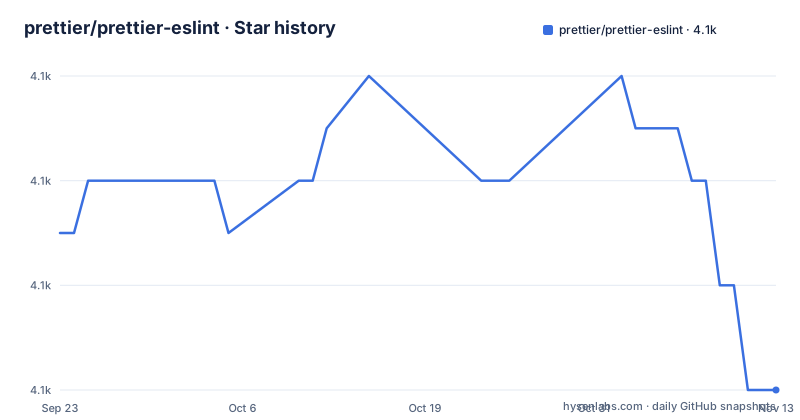
Star history
- prettier/prettier-eslint4,096 ★ · -3
| Repository | 2026-09-23 | 2026-11-13 |
|---|---|---|
| prettier/prettier-eslint | 4.1k | 4.1k |
-3 Stars in the last 51 days, measured from the daily GitHub snapshot. Compare with other projects
Editorial analysis
Every example in the README uses a module system the package no longer ships
The manifest declares the package as an ES module and publishes an exports map whose only conditions are types and a default pointing at the compiled output. There is no CommonJS condition anywhere in it. Both runnable examples in the README, the formatting one and the analysis one, are written with the older synchronous import call. That import will not resolve against the published package. So the two snippets a new user is most likely to copy are the two that are broken, and the failure arrives as a module resolution error rather than anything pointing at the documentation. The rest of the file has clearly been kept current: the options list is thorough, the note about precedence between inferred and supplied options is precise, and the prose explains why each option exists rather than only listing it. Which suggests the drift is confined to the examples, probably carried over from when the package supported both module systems.
It may format your code with a different formatter than the one your project has
There is an option for pointing at an explicit copy of either tool, and reading its description explains why that option is more than a convenience. By default the library tries to locate the relevant linter and formatter modules based on the file path it was given. If it cannot find them, it falls back to the version installed locally alongside itself. So in the failure case you get output from a different version of the formatter than the one your project depends on, with no error and no message telling you that is what happened. Formatting output is sensitive to formatter version in ways that are easy to miss: line width decisions, quote normalisation and trailing comma defaults have all changed across major versions. The practical consequence is that the same input can produce different output depending on whether module resolution succeeded, and the difference looks like a bug in your configuration rather than a resolution fallback. If you care about determinism, set both paths explicitly.
The main entry point swallows rule failures, which is why a second one exists
The throws section is two sentences and both are load-bearing. It says the library will only propagate parsing errors, meaning that a file which cannot be parsed by either tool raises, but a file that parses and then trips a lint rule does not. In addition it logs a specific message describing what it was doing at the time. And then a note: the main call will not show any message regarding broken rules in either tool. That is a large scope for a formatting function to leave out. A rule that has been renamed, or a plugin that failed to load, or a configuration that does not parse as a rule set, all of those produce silence from the main entry point. The second export exists precisely to close that hole. It does the same work and returns an object with the formatted output and the array of lint messages:
const { analyze } = require('prettier-eslint');

const text = 'var x = 0;';
const result = await analyze({
  text,
  eslintConfig: {
    rules: { 'no-var': 'error' },
  },
});
So if you are using this to enforce anything rather than to rearrange whitespace, you want the analysis entry point.
The install hook exits successfully even when its own patches fail
The prepare script runs three commands in sequence and then appends a fallback that returns success no matter what. The three commands install a dependency patcher, set up git hooks, and deduplicate packages. Each is genuinely useful: the patcher applies local patches, the hooks configure version control, and the deduplication step collapses duplicated packages. And then the whole chain is followed by an unconditional success. Since a prepare script runs automatically during installation for anyone who adds this as a dependency, that fallback means a consumer can end up with a partially prepared tree and no indication of it. The local patches in particular are the part where silent failure matters most, since those patches alter behaviour rather than cosmetics. Nothing suggests this was accidental; making the hook non-fatal is a common defensive choice when a lifecycle script should never break an install. But for this package the consequence is that the tree you get may not be the tree the author tested.
The package patches its own dependencies on every install
There is a patches directory at the repository root and the prepare script applies it. That is a mechanism worth understanding before you adopt the package, because it operates on your dependency tree rather than on its own source. What the patches contain is not visible from the file listing, and the manifest does not describe them, so a consumer has to read the patch files to know which of their transitive dependencies are being modified on install. This is a normal and accepted practice in the JavaScript ecosystem and is how many projects work around an unfixed upstream bug, so the mechanism itself is not the concern. The concern is that it is invisible by default. A formatter that fixes formatting problems and silently rewrites part of your installed tree is two things at once, and you should look at the patches before wiring it into a repository you care about rather than after.
Option precedence runs three layers deep, and the manual override silently wins
There are three separate option objects and the order between them is not obvious from the names. The primary options object is documented as overriding the configuration, with an explicit note that if you want the fallback values used only when a rule cannot be inferred, you should use the third object instead. The fallback object then applies only when a corresponding rule cannot be found and the option has not already been set manually. And if you provide neither, the formatter's own default is used. Read as a chain: an explicit option beats an inferred one, an inferred one beats a fallback, and a fallback beats the tool's built-in default. There is also a documented partial case, where you supply some options and let the rest be inferred from the configuration, which is called out as useful for parser selection. Inference itself needs a configuration and a filename to infer from, falling back to the current working directory when no filename is given, and the README flags that this inference may not support every case, with that sentence cutting off mid-word.
For four file extensions, the second half of the pipeline does nothing at all
There is one short note under the solution heading that determines whether this package is useful to you at all. For files with the extensions for stylesheets and for JSON, only the first formatter runs, because the linter cannot process those files. No warning is emitted and no configuration is consulted; the pipeline simply becomes one tool instead of two. That is correct behaviour and it is easy to miss, because the package presents itself as the combination of two tools and the README's opening claim does not narrow that. It also means the inferred-options machinery, the fallback layer and the three-layer precedence are all irrelevant for those extensions, since there is no configuration to infer from. If your repository is mostly stylesheets or JSON, this package reduces to a wrapper around one formatter and you would be better served by configuring that formatter directly.
Editorial conclusion
prettier-eslint suits a project that has standardised on one formatter and wants the other tool's configuration to still have the final word on style. Four things to check before you wire it in. Set the paths to both tools explicitly, because the default falls back to whatever copy the library itself installed and the output then depends on resolution succeeding. Use the analysis export rather than the formatting one if you care about rules at all, since the main call is silent about rule failures by design. Read the patches directory, because installation modifies your dependency tree and the install hook exits successfully even when that fails. And if your repository is mostly stylesheets or JSON, skip it entirely, since the second half of the pipeline does nothing for those extensions.
Frequently asked questions
what is prettier eslint
It is a module that formats your code with one formatter and then passes the result to the other tool's auto-fix mode, so you get the first tool's formatting power plus the second tool's configuration. It is distributed through the npm registry, installed as a development dependency, and published under the MIT licence by the same organisation that maintains the formatter it wraps.
how to use prettier eslint
Install it as a development dependency, then call the format function with an options object containing the source text and, optionally, a path, a linter configuration, and options for the formatter and its fallbacks. If you supply only some formatter options, the rest are inferred from the linter configuration, which is found from the file path or falls back to the current working directory.
Does prettier-eslint report lint errors?
Not from its main formatting call. It only propagates parsing errors when either tool fails to parse a file, and a note states it will not show any message about broken rules in either tool. To see lint messages, use the additional analysis export instead, which does the same work and returns both the formatted output and the array of lint messages.
Which prettier-eslint options can I omit?
Most of them. If the linter configuration is not provided, it is located from the file path, or from the current working directory if no path is given. Formatter options not supplied are inferred from that configuration, and options you do supply override the inference. Fallback values apply only where a rule cannot be found and you have not set the option yourself, and the formatter's own default applies if there is no fallback either.
Does prettier-eslint work with CSS, SCSS and JSON files?
It runs only the formatter on files with the stylesheet and JSON extensions, because the linter cannot process them. There is no warning and no configuration consulted for those files, so the option inference and fallback behaviour does not apply to them and the module reduces to a wrapper around the single formatter.
Official sources
Add this badge to your README
If you maintain this project, the badge below links readers to this analysis and shows its maintenance status from the daily GitHub snapshot. Paste the markdown into your README; add ?metric=license or ?metric=stars to the image URL for a different field.

[](https://hysenlabs.com/projects/prettier-prettier-eslint)Star history chart for your README
[](https://hysenlabs.com/projects/prettier-prettier-eslint)Was this useful?