soccerdata puts eight soccer scrapers behind one DataFrame contract
⛏⚽ Scrape soccer data from Club Elo, ESPN, FBref, Football-Data.co.uk, Sofascore, SoFIFA, Understat and WhoScored.
At a glance
- What is it?
- Club Elo, ESPN, FBref, Football-Data.co.uk, Sofascore, SoFIFA, Understat and WhoScored each describe a season in their own HTML, and soccerdata folds all eight into Pandas DataFrames with matching column names plus a local cache. It exists for analysts who would otherwise write and maintain eight parsers, and its own documentation admits that a change on any one of those sites breaks the package.
- Who is it for?
- soccerdata belongs in an analysis script that wants fixtures, team and player tables from FBref, Understat or WhoScored without writing parsers by hand, and it is the wrong choice when you need a schema somebody else guarantees.
- Can I use it commercially?
- Check first. The repository uses a licence we do not classify automatically, so read its LICENSE file before any commercial use.
- Is it still maintained?
- Yes. The repository last received commits 3 days ago.
- What is it written in?
- Mainly Python, according to GitHub's language statistics.
Answers come from the project's GitHub data, last synced on November 7, 2026, and from our analysis. They are not legal advice.
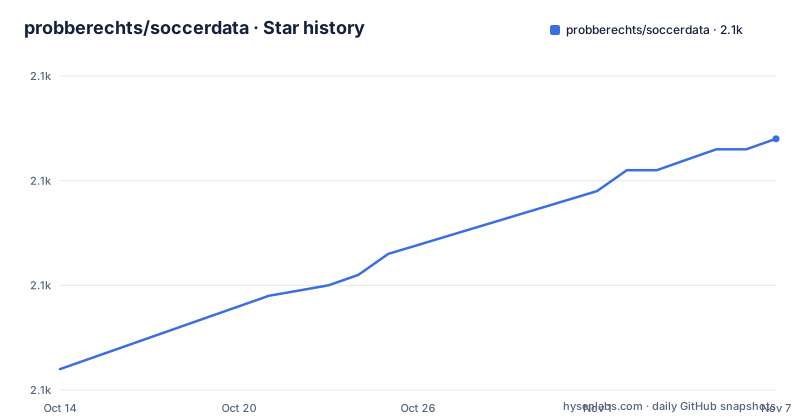
Star history
- probberechts/soccerdata2,134 ★ · +22
| Repository | 2026-10-14 | 2026-11-07 |
|---|---|---|
| probberechts/soccerdata | 2.1k | 2.1k |
22 Stars in the last 24 days, measured from the daily GitHub snapshot. Compare with other projects
Editorial analysis
One column vocabulary across eight scraping sites
The package removes one specific annoyance: eight sites describe the same football season in eight different HTML shapes, and anyone doing match, team or player analysis ends up writing eight parsers and eight maintenance loops. SoccerData answers with a single import that returns Pandas DataFrames carrying matching column names and identifiers across datasets, so a team join in pandas does not need a per-source rename table first. Downloading is lazy rather than eager, since a response arrives when a method asks for it and is then cached locally, so the next identical call reads from disk instead of from the site.
The eight named sources are Club Elo, ESPN, FBref, Football-Data.co.uk, Sofascore, SoFIFA, Understat and WhoScored, each behind its own class inside the one package. A ninth name lingers where a quick skim misses it: the link definitions still carry a FiveThirtyEight entry aimed at `https://fivethirtyeight.com/soccer-predictions/`, and `fivethirtyeight` sits in the repository topics, while the sentence above and the project description both name exactly eight sites. Whether a ninth scraper still ships is not answered in any of the files, so plan on eight. Per-source behaviour lives in notebooks under the datasources section of the documentation site, and the call signatures live in a separate API reference, which means the details you need to write real code are hosted pages rather than files you can grep.
A class per source and a league key per constructor
Every source is a separate class inside the single `soccerdata` package, and the constructor takes a league identifier plus a season. The README example builds `sd.FBref('ENG-Premier League', '2021')`, where the season argument is the starting year of the campaign, and then calls three read methods on that one instance. Keyword arguments select the slice you want: `stat_type="passing"` for team season stats, `stat_type="standard"` for player season stats, while `read_schedule()` takes no arguments at all. Return shapes differ by method, so the caller has to know whether a frame is keyed per team or per player before writing any join.
What the repository files do not spell out is the full league key list. Only one key appears anywhere in the files given, the Premier League example above, and the mapping from a league name to whatever the site itself expects lives in the hosted notebooks. That is the first thing to check when you move from the example to a real league, because a wrong key produces an empty result rather than a useful error.
Reading a Premier League season step by step
The only code the repository ships in its own documentation is the three-call sequence below. Copy it as it stands, then point the constructor at your own league and season before trusting any of the three frames.
import soccerdata as sd

# Create a scraper class instance for the 2020/21 Premier League
fbref = sd.FBref('ENG-Premier League', '2021')

# Fetch data
games = fbref.read_schedule()
team_season_stats = fbref.read_team_season_stats(stat_type="passing")
player_season_stats = fbref.read_player_season_stats(stat_type="standard")
A first run has no cache to fall back on, so each of those three calls reaches the site and then writes what it got into the local cache directory for later calls. There is no progress output described for any of them, which matters on a player-level pull that can cover a thousand rows per team.
Installation is the step the repository itself refuses to spell out. The README carries no shell command for it and sends readers to the Quickstart guide at `soccerdata.readthedocs.io/en/latest/intro.html`, so read that hosted page instead of guessing at a package name and a version range. The one constraint you can check locally comes from the package metadata, which pins `requires-python` to a narrow window rather than to open ranges, so an interpreter outside it is rejected before any scraper code runs.
A browser stack arrives with the core install
The core dependency list is heavier than a parser library usually is. Read it before you install:
requires-python = ">=3.10,<3.15"
dependencies = [
  "html5lib>=1.1,<2.0.0",
  "lxml>=4.9.4; python_version < '3.13'",
  "pandas>=2.0.0,!=2.1.0,<4.0.0",
  "seleniumbase>=4.38.2,<6.0.0",
  "urllib3<3",
]
`seleniumbase` is a Selenium wrapper, so a browser automation stack lands in your environment whether or not the site you scrape needs one, and it is not held back behind an extra. `urllib3` is the odd one out, pinned with an upper bound below 3 and no floor at all, so an unpinned upgrade can land there without the resolver complaining. `wrapper-tls-requests` sits next to it, and no documentation excerpt says which sources need it. `unidecode` is there to fold accented club names into comparable strings.
Two floors deserve a second look: pandas must be at least 2.0.0 and cannot be exactly 2.1.0, while lxml changes floor at the Python 3.13 boundary, 4.9.4 below it and 5.0.0 above. An optional extra named `socceraction` adds that single package, and nothing in the files here says what the extra turns on inside the scrapers, so read the API reference before you assume it swaps a data format.
The test suite replays cached responses for a week
The Makefile exposes one knob to the tests, and it is the only number that governs freshness. Its test rule runs this:
SOCCERDATA_DIR=$(SOCCERDATA_DIR) MAX_AGE=604800 \
		pytest \
			--cov=$(MODULE_NAME)
`MAX_AGE` at 604800 seconds is seven days, so a stored fixture older than a week is treated as stale and re-fetched, which means a test run can reach the network without asking. The cache root is `SOCCERDATA_DIR`, and the Makefile points it at `tests/appdata`, so nothing lands in your home directory. Coverage is collected in the same call through `--cov`, and the module name comes from `MODULE_NAME`.
The test dependency group explains the rest of the setup: dvc with Google Storage support for versioned fixtures, pytest-cov, pytest-mock, and time-machine so a test can pin the clock instead of waiting for real fixtures to move. Two neighbouring rules matter for local work. `test-class` filters by class name using the make target you pass, and `test-continuous` runs pytest-watcher in watch mode. A bare `make` prints the rule list because `.DEFAULT_GOAL` is help, and documentation serving uses `DOCS_PORT` ?= 8000.
Upstream markup changes break the package by design
The project is blunt about its own weak point: because it relies on web scraping, any changes to the scraped websites will break the package, so the README asks readers not to expect all code to work all the time. That single sentence is the operational risk, and it explains why the fix route runs through a fork and a pull request in `CONTRIBUTING.rst` rather than through a patch queue you can patch locally and forget. The same notice hands the legal side back to you as well: use it in line with the terms of service of the sites you intend to scrape, the software is provided as-is with no warranty, and the developers disclaim responsibility for misuse, legal consequences or damages.
Fifteen top-level entries back that claim up. `.dvc/`, `tests/`, `docs/`, `uv.lock` and a pre-commit config sit beside the package, so the captured fixtures and the locked dependency versions are versioned next to the code instead of being rebuilt by hand after every break. `.readthedocs.yml` and the readthedocs badge point at the same hosted documentation that already holds the install steps, and the default branch is master, which matters if you write automation around raw GitHub URLs.
Where the package file and the repository field disagree
The legal signal in this repository does not line up, and the mismatch is easy to miss. GitHub's licence field for this repository reads Other, a custom licence it cannot classify, and points at `LICENSE.rst`, yet the package metadata declares `license = "Apache-2.0"` and the README badge links to opensource.org/licenses/Apache-2.0. A field the classifier could not read and a field naming a different text cannot both be right, and no file explains the gap, so read the shipped file yourself before vendoring this into a codebase that has its own distribution terms.
A second inconsistency sits in the generated dependency file. `requirements.txt` opens with a header saying it was autogenerated by uv through `uv export --no-hashes --output-file=requirements.txt`, and its first requirement is `-e .`, which is the project itself in editable mode. Because that export carries every dependency group, a file that reads like a runtime manifest also lists things such as celery==5.6.3 and the dvc test chain, so installing it hands you a development environment rather than a scraper. Treat `uv.lock` plus the pyproject metadata as the accurate description of a minimal install instead.
What to verify before you pin a version
The last push was on 2026-09-28, and the gap between v1.8.7 on 2025-02-09 and v1.9.0 on 2026-04-12 shows the work arrives in batches rather than one commit per upstream site change. Read together, those dates mean a pin is a real decision, because you can sit on a build with no new tag beside it for more than a stretch of a year.
Before committing to one, open the per-source notebooks for your league, confirm the constructor key exists there, and decide what your incident response is when a site changes. The alternative approach is to keep your own parser per site and skip this package altogether, which trades a small upfront job for maintenance you control end to end; the project nudges toward the other path by asking for forks and pull requests, and `.dvc/` plus `uv.lock` show why a fork can reproduce its fixtures and locked dependencies instead of re-recording everything. What no file documents is a way to install one source and skip the rest, so a site you never call can still break your import or your dependency resolution. That single fact is the strongest argument for a thin wrapper of your own around one class.
Editorial conclusion
soccerdata belongs in an analysis script that wants fixtures, team and player tables from FBref, Understat or WhoScored without writing parsers by hand, and it is the wrong choice when you need a schema somebody else guarantees. Pin version 1.9.1 only after opening the terms file the repository points at, confirm that your league key appears in the per-source notebooks, and keep the local cache directory, because this project states plainly that site changes break the package and that its own tests re-fetch anything held longer than seven days.
Frequently asked questions
How do I install soccerdata?
The README carries no shell command for installation. It sends readers to the Quickstart guide at `soccerdata.readthedocs.io/en/latest/intro.html`, and the package metadata requires Python `>=3.10,<3.15`.
Which data sources does soccerdata scrape?
Club Elo, ESPN, FBref, Football-Data.co.uk, Sofascore, SoFIFA, Understat and WhoScored, one class per site inside the `soccerdata` package. A FiveThirtyEight link definition still sits in the README even though the source list names eight sites.
Does soccerdata need a browser installed?
A browser automation stack arrives with the base install because `seleniumbase` is a core dependency rather than an extra. Data is downloaded when needed and cached locally, so repeated calls reuse the stored response.
What happens when a football website changes its layout?
The README states that any changes to the scraped websites will break the package and asks users not to expect all code to work all the time. The offered fix route is a fork and a pull request through `CONTRIBUTING.rst`.
What are the Python and pandas version constraints?
The metadata sets `requires-python` to `>=3.10,<3.15`. pandas must be at least 2.0.0 and cannot be exactly 2.1.0, while the lxml floor changes at Python 3.13 from 4.9.4 to 5.0.0.
Is soccerdata licensed under Apache-2.0?
The repository licence field reads Other, a custom licence GitHub cannot classify, and points at `LICENSE.rst`, while the package metadata declares Apache-2.0 and the README badge links to the Apache-2.0 text. Read `LICENSE.rst` before shipping it inside a closed-source codebase.
Official sources
Add this badge to your README
If you maintain this project, the badge below links readers to this analysis and shows its maintenance status from the daily GitHub snapshot. Paste the markdown into your README; add ?metric=license or ?metric=stars to the image URL for a different field.

[](https://hysenlabs.com/projects/probberechts-soccerdata)Star history chart for your README
[](https://hysenlabs.com/projects/probberechts-soccerdata)Was this useful?