tlsx: a TLS grabber for certificate inventories and misconfiguration checks
Fast and configurable TLS grabber focused on TLS based data collection.
At a glance
- What is it?
- tlsx is a Go tool from ProjectDiscovery that opens TLS connections to a list of hosts and reports certificates, fingerprints, supported versions and ciphers, and misconfigurations such as expired or self signed certificates, in text or JSON lines. This looks at how the scan modes work and where the tool stops.
- Who is it for?
- tlsx fits a team doing asset inventory or certificate hygiene at scale, that needs a single tool to enumerate TLS versions, ciphers, fingerprints and expiry across thousands of hosts, and that wants JSON lines to feed into the rest of its pipeline. It does not fit an application security assessment, because it stops at the TLS handshake and looks at nothing above it, and it is the wrong tool for a network it cannot reach directly.
- Can I use it commercially?
- Yes. MIT is a permissive licence: you can use, modify and sell software built on it, as long as you keep its copyright and licence notices.
- Is it still maintained?
- Yes. The repository last received commits 1 day ago.
- What is it written in?
- Mainly Go, according to GitHub's language statistics.
Answers come from the project's GitHub data, last synced on November 7, 2026, and from our analysis. They are not legal advice.
Star history
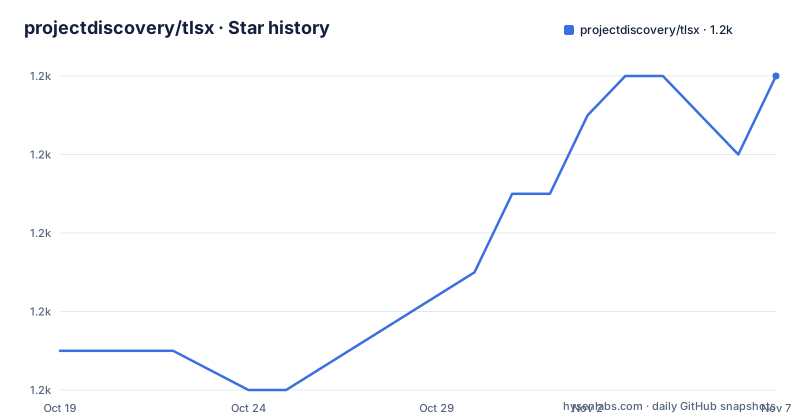
- projectdiscovery/tlsx1,158 ★ · +7
| Repository | 2026-10-19 | 2026-11-07 |
|---|---|---|
| projectdiscovery/tlsx | 1.2k | 1.2k |
7 Stars in the last 19 days, measured from the daily GitHub snapshot. Compare with other projects
Editorial analysis
A grabber, not a scanner
tlsx is described as a fast and configurable TLS grabber focused on TLS based data collection and analysis, and the readme repeats the emphasis on data collection and analysis rather than on finding vulnerabilities.
That is a useful distinction to hold on to. The tool opens a TLS connection to a host and reports what the server said: which version and cipher it negotiated, what is in the certificate, what fingerprints it produces, and whether the certificate is expired, self signed, mismatched, revoked or untrusted. It does not probe the application behind the handshake, and it is not an exploit scanner.
The audience is therefore the person who already has a list of hosts and wants to know the shape of their TLS estate: which of them still speak TLS 1.0, which have certificates that expire next week, which are misconfigured in the ways that scanners flag, and which servers present the same fingerprint, which is a common signal that a whole fleet was deployed from one template.
The implementation is Go, the licence is MIT, and the tool lives in the ProjectDiscovery ecosystem, which explains the shape of the flags and the presence of a dashboard upload path. Installation requires Go 1.25, and the readme notes that pre-compiled binaries are also available from the release page.
Four connection modes, and the fallback that handles old servers
The scan mode flag selects how the connection is made:
-sm, -scan-mode string tls connection mode to use (ctls, ztls, openssl, auto) (default "auto")The four options are worth reading as a progression. `ctls` and `ztls` are the native Go implementations, `openssl` shells out to an OpenSSL binary, and you can point at a specific one with `-ob, -openssl-binary string` if the default is not the binary you want. `auto` is the default and picks for you.
The reason for having more than one is old servers, and the readme lists auto TLS fallback for older TLS versions as a feature. A server that only speaks TLS 1.0 will fail a modern client, and a client that only speaks modern TLS will fail against it. A fallback ladder that steps down the version list gets you a result where a strict client gets nothing.
There is a second, more aggressive option: `-ps, -pre-handshake` enables a pre-handshake TLS connection with early termination using ztls. The point of a pre-handshake connection is that you can collect what the server tells you before the handshake completes, which is faster and works against servers that will not complete a full handshake with a client that does not look right.
The cost of that speed is that early termination means less data. The features list notes the modes in the same breath, and the flag documentation is explicit that the `-ch, -client-hello` and `-sh, -server-hello` options, which include the raw hellos in the JSON output, work in ztls mode only.
The probes decide what a scan tells you
The probe flags are the substance of the tool, and they are grouped by what they ask the server to reveal.
The certificate probes read identity: `-san` for subject alternative names, `-cn` for the common name, `-so` for the organization name, and `-se, -serial` for the serial number. The protocol probes read negotiation: `-tv, -tls-version` for the version used and `-cipher` for the cipher used, plus `-ve, -version-enum` and `-ce, -cipher-enum` to enumerate what the server supports rather than what it picked, and the cipher enumeration can be filtered by type with `-ct, -cipher-type` taking all, secure, insecure or weak.
The fingerprint probes are the ones people usually reach for: `-jarm` displays the JARM fingerprint hash and `-ja3` displays the JA3 fingerprint hash using ztls. The `-hash` option gives certificate fingerprint hashes in md5, sha1 or sha256. Two hosts with the same JA3 are running the same client library, and two hosts with the same JARM are often the same server stack, which makes these the closest thing the tool has to a grouping key.
There is also a status probe, `-tps, -probe-status`, which reports the TLS probe status, and a wildcard check, `-wc, -wildcard-cert`, which flags hosts presenting a wildcard certificate, which is a common misconfiguration on a shared hosting name.
The number of probes you enable is the number of round trips you pay, which is why the optimisation flags matter: concurrency defaults to 300 threads, cipher enumeration concurrency to 10 per target, the timeout to 5 seconds, retries to 3, with a delay option to space connections out per thread.
Misconfiguration checks and the revocation question
The misconfiguration group is the part of tlsx that overlaps with what people expect a scanner to do, and it is worth knowing exactly how much it covers.
There are five checks: `-ex, -expired` for hosts with an expired certificate, `-ss, -self-signed` for self signed ones, `-mm, -mismatched` for a certificate that does not match the host, `-re, -revoked` for revoked certificates, and `-un, -untrusted` for untrusted ones.
The revoked check is the one with a dependency, and the tool is explicit about it. Revocation status means asking the certificate authority, and that check can fail for reasons that have nothing to do with the certificate. So there is `-hf, -hardfail`, described as the strategy to use if you encounter errors while checking revocation status. In other words, by default a failure to reach the revocation endpoint is not treated as a positive finding, and you can choose to make it one.
That is a good design decision, and it is a small one that most people never think about. A scanner that reports every host as revoked because the CRL endpoint was unreachable is worse than useless, because the finding list becomes noise. The same reasoning applies to `-vc, -verify-cert`, which enables verification of the server certificate and is off by default, and to the client CA file option `-cc, -cacert` for the cases where your own trust store matters.
The configuration group also covers the parts of a TLS connection that are often wrong in a different way: `-min-version` and `-max-version` to restrict what you will accept, `-sni` and `-rs, -random-sni` for the server name sent, `-rps, -rev-ptr-sni` to derive the SNI from a reverse PTR lookup, and `-ci, -cipher-input` to send a specific cipher list.
Input, output, and the dashboard upload
The input formats are the usual ProjectDiscovery set, and the readme lists them as ASN, CIDR, IP, HOST and URL input. The flags are `-u, -host` for one or more targets, `-l, -list` for a file of targets, and `-p, -port` for the ports to connect to, with 443 as the default.
Two flags decide how a hostname is turned into addresses. `-sa, -scan-all-ips` scans all IPs for a host, and `-iv, -ip-version` chooses between 4 and 6, defaulting to 4. A tool that resolves one address per name will miss a host that serves different certificates on different addresses, which is a real finding in a shared hosting environment.
On the output side there are two formats, STD IN/OUT and TXT/JSON, with `-j, -json` producing jsonline, one JSON object per line, and `-o, -output` writing to a file. The other output flags are conveniences: `-dns` to display the unique hostname from the SSL certificate response, `-ro, -resp-only` to display only the TLS response, `-silent`, `-nc, -no-color` and `-v, -verbose`.
The PDCP group is the one to read carefully. There is `-pd, -dashboard` to upload or view output in the PDCP UI dashboard, `-pdu, -dashboard-upload` to upload a JSONL output file, and `-auth` for the PDCP API key. There is also `-tid, -team-id`, `-aid, -asset-id` and `-aname, -asset-name` for pushing results into an existing asset or team. In other words, the tool can either print to your terminal or send your scan results to a hosted ProjectDiscovery service, and the second path needs an account and an API key.
The proxy option, `-proxy string` for a socks5 proxy, and the resolvers option, `-r, -resolvers`, are there for scanning through a controlled egress path.
Installing, and using it as a library
Installation is one command, and the readme is clear that Go 1.25 is needed for it to succeed:
go install github.com/projectdiscovery/tlsx/cmd/tlsx@latestThe help output is the real documentation, and it is worth reading once because the flag groups map onto the feature list:
tlsx -hThe module path is `github.com/projectdiscovery/tlsx` with `go 1.25.0` in the go.mod, and the repository has the usual ProjectDiscovery layout of `cmd/tlsx` for the command, `pkg/` for the public packages, `internal/` for the implementation, and `examples/`.
The library entry point is `pkg/tlsx`, and there is a section in the readme on using tlsx as a library. The `examples/` directory holds `simple.go` and a `ctlogs/` example, the latter pointing at certificate transparency, which lines up with the `github.com/google/certificate-transparency-go` dependency in the manifest.
The dependency list also tells you what the tool is built on: `zmap/zcrypto` for the TLS and certificate handling, `hdm/jarm-go` for the JARM fingerprint, ProjectDiscovery's own `dnsx`, `fastdialer`, `goflags`, `gologger`, `mapcidr` and `utils`, and `miekg/dns` for name resolution. There is also a `Dockerfile` that builds from Alpine, copies the platform-specific binary into `/usr/local/bin/` and sets the entrypoint to `tlsx`, with the image labelled with the ProjectDiscovery author, the MIT licence and the project URL.
Where tlsx is the wrong tool
Four limits are clear.
The first is the altitude. tlsx stops at the handshake. It does not make an HTTP request, it does not look at the application, it does not follow redirects, and it does not check anything above TLS. A team looking for an application security assessment needs something else, and a team that has a large list of hosts and wants a TLS inventory is exactly where this belongs.
The second is the network access. The tool connects to the targets from wherever it runs, so a scan of internal hosts has to run inside the network, and a scan of someone else's estate generates traffic that their monitoring will see. There is no crawling, no authentication against the target beyond the TLS client certificate options, and no scheduling.
The third is what early termination and fallback cost. Pre-handshake mode is faster and works against uncooperative servers, but it changes what the output contains, and the raw client and server hello options are limited to ztls mode. The auto TLS fallback is what makes old servers visible, but a fallback connection is a connection with different negotiation behaviour, and a fingerprint taken over a downgraded handshake is a different artifact from one taken over a modern one. For a tool whose output is a fingerprint, that is a subtlety worth knowing about.
The fourth is the dashboard path. The PDCP flags will send your results, and for a third party asset inventory that is a data egress decision rather than a convenience.
On maintenance, the record is active: v1.2.2 on 2025-11-17, v1.3.0 on 2026-08-02, and v1.4.0 on 2026-09-07, with the last push to the repository on 2026-10-14. The licence is MIT, with the file at the root of the repository.
Editorial conclusion
tlsx fits a team doing asset inventory or certificate hygiene at scale, that needs a single tool to enumerate TLS versions, ciphers, fingerprints and expiry across thousands of hosts, and that wants JSON lines to feed into the rest of its pipeline. It does not fit an application security assessment, because it stops at the TLS handshake and looks at nothing above it, and it is the wrong tool for a network it cannot reach directly. Before you point it at someone else's infrastructure, read the PDCP upload flags, because the dashboard options send your results to a hosted ProjectDiscovery service, and check the pre-handshake behaviour, since early termination changes what the output contains.
Frequently asked questions
How do I install tlsx?
Run `go install github.com/projectdiscovery/tlsx/cmd/tlsx@latest`, which requires Go 1.25 to install successfully. Pre-compiled binaries are also published on the release page, and there is a Dockerfile that builds from Alpine and sets the entrypoint to tlsx.
Which TLS connection modes does tlsx support?
The scan mode flag accepts ctls, ztls, openssl and auto, with auto as the default. The tool also has an auto TLS fallback for older TLS versions, and a pre-handshake option that enables a pre-handshake connection with early termination using ztls.
What can tlsx report about a server's certificate?
Subject alternative names, common name, organization name and serial number, the negotiated TLS version and cipher, certificate fingerprint hashes in md5, sha1 or sha256, JA3 and JARM fingerprints, and the certificate misconfiguration checks for expired, self-signed, mismatched, revoked and untrusted certificates.
How does tlsx output results?
It supports standard input and output and TXT or JSON formats, with the `-j` flag producing jsonline output and `-o` writing to a file. There is also a PDCP dashboard option, `-pd`, which uploads or views the output in the hosted ProjectDiscovery UI and requires an API key with `-auth`.
Can I use tlsx as a Go library?
Yes, the public packages live under pkg/tlsx, and the repository includes an examples directory with a simple example and a certificate transparency logs example. The module path is github.com/projectdiscovery/tlsx and it requires Go 1.25.
Official sources
Add this badge to your README
If you maintain this project, the badge below links readers to this analysis and shows its maintenance status from the daily GitHub snapshot. Paste the markdown into your README; add ?metric=license or ?metric=stars to the image URL for a different field.

[](https://hysenlabs.com/projects/projectdiscovery-tlsx)Star history chart for your README
[](https://hysenlabs.com/projects/projectdiscovery-tlsx)Was this useful?